linkedin
Wirecast logo
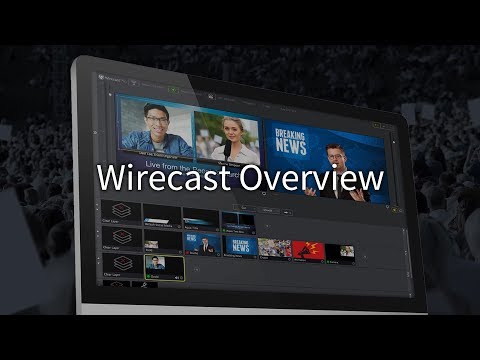
play Wirecast demo
wirecast display
wirecast heading

Wirecast

Brand: Telestream

  • 4.1

  • 5 Ratings

Wirecast is a leading live streaming and video production software tailored for creators, broadcasters, and businesses looking to deliver professional-quality live videos. It combines powerful tools like multi-source inputs, audio mixers, and social media integrations, making it an all-in-one soluti...

See More

Have you used Wirecast before?

Share your insights for better experience

Add a Review
Starting Price
$35

View plans

100% Genuine
Products
Best Price
Guaranteed
Safe & Secure
Payment
  • Description

  • Pricing

  • Features

  • Specification

  • Review

  • Compare

  • Alternatives

  • FAQ

Starting at $35

Wirecast Software Overview

What is Wirecast?

Wirecast is an advanced business software and live streaming software that caters to diverse needs, including sports production, conferencing, remote collaboration, and professional broadcasts. Designed for both beginners and professionals, it provides the perfect platform for creating high-quality live streams for events, webinars, or social media platforms.

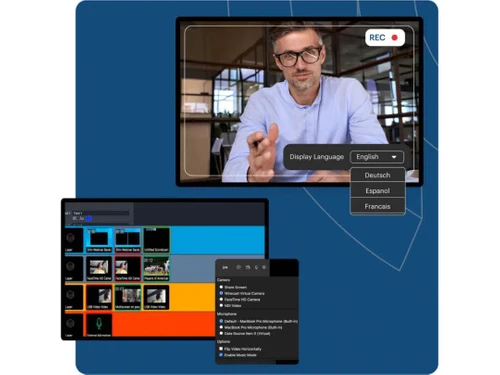
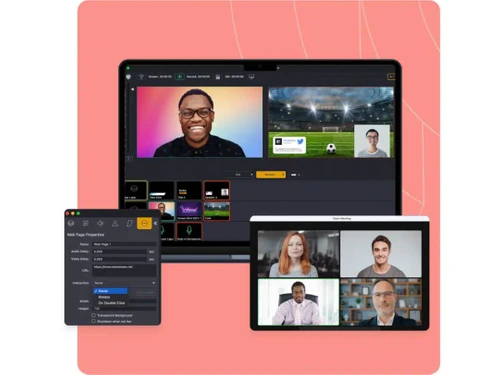
With Wirecast, users can utilize unlimited sources, including cameras, microphones, screenshares, and web streams. The software also supports chroma keying, allowing seamless integration of virtual backgrounds during live productions.

Its intuitive interface, coupled with features like SMS & email support, stock media library access, and advanced transitions, makes the software highly versatile for creators across industries. Wirecast’s integration capabilities allow businesses to connect with popular social media platforms, ensuring maximum reach for live events.

Additionally, its robust audio recording and mixing tools deliver exceptional sound quality. Whether you’re producing sports broadcasts, online conferences, or creative videos, Wirecast provides all the tools needed for a polished production.

Why Choose Wirecast Live Streaming Software?

  • User-Friendly Interface: Simplifies live video production for both beginners and advanced users.
  • Unlimited Source Inputs: Supports multiple camera feeds, screenshares, and web streams for professional-quality output.
  • Integration with Social Media: Directly stream to platforms like Facebook, YouTube, and Twitter.
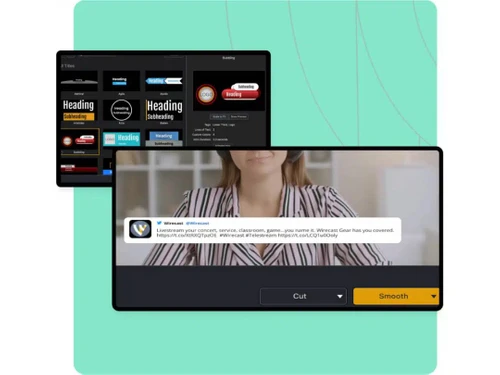
  • Advanced Transitions: Use smooth transitions to enhance the visual appeal of your live streams.
  • Chroma Key Support: Easily replace backgrounds for creative and professional productions.
  • Stock Media Library: Access high-quality images, audio, and videos to enrich your content.
  • Sports Production Tools: Includes features like scoreboard overlays and live replay capabilities.
  • Multi-Purpose Use: Ideal for conferences, remote collaboration, webinars, and live events.

Benefits of Wirecast

  • Streamlined Production: Consolidates multiple production tools into one user-friendly platform.
  • High-Quality Output: Ensures professional-grade audio and video for all broadcasts.
  • Real-Time Collaboration: Enables remote production and conferencing with minimal lag.
  • Increased Audience Reach: Directly integrates with social platforms for broader visibility.
  • Customizable Content: Offers dynamic overlays, transitions, and chroma key features.
  • Efficient Workflow: Simplifies the process of capturing, editing, and broadcasting live content.
  • Versatile Applications: Suited for sports events, online tutorials, webinars, and more.
  • Reliable Support: Backed by SMS & email support to resolve any technical issues swiftly.

Pricing of Wirecast

Wirecast's price starts at $ 35 at techjockey.com.

The pricing model is based on different parameters, including extra features, deployment type, and the total number of users. For further queries related to the product, you can contact our product team and learn more about the pricing and offers.

Read more

Telestream Company Details

Founded Year:  1998

For nearly 25 years, Telestream® has been at the forefront of innovation in the digital video industry.

Director/Founders Dan Castles
Company Size 101-500 Employees

Wirecast Pricing & Plans

Wirecast studio
Starting at $35
    • Licenses

      Licenses
      Licenses
    • Monthly

      Monthly
      Monthly

Key Features

  • NDI

  • Screen Capture

  • Add additional media: audio, video, graphics

  • Supported GPU-accelerated encoding

  • Integrated stock media library

  • Integrated stock media library

Wirecast Pro
Starting at $46
    • Licenses

      Licenses
      Licenses
    • Monthly

      Monthly
      Monthly

Key Features

  • 7 remote guests

  • ISO recording

  • Sports production tools

  • Multi-track audio recording

  • Multi-track audio routing

  • 1-17 slot multi-viewer output

Wirecast Features

  • icon_check Leads Capture
    Enhance engagement with integrated lead capture tools.
  • icon_check Produce
    Deliver polished video content using advanced production tools.
  • icon_check Audio Mixer
    Fine-tune audio with a professional-grade mixer.
  • icon_check Transitions
    Use dynamic transitions for smoother scene changes.
  • icon_check Integration
    Connect seamlessly with other software and platforms.
  • icon_check SMS & Email Support
    Quickly resolve issues with built-in support tools.
  • icon_check Social Media Integration
    Stream directly to popular platforms like YouTube and Facebook.
  • icon_check Stock Media Library
    Access a vast library of media resources for content creation.
  • icon_check Audio Recording
    Record high-quality audio for professional productions.
  • icon_check Sports Production
    Includes features like live replay and overlays for sports broadcasts.
  • icon_check Unlimited Sources
    Add multiple inputs, including cameras and screenshares.
  • icon_check Controller
    Manage your production setup easily with an intuitive controller interface.
  • icon_check Conferencing & Remote Production
    Collaborate in real-time with remote contributors.
  • icon_check Chroma Key Threshold
    Replace or modify backgrounds effortlessly for live videos.
Wirecast Demo Video play icon

Get Wirecast Demo

Watch the demo video to explore key features, real workflows, and how the software fits your business needs.

Understand
Key Features
Personal
Demo Insights
Interactive
Demo Support

Wirecast Specifications

Supported Platforms
Ubuntu Ubuntu Windows Windows MacOS MacOS Linux Linux
Devices
Desktop Desktop
Deployment
Cloud-Based Cloud-Based
Suitable For
All Industries
Business Specific
All Businesses
Business Size
Small Business Startups Medium Business Enterprises
Customer Support
Email Communities
Language
English
Training Resources
Videos

Explore the Best Alternative Solutions Similar to Your Business Size and Needs

Small Business

Designed for startups and growing businesses

vMix

4.5

GoBrunch

4.5

Restream

4.4

See More

Wirecast Review

4.1

Out of 5

img

Overall Rating

Based on
5 Verified Ratings

Rating Breakdown

  • Features 4
  • Value for Money 4.2
  • Ease of Use 4.2
  • Customer Support 4.2

86% Recommend this Product

Add Review

Techjockey Trusted Reviews from Verified Users

No reviews are currently available for Wirecast. Discover similar Live Streaming Software reviews

  • GudSho

    4.3

    Whats great - I can create branded channels for each subject, allowing me to organize my content and cater to different learning styles. read more

  • Yostream

    4.8

    Whats great - We had to organize a virtual event at very short notice. Yostream was perfect for our case, in a couple of minutes we were re... read more

  • OBS Studio

    4.2

    Whats great - Highly customizable, supports multiple sources (webcams, screen capture, images, etc.), excellent for live streaming on vario... read more

Compare Wirecast With other Live Streaming Software

Products
Ratings
Pricing
Device Supported
Deployment
Supported Platforms
  • img

    Wirecast

  • 4.1

  • Price On Request

  • Desktop

    Mobile

  • Web based

    On Premises

  • Windows

    Mac OS

  • img

    Livebox

  • 4.4

  • ₹ 1170

  • Desktop

    Mobile

  • Web based

    On Premises

  • Windows

    Mac OS

  • img

    Castr

  • 4.3

  • Price On Request

  • Desktop

    Mobile

  • Web based

    On Premises

  • Windows

    Mac OS

  • img

    Grabyo

  • 4.3

  • Price On Request

  • Desktop

    Mobile

  • Web based

    On Premises

  • Windows

    Mac OS

  • img

    Riverside

  • 4.1

  • Price On Request

  • Desktop

    Mobile

  • Web based

    On Premises

  • Windows

    Mac OS

  • img

    Yostream

  • 4.8

  • ₹ 1250

  • Desktop

    Mobile

  • Web based

    On Premises

  • Windows

    Mac OS

  • img

    Prism live Studio

  • 4.2

  • Price On Request

  • Desktop

    Mobile

  • Web based

    On Premises

  • Windows

    Mac OS

  • img

    Evmux

  • 4.5

  • Price On Request

  • Desktop

    Mobile

  • Web based

    On Premises

  • Windows

    Mac OS

  • img

    Vimeo Pro

  • 4.2

  • Price On Request

  • Desktop

    Mobile

  • Web based

    On Premises

  • Windows

    Mac OS

  • img

    Dacast

  • 4.4

  • Price On Request

  • Desktop

    Mobile

  • Web based

    On Premises

  • Windows

    Mac OS

  • img

    ManyCam

  • 4.2

  • Price On Request

  • Desktop

    Mobile

  • Web based

    On Premises

  • Windows

    Mac OS

(0) Product(s) selected

Wirecast Alternatives

See All Wirecast Alternatives

Starting Price:

$20 /Month

Available

Price on Request

Starting Price:

$29 /Month

Starting Price:

$25

Starting Price:

$39

Starting Price:

$49 /year

Starting Price:

$59 /month

Starting Price:

$39 /Month

Starting Price:

$70 /Month

Articles for Wirecast

See All Related Articles

How does Wirecast support social media integration?

Wirecast integrates directly with popular platforms like Facebook, YouTube, and Twitter, allowing users to stream live content effortlessly. It ensures maximum audience engagement by providing seamless connectivity and high-quality output.

Can Wirecast handle multiple camera inputs?

Yes, Wirecast supports unlimited source inputs, including multiple cameras, microphones, and screenshares. This feature enables professional-quality productions with ease.

Is Wirecast suitable for sports production?

Wirecast includes specialized tools like scoreboard overlays and live replays, making it ideal for sports events. It provides all the necessary features for creating engaging sports broadcasts.

Does Wirecast offer chroma keying?

Yes, Wirecast supports chroma key functionality, allowing users to replace or modify backgrounds during live streams for a professional finish.

Can Wirecast be used for remote collaboration?

Absolutely. Wirecast supports conferencing and remote production, enabling teams to collaborate in real-time without compromising video or audio quality.

Is there a stock media library available?

Yes, Wirecast includes a stock media library with high-quality images, audio, and video resources to enhance your content creation.

How does Wirecast ensure high-quality audio?

Wirecast features a professional audio mixer and recording tools that allow users to produce clear and balanced sound in their broadcasts.

What types of live events can I produce with Wirecast?

Wirecast is versatile and supports various live events such as webinars, sports events, conferences, church services, and creative video productions.

Does Wirecast support real-time analytics?

Yes, Wirecast provides real-time analytics to track engagement and performance, helping users optimize their live streams.

How reliable is Wirecast's support system?

Wirecast offers robust SMS and email support, ensuring that users can resolve technical issues quickly and keep their operations running smoothly.

20,000+ Software Listed

Best Price Guranteed

Free Expert Consultation

2M+ Happy Customers

Terms and Condtions

close

Users with registered businesses can purchase goods from merchants on the platform to satisfy their business needs. Users are not permitted to utilize any products acquired through the platform for resale, advertising, business, or further distribution.

For each purchase made, users will receive a Tax Invoice (or 'GST invoice') that includes specific details such as:

  • the GSTIN of the user associated with their registered business, and

  • the specified Entity Name for their business.

It should be noted that not all products are eligible for GST Invoice. Only the products displayed by participating sellers with the 'GST-based Invoice Available' callout on the product description page would qualify.

Certain goods and services are not eligible to get a GST Invoice, including items with VAS, i.e., Value Added Services (e.g., Total Mobile Protection/Assured Buyback) and those involving an exchange offer at the time of purchase.

Users must ensure the accuracy of the GSTIN, and business entity name provided for the GST Invoice. Requests for corrections into GST Invoice would not be accommodated by Techjockey.com or any Seller, and any issues arising from user-provided information are the sole responsibility of users.

Techjockey.com is not liable for the GST Invoice or any associated input tax credit. To efficiently claim an input tax credit, users should select the registered place of business address as per the GST authority's data and follow the provisions of the GST Act and rules.

To claim an input tax credit, the delivery and billing addresses must match. Furthermore, input tax credits will not be granted if the delivery address and GSTIN on the invoice are from different states. In case of incorrect GST details provided during the order placement, the order will be canceled automatically.