linkedin
Vimeo Pro logo
play Vimeo - Video Power
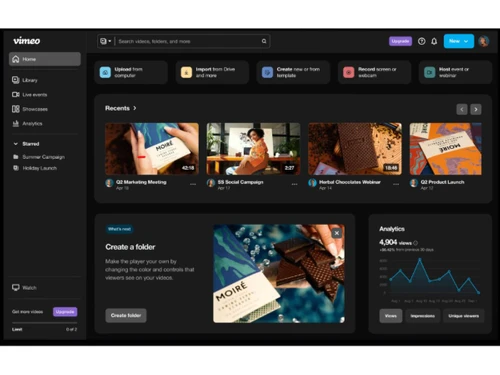
Vimeo Pro-Home Page
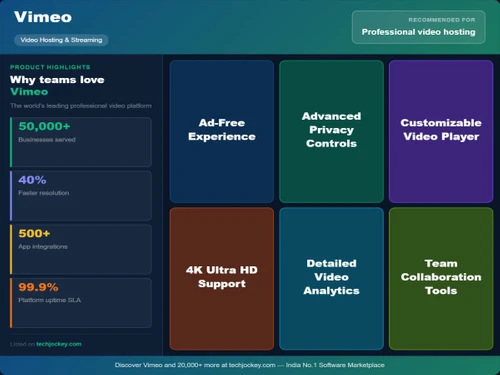
Vimeo Pro-USP

Vimeo Pro

Brand: Vimeo

  • 4.2

  • 4 Ratings

Vimeo Pro is the most affordable and comfortable way of sharing videos across the globe. The video making software solution allows creative professionals to use it optimally through its high-definition video sharing platforms. It allows users to upload, share, and view high-quality videos. Topping it off – with this edition – Vimeo gives the marketers an amazing tool and edge over others for ...

See More

Have you used Vimeo Pro before?

Share your insights for better experience

Add a Review
Starting Price
₹1200

View plans

100% Genuine
Products
Best Price
Guaranteed
Safe & Secure
Payment
  • Description

  • Pricing

  • Features

  • Specification

  • Review

  • Compare

  • Alternatives

  • FAQ

Starting at ₹1,200

Vimeo Pro Software Overview

What is Vimeo Pro?

Vimeo Pro is the most affordable and comfortable way of sharing videos across the globe. The video making software solution allows creative professionals to use it optimally through its high-definition video sharing platforms. It allows users to upload, share, and view high-quality videos. Topping it off – with this edition – Vimeo gives the marketers an amazing tool and edge over others for customizing and branding videos.

Benefits of Using Vimeo Pro

  1. High-definition playback on mobile, desktop, tablet & TV
  2. Third-party player support
  3. Optional file storage
  4. Customized private review pages
  5. No unwanted ads
  6. Edit caption sand subtitles
  7. Professional video and workflow management tools
  8. Fully customizable HTML5 player
  9. Enhanced Statistics
  10. Special VIP support
  11. Sell videos worldwide
  12. Hosted portfolio sites
  13. Complete SEO visibility
  14. Dropbox addition
  15. Free tutorials

Technical Specifications

  1. Storage space: Upto 20GB videos per week
  2. Team Collaboration: Add upto 3 members into account
  3. PRO Status: Dig into the data at video level, customize the reports and monitor engagement on your videos
  4. Professional player: Advanced customization, easily change the colours or hide any elements. Play around with brand logos, add a link to the end of video
  5. Review tools: Create unlisted and private review pages.
  6. Customizable portfolio sites: Build and customize a fully professional and hosted video portfolio, add a custom domain and even share it privately
  7. Private Mode: Keep your videos and profile page from appearing on vimeo.com
  8. Vimeo On Demand: Earn more money by directly selling to the audience online and worldwide

Vimeo Pro Price

Connect with us to be informed about the prices.

Vimeo Pro Features:

  1. Storage space - Being a Pro member, one can upload up to 20GB videos per week. The uploading space is refreshed every week. The membership fee covers the ongoing cost of storing videos.
  2. Team Collaboration - You can add upto 3 members into account to assist in uploading and managing videos and collections.
  3. PRO Status - Being a Pro Member, one can dig into the data at the video level, customize the reports and even see the traffic engagement on your videos.
  4. Professional player - Pro members have access to the advanced customization option for embedded player. They can easily change the colours or hide any elements. They also play around with brand logos, add a link to the end of video. And the best feature, the Pro members can choose a third-party player for their videos.
  5. Review tools - Pro enables you to create unlisted and private review pages.
  6. Customizable portfolio sites - Simply build and customize a fully professional and hosted video portfolio, add a custom domain and even share it privately.
  7. Private Mode - This feature enables you to keep your videos and profile page from appearing on vimeo.com.
  8. Vimeo On Demand - You can the opportunity to earn more money from your videos by directly selling to audience online and worldwide.
Read more

Vimeo Pro Pricing & Plans

Starter
Starting at ₹1200
    • Licenses

      Licenses
      Licenses
    • Monthly

      Monthly
      Monthly

Key Features

  • 1 user

  • 2TB storage

  • Customizable video player

  • Password privacy & unlisted links

  • Review & collaboration tools

Standard
Starting at ₹2500
    • Licenses

      Licenses
      Licenses
    • Monthly

      Monthly
      Monthly

Key Features

  • 5 user

  • 4TB storage

  • Everything in Starter, plus

  • Branding in the player

  • Custom watermark

Vimeo Pro Features

  • icon_check Video Hosting
    Secure platform to upload, store and stream HD/4K videos with fast playback and global delivery without ads
  • icon_check Custom Player
    Fully customizable ad-free video player with branding options, controls, and seamless embedding on websites
  • icon_check Video Editing
    Built-in editor to trim, cut, merge clips, add text, music, transitions, and enhance video quality easily
  • icon_check Screen Recording
    Record screen, webcam, or both with ease, ideal for tutorials, demos, presentations, and training videos
  • icon_check Live Streaming
    Stream live events, webinars, and sessions in real time with high-quality video and audience interaction tools
  • icon_check Webinars
    Host live, automated, or on-demand webinars with registration, engagement tools, and performance tracking
  • icon_check Collaboration
    Team collaboration tools with shared libraries, role-based access, and video review with comments & feedback
  • icon_check Stunning player, no hidden fees
    Provides a high-quality, ad-free HD video player with no bandwidth limits or hidden charges, ensuring a clean viewing experience.
  • icon_check Secure sharing
    Enables password protection, private links, and domain-level controls to securely share videos with selected audiences.
  • icon_check Advanced Tools
    Offers editing, collaboration, analytics, and AI-powered tools to create, manage, and optimize professional video content.
  • icon_check Customizable player
    Allows full customization of the video player with logos, colors, and branding for a professional and consistent look.
  • icon_check Power Integrations
    Supports integrations with third-party tools like Dropbox and workflows for seamless uploading and content management.
  • icon_check 360 Video support
    Supports immersive 360-degree video playback, enabling interactive and engaging viewing experiences across devices.
  • icon_check Publish Natively to social
    Allows easy sharing and publishing of videos across social platforms, helping expand reach and audience engagement.
  • icon_check Showcase and embed, beautifully
    Enables creation of portfolio sites and embeds videos in high-quality players for professional presentation on websites.
Vimeo Pro Demo Video play icon

Get Vimeo Pro Demo

Watch the demo video to explore key features, real workflows, and how the software fits your business needs.

Understand
Key Features
Personal
Demo Insights
Interactive
Demo Support

Vimeo Pro Specifications

Supported Platforms
Ubuntu Ubuntu Windows Windows iOS iOS Android Android MacOS MacOS Linux Linux
Devices
Desktop Desktop Mobile Mobile Tablet Tablet iPad iPad
Deployment
Cloud-Based Cloud-Based
Suitable For
Media House
Business Specific
Media
Business Size
Individual Small Business Startups Medium Business Enterprises SMBs SMEs MSMEs Freelancers
Customer Support
Email Live Chat Communities Forums
Language
English
Integration
API Integration
Training Resources
Live Online Webinars Documentation Videos
AI Features
AI Integrated
Technology
Next Generation
Compliance Regulation
CCPA CPRA

Explore the Best Alternative Solutions Similar to Your Business Size and Needs

Small Business

Designed for startups and growing businesses

vMix

4.5

GoBrunch

4.5

Restream

4.4

See More

Vimeo Pro Review

4.2

Out of 5

img

Overall Rating

Based on
4 Verified Ratings

Rating Breakdown

  • Features 4.6
  • Value for Money 3.7
  • Ease of Use 4.1
  • Customer Support 4.5

92% Recommend this Product

Add Review

Techjockey Trusted Reviews from Verified Users

No reviews are currently available for Vimeo Pro. Discover similar Live Streaming Software reviews

  • GudSho

    4.3

    Whats great - I can create branded channels for each subject, allowing me to organize my content and cater to different learning styles. read more

  • Yostream

    4.8

    Whats great - We had to organize a virtual event at very short notice. Yostream was perfect for our case, in a couple of minutes we were re... read more

  • OBS Studio

    4.2

    Whats great - Highly customizable, supports multiple sources (webcams, screen capture, images, etc.), excellent for live streaming on vario... read more

Compare Vimeo Pro With other Live Streaming Software

Products
Ratings
Pricing
Device Supported
Deployment
Supported Platforms
  • img

    Vimeo Pro

  • 4.2

  • Price On Request

  • Desktop

    Mobile

  • Web based

    On Premises

  • Windows

    Mac OS

  • img

    Livebox

  • 4.4

  • ₹ 1170

  • Desktop

    Mobile

  • Web based

    On Premises

  • Windows

    Mac OS

  • img

    Castr

  • 4.3

  • Price On Request

  • Desktop

    Mobile

  • Web based

    On Premises

  • Windows

    Mac OS

  • img

    Grabyo

  • 4.3

  • Price On Request

  • Desktop

    Mobile

  • Web based

    On Premises

  • Windows

    Mac OS

  • img

    Riverside

  • 4.1

  • Price On Request

  • Desktop

    Mobile

  • Web based

    On Premises

  • Windows

    Mac OS

  • img

    Yostream

  • 4.8

  • ₹ 1250

  • Desktop

    Mobile

  • Web based

    On Premises

  • Windows

    Mac OS

  • img

    Prism live Studio

  • 4.2

  • Price On Request

  • Desktop

    Mobile

  • Web based

    On Premises

  • Windows

    Mac OS

  • img

    Wirecast

  • 4.1

  • Price On Request

  • Desktop

    Mobile

  • Web based

    On Premises

  • Windows

    Mac OS

  • img

    Evmux

  • 4.5

  • Price On Request

  • Desktop

    Mobile

  • Web based

    On Premises

  • Windows

    Mac OS

  • img

    Dacast

  • 4.4

  • Price On Request

  • Desktop

    Mobile

  • Web based

    On Premises

  • Windows

    Mac OS

  • img

    ManyCam

  • 4.2

  • Price On Request

  • Desktop

    Mobile

  • Web based

    On Premises

  • Windows

    Mac OS

(0) Product(s) selected

Vimeo Pro Alternatives

See All Vimeo Pro Alternatives

Starting Price:

$20 /Month

Available

Price on Request

Starting Price:

$29 /Month

Starting Price:

$25

Starting Price:

$39

Starting Price:

$49 /year

Starting Price:

$59 /month

Starting Price:

$39 /Month

Starting Price:

$70 /Month

Articles for Vimeo Pro

See All Related Articles

Which operating system does Vimeo Pro support?

Vimeo Pro Video Making Software is compatible with Windows operating systems.

Is there any Vimeo Pro app?

Vimeo Pro Video Making Software app is not available.

What is deployment type of Vimeo Pro?

Vimeo Pro Video Making Software supports Web-Based.

Who are the potential users of Vimeo Pro?

Vimeo Pro Video Making Software is typically used in Media House.

Is there any free trial or demo for Vimeo Pro?

Vimeo Pro Video Making Software demo is available for free at Techjockey.

Is Vimeo Pro free?

Vimeo Pro Video Making Software offers a free trial. However, the premium plan with advanced features available at Techjockey.

How can you download Vimeo Pro?

For Vimeo Pro Video Making Software installation, insert the given CD/USB flash storage in your system and open the Setup Wizard to get started.

How does Vimeo Pro work?

Vimeo Pro Video Making Software helps with Stunning player, no hidden fees,Secure sharing and Advanced Tools. It's a complete solution for Customizable player,Power Integrations,360 Video support and Publish Natively to social.

20,000+ Software Listed

Best Price Guranteed

Free Expert Consultation

2M+ Happy Customers

Terms and Condtions

close

Users with registered businesses can purchase goods from merchants on the platform to satisfy their business needs. Users are not permitted to utilize any products acquired through the platform for resale, advertising, business, or further distribution.

For each purchase made, users will receive a Tax Invoice (or 'GST invoice') that includes specific details such as:

  • the GSTIN of the user associated with their registered business, and

  • the specified Entity Name for their business.

It should be noted that not all products are eligible for GST Invoice. Only the products displayed by participating sellers with the 'GST-based Invoice Available' callout on the product description page would qualify.

Certain goods and services are not eligible to get a GST Invoice, including items with VAS, i.e., Value Added Services (e.g., Total Mobile Protection/Assured Buyback) and those involving an exchange offer at the time of purchase.

Users must ensure the accuracy of the GSTIN, and business entity name provided for the GST Invoice. Requests for corrections into GST Invoice would not be accommodated by Techjockey.com or any Seller, and any issues arising from user-provided information are the sole responsibility of users.

Techjockey.com is not liable for the GST Invoice or any associated input tax credit. To efficiently claim an input tax credit, users should select the registered place of business address as per the GST authority's data and follow the provisions of the GST Act and rules.

To claim an input tax credit, the delivery and billing addresses must match. Furthermore, input tax credits will not be granted if the delivery address and GSTIN on the invoice are from different states. In case of incorrect GST details provided during the order placement, the order will be canceled automatically.