linkedin
StreamYard logo
play How to Add Multiple Cameras In StreamYard - Streamyard Demo
streamyard
streamyard features

StreamYard

Brand: StreamYard

  • 4.3

  • 5 Ratings

StreamYard is a live streaming software. With this web-based web streaming solution, one can interview guests, share the screen, and do much more. It allows streaming directly to Facebook, YouTube, LinkedIn, and other platforms. This live streaming software further helps users create unique shows with their own colours, overlays, and logos. You can also upload GIFs, images and videos to your live...

See More

Have you used StreamYard before?

Share your insights for better experience

Add a Review
Starting Price
$45

View plans

100% Genuine
Products
Best Price
Guaranteed
Safe & Secure
Payment
  • Description

  • Pricing

  • Features

  • Specification

  • Review

  • Compare

  • Alternatives

  • FAQ

Starting at $45

StreamYard Software Overview

What is StreamYard?

StreamYard is a live streaming software. With this web-based web streaming solution, one can interview guests, share the screen, and do much more. It allows streaming directly to Facebook, YouTube, LinkedIn, and other platforms. This live streaming software further helps users create unique shows with their own colours, overlays, and logos. You can also upload GIFs, images and videos to your live stream.

“Everyone has a message to share”, with this thought, StreamYard works for everybody. It makes it simple to stream live events across numerous platforms at a time. With this, one can have an interview with a guest, and synchronize comments, and their brand. Because the show must go on, its backup servers ensure that the live stream always operates seamlessly.

Why Choose StreamYard Software?

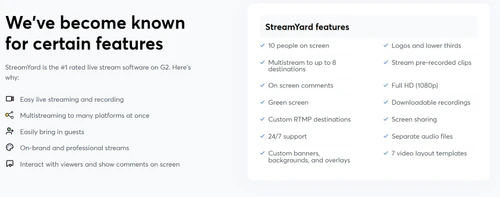
StreamYard is a preferred software for live stream by its users. Apart from that, it is particularly known for these features:

  • StreamYard live streaming studio supports smooth live streaming and recording.
  • Multi streaming to different platforms at one go is possible with StreamYard.
  • With the help of StreamYard live streaming software, you can easily bring in guests to your event.
  • StreamYard allows interaction with viewers while showing their comments over the screen.
  • You can also record videos on the go, and download them for the future use.

Benefits of StreamYard Live Stream Platform

  • It can accumulate 10 people on the screen at a time.
  • It allows multi-streaming to up to 8 destinations.
  • It facilitates an on-screen comment feature.
  • With a 24/7 feature, it provides support as and when required.
  • Using this, one can have custom-made banners, backgrounds, and even overlays.
  • Offers to stream pre-recorded clips online.
  • The video recordings are downloadable.
  • It provides an option of screen sharing also
  • If you want, you can also record and run a video. No need to live stream.
  • Allows you to record on the move and download your video and audio recordings.

Who Uses StreamYard Live Stream Software?

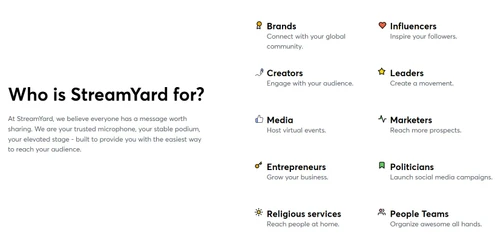
StreamYard is for everybody! Let’s see how different purposes can be fulfilled by different users:

  • Brands: Using StreamYard live streaming platform, brands can connect with the global community.
  • Influencers: Influencers can inspire their followers with the help of StreamYard.
  • Creators: This platform would help the creators to connect with their audience.
  • Leaders: Through StreamYard live streaming software, leaders can start a movement.
  • Media: Media can host virtual events with the help of StreamYard.
  • Marketers: To reach more prospects, Marketers must opt for StreamYard.
  • Entrepreneurs: Growing business would be much easier with the help of StreamYard.
  • Politicians: StreamYard can be of great help to politicians in launching their social media campaign
  • Religious services: For religious services, one can use StreamYard platform to reach people at home.

Pricing of StreamYard

StreamYard price is available for $ 45 at techjockey.com.

The pricing model is based on different parameters, including extra features, deployment type, and the total number of users.

Read more

StreamYard Company Details

Founded Year:  2018

StreamYard is a live streaming studio that can be used in a browser and simulcast to Facebook and other platforms.

Director/Founders Dan Briggs, Geige Vandentop
Company Size 1-100 Employees

StreamYard Pricing & Plans

Core
Starting at $45
    • Licenses

      Licenses
      Licenses
    • Monthly

      Monthly
      Monthly

Key Features

  • Full HD (1080p)

  • Multistream - 3 destinations

  • 10 on-screen participants

  • Live streams are recorded

  • 50 hours of permanent storage

Advanced
Starting at $89
    • Licenses

      Licenses
      Licenses
    • Monthly

      Monthly
      Monthly

Key Features

  • 4K (2160p) local recordings

  • Multistream - 8 destinations

  • 15 backstage participants

  • On-Air webinars

  • Custom fonts

StreamYard Features

  • icon_check Multi Streaming
    It works seamlessly with Facebook, YouTube, LinkedIn, Twitter, and other streaming platforms.
  • icon_check Branded Streams
    One can personalize live-streaming with their own logos, color, tags, etc. For branding.
  • icon_check Guest Engagement
    It allows viewers to engage with the guests through on-screen comments.
  • icon_check Recording
    One can record the live streaming and view it later. You can also record and play videos without going live.
  • icon_check Security
    StreamYard is one of the most secure live streaming software that allows restricted access to live streams.
  • icon_check 24/7 support
    This is one of the key features of StreamYard which sets it apart from others.
  • icon_check Screen Sharing
    StreamYard live stream platform allows you to share your live screen for higher engagement.
StreamYard Demo Video play icon

Get StreamYard Demo

Watch the demo video to explore key features, real workflows, and how the software fits your business needs.

Understand
Key Features
Personal
Demo Insights
Interactive
Demo Support

StreamYard Specifications

Supported Platforms
Windows Windows
Devices
Desktop Desktop
Deployment
Cloud-Based Cloud-Based
Suitable For
All Industries
Business Specific
All Businesses
Business Size
Small Business Startups Medium Business Enterprises SMBs SMEs MSMBs MSMEs
Customer Support
Email Communities
Language
English
Training Resources
Documentation

Explore the Best Alternative Solutions Similar to Your Business Size and Needs

Small Business

Designed for startups and growing businesses

vMix

4.5

GoBrunch

4.5

Restream

4.4

See More

StreamYard Review

4.3

Out of 5

img

Overall Rating

Based on
5 Verified Ratings

Rating Breakdown

  • Features 4.4
  • Value for Money 4.1
  • Ease of Use 4.7
  • Customer Support 4.2

100% Recommend this Product

Add Review

Techjockey Trusted Reviews from Verified Users

No reviews are currently available for StreamYard. Discover similar Live Streaming Software reviews

  • GudSho

    4.3

    Whats great - I can create branded channels for each subject, allowing me to organize my content and cater to different learning styles. read more

  • Yostream

    4.8

    Whats great - We had to organize a virtual event at very short notice. Yostream was perfect for our case, in a couple of minutes we were re... read more

  • OBS Studio

    4.2

    Whats great - Highly customizable, supports multiple sources (webcams, screen capture, images, etc.), excellent for live streaming on vario... read more

Compare StreamYard With other Live Streaming Software

Products
Ratings
Pricing
Device Supported
Deployment
Supported Platforms
  • img

    StreamYard

  • 4.3

  • Price On Request

  • Desktop

    Mobile

  • Web based

    On Premises

  • Windows

    Mac OS

  • img

    Livebox

  • 4.4

  • ₹ 1170

  • Desktop

    Mobile

  • Web based

    On Premises

  • Windows

    Mac OS

  • img

    Castr

  • 4.3

  • Price On Request

  • Desktop

    Mobile

  • Web based

    On Premises

  • Windows

    Mac OS

  • img

    Grabyo

  • 4.3

  • Price On Request

  • Desktop

    Mobile

  • Web based

    On Premises

  • Windows

    Mac OS

  • img

    Riverside

  • 4.1

  • Price On Request

  • Desktop

    Mobile

  • Web based

    On Premises

  • Windows

    Mac OS

  • img

    Yostream

  • 4.8

  • ₹ 1250

  • Desktop

    Mobile

  • Web based

    On Premises

  • Windows

    Mac OS

  • img

    Prism live Studio

  • 4.2

  • Price On Request

  • Desktop

    Mobile

  • Web based

    On Premises

  • Windows

    Mac OS

  • img

    Wirecast

  • 4.1

  • Price On Request

  • Desktop

    Mobile

  • Web based

    On Premises

  • Windows

    Mac OS

  • img

    Evmux

  • 4.5

  • Price On Request

  • Desktop

    Mobile

  • Web based

    On Premises

  • Windows

    Mac OS

  • img

    Vimeo Pro

  • 4.2

  • Price On Request

  • Desktop

    Mobile

  • Web based

    On Premises

  • Windows

    Mac OS

  • img

    Dacast

  • 4.4

  • Price On Request

  • Desktop

    Mobile

  • Web based

    On Premises

  • Windows

    Mac OS

(0) Product(s) selected

StreamYard Alternatives

See All StreamYard Alternatives

Starting Price:

$20 /Month

Available

Price on Request

Starting Price:

$29 /Month

Starting Price:

$25

Starting Price:

$39

Starting Price:

$49 /year

Starting Price:

$59 /month

Starting Price:

$39 /Month

Starting Price:

$70 /Month

Articles for StreamYard

See All Related Articles

Which operating system does StreamYard support?

StreamYard live streaming platform is compatible with Windows operating systems.

Is there any StreamYard app?

StreamYard live streaming platform is available for Android devices.

What is the deployment type of StreamYard?

StreamYard live streaming platform supports web-based deployment.

How much does StreamYard cost?

StreamYard price is available for $ 45 at techjockey.com.

Who are the potential users of StreamYard?

StreamYard live streaming software is typically used in every industry.

Is there any free trial or demo for StreamYard?

StreamYard live streaming system demo is available for free with techjockey.com.

Is StreamYard free?

StreamYard live streaming platform offers a free trial. However, the premium plan with advanced features is available at techjockey.com with exciting deals.

How can you download StreamYard?

StreamYard live streaming software installation is not required, as it is web-based. Just open the Setup Wizard to get started.

How does StreamYard work?

StreamYard live streaming platform helps with live streams, video recording, screen-sharing, etc. It's a complete solution for multi-streaming, guest engagement, etc.

Can we use StreamYard on iPhone?

Yes, you can use StreamYard on your iPhone directkly from your browser. Your guests can also join the live stream through the invite link. Theer is no need to download the app.

How to use your phone as a camera for StreamYard?

While working on a StreamYard over your phone, you would be asked to choose a camera. We suggest you choose the primary camera.

20,000+ Software Listed

Best Price Guranteed

Free Expert Consultation

2M+ Happy Customers

Terms and Condtions

close

Users with registered businesses can purchase goods from merchants on the platform to satisfy their business needs. Users are not permitted to utilize any products acquired through the platform for resale, advertising, business, or further distribution.

For each purchase made, users will receive a Tax Invoice (or 'GST invoice') that includes specific details such as:

  • the GSTIN of the user associated with their registered business, and

  • the specified Entity Name for their business.

It should be noted that not all products are eligible for GST Invoice. Only the products displayed by participating sellers with the 'GST-based Invoice Available' callout on the product description page would qualify.

Certain goods and services are not eligible to get a GST Invoice, including items with VAS, i.e., Value Added Services (e.g., Total Mobile Protection/Assured Buyback) and those involving an exchange offer at the time of purchase.

Users must ensure the accuracy of the GSTIN, and business entity name provided for the GST Invoice. Requests for corrections into GST Invoice would not be accommodated by Techjockey.com or any Seller, and any issues arising from user-provided information are the sole responsibility of users.

Techjockey.com is not liable for the GST Invoice or any associated input tax credit. To efficiently claim an input tax credit, users should select the registered place of business address as per the GST authority's data and follow the provisions of the GST Act and rules.

To claim an input tax credit, the delivery and billing addresses must match. Furthermore, input tax credits will not be granted if the delivery address and GSTIN on the invoice are from different states. In case of incorrect GST details provided during the order placement, the order will be canceled automatically.