linkedin
Evmux logo
play How to Setup Hot Keys in Evmux using Stream Deck
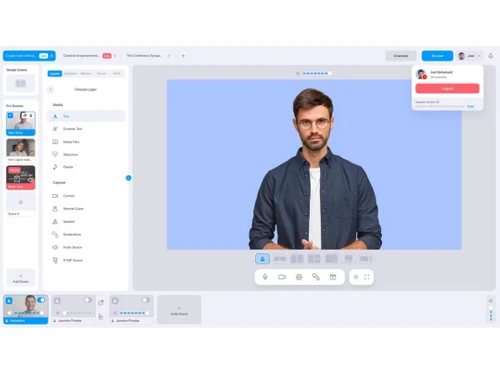
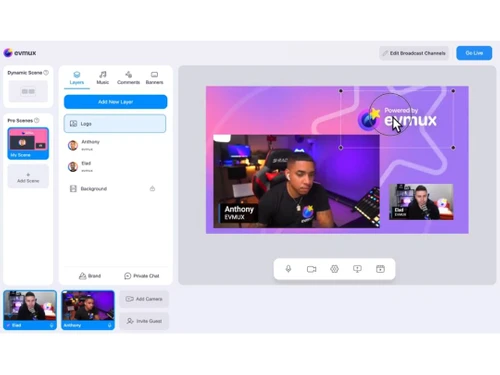
Evmux Dashboard
Evmux Record

Evmux

Brand: Evmux

  • 4.5

  • 4 Ratings

Evmux Live Streaming Software offers seamless and professional live streaming solutions, making your online broadcasts easily stand out.

See More

Have you used Evmux before?

Share your insights for better experience

Add a Review
Starting Price
$25

View plans

100% Genuine
Products
Best Price
Guaranteed
Safe & Secure
Payment
  • Description

  • Pricing

  • Features

  • Specification

  • Review

  • Compare

  • Alternatives

  • FAQ

Starting at $25

Evmux Software Overview

What is Evmux Software?

Evmux is a live-streaming platform that simplifies the process of producing high-quality live streams, podcasts, webinars, and virtual events. It enables individuals and businesses to create professional recorded and live content directly from their web browsers. This innovative tool offers a seamless and efficient way to go live with just a few clicks.

The platform facilitates guest interviews, making it ideal for talk shows, panel discussions, or interactive webinars. This includes the capacity to share screens, enhancing interaction and content variety during live streams. Users can stream their content to various popular platforms like Facebook, YouTube, LinkedIn, Twitch, or custom RTMP outputs. It empowers you to easily reach your audience wherever they prefer to engage, maximizing your content's exposure and impact.

Why Choose Evmux System?

  • The live-streaming software allows you to engage with your audience through real-time messaging during your live-stream or event.
  • It allows you to organize elements hierarchically in your content composition, which can be manipulated and viewed independently.
  • The software provides a private area to prepare and coordinate with your team or guests before going live.
  • It enables push-to-talk functionality to control your audio input when communicating in a live stream or virtual event.
  • The platform supports Full HD (1080P) video quality to ensure high-resolution video output for a professional and clear visual experience.

Benefits of Evmux Live Streaming Solution

  • The live-streaming software supports using a green screen or chroma key technology to replace the background of your video with a different image or backdrop.
  • It allows you to add custom images or videos on top of your content composition with creative control over your live streams and recordings.
  • The platform enables you to connect your encoder with a server for live streaming to platforms like Facebook, YouTube, and more.
  • It supports the inclusion of banners to convey messages, branding, or additional information during a live stream or virtual event.
  • The platform provides tickers with dynamic text overlays that can scroll horizontally or vertically across the screen, displaying important updates or information.

Pricing of Evmux Live Streaming Platform

Evmux live streaming platform pricing starts from $25 at techjockey.com.

The pricing model is based on different parameters, including extra features, deployment type, and total users. For further queries related to the product, you can contact our product team and learn more about the pricing and offers.

Read more

Evmux Company Details

Founded Year:  2020

Produce stunning Live stream and recorded content all from your browser!

Director/Founders Eran Eluz
Company Size 1-100 Employees

Evmux Pricing & Plans

Basic
Key Features
  • Unlimited streaming hours
  • Multistream - 4 destinations
  • Custom RTMP
  • Record your content
  • No
Starting at $25
    • Quantity

      Quantity
      Quantity
    • Monthly

      Monthly
      Monthly

Key Features

  • Unlimited streaming hours

  • Multistream - 4 destinations

  • Custom RTMP

  • Record your content

  • No

Evmux Features

  • icon_check Live Streaming
    Allows users to go live easily and professionally directly from their browser.
  • icon_check Video Hosting
    Offers video hosting capabilities for storing and managing recorded content.
  • icon_check Dashboard
    Offers a user-friendly dashboard for easy control and monitoring of live streams and recorded videos.
  • icon_check Video Recording
    Users can effortlessly record their content within the platform for later use or distribution.
  • icon_check Monetization Tools
    Provides monetization options for content creators to generate video revenue.
  • icon_check Video Streaming
    Facilitates smooth and reliable video streaming to ensure viewers have an excellent streaming experience.
  • icon_check Storage
    Offers storage solutions for users to manage and access content efficiently.
  • icon_check Templates
    Provides templates to streamline the creation of professional-looking live streams and recorded content.
  • icon_check Screen Sharing
    Allows seamless screen sharing to enhance interactivity during live streams and webinars.
  • icon_check Integrations
    Integrate with other platforms and tools for seamless content distribution and management.
Evmux Demo Video play icon

Get Evmux Demo

Watch the demo video to explore key features, real workflows, and how the software fits your business needs.

Understand
Key Features
Personal
Demo Insights
Interactive
Demo Support

Evmux Specifications

Supported Platforms
Ubuntu Ubuntu Windows Windows MacOS MacOS Linux Linux
Devices
Desktop Desktop Mobile Mobile Tablet Tablet iPad iPad
Deployment
Cloud-Based Cloud-Based
Suitable For
All Industries
Business Specific
All Businesses
Business Size
Small Business Medium Business SMBs SMEs
Customer Support
Email Communities
Language
English
Training Resources
Videos

Explore the Best Alternative Solutions Similar to Your Business Size and Needs

Evmux Review

4.5

Out of 5

img

Overall Rating

Based on
4 Verified Ratings

Rating Breakdown

  • Features 4.5
  • Value for Money 4.5
  • Ease of Use 4.3
  • Customer Support 5

87% Recommend this Product

Add Review

Techjockey Trusted Reviews from Verified Users

No reviews are currently available for Evmux. Discover similar Live Streaming Software reviews

  • GudSho

    4.3

    Whats great - I can create branded channels for each subject, allowing me to organize my content and cater to different learning styles. read more

  • Yostream

    4.8

    Whats great - We had to organize a virtual event at very short notice. Yostream was perfect for our case, in a couple of minutes we were re... read more

  • OBS Studio

    4.2

    Whats great - Highly customizable, supports multiple sources (webcams, screen capture, images, etc.), excellent for live streaming on vario... read more

Compare Evmux With other Live Streaming Software

Products
Ratings
Pricing
Device Supported
Deployment
Supported Platforms
  • img

    Evmux

  • 4.5

  • Price On Request

  • Desktop

    Mobile

  • Web based

    On Premises

  • Windows

    Mac OS

  • img

    Livebox

  • 4.4

  • ₹ 1170

  • Desktop

    Mobile

  • Web based

    On Premises

  • Windows

    Mac OS

  • img

    Castr

  • 4.3

  • Price On Request

  • Desktop

    Mobile

  • Web based

    On Premises

  • Windows

    Mac OS

  • img

    Grabyo

  • 4.3

  • Price On Request

  • Desktop

    Mobile

  • Web based

    On Premises

  • Windows

    Mac OS

  • img

    Riverside

  • 4.1

  • Price On Request

  • Desktop

    Mobile

  • Web based

    On Premises

  • Windows

    Mac OS

  • img

    Yostream

  • 4.8

  • ₹ 1250

  • Desktop

    Mobile

  • Web based

    On Premises

  • Windows

    Mac OS

  • img

    Prism live Studio

  • 4.2

  • Price On Request

  • Desktop

    Mobile

  • Web based

    On Premises

  • Windows

    Mac OS

  • img

    Wirecast

  • 4.1

  • Price On Request

  • Desktop

    Mobile

  • Web based

    On Premises

  • Windows

    Mac OS

  • img

    Vimeo Pro

  • 4.2

  • Price On Request

  • Desktop

    Mobile

  • Web based

    On Premises

  • Windows

    Mac OS

  • img

    Dacast

  • 4.4

  • Price On Request

  • Desktop

    Mobile

  • Web based

    On Premises

  • Windows

    Mac OS

  • img

    ManyCam

  • 4.2

  • Price On Request

  • Desktop

    Mobile

  • Web based

    On Premises

  • Windows

    Mac OS

(0) Product(s) selected

Evmux Alternatives

See All Evmux Alternatives

Starting Price:

$20 /Month

Available

Price on Request

Starting Price:

$29 /Month

Starting Price:

$39

Starting Price:

$49 /year

Starting Price:

$59 /month

Starting Price:

$19 /Month

Starting Price:

$39 /Month

Starting Price:

$70 /Month

Articles for Evmux

See All Related Articles

Which operating system does the Evmux Live support?

Evmux Live is compatible with Windows and macOS device systems.

Is there any Evmux app?

The Evmux app is not available on Android and iOS devices.

What is the deployment type of the Evmux Live Streaming Software?

Evmux Live supports web-based deployment.

How much does the Evmux Live cost?

Evmux Live Software’s price in India starts from $25 at techjockey.com. This software has multiple pricing plans and caters to a diverse customer base.

Who are the potential users of the Evmux Live?

Evmux suits content creators, businesses, event organizers, and individuals looking to produce branded, high-quality live streams. It caters to a broad range of users seeking professional live-streaming solutions.

Is there any free trial or demo for Evmux?

Evmux Software’s demo is available for free with techjockey.com.

Is the Evmux free?

Evmux System does not offer a free trial.

How can you download the Evmux?

Evmux Software's installation is not required, as it is web-based. Just open the Setup Wizard to get started.

How does Evmux work?

Evmux is a robust live streaming software that offers fully branded live stream capabilities. It empowers users with simplicity and power, enabling them to create high-quality live streams that outshine their competition, making it an ideal choice for live stream studio needs.

20,000+ Software Listed

Best Price Guranteed

Free Expert Consultation

2M+ Happy Customers

Terms and Condtions

close

Users with registered businesses can purchase goods from merchants on the platform to satisfy their business needs. Users are not permitted to utilize any products acquired through the platform for resale, advertising, business, or further distribution.

For each purchase made, users will receive a Tax Invoice (or 'GST invoice') that includes specific details such as:

  • the GSTIN of the user associated with their registered business, and

  • the specified Entity Name for their business.

It should be noted that not all products are eligible for GST Invoice. Only the products displayed by participating sellers with the 'GST-based Invoice Available' callout on the product description page would qualify.

Certain goods and services are not eligible to get a GST Invoice, including items with VAS, i.e., Value Added Services (e.g., Total Mobile Protection/Assured Buyback) and those involving an exchange offer at the time of purchase.

Users must ensure the accuracy of the GSTIN, and business entity name provided for the GST Invoice. Requests for corrections into GST Invoice would not be accommodated by Techjockey.com or any Seller, and any issues arising from user-provided information are the sole responsibility of users.

Techjockey.com is not liable for the GST Invoice or any associated input tax credit. To efficiently claim an input tax credit, users should select the registered place of business address as per the GST authority's data and follow the provisions of the GST Act and rules.

To claim an input tax credit, the delivery and billing addresses must match. Furthermore, input tax credits will not be granted if the delivery address and GSTIN on the invoice are from different states. In case of incorrect GST details provided during the order placement, the order will be canceled automatically.