USA
USA UAE
UAESmall Business
Designed for startups and growing businesses

See More



Brand: SAP
SAP LeanIX is an enterprise architecture management platform that helps organizations analyze their IT landscape, manage risk, and support technology transformation.
See MoreHave you used SAP LeanIX before?
Share your insights for better experience
Brand: SAP
Founded Year: 1972
SAP is a technology company that develops enterprise application software for companies and industries across diverse sectors.
Looking for The Right Pricing?
Share your requirements and get a plan built around your business.
Price Available on Request
Get personalised SAP LeanIX pricing that fits your needs. Our team will connect with you.
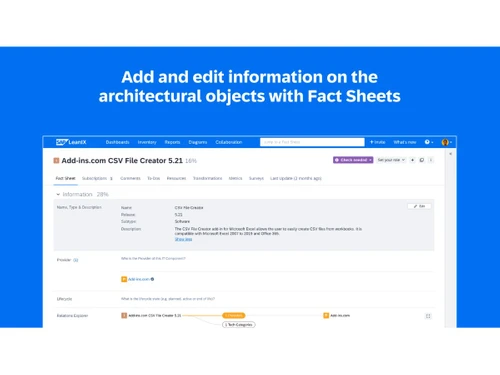
 Application Portfolio Management Enterprise Architecture Repository Business Capability Mapping Lifecycle Management Application Rationalization Dependency Mapping Risk & Compliance Monitoring SaaS Discovery & Management Data Quality Management Reporting & Analytics Integrations Collaboration Workspace Survey & Data Collection AI-Assisted Insights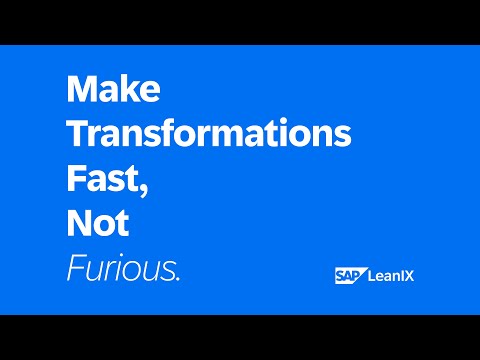

Watch the demo video to explore key features, real workflows, and how the software fits your business needs.
 Ubuntu
  Windows
  MacOS
MacOS  Linux
Linux  Desktop
  Cloud-Based
  Perpetual

Small Business
Designed for startups and growing businesses
Medium Business
Built for business growth and flexibility
Enterprises
Designed for complex and large-scale business needs
Techjockey Trusted Reviews from Verified Users
No reviews are currently available for SAP LeanIX. Discover similar BPM Software reviews

Bonita BPM
Whats great - I found Bonita Software. It delivers vital capabilities like assigning roles and permissions, developing composite applicatio... read more

OnexFlow
Whats great - Onex flow has been a genuinely significant part of our organization. Without leaving my desks, I can collaborate with staff f... read more

Newton BPM
Whats great - Newton is a decent decision, usability for the new clients, and when you dive in there's a strong framework to help. read more
SAP LeanIX
Price On Request
Desktop
Mobile
Web based
On Premises
Windows
Mac OS

CollabCRM
Price On Request
Desktop
Mobile
Web based
On Premises
Windows
Mac OS
Bonita BPM
Price On Request
Desktop
Mobile
Web based
On Premises
Windows
Mac OS

Pronnel
Price On Request
Desktop
Mobile
Web based
On Premises
Windows
Mac OS

Gravity Flow
Price On Request
Desktop
Mobile
Web based
On Premises
Windows
Mac OS
OnexFlow
Price On Request
Desktop
Mobile
Web based
On Premises
Windows
Mac OS

Posse
Price On Request
Desktop
Mobile
Web based
On Premises
Windows
Mac OS
Prime BPM
Price On Request
Desktop
Mobile
Web based
On Premises
Windows
Mac OS

Automaited
Price On Request
Desktop
Mobile
Web based
On Premises
Windows
Mac OS

Modelio
Price On Request
Desktop
Mobile
Web based
On Premises
Windows
Mac OS

Camunda-Platform
Price On Request
Desktop
Mobile
Web based
On Premises
Windows
Mac OS
(0) Product(s) selected
Available
Price on Request
Starting Price:
$99 /Year
Available
Price on Request
Available
Price on Request
Available
Price on Request

Available
Price on Request
Available
Price on Request

Available
Price on Request
Available
Price on Request

Starting Price:
$500 /Month
Available
Price on Request
LeanIX is used for enterprise architecture transformation, helping organizations manage their full software estate, make confident technology investments, manage change, identify and manage risk, and navigate ERP transformations.
SAP LeanIX pricing details are available on request on techjockey.com.
LeanIX Enterprise Architecture is a solution designed to provide a single source of truth for an organization's IT landscape, enabling faster and more confident decision-making for technology investments, change management, and business impact.
LeanIX integrates with ServiceNow, specifically through its Technology Risk and Compliance module, to synchronize infrastructure and software asset information with service management solutions rather than being a direct competitor in all aspects.
SAP LeanIX is designed for organizations of all sizes, including industry leaders, and is primarily used by enterprise architects and transformation leaders to align business and IT, govern complexity, and drive continuous transformation.
SAP LeanIX accelerates transformations by providing businesses with a common language and a single source of truth for their software estate, enabling changes to happen better, faster, and with greater impact.
SAP LeanIX offers phone support with a 24/7 reply time and provides Customer Success Management to assist users every step of the way with product knowledge and enterprise architecture experience.
Yes, SAP LeanIX incorporates AI capabilities to help users act on their software estate insights faster and with more confidence, enhancing decision-making and transformation processes.
20,000+ Software Listed
Best Price Guranteed
Free Expert Consultation
2M+ Happy Customers
Terms and Condtions

Users with registered businesses can purchase goods from merchants on the platform to satisfy their business needs. Users are not permitted to utilize any products acquired through the platform for resale, advertising, business, or further distribution.
For each purchase made, users will receive a Tax Invoice (or 'GST invoice') that includes specific details such as:
the GSTIN of the user associated with their registered business, and
the specified Entity Name for their business.
It should be noted that not all products are eligible for GST Invoice. Only the products displayed by participating sellers with the 'GST-based Invoice Available' callout on the product description page would qualify.
Certain goods and services are not eligible to get a GST Invoice, including items with VAS, i.e., Value Added Services (e.g., Total Mobile Protection/Assured Buyback) and those involving an exchange offer at the time of purchase.
Users must ensure the accuracy of the GSTIN, and business entity name provided for the GST Invoice. Requests for corrections into GST Invoice would not be accommodated by Techjockey.com or any Seller, and any issues arising from user-provided information are the sole responsibility of users.
Techjockey.com is not liable for the GST Invoice or any associated input tax credit. To efficiently claim an input tax credit, users should select the registered place of business address as per the GST authority's data and follow the provisions of the GST Act and rules.
To claim an input tax credit, the delivery and billing addresses must match. Furthermore, input tax credits will not be granted if the delivery address and GSTIN on the invoice are from different states. In case of incorrect GST details provided during the order placement, the order will be canceled automatically.