linkedin
Signal Messaging App logo
signal messaging app-timer
signal messaging app-say
signal messaging app-speak

Signal Messaging App

Brand: SIGNALS

  • 4.4

  • 3 Ratings

Signal is a secure messaging app that uses end-to-end encryption to ensure private communication through text messages, voice calls, and video calls.

See More

Have you used Signal Messaging App before?

Share your insights for better experience

Add a Review

Free Forever

Get started immediately at no cost. Upgrade anytime if your business demand more.

100% Genuine
Products
Best Price
Guaranteed
Safe & Secure
Payment
  • Description

  • Pricing

  • Features

  • Specification

  • Review

  • Compare

  • Alternatives

  • FAQ

Signal Messaging App Software Overview

What is Signal Messaging App?

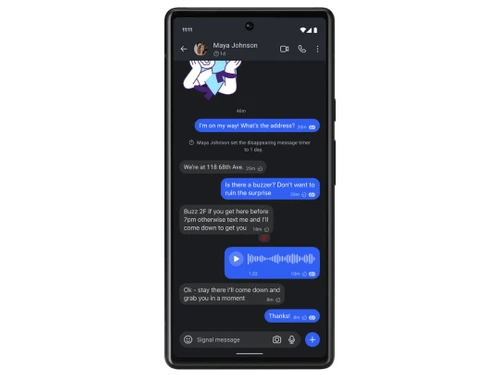
Signal is an instant messaging software that offers end-to-end encryption for all communications, including text messages, voice calls, and video calls. Developed by the nonprofit Signal Foundation, it allows users to send various media such as photos, videos, and documents while ensuring that only the intended recipients can read or listen to the content. Signal uses mobile phone numbers for registration but has introduced usernames to enhance privacy by allowing users to hide their phone numbers.

The app includes features like disappearing messages, which automatically delete after a set time, and supports group chats for up to forty participants. Signal is open-source, meaning its code can be reviewed by anyone for security purposes. It is available on multiple platforms, including Android, iOS, and desktop devices, making it versatile for users. With no ads or data tracking, Signal prioritizes user privacy and security above all else.

Why Choose Signal Messaging App Software?

  • Top-Notch Security: Signal uses state-of-the-art end-to-end encryption, ensuring that only the intended recipients can read your messages and hear your calls, with no data tracking or ads involved.
  • Open Source: The app's open-source nature allows security experts to review its code, enhancing trust and transparency regarding its security features.
  • Free Communication: Signal enables users to send messages, voice notes, photos, and videos for free using their internet connection, avoiding SMS fees.
  • Crystal-Clear Voice and Video Calls: Users can make high-quality voice and video calls without incurring long-distance charges, making it ideal for international communication.
  • No Data Collection: As a nonprofit organization, Signal does not collect user data or sell advertisements, prioritizing user privacy over profit.
  • Disappearing Messages: The app allows users to send messages that automatically disappear after a set time, adding an extra layer of privacy.
  • Group Chats: Signal supports group messaging for easy communication with family, friends, and colleagues, fostering connectivity.
  • User-Friendly Features: The app includes fun features like encrypted stickers and message reactions, enhancing the user experience without compromising security.
  • Widely Recommended: Signal is endorsed by privacy advocates and organizations for its strong security measures, making it a trusted choice for secure communication.

Benefits of Signal Messaging App Software

  • Message Scheduling: It allows users to schedule messages for future delivery, making it convenient to send reminders or important information at the right time.
  • View-Once Media: Users can send photos and videos that disappear after being viewed once, enhancing privacy and control over shared content.
  • Customizable App Appearance: It offers options to change the app icon and color themes, allowing users to personalize their experience and even disguise the app.
  • Safety Numbers for Verification: The app provides safety numbers that users can compare to verify they are communicating with the intended person, adding an extra layer of security.
  • Proxy Support: It includes proxy support, enabling users to maintain secure connections even in regions with restricted internet access.
  • In-App Payments: The platform allows for secure in-app payments, facilitating transactions without compromising user privacy.
  • Incognito Keyboard: It features an incognito keyboard option that prevents the keyboard from suggesting words based on previous conversations, enhancing privacy during chats.
  • @ Mentions in Group Chats: Users can tag specific participants in group chats using @ mentions, making it easier to direct messages to individuals within larger conversations.
  • Comprehensive Storage Management: It provides tools for managing storage effectively, allowing users to delete old messages and media to free up space.

Pricing of Signal Messaging App

Signal Messaging App Software is available for FREE at techjockey.com.

The pricing model is based on different parameters, including extra features, deployment type, and the total number of users. For further queries related to the product, you can contact our product team and learn more about the pricing and offers.

Read more

Signal Messaging App Pricing & Plans

This Product is Available Free Forever.

Start instantly with no fees, no subscriptions, and no commitments.

  • Full access to basic version available
  • No credit card or sign-up required

Free Forever Plan

Get started immediately at no cost. Upgrade anytime if your business demand more.

Free Forever

Signal Messaging App Features

  • icon_check Instant messaging
    Send private text messages instantly with end-to-end encryption for secure communication between contacts and groups.
  • icon_check End-to-End Encryption
    Encrypts messages and calls so only the intended participants can access the content of private conversations.
  • icon_check Voice Calling
    Make private, encrypted voice calls over the internet without relying on traditional cellular calling services.
  • icon_check Video Calling
    Make secure video calls with end-to-end encryption for private face-to-face communication with other users.
  • icon_check File Sharing
    Securely share documents, files, photos, videos, and other supported attachments through encrypted conversations.
  • icon_check Screen Sharing
    Share your screen during supported calls to demonstrate applications, present information, or collaborate remotely.
  • icon_check Phone Number Privacy
    Control who can see your phone number and whether people can find you using your phone number.
  • icon_check Private & Group Chat
    Create encrypted group conversations for communicating privately with multiple contacts in a single conversation.
  • icon_check Photo Sharing
    Send photos privately through encrypted chats while maintaining Signal's focus on secure communication.
  • icon_check Disappearing Messages
    Set message timers to automatically remove messages from conversations after a selected period of time.
  • icon_check Call Links
    Create shareable call links that allow participants to join supported Signal calls without starting a new chat.
  • icon_check Backup
    Create secure backups of supported Signal conversations and restore message history when moving between devices.
  • icon_check Password Protection
    Use a Signal PIN to help protect account information and support recovery of certain profile and contact settings.

Signal Messaging App Specifications

Supported Platforms
Ubuntu Ubuntu Windows Windows iOS iOS Android Android MacOS MacOS Linux Linux
Devices
Desktop Desktop Mobile Mobile Tablet Tablet iPad iPad
Deployment
Cloud-Based Cloud-Based
Suitable For
All Industries
Business Specific
All Businesses
Business Size
Small Business Startups Medium Business Enterprises SMBs SMEs MSMBs
Customer Support
Communities Forums
Language
عربى অসমীয়া বাংলা Nederlands English français ગુજરાતી हिन्दी 日本人 मराठी नेपाली ਪੰਜਾਬੀ русский Español தமிழ் اُردُو‬
Training Resources
Documentation

Explore the Best Alternative Solutions Similar to Your Business Size and Needs

Signal Messaging App Review

4.4

Out of 5

img

Overall Rating

Based on
3 Verified Ratings

Rating Breakdown

  • Features 4.6
  • Value for Money 4.1
  • Ease of Use 4.6
  • Customer Support 4.1

80% Recommend this Product

Add Review

Techjockey Trusted Reviews from Verified Users

No reviews are currently available for Signal Messaging App. Discover similar Instant Messaging Software reviews

  • Arattai

    4.4

    Whats great - I’m impressed by the ambition made in India, clean UI, multi-device, meeting + chat + pocket. read more

  • Troop Messenger

    4.9

    Whats great - Easy to use interface with a smooth messaging with quick delivery and focus on security and data privacy. Also recently I'm u... read more

  • Microsoft Teams

    4.4

    Whats great - It increased team productivity and enhanced communication seamlessly read more

Compare Signal Messaging App With other Instant Messaging Software

Products
Ratings
Pricing
Device Supported
Deployment
Supported Platforms
  • img

    Signal Messaging App

  • 4.4

  • FREE

  • Desktop

    Mobile

  • Web based

    On Premises

  • Windows

    Mac OS

  • img

    Arattai

  • 4.4

  • Price On Request

  • Desktop

    Mobile

  • Web based

    On Premises

  • Windows

    Mac OS

  • img

    Zangi

  • 4.3

  • Price On Request

  • Desktop

    Mobile

  • Web based

    On Premises

  • Windows

    Mac OS

  • img

    Discord

  • 4.7

  • Price On Request

  • Desktop

    Mobile

  • Web based

    On Premises

  • Windows

    Mac OS

  • img

    Zoho Cliq

  • 4.4

  • ₹ 750

  • Desktop

    Mobile

  • Web based

    On Premises

  • Windows

    Mac OS

  • img

    Jabber

  • 4.4

  • Price On Request

  • Desktop

    Mobile

  • Web based

    On Premises

  • Windows

    Mac OS

  • img

    Personal AI

  • 4.2

  • Price On Request

  • Desktop

    Mobile

  • Web based

    On Premises

  • Windows

    Mac OS

  • img

    Viber

  • 4.2

  • Price On Request

  • Desktop

    Mobile

  • Web based

    On Premises

  • Windows

    Mac OS

  • img

    Fleep

  • 4.3

  • Price On Request

  • Desktop

    Mobile

  • Web based

    On Premises

  • Windows

    Mac OS

  • img

    Ryver

  • 4.2

  • Price On Request

  • Desktop

    Mobile

  • Web based

    On Premises

  • Windows

    Mac OS

  • img

    Twist

  • 4.3

  • Price On Request

  • Desktop

    Mobile

  • Web based

    On Premises

  • Windows

    Mac OS

(0) Product(s) selected

Signal Messaging App Alternatives

See All Signal Messaging App Alternatives

Starting Price:

€5 /Month

Starting Price:

$69 /Month

Starting Price:

$8 /month

Starting Price:

$7 /Month

Available

Price on Request

Articles for Signal Messaging App

See All Related Articles

What is the cost of Signal Messaging App Software?

Signal Messaging App Software is available for FREE at techjockey.com.

Is there a mobile app for Signal Messaging App Software?

Yes, Signal Messaging App Software offers an Android and iOS mobile app.

Which operating systems are compatible with Signal Messaging App Software?

Signal Messaging App Software is compatible with Ubuntu, Windows, MacOS, Windows(Phone), and Linux.

Does Signal Messaging App Software offer a free trial?

No, Signal does not offer a free trial because it is completely free to use.

How does Signal Messaging App Software function?

Signal functions as a secure messaging platform that uses end-to-end encryption to facilitate private text messages, voice calls, and video calls.

Who can benefit from using Signal Messaging App Software?

Anyone concerned about privacy and security in their communications, including individuals, journalists, and government officials, can benefit from using Signal.

Is there a free demo available for Signal Messaging App Software?

No, there is no free demo available since Signal is entirely free to download and use.

Is Signal Messaging App Software available for free?

Yes, Signal is available for free on multiple platforms, including iOS, Android, and desktop.

20,000+ Software Listed

Best Price Guranteed

Free Expert Consultation

2M+ Happy Customers

Terms and Condtions

close

Users with registered businesses can purchase goods from merchants on the platform to satisfy their business needs. Users are not permitted to utilize any products acquired through the platform for resale, advertising, business, or further distribution.

For each purchase made, users will receive a Tax Invoice (or 'GST invoice') that includes specific details such as:

  • the GSTIN of the user associated with their registered business, and

  • the specified Entity Name for their business.

It should be noted that not all products are eligible for GST Invoice. Only the products displayed by participating sellers with the 'GST-based Invoice Available' callout on the product description page would qualify.

Certain goods and services are not eligible to get a GST Invoice, including items with VAS, i.e., Value Added Services (e.g., Total Mobile Protection/Assured Buyback) and those involving an exchange offer at the time of purchase.

Users must ensure the accuracy of the GSTIN, and business entity name provided for the GST Invoice. Requests for corrections into GST Invoice would not be accommodated by Techjockey.com or any Seller, and any issues arising from user-provided information are the sole responsibility of users.

Techjockey.com is not liable for the GST Invoice or any associated input tax credit. To efficiently claim an input tax credit, users should select the registered place of business address as per the GST authority's data and follow the provisions of the GST Act and rules.

To claim an input tax credit, the delivery and billing addresses must match. Furthermore, input tax credits will not be granted if the delivery address and GSTIN on the invoice are from different states. In case of incorrect GST details provided during the order placement, the order will be canceled automatically.