linkedin
Arattai logo
Arattai messages
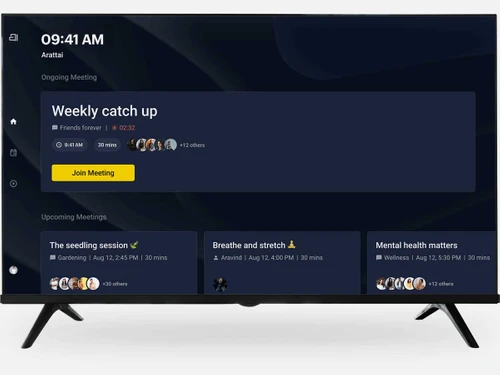
Arattai meeting
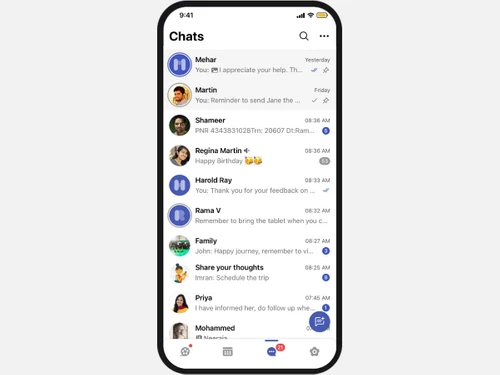
Arattai chats

Arattai

Brand: Zoho Corporation

  • 4.4

  • 11 Ratings & 11 Reviews

  • Indian-based, simple and secure instant messaging software
  • Supports files, voice notes, audio/video calls and texts
  • Allows you to build up groups, channels and stories for large reach
  • Privacy is built in and designed to communicate personally and professionally
See More

Have you used Arattai before?

Share your insights for better experience

Add a Review

Price Available on Request

Questions about pricing or customization? We’re here to help, just a click away.

100% Genuine
Products
Best Price
Guaranteed
Safe & Secure
Payment
  • Description

  • Pricing

  • Features

  • Specification

  • Review

  • FAQ

Arattai Software Overview

What is Arattai?

Arattai is a user-friendly instant messaging app that is developed by Zoho to make you stay connected. It allows users to chat, call, file-share and communicate in stories and channels.

This IM app also offers group chats, channels, and stories. Furthermore, it is end-to-end encrypted that keeps your information private.

It offers features such as chatbots, scheduled messages, and contact organization so that you can use it both personally and professionally.

Why Choose Arattai Instant Messaging Software?

  • User-friendly Software: Simple and clean interface that is easy to use. There is literally no learning curve while using Arattai.
  • Secure and Private: Comes with high grade security features to keep your messaging and calls private.
  • Rich Messaging Features:Send texts, voice notes, photos, and documents easily.
  • Video and Audio Calls: Easily make direct one on one or group audio or video calls.
  • Fun Ways of Messaging:Interact using custom and animated stickers, emojis, and reactions. Personalise your chats and make them more interesting.
  • Status and Stories Update:Enables users to share key moments with contacts. They can stay updated with what their friends are posting.
  • Broadcast with channels: For business, they can reach a large audience at once. It is perfect for sharing any updates or announcements to their customers.
  • Multiple devices supported: Arattai is available on multiple devices including desktops, tablets and smartphones.

Arattai Pricing

Arattai is completely free to use. You can download it on your devices without any subscription cost.

Read more

Zoho Corporation Company Details

Founded Year:  1996

Zoho Corporation is an Indian multinational company that specialises in software development, cloud computing, and web-based business tools. It is best known for Zoho Office suite and its enterprise IT management division, ManageEngine

Director/Founders Sridhar Vembu / Tony Thomas
Company Size 1000+ Employees

Arattai Pricing & Plans

Looking for The Right Pricing?

Share your requirements and get a plan built around your business.

  • Define your business needs
  • Get customised pricing
  • Choose features that fit your workflow

Price Available on Request

Get personalised Arattai pricing that fits your needs. Our team will connect with you.

Arattai Features

  • icon_check Text & Voice Messaging
    With Arattai, you can send instant texts and voice notes easily.
  • icon_check Audio & Video Calls
    You can make audio or video calls anytime.
  • icon_check End-to-End Encryption
    All the calls and chats are secured and private.
  • icon_check Group Chats
    You can create and manage groups within the app.
  • icon_check Stories & Media Sharing
    Share photos, videos, and updates through the app.
  • icon_check Meetings / Video Conference
    Users can host or join video meetings.
  • icon_check Multi Language Support
    Arattai supports multiple languages for users to chat in.
  • icon_check Auto-Responders
    Arattai enables you to send instant replies when you're away using auto-responders.
  • icon_check Recurring Messaging
    You can send messages at regular intervals with Arattai.
  • icon_check Contact Tagging & Segmentation
    Organize and group contacts smartly.
  • icon_check Easily Import / Export Contacts
    Move your contacts in or out easily through the app.
  • icon_check Broadcast Lists
    Users can easily send a message to multiple people at once.
  • icon_check Message Templates
    Comes with message templates for quick replies.
  • icon_check Scheduled Messaging
    Schedule, plan and send messages at the right time.
  • icon_check Rich Media Support
    Arattai lets you share images, videos, and documents easily.

Arattai Specifications

Supported Platforms
Ubuntu Ubuntu Windows Windows iOS iOS Android Android MacOS MacOS Windows(Phone) Windows(Phone) Linux Linux
Devices
Desktop Desktop Mobile Mobile Tablet Tablet iPad iPad
Deployment
Cloud-Based Cloud-Based
Suitable For
All Industries
Business Specific
All Businesses
Business Size
Small Business Startups Medium Business Enterprises SMBs SMEs MSMBs MSMEs Freelancers
Customer Support
Phone Email Live Chat Communities
Language
English
Training Resources
Documentation

Arattai Reviews

4.4

Out of 5

img

Overall Rating

Based on
11 Verified Reviews

Rating Breakdown

  • Features 4.5
  • Value for Money 4.5
  • Ease of Use 4.0
  • Customer Support 4.5

90% Recommend this Product

Add Review

Pros

  • "Arattai emphasises that your data is private, stored in India, no ads and minimal third-party sharing."

    Anjali SinghNov 3, 2025

  • "I’m impressed by the ambition made in India, clean UI, multi-device, meeting + chat + pocket."

    SACHIN GUPTA Oct 30, 2025

  • "Arattai supports channels/broadcasts which let me follow creators or send updates to large groups without clutter."

    Hakim SinghSep 12, 2025

Cons

  • "Some key privacy features like full end-to-end encryption for text messages are still pending."

    Anjali SinghNov 3, 2025

  • "Sending multimedia like photos and videos takes a lot of time. This needs some work."

    SACHIN GUPTA Oct 30, 2025

  • "The feature-set is still evolving; some creator/monetisation tools missing."

    Hakim SinghSep 12, 2025

Arattai Video Review

youtubeVideoId

4.1

“Arattai App Full Review | Is It Safer Than WhatsApp? Security Check!”

Review by: Everything for all

SACHIN GUPTA

Scrum Master

Industry: Warehousing User since: < 6 months

4.5

Reviewed on: Oct 30, 2025

Techjockey Verified

“Promising but some bugs and feature gaps still visible”

I decided to try Arattai as part of early-adopter behaviour. It’s good, but I did experience a few bugs and there are still missing features I expect from big apps. I’m keeping it alongside my primary messenger for now.

Pros

I’m impressed by the ambition made in India, clean UI, multi-device, meeting + chat + pocket.

Cons

Sending multimedia like photos and videos takes a lot of time. This needs some work.

Switched from WhatsApp

Reason to switch

I wanted to evaluate a new alternative while having the old app as backup; I switched because I believed in the Indian-made value proposition of Arattai, but I’m still watching whether it matures fully before completely moving away.

Azeem Salimi

IT Analyst - Systems

Industry: IT User since: 1-2 years

4.3

Reviewed on: Aug 21, 2025

Techjockey Verified

“Free plan for basic use works, paid may be needed later”

For our small non-profit we moved to Arattai because we wanted to reduce costs while still getting voice/video+storage+chat. It works so far. If we grow, we’ll evaluate paid plans or supplementary tools.

Pros

The free version of Arattai gives many useful features chat, calls, group, storage.

Cons

If you scale up you may hit limitations and need to consider paid plans.

Switched from Microsoft Teams

Reason to switch

We switched from Microsoft Teams (and separate chat tool) because Teams was over-feature-heavy and costly for what we needed; Arattai felt simpler and more cost-effective.

Hakim Singh

Content Marketer

Industry: Semiconductors User since: 6-12 months

4.5

Reviewed on: Sep 12, 2025

Techjockey Verified

“Election-talk/creator channels look promising”

I run a small content-page and using Arattai channels I can push updates to followers. It’s nice to have one app for messaging + broadcasts. I’m hopeful it adds more creator tools soon.

Pros

Arattai supports channels/broadcasts which let me follow creators or send updates to large groups without clutter.

Cons

The feature-set is still evolving; some creator/monetisation tools missing.

Switched from Telegram

Reason to switch

We previously used Telegram channels but needed voice/video calls and stronger Indian hosting/privacy – Arattai offered a more local alternative.

See All Arattai Reviews

Articles for Arattai

See All Related Articles

How much does Arattai Instant Messaging Software Cost?

Arattai is a free to use app. You can download it from Playstore or iOS stores for free.

Is Arattai software safe?

Yes, Arattai is safe to use. It comes with strong security features that keep your data and conversations private.

Does Arattai Instant Messaging App support Audio and Video Calls?

Yes, it allows users to make high-quality audio and video calls.

Can I use Arattai on Multiple Devices?

Yes, Arattai is compatible with multiple devices such as desktops, smartphones and tablets.

How does Arattai Instant Messaging Software Work?

With the Arattai IM app, you can send messages, share files, make calls, and connect with groups or channels.

Does Arattai offer a free trial?

You don’t need a free trial as this is a completely free to use software.

Can I import chats from other apps?

Yes, Arattai offers an easy way to import chats from other platforms.

Do Arattai Instant Messaging Software Support Stories?

Yes, you can post photos, videos, and updates to share with your contacts.

20,000+ Software Listed

Best Price Guranteed

Free Expert Consultation

2M+ Happy Customers

Terms and Condtions

close

Users with registered businesses can purchase goods from merchants on the platform to satisfy their business needs. Users are not permitted to utilize any products acquired through the platform for resale, advertising, business, or further distribution.

For each purchase made, users will receive a Tax Invoice (or 'GST invoice') that includes specific details such as:

  • the GSTIN of the user associated with their registered business, and

  • the specified Entity Name for their business.

It should be noted that not all products are eligible for GST Invoice. Only the products displayed by participating sellers with the 'GST-based Invoice Available' callout on the product description page would qualify.

Certain goods and services are not eligible to get a GST Invoice, including items with VAS, i.e., Value Added Services (e.g., Total Mobile Protection/Assured Buyback) and those involving an exchange offer at the time of purchase.

Users must ensure the accuracy of the GSTIN, and business entity name provided for the GST Invoice. Requests for corrections into GST Invoice would not be accommodated by Techjockey.com or any Seller, and any issues arising from user-provided information are the sole responsibility of users.

Techjockey.com is not liable for the GST Invoice or any associated input tax credit. To efficiently claim an input tax credit, users should select the registered place of business address as per the GST authority's data and follow the provisions of the GST Act and rules.

To claim an input tax credit, the delivery and billing addresses must match. Furthermore, input tax credits will not be granted if the delivery address and GSTIN on the invoice are from different states. In case of incorrect GST details provided during the order placement, the order will be canceled automatically.