linkedin
Twist logo
play Twist Essentials: Welcome!
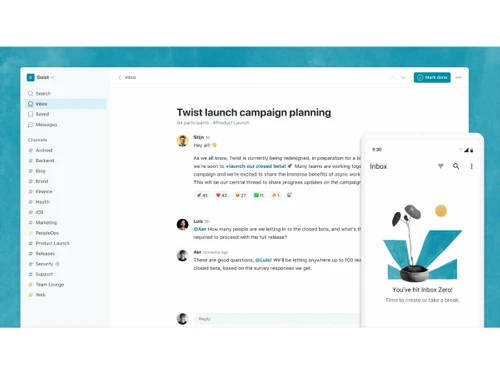
Twist-inbox
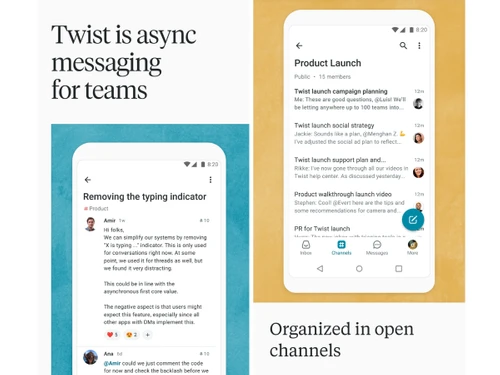
Twist-messaging

Twist

Brand: Doist

  • 4.3

  • 3 Ratings

Twist is a team communication platform that helps businesses organize conversations, collaborate asynchronously, and reduce distractions with threaded messaging.

See More

Have you used Twist before?

Share your insights for better experience

Add a Review
Starting Price
$8

View plans

100% Genuine
Products
Best Price
Guaranteed
Safe & Secure
Payment
  • Description

  • Pricing

  • Features

  • Specification

  • Review

  • Compare

  • Alternatives

  • FAQ

Starting at $8

Twist Software Overview

What is Twist?

Twist is an asynchronous Instant Messaging Software designed for modern, flexible teams that prioritize focused work over constant chatter. Developed by Doist, it organizes team communication into clear, on-topic threads, preventing important information from being buried in a continuous stream of messages. Unlike traditional real-time chat applications, Twist is built to foster a calmer, more organized, and productive work environment. It serves as an all-in-one communication hub for a wide range of businesses, including startups, SMBs, SMEs, and agencies, providing a structured alternative to the chaos of group chat.

Why Choose Twist?

  • Promotes Deep Work: Twist is designed to protect your team's time and attention. By eliminating presence indicators (the glowing green dot) and reducing notification pressure, it creates an environment where team members can focus on complex tasks without constant interruption.
  • Eliminates FOMO (Fear of Missing Out): The asynchronous, thread-based structure means you can disconnect without worrying about missing critical conversations. You can catch up on discussions in your own time, responding thoughtfully when you are ready.
  • Creates a Permanent Knowledge Base: Conversations in Twist are organized, on-topic, and easily searchable. This turns your team's communication history into a valuable and accessible knowledge base, simplifying onboarding for new employees and providing context for past decisions.
  • Clarity Across the Board: By organizing work into channels and threads, Twist provides clear visibility into projects and discussions. This structure breaks down information silos and ensures everyone has access to the information they need to do their job effectively.
  • Built for Asynchronous Teams: For globally distributed or remote-first teams, Twist is a game-changer. It values productivity over presence, ensuring that team members across different time zones can contribute equally without needing to be online simultaneously.

Advanced Features of Twist

  • Threaded Conversations: The core of Twist. Every conversation is a thread with a clear subject, keeping discussions focused and preventing topic-hijacking. This structure is like a hybrid of email and chat, taking the best from both.
  • Channels: Organize your work by creating channels for specific projects, teams, clients, or topics. This ensures all related conversations and files are stored in one logical place.
  • Inbox: A personal space that gathers all the threads you are following. The Inbox allows you to quickly catch up on conversations, prioritize responses, and mark threads as done, all without having to scan through multiple channels.
  • Messages: For conversations that don't require a full thread, Messages provide a space for private one-on-one or small group chats, complete with GIFs and emojis.
  • Guest Access: Collaborate securely with external partners, freelancers, or clients by inviting them as guests. Guests have limited access and can only see the specific channels they are invited to.
  • Integrations & Automation: Connect Twist with the tools your team already uses, from calendars and to-do lists to developer tools. You can also create custom automations to further streamline your workflows.

Key Capabilities of Twist

  • Organization: Twist thread-based system ensures that conversations remain structured and on-topic, creating a clean, easily referenced archive of all team communication.
  • Clarity: By using dedicated channels for different workstreams, Twist provides a central, transparent view of team activities, breaking down silos and improving visibility.
  • Focus: The platform actively encourages deep work by minimizing distractions. Smarter notifications and the absence of online statuses help team members stay in their flow state.
  • Access: New and existing team members can easily access historical context on any topic, thanks to a fully searchable and organized conversation history.
  • Communication: Twist supports diverse communication styles, offering structured threads for thoughtful, long-form discussions and direct messages for quick, private exchanges.

How to Use Twist?

  1. Set Up Channels: Create channels for each project, department, or ongoing topic to keep conversations organized.
  2. Start New Threads: For any new topic or discussion, start a new thread within the relevant channel. Give it a clear, descriptive subject line so others know what it's about at a glance.
  3. Communicate Asynchronously: Post your updates, questions, and feedback in the relevant threads. Team members can then respond when they have a dedicated moment to focus.
  4. Manage Your Inbox: Use your personal Inbox to review new activity in the threads you follow. Respond, comment, and clear your inbox to stay on top of your tasks.
  5. Use Messages for Quick Chats: For urgent or private matters, use the direct messaging feature.

Twist Pricing

Twist price starts at USD 8 at techjockey.com.

The pricing model is based on different parameters, including extra features, deployment type, and the total number of users. For further queries related to the product, you can contact our product team and learn more about the pricing and offers.

Read more

Doist Company Details

Founded Year:  2007

Doist is a pioneer of remote work that specializes in productivity software like Todoist and Twist.

Director/Founders Amir Salihefendic
Company Size 1-100 Employees

Twist Pricing & Plans

Unlimited
Key Features
  • Unlimited file storage
  • Unlimited integrations
  • Unlimited internal member accounts
  • Unlimited external guest accounts
Starting at $8
    • Licenses

      Licenses
      Licenses
    • Monthly

      Monthly
      Monthly

Key Features

  • Unlimited file storage

  • Unlimited integrations

  • Unlimited internal member accounts

  • Unlimited external guest accounts

Twist Features

  • icon_check Notification
    Customize notifications to control interruptions and stay informed about conversations that require your attention.
  • icon_check File Sharing
    Attach PDFs, documents, spreadsheets, images, and other files directly to threads for convenient collaboration.
  • icon_check Thread Management
    Organize, move, archive, and manage threads to keep project conversations structured and easy to navigate.
  • icon_check Mentions
    Mention specific teammates in conversations to bring relevant discussions or updates directly to their attention.
  • icon_check GIF Support
    Add GIFs to messages to make informal conversations more expressive and engaging for team members.
  • icon_check Integration
    Connect Twist with other workplace applications to bring external updates and workflows into team conversations.
  • icon_check Custom Automations
    Build custom workflows that connect Twist with other tools and automate recurring communication activities.
  • icon_check Communication Management
    Support flexible collaboration by allowing teams to communicate without requiring everyone to respond immediately.
  • icon_check Channels
    Organize conversations by project, department, topic, or client to keep team communication structured.
  • icon_check Discussion Threads
    Create focused conversations around individual topics so discussions stay organized and easy to follow.
  • icon_check Direct Messaging
    Send private one-to-one or group messages for quick discussions, feedback, and team coordination.
  • icon_check Inbox Management
    Centralize thread updates relevant to you so you can quickly review, respond to, and manage conversations.
  • icon_check Private Channels
    Create restricted channels visible only to invited members for focused or confidential team discussions.
  • icon_check Advance Search
    Search conversations and threads to quickly find previous discussions, decisions, shared information, and context.
Twist Demo Video play icon

Get Twist Demo

Watch the demo video to explore key features, real workflows, and how the software fits your business needs.

Understand
Key Features
Personal
Demo Insights
Interactive
Demo Support

Twist Specifications

Supported Platforms
Windows Windows iOS iOS Android Android MacOS MacOS
Devices
Desktop Desktop Mobile Mobile Tablet Tablet
Deployment
Cloud-Based Cloud-Based
Suitable For
All Industries
Business Specific
All Businesses
Business Size
Small Business Startups Medium Business Enterprises SMBs SMEs MSMBs MSMEs
Language
English
Integration
API Integration
Training Resources
Documentation Videos

Explore the Best Alternative Solutions Similar to Your Business Size and Needs

Medium Business

Built for business growth and flexibility

Viber

4.2

Discord

4.7

Zangi

4.3

See More

Twist Review

4.3

Out of 5

img

Overall Rating

Based on
3 Verified Ratings

Rating Breakdown

  • Features 4
  • Value for Money 4.8
  • Ease of Use 4.3
  • Customer Support 4.3

93% Recommend this Product

Add Review

Techjockey Trusted Reviews from Verified Users

No reviews are currently available for Twist. Discover similar Instant Messaging Software reviews

  • Arattai

    4.4

    Whats great - I’m impressed by the ambition made in India, clean UI, multi-device, meeting + chat + pocket. read more

  • Troop Messenger

    4.9

    Whats great - Troop Messenger offers an easy-to-use interface, smooth team communication, quick messaging, file sharing, and useful collabo... read more

  • Microsoft Teams

    4.4

    Whats great - It increased team productivity and enhanced communication seamlessly read more

Compare Twist With other Instant Messaging Software

Products
Ratings
Pricing
Device Supported
Deployment
Supported Platforms
  • img

    Twist

  • 4.3

  • Price On Request

  • Desktop

    Mobile

  • Web based

    On Premises

  • Windows

    Mac OS

  • img

    Discord

  • 4.7

  • Price On Request

  • Desktop

    Mobile

  • Web based

    On Premises

  • Windows

    Mac OS

  • img

    Arattai

  • 4.4

  • Price On Request

  • Desktop

    Mobile

  • Web based

    On Premises

  • Windows

    Mac OS

  • img

    Zangi

  • 4.3

  • Price On Request

  • Desktop

    Mobile

  • Web based

    On Premises

  • Windows

    Mac OS

  • img

    Zoho Cliq

  • 4.4

  • ₹ 750

  • Desktop

    Mobile

  • Web based

    On Premises

  • Windows

    Mac OS

  • img

    Viber

  • 4.2

  • Price On Request

  • Desktop

    Mobile

  • Web based

    On Premises

  • Windows

    Mac OS

  • img

    Personal AI

  • 4.2

  • Price On Request

  • Desktop

    Mobile

  • Web based

    On Premises

  • Windows

    Mac OS

  • img

    Microsoft Kaizala

  • 4.2

  • Price On Request

  • Desktop

    Mobile

  • Web based

    On Premises

  • Windows

    Mac OS

  • img

    Fleep

  • 4.3

  • Price On Request

  • Desktop

    Mobile

  • Web based

    On Premises

  • Windows

    Mac OS

  • img

    Ryver

  • 4.2

  • Price On Request

  • Desktop

    Mobile

  • Web based

    On Premises

  • Windows

    Mac OS

(2) Product(s) selected

Twist Alternatives

See All Twist Alternatives

Starting Price:

€5 /Month

Starting Price:

$69 /Month

Starting Price:

$7 /Month
Available

Price on Request

Articles for Twist

See All Related Articles

Which operating system does Twist support?

Twist Instant Messaging Software is compatible with Windows operating systems.

Is there any Twist app?

Twist Instant Messaging Software app is not available.

What is deployment type of Twist?

Twist Instant Messaging Software supports Web-Based.

Who are the potential users of Twist?

Twist Instant Messaging Software is typically used in All Industries.

Is there any Twist demo or free trial?

Twist demo is available for free with Techjockey.com. Please request a call back.

Is Twist free?

Twist Instant Messaging Software offers a free trial. However, the premium plan with advanced features available at Techjockey.com.

How can you download Twist?

For Twist installation, insert the given CD/USB flash storage in your system and open the Setup Wizard to get started. The web-based version can be accessed directly through Twist portal.

How does Twist work?

Twist Instant Messaging Software helps with Member Management,Integration,File Storage and Priority Support.

Are there any hidden charges for Twist updates?

Twist regular updates are available free of cost. There are no hidden software update charges.

What is Twist used for?

Twist Instant Messaging Software used for Member Management,Integration,File Storage and Priority Support.

How do I contact Twist support?

You can directly visit Twist portal and get in touch with Twist customer support for any software-related query.

How to get Twist lifetime deal?

Please contact our product experts to get Twist lifetime deal with exclusive offers.

Is Twist better than Slack?

Twist is designed as an alternative to Slack for teams that prioritize focused, asynchronous communication over real-time chat, using organized threads to prevent important information from being buried.

What is the Twist app used for?

Twist is an asynchronous messaging app used by teams for organized work communication, keeping conversations on-topic within threads to avoid distraction and information loss.

Is Twist free?

Yes, Twist offers a free plan that provides access to one month of comments and messages, up to 5 integrations, and 5 GB of file storage for your team.

How does Twist work?

Twist works by organizing team conversations into topic-specific threads within channels, which prevents important discussions from getting lost in a single stream of real-time chat.

Who can use Twist?

Twist is ideal for remote and hybrid teams, startups, SMEs, agencies, consultancies, and knowledge workers who need organized, asynchronous team communication and collaboration.

What is asynchronous communication in Twist?

Asynchronous communication in Twist means you can respond to conversations on your own schedule, as the platform is built for deep work rather than instant, real-time replies.

How does Twist's Inbox feature help with focus?

The Inbox gathers all your relevant threads in one place, allowing you to process notifications in batches and prioritize what needs your attention without constant interruptions.

Can I collaborate with external clients or contractors in Twist?

Yes, you can invite external collaborators as guests, giving them access only to specific channels you choose without exposing your entire team's conversations.

How much does Twist cost?

Twist price starts at USD 8 at techjockey.com.

20,000+ Software Listed

Best Price Guranteed

Free Expert Consultation

2M+ Happy Customers

Terms and Condtions

close

Users with registered businesses can purchase goods from merchants on the platform to satisfy their business needs. Users are not permitted to utilize any products acquired through the platform for resale, advertising, business, or further distribution.

For each purchase made, users will receive a Tax Invoice (or 'GST invoice') that includes specific details such as:

  • the GSTIN of the user associated with their registered business, and

  • the specified Entity Name for their business.

It should be noted that not all products are eligible for GST Invoice. Only the products displayed by participating sellers with the 'GST-based Invoice Available' callout on the product description page would qualify.

Certain goods and services are not eligible to get a GST Invoice, including items with VAS, i.e., Value Added Services (e.g., Total Mobile Protection/Assured Buyback) and those involving an exchange offer at the time of purchase.

Users must ensure the accuracy of the GSTIN, and business entity name provided for the GST Invoice. Requests for corrections into GST Invoice would not be accommodated by Techjockey.com or any Seller, and any issues arising from user-provided information are the sole responsibility of users.

Techjockey.com is not liable for the GST Invoice or any associated input tax credit. To efficiently claim an input tax credit, users should select the registered place of business address as per the GST authority's data and follow the provisions of the GST Act and rules.

To claim an input tax credit, the delivery and billing addresses must match. Furthermore, input tax credits will not be granted if the delivery address and GSTIN on the invoice are from different states. In case of incorrect GST details provided during the order placement, the order will be canceled automatically.