linkedin
Zoho Cliq logo
play Webinar | Why should you use Zoho Cliq for your organization | Zoho Cliq
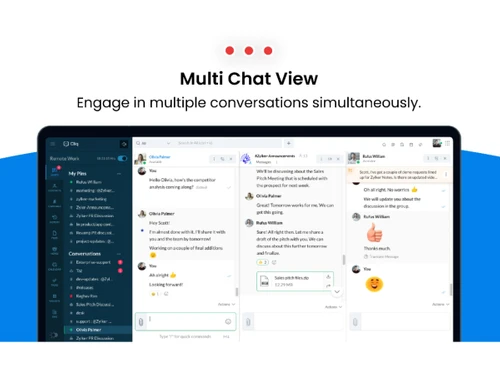
Zoho Cliq-multi chat
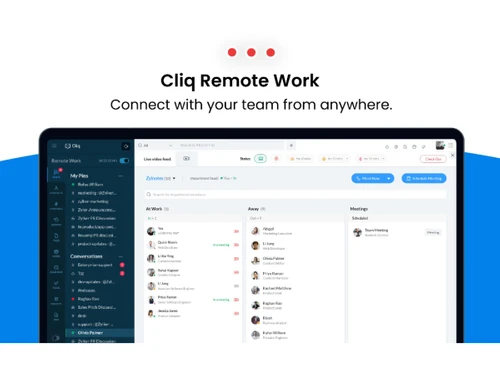
Zoho Cliq-remote work

Zoho Cliq

Brand: Zoho Corporation

  • 4.4

  • 4 Ratings

A team collaboration and communication platform that facilitates real-time messaging, video calls, and file sharing to enhance workplace productivity.

See More

Have you used Zoho Cliq before?

Share your insights for better experience

Add a Review
Starting Price
₹750 excl.GST
₹ 885 incl. GST

View plans

offer Save upto 18%, Get GST Invoice on your business purchase T&C
offer Buy Now & Pay Later, Check offer on payment page.
Buy Now
100% Genuine
Products
Best Price
Guaranteed
Safe & Secure
Payment
  • Description

  • Pricing

  • Features

  • Specification

  • Review

  • Compare

  • Alternatives

  • FAQ

Starting at ₹750
Buy Now

Zoho Cliq Software Overview

What is Zoho Cliq?

Zoho Cliq is a collaboration and instant messaging software designed to enhance team communication and productivity. It enables users to create channels for specific topics, projects, or departments, making team collaboration more organized. Cliq supports direct messaging, group chats, voice and video calls, and file sharing for seamless communication.

The platform integrates with Zoho's suite of apps and third-party tools to streamline workflows and centralize information. It also offers features like task management, custom workflows, and notifications to keep teams on track. Zoho Cliq is available on web, desktop, and mobile platforms, ensuring flexibility for remote and in-office teams.

Why Choose Zoho Cliq Software?

  • Real-time Communication: It offers instant messaging, voice, and video calls to ensure smooth and quick communication among team members.
  • Seamless Integration: It integrates with various Zoho apps and third-party tools, streamlining workflows and centralizing work-related information.
  • Customizable Channels: You can create topic-based channels, making collaboration more organized and efficient for different teams or projects.
  • File Sharing and Collaboration: It allows easy file sharing and document collaboration, keeping everything accessible in one place.
  • Task Management: With built-in task management tools, teams can assign and track tasks directly within the chat interface.
  • Cross-Platform Access: Available on web, desktop, and mobile devices, Zoho Cliq ensures your team stays connected, whether in the office or remote.
  • Live Event Hosting: The platform supports virtual events, allowing organizations to conduct large-scale meetings with interactive features for enhanced engagement.

Benefits of Zoho Cliq Software

  • Automated Workflow: It allows you to automate repetitive tasks using bots and custom workflows, saving time and improving efficiency.
  • Custom Bots for Efficiency: Users can utilize built-in bots like Taz for reminders and task management, enhancing team productivity through automation.
  • Advanced Search: It has a powerful search feature, enabling users to quickly find messages, files, and conversations, even in large teams or channels.
  • Security Features: It provides robust security with features like encryption, multi-factor authentication, and secure file sharing, ensuring the privacy of communications.
  • Customizable Interface: It offers a highly customizable interface, allowing users to adjust themes, layouts, and notifications according to their preferences.
  • Voice and Video Conferencing: It provides high-quality voice and video conferencing features for virtual meetings, without the need for third-party apps.
  • Mobile-Friendly: Its mobile app ensures that team members can stay connected and productive while on the go.
  • Automated Reminders and Follow-Ups: The software allows users to set reminders and follow up on tasks directly from conversations, turning discussions into actionable items.
  • AI-Enhanced Features: It incorporates AI capabilities such as meeting summaries, tone analysis, and auto-corrections, improving communication quality and productivity.
  • Integration with Zoho Suite: The software seamlessly integrates with other Zoho applications, enhancing workflow efficiency and data sharing across different departments.

Pricing of Zoho Cliq

Zoho Cliq price in India starts at INR 750 at techjockey.com.

The pricing model is based on different parameters, including extra features, deployment type, and the total number of users. For further queries related to the product, you can contact our product team and learn more about the pricing and offers.

Read more

Zoho Corporation Company Details

Founded Year:  1996

Zoho Corporation is an Indian multinational company that specialises in software development, cloud computing, and web-based business tools. It is best known for Zoho Office suite and its enterprise IT management division, ManageEngine

Director/Founders Sridhar Vembu / Tony Thomas
Company Size 1000+ Employees

Zoho Cliq Pricing & Plans

Standard

Calculated Price

750 Exclusive of all taxes
    • Users

      Users
      Users
    • Monthly

      Monthly
      Monthly

Key Features

  • External channels

  • Call recording

  • Custom domain and email

  • Basic usage reports

  • Networks

Professional

Calculated Price

1000 Exclusive of all taxes
    • Users

      Users
      Users
    • Monthly

      Monthly
      Monthly

Key Features

  • Team management

  • Task management

  • Roles and permissions

  • Module configurations

  • Live events and room devices

Enterprise

Calculated Price

2000 Exclusive of all taxes
    • Users

      Users
      Users
    • Monthly

      Monthly
      Monthly

Key Features

  • Audit history

  • Advanced usage reports

  • eDiscovery and DRP

  • Networks (3 free Networks)

  • Data Loss Prevention

Zoho Cliq Features

  • icon_check Team Collaboration
    Enables seamless communication with channels, groups, and file sharing, making it easier for teams to collaborate effectively.
  • icon_check Work Remotely
    Facilitates remote work by keeping teams connected through messaging, voice, and video calls, regardless of location.
  • icon_check Chatbot
    Automates routine tasks and provides quick responses to frequently asked questions, saving time and enhancing productivity.
  • icon_check Task Management
    Lets users assign and track tasks directly within chats, helping teams stay organized and focused on priorities.
  • icon_check Video Collaboration
    Offers high-quality video conferencing for virtual meetings, ensuring clear communication and collaboration.
  • icon_check Data Security
    Ensures the protection of communication with encryption, multi-factor authentication, and secure file sharing.
  • icon_check Automated Workflow Optimization
    Streamlines business processes by automating repetitive tasks and workflows, reducing manual effort and increasing efficiency.
  • icon_check Zia AI-Powered Assistance
    A specialized intelligence agent that can summarize long chat threads, suggest meeting times based on calendars, and provide
  • icon_check Multi-pane view
    A unique productivity interface that allows you to open and monitor up to three different channels or chats side-by-side,
  • icon_check Slash Commands
    A high-efficiency navigation tool that allows you to perform complex actions—like fetching a CRM record or starting a
  • icon_check Guest Access
    A secure "bridge" utility that allows you to invite clients or vendors into specific channels, keeping your internal
  • icon_check Screen Recording
    A specialized communication feature that lets you record and send quick 60-second video clips or screen captures to explain
Zoho Cliq Demo Video play icon

Get Zoho Cliq Demo

Watch the demo video to explore key features, real workflows, and how the software fits your business needs.

Understand
Key Features
Personal
Demo Insights
Interactive
Demo Support

Zoho Cliq Specifications

Supported Platforms
Windows Windows
Devices
Desktop Desktop
Deployment
Cloud-Based Cloud-Based
Suitable For
All Industries
Business Specific
All Businesses
Customer Support
Phone Email Live Chat
Language
English

Explore the Best Alternative Solutions Similar to Your Business Size and Needs

Medium Business

Built for business growth and flexibility

Viber

4.2

Discord

4.7

Zangi

4.3

See More

Zoho Cliq Review

4.4

Out of 5

img

Overall Rating

Based on
4 Verified Ratings

Rating Breakdown

  • Features 4.5
  • Value for Money 4.5
  • Ease of Use 4.2
  • Customer Support 4.5

87% Recommend this Product

Add Review

Techjockey Trusted Reviews from Verified Users

No reviews are currently available for Zoho Cliq. Discover similar Instant Messaging Software reviews
  • Arattai

    4.4

    Whats great - I’m impressed by the ambition made in India, clean UI, multi-device, meeting + chat + pocket. read more

  • Troop Messenger

    4.9

    Whats great - Troop Messenger offers an easy-to-use interface, smooth team communication, quick messaging, file sharing, and useful collabo... read more

  • Microsoft Teams

    4.4

    Whats great - It increased team productivity and enhanced communication seamlessly read more
Compare Zoho Cliq With other Instant Messaging Software

Products
Ratings
Pricing
Device Supported
Deployment
Supported Platforms
  • img

    Zoho Cliq

  • 4.4

  • ₹ 750.00 excl. GST

  • Desktop

    Mobile

  • Web based

    On Premises

  • Windows

    Mac OS

  • img

    Arattai

  • 4.4

  • Price On Request

  • Desktop

    Mobile

  • Web based

    On Premises

  • Windows

    Mac OS

  • img

    Discord

  • 4.7

  • Price On Request

  • Desktop

    Mobile

  • Web based

    On Premises

  • Windows

    Mac OS

  • img

    Zangi

  • 4.3

  • Price On Request

  • Desktop

    Mobile

  • Web based

    On Premises

  • Windows

    Mac OS

  • img

    Viber

  • 4.2

  • Price On Request

  • Desktop

    Mobile

  • Web based

    On Premises

  • Windows

    Mac OS

  • img

    Personal AI

  • 4.2

  • Price On Request

  • Desktop

    Mobile

  • Web based

    On Premises

  • Windows

    Mac OS

  • img

    Microsoft Kaizala

  • 4.2

  • Price On Request

  • Desktop

    Mobile

  • Web based

    On Premises

  • Windows

    Mac OS

  • img

    Twist

  • 4.3

  • Price On Request

  • Desktop

    Mobile

  • Web based

    On Premises

  • Windows

    Mac OS

  • img

    Fleep

  • 4.3

  • Price On Request

  • Desktop

    Mobile

  • Web based

    On Premises

  • Windows

    Mac OS

  • img

    Ryver

  • 4.2

  • Price On Request

  • Desktop

    Mobile

  • Web based

    On Premises

  • Windows

    Mac OS

(0) Product(s) selected

Zoho Cliq Alternatives

See All Zoho Cliq Alternatives

Starting Price:

$8 /month

Starting Price:

€5 /Month

Starting Price:

$69 /Month

Starting Price:

$7 /Month

Available

Price on Request

Articles for Zoho Cliq

See All Related Articles

How much does Zoho Cliq Software Cost?

The price of Zoho Cliq in India starts at INR 750, available on techjockey.com.

Is there any Zoho Cliq Software App?

No, Zoho Cliq has no mobile apps.

Which operating system does Zoho Cliq Software Support?

Zoho Cliq supports Windows only.

Does this product offer a free trial?

Yes, Zoho Cliq offers a 10-day free trial for its paid plans.

How does Zoho Cliq Software Work?

Zoho Cliq allows teams to communicate through channels, messages, voice/video calls, and integrates with other Zoho apps and tools.

Who are the potential users of Zoho Cliq Software?

Zoho Cliq is ideal for businesses, teams, and remote workers seeking streamlined communication and collaboration.

Is there any free demo for Zoho Cliq Software?

Yes, Zoho Cliq provides a free demo to help users explore its features.

Is Zoho Cliq Software Free?

Yes, Zoho Cliq offers a free plan with limited features, in addition to its paid plans.

Can Zoho Cliq integrate with third-party tools?

Yes, Zoho Cliq supports integration with various third-party tools like Google Drive, Dropbox, Trello, and more.

Does Zoho Cliq support voice and video calls?

Yes, Zoho Cliq provides high-quality voice and video calling features for seamless communication.

20,000+ Software Listed

Best Price Guranteed

Free Expert Consultation

2M+ Happy Customers

Terms and Condtions

close

Users with registered businesses can purchase goods from merchants on the platform to satisfy their business needs. Users are not permitted to utilize any products acquired through the platform for resale, advertising, business, or further distribution.

For each purchase made, users will receive a Tax Invoice (or 'GST invoice') that includes specific details such as:

  • the GSTIN of the user associated with their registered business, and

  • the specified Entity Name for their business.

It should be noted that not all products are eligible for GST Invoice. Only the products displayed by participating sellers with the 'GST-based Invoice Available' callout on the product description page would qualify.

Certain goods and services are not eligible to get a GST Invoice, including items with VAS, i.e., Value Added Services (e.g., Total Mobile Protection/Assured Buyback) and those involving an exchange offer at the time of purchase.

Users must ensure the accuracy of the GSTIN, and business entity name provided for the GST Invoice. Requests for corrections into GST Invoice would not be accommodated by Techjockey.com or any Seller, and any issues arising from user-provided information are the sole responsibility of users.

Techjockey.com is not liable for the GST Invoice or any associated input tax credit. To efficiently claim an input tax credit, users should select the registered place of business address as per the GST authority's data and follow the provisions of the GST Act and rules.

To claim an input tax credit, the delivery and billing addresses must match. Furthermore, input tax credits will not be granted if the delivery address and GSTIN on the invoice are from different states. In case of incorrect GST details provided during the order placement, the order will be canceled automatically.