linkedin
Skytouch logo
SkyTouch Hotel OS
SkyTouch Hotel OS
SkyTouch Hotel OS

Skytouch

Brand: SkyTouch Solutions

  • 3.8

  • 6 Ratings

Effortlessly manage reservations, housekeeping, groups, and guest experiences with Skytouch, the intuitive cloud-based PMS designed to scale with your hotel.

See More

Have you used Skytouch before?

Share your insights for better experience

Add a Review

Price Available on Request

Questions about pricing or customization? We’re here to help, just a click away.

100% Genuine
Products
Best Price
Guaranteed
Safe & Secure
Payment
  • Description

  • Pricing

  • Features

  • Specification

  • Review

  • Compare

  • Alternatives

  • FAQ

Skytouch Software Overview

What is Skytouch?

Skytouch is a 100% cloud-based Hotel Management Software (PMS) designed to simplify and streamline property operations. Its intuitively designed interface enables hotel staff to manage reservations, housekeeping, guest services, and group bookings with greater efficiency. The platform is built to be easy to use, reducing training time and empowering staff to deliver exceptional guest experiences. Skytouch centralizes critical hotel data and functions, providing a comprehensive solution for properties of various sizes.

Why Choose Skytouch?

  • Intuitive Interface: The system is designed for ease of use, which significantly reduces the time and resources required for staff training. Its clean layout allows for quick access to essential functions.
  • Enhanced Guest Experience: With integrated guest experience programs, staff can track preferences, reward loyalty, and personalize stays, leading to higher guest satisfaction and repeat business.
  • Scalable and Flexible: Skytouch is suitable for properties ranging from small inns to larger hotels. Its per-room pricing model allows the software to grow with your business without complex contract renegotiations.
  • Seamless Integrations: The platform is designed to work well with other vendors, connecting effortlessly with a variety of third-party systems to create a unified and future-proof technology stack.
  • Reliable Support: Skytouch provides U.S.-based, 24/7 technical support, ensuring that hoteliers can resolve issues quickly and confidently at any time.

Advanced Features of Skytouch

  • Smart Welcome Dashboard: Upon login, users are greeted with a dashboard that displays all important hotel statistics at a glance, allowing for quick, data-driven decisions.
  • Room Assignment Optimizer: This tool helps maximize room usage and availability, ensuring that room rotation and assignments are handled efficiently to meet property-specific needs.
  • Automated Revenue Management Rules: The system allows you to configure automated rules for rate management, helping to optimize pricing strategies and maximize revenue without constant manual intervention.
  • Two-Way Channel Distribution: Skytouch integrates with distribution channels to ensure that rates and availability are synchronized across all platforms in real-time, reducing the risk of overbooking.
  • Customizable Quick Links: Staff can configure the interface with quick links to frequently used features, such as 'make a reservation' or external links like 'weather,' to serve guests more rapidly.

Key Capabilities of Skytouch

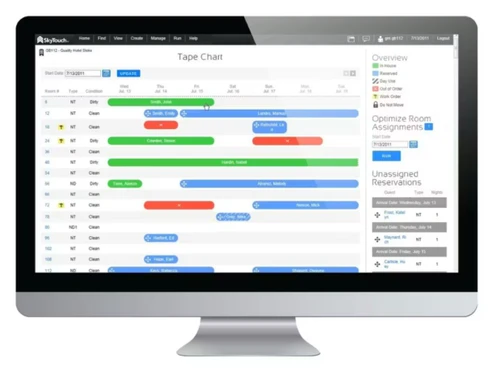
  1. Front Desk Management: The visual Tape Chart provides a user-friendly screen to view room availability, make or modify reservations, and optimize room usage. It simplifies the entire check-in and check-out process.
  2. Group Management: A dedicated module allows for the efficient handling of various group types, from wholesalers to one-time events. You can manage rates by night or group size, apply packages, import rooming lists, and set cut-off dates from one central location.
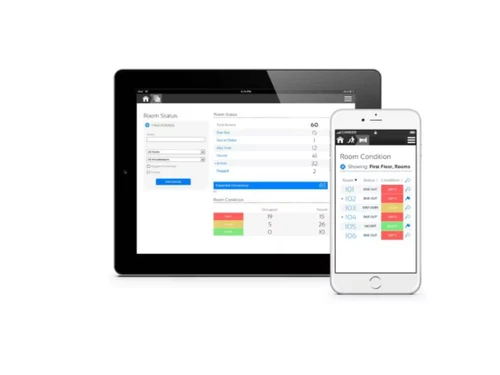
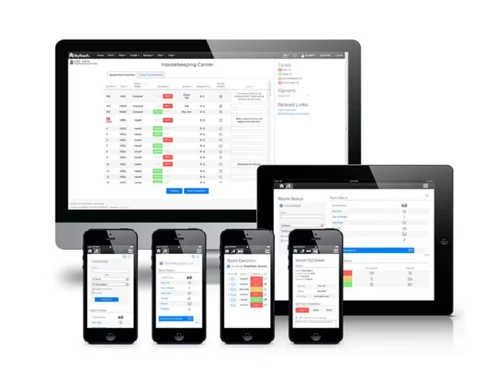
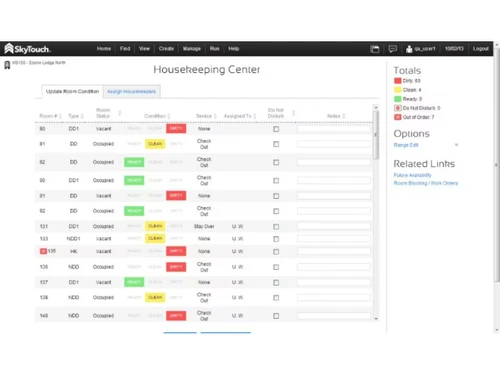
  3. Housekeeping & Room Maintenance: Staff can update room statuses instantly from any mobile device or tablet on the property. This real-time communication keeps the front desk and housekeeping teams perfectly synchronized, improving room turnover times.
  4. Guest Experience Programs: This capability allows you to create and manage loyalty programs. You can reward guests based on nights or revenue, set reward tiers, and track guest preferences and amenities to deliver a highly personalized experience.

How to Use Skytouch?

  1. Managing Reservations: Use the interactive Tape Chart to view availability and book, modify, or cancel reservations directly from a single screen.
  2. Handling Groups: Navigate to the group management module to create group blocks, manage rooming lists, and apply special rates or packages.
  3. Coordinating Housekeeping: Housekeeping staff use tablets or mobile devices to update a room's status (e.g., from 'Dirty' to 'Clean'), which is reflected instantly at the front desk.
  4. Personalizing Guest Stays: During check-in, the system displays guest notes and loyalty program details, prompting staff to acknowledge preferences or offer rewards.
  5. Running Reports: Access a wide range of reports to monitor performance, track revenue, and gain insights into hotel operations.

Skytouch Price

Skytouch software price is available on request at Techjockey. The pricing model is based on different parameters, including extra features, deployment type, and the total number of users. For further queries related to the product, you can contact our product expert and learn more about the pricing and offers.

Read more

Skytouch Pricing & Plans

Looking for The Right Pricing?

Share your requirements and get a plan built around your business.

  • Define your business needs
  • Get customised pricing
  • Choose features that fit your workflow

Price Available on Request

Get personalised Skytouch pricing that fits your needs. Our team will connect with you.

Skytouch Features

  • icon_check Tape Chart
    A specialized visual dashboard used to view room availability and manage reservations from a single screen now.
  • icon_check Rate Management
    A mission critical engine used to set dynamic pricing and automate BAR levels based on current occupancy today.
  • icon_check Group Management
    A high efficiency utility used to create room blocks, manage wholesalers, and track group contracts easily now.
  • icon_check Housekeeping
    A real time monitoring bridge that updates room status across all devices as soon as staff finish cleaning today.
  • icon_check Direct Billing
    A specialized financial tool used to invoice corporate clients and travel agencies directly after checkout now.
  • icon_check Automated Audit
    A mission critical system that performs night audits automatically to ensure daily financial accuracy today.
  • icon_check Guest Profiles
    A data driven repository used to track guest preferences, loyalty numbers, and stay history for better service now.
  • icon_check Channel Manager
    A high speed connectivity suite that syncs inventory across OTAs and GDS to prevent overbooking today.
  • icon_check Inventory Control
    A mission critical logic engine that manages pooled inventory across all booking sites in real time now.
  • icon_check Quick Links
    A versatile navigation tool that allows staff to pin their most used features for rapid one click access now.

Skytouch Specifications

Supported Platforms
Ubuntu Ubuntu Windows Windows iOS iOS Android Android MacOS MacOS Linux Linux
Devices
Desktop Desktop Mobile Mobile Tablet Tablet iPad iPad
Deployment
Cloud-Based Cloud-Based
Suitable For
All Industries
Business Specific
All Businesses
Business Size
Small Business Startups Medium Business Enterprises SMBs SMEs MSMBs MSMEs Freelancers
Customer Support
Phone Email Live Chat Communities Forums
Language
English
Integration
API Integration
Training Resources
Live Online Webinars Documentation Videos
AI Features
AI Integrated
Technology
Next Generation
Property Type
Independent-Property Luxury-Boutique Branded-Chains Resorts
Compliance Regulation
CCPA CPRA ECPA

Explore the Best Alternative Solutions Similar to Your Business Size and Needs

Skytouch Review

3.8

Out of 5

img

Overall Rating

Based on
6 Verified Ratings

Rating Breakdown

  • Features 3.6
  • Value for Money 4.3
  • Ease of Use 3.9
  • Customer Support 3.6

90% Recommend this Product

Add Review

Techjockey Trusted Reviews from Verified Users

No reviews are currently available for Skytouch. Discover similar Hotel Management Software reviews

  • AsiaTech

    4.6

    Whats great - enables real-time room status updates, access to visitor data, including contact and billing information, offers resources fo... read more

  • KnectHotel

    4.9

    Whats great - The Request Any Service feature lets guests raise requests directly, and instant notifications mean our staff responds much f... read more

  • ProfitLabs

    4.8

    Whats great - While ProfitLabs offers a user-friendly interface and valuable reporting tools, users looking for broader industry applicatio... read more
Compare Skytouch With other Hotel Management Software

Products
Ratings
Pricing
Device Supported
Deployment
Supported Platforms
  • img

    Skytouch

  • 3.8

  • Price On Request

  • Desktop

    Mobile

  • Web based

    On Premises

  • Windows

    Mac OS

  • img

    KnectHotel

  • 4.9

  • ₹ 1499

  • Desktop

    Mobile

  • Web based

    On Premises

  • Windows

    Mac OS

  • img

    RevCatalyst

  • 5

  • ₹ 1599

  • Desktop

    Mobile

  • Web based

    On Premises

  • Windows

    Mac OS

  • img

    AsiaTech

  • 4.5

  • ₹ 2000

  • Desktop

    Mobile

  • Web based

    On Premises

  • Windows

    Mac OS

  • img

    Check In Cloud

  • 4.5

  • ₹ 750

  • Desktop

    Mobile

  • Web based

    On Premises

  • Windows

    Mac OS

  • img

    Mini Hotel Man

  • 4.3

  • ₹ 1300

  • Desktop

    Mobile

  • Web based

    On Premises

  • Windows

    Mac OS

  • img

    Tezpravesh

  • 4.6

  • ₹ 13188

  • Desktop

    Mobile

  • Web based

    On Premises

  • Windows

    Mac OS

  • img

    Truelogics HMS

  • 4.2

  • ₹ 18000

  • Desktop

    Mobile

  • Web based

    On Premises

  • Windows

    Mac OS

  • img

    Koobit

  • 4.3

  • ₹ 999

  • Desktop

    Mobile

  • Web based

    On Premises

  • Windows

    Mac OS

  • img

    Exceed Software

  • 4.6

  • ₹ 2200

  • Desktop

    Mobile

  • Web based

    On Premises

  • Windows

    Mac OS

(0) Product(s) selected

Skytouch Alternatives

See All Skytouch Alternatives

Starting Price:

€165 /Month

Starting Price:

₹800 /Property/Month

Starting Price:

$9 /Year $15

SAVE UPTO 40%

Available

Price on Request

Articles for Skytouch

See All Related Articles

Is there any free trial or demo for Skytouch?

Skytouch Hotel Management Software demo is available for free at Techjockey.

Is Skytouch free?

Skytouch Hotel Management Software offers a free trial. However, the premium plan with advanced features available at Techjockey.

How can you download Skytouch?

For Skytouch Hotel Management Software installation, insert the given CD/USB flash storage in your system and open the Setup Wizard to get started.

What is Skytouch PMS?

Skytouch PMS is an easy-to-use, 100% cloud-based hotel property management system designed to help hotels efficiently manage operations like front desk, housekeeping, and group reservations.

How do I log into Skytouch?

Existing customers can log into the system by using the "Customer Log-In" link available on the official SkyTouch Technology website.

How much does Skytouch cost?

Skytouch price is available on request at techjockey.com.

Who Uses Skytouch Software?

Skytouch is used by hoteliers and property managers across independent hotels, small inns, and larger multi-property hotel groups looking to streamline front desk operations, reservations, housekeeping, and guest management through a cloud-based platform.

Is Skytouch cloud based?

Yes, the SkyTouch Hotel Operating System is a 100% cloud-based platform designed for accessibility and advanced integration capabilities.

What is the Tape Chart feature in Skytouch?

The Tape Chart is a user-friendly visual dashboard within Skytouch that allows staff to view room availability, optimize room usage, and manage reservations from one convenient screen.

How does Skytouch handle group bookings?

Skytouch provides a comprehensive Group Management module to manage different group types, apply packages or recurring charges, import rooming lists, and configure cut-off dates.

Can housekeeping staff update room status remotely?

Yes, the housekeeping and maintenance module allows staff to instantly update a room's status from anywhere on the property using a tablet or mobile device.

Does Skytouch have a guest loyalty or rewards feature?

Yes, Skytouch includes Guest Experience Programs that let you reward guests based on nights or revenue, create custom reward tiers, and track guest preferences to personalize their stay.

20,000+ Software Listed

Best Price Guranteed

Free Expert Consultation

2M+ Happy Customers

Terms and Condtions

close

Users with registered businesses can purchase goods from merchants on the platform to satisfy their business needs. Users are not permitted to utilize any products acquired through the platform for resale, advertising, business, or further distribution.

For each purchase made, users will receive a Tax Invoice (or 'GST invoice') that includes specific details such as:

  • the GSTIN of the user associated with their registered business, and

  • the specified Entity Name for their business.

It should be noted that not all products are eligible for GST Invoice. Only the products displayed by participating sellers with the 'GST-based Invoice Available' callout on the product description page would qualify.

Certain goods and services are not eligible to get a GST Invoice, including items with VAS, i.e., Value Added Services (e.g., Total Mobile Protection/Assured Buyback) and those involving an exchange offer at the time of purchase.

Users must ensure the accuracy of the GSTIN, and business entity name provided for the GST Invoice. Requests for corrections into GST Invoice would not be accommodated by Techjockey.com or any Seller, and any issues arising from user-provided information are the sole responsibility of users.

Techjockey.com is not liable for the GST Invoice or any associated input tax credit. To efficiently claim an input tax credit, users should select the registered place of business address as per the GST authority's data and follow the provisions of the GST Act and rules.

To claim an input tax credit, the delivery and billing addresses must match. Furthermore, input tax credits will not be granted if the delivery address and GSTIN on the invoice are from different states. In case of incorrect GST details provided during the order placement, the order will be canceled automatically.