linkedin
Speaktor logo
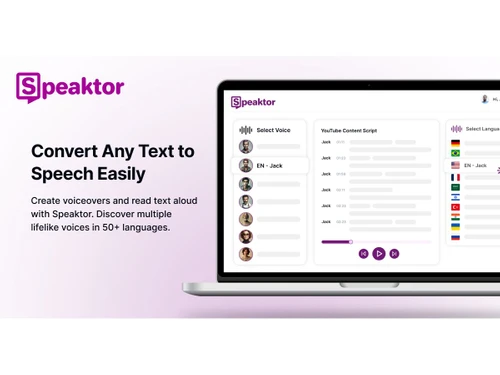
Speaktor-convert
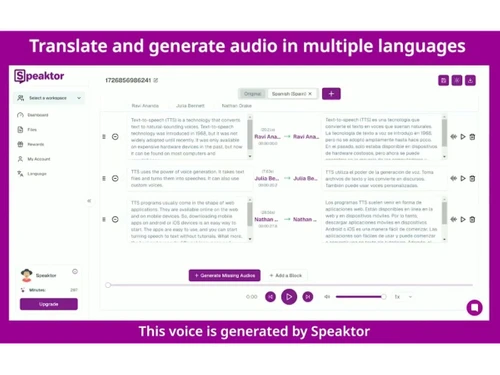
Speaktor-translate
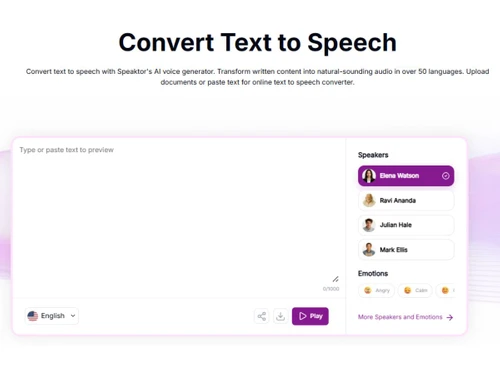
Speaktor-voice generation

Speaktor

Brand: Speaktor

  • No Ratings & Reviews

A text-to-speech software that turns written words into lifelike audio within seconds and lets your content speak clearly and naturally.

See More

Have you used Speaktor before?

Share your insights for better experience

Add a Review
Starting Price
$10

View plans

100% Genuine
Products
Best Price
Guaranteed
Safe & Secure
Payment
  • Description

  • Pricing

  • Features

  • Specification

  • Review

  • FAQ

Starting at $10

Speaktor Software Overview

What is Speaktor?

Speaktor is a smart text-to-speech software solution that turns written content into spoken audio in no time. It helps people listen to text instead of reading everything manually. The tool is designed to make information easier to absorb every day. It fits very well into modern routines where time feels constantly limited.

The widely trusted audio-generating platform supports many different types of users across learning and working environments. For example, students can totally rely on it to review notes in a relaxed and convenient way. Professionals may also use it to go through documents while handling other tasks. It overall brings a simple shift from reading strain to effortless listening.

Why Choose Speaktor Software?

  • Smooth Listening Flow: Audio feels natural and easy to follow during daily use. Listening replaces reading strain and keeps content simple to absorb.
  • Better Time Balance: Daily routines feel lighter with audio support in place. Content fits smoothly into tasks without adding extra pressure.
  • Clear Voice Quality: Speech stays clear and steady throughout longer listening sessions. Words remain easy to understand without causing mental fatigue.
  • Wide Language Support: Multiple languages make content accessible across different user groups. Understanding improves when information feels familiar and comfortable.
  • Flexible Content Access: Files stay easy to manage and available when needed most. Content remains within reach without extra effort or delay.
  • Wide User Appeal: Different users find it helpful across study and work needs. Usage feels simple and fits naturally into everyday routines.

Benefits of Speaktor Software

  • Improved Content Retention: Listening helps information stay longer in memory during daily use. Audio creates a steady flow that supports better understanding.
  • Reduced Eye Strain: Screen exposure decreases when content shifts into audio format. Eyes feel relaxed without constant reading pressure throughout the day.
  • Better Accessibility Support: People with reading difficulties find content easier to consume through audio. Information becomes more inclusive and widely reachable.
  • Consistent Content Delivery: Audio maintains a steady pace without skipping important details. Information flows evenly from start to finish without distraction.
  • Easy Content Sharing: Audio files can be shared across platforms without extra effort. Information spreads quickly in a more engaging format.
  • Creative Output Boost: Content creation feels smoother when ideas convert into audio in a flash. Expression becomes more flexible across different formats.

Speaktor Pricing

Speaktor price starts at USD 10.00 per month at techjockey.com. The pricing model is based on different parameters, including extra features, deployment type, and the total number of users. For further queries related to the product, you can contact our product team and learn more about the pricing and offers.

Read more

Speaktor Pricing & Plans

Lite
Starting at $10
    • Licenses

      Licenses
      Licenses
    • Monthly

      Monthly
      Monthly

Key Features

  • 90 minutes of text-to-audio conversion per month

  • Export audio as MP3 or WAV and subtitles as SRT

  • Output available in 55 + languages

  • Multi-speaker audio creation

  • Works on desktop and mobile

Pro
Starting at $25
    • Licenses

      Licenses
      Licenses
    • Monthly

      Monthly
      Monthly

Key Features

  • 600 minutes of text-to-audio conversion per month

  • Video dubbing with voice cloning

  • Access best quality pro voices

  • Multi-speaker audio creation

  • Works on desktop and mobile

Speaktor Features

  • icon_check Text-to-Speech
    Converts written text into natural, human-like audio for content, learning, and accessibility use cases.
  • icon_check Multilingual Support
    Supports 50+ languages, enabling global content creation and localization across diverse audiences.
  • icon_check AI Voice Library
    Offers multiple realistic AI voices including male, female, and different tones for varied content needs.
  • icon_check Voice Cloning
    Enables dubbing and voice cloning for personalized or branded voiceovers in advanced plans.
  • icon_check Multi-Speaker Audio
    Create conversations or dialogues using multiple AI voices within a single audio project.
  • icon_check File Upload Management
    Import PDFs, DOCX, and TXT files to convert documents directly into spoken audio.
  • icon_check Audio Export
    Export generated audio in MP3 or WAV formats and subtitles in SRT for multimedia use.
  • icon_check Subtitle Generation
    Automatically generates subtitle files for videos or presentations from text inputs.
  • icon_check Adjustable Playback Speed
    Customize speech speed and pacing for better listening experience and comprehension.
  • icon_check Team Collaboration
    Provides shared workspaces and centralized billing for team-based projects.
  • icon_check API & Integrations
    Enterprise plans include API access and integrations for workflow automation.
  • icon_check Video Dubbing
    Convert scripts into dubbed audio for videos with multilingual voice options.
  • icon_check Natural Voice Quality
    Uses AI and deep learning to produce realistic, expressive voice outputs.

Speaktor Specifications

Supported Platforms
Windows Windows iOS iOS Android Android MacOS MacOS
Devices
Desktop Desktop Mobile Mobile
Deployment
Cloud-Based Cloud-Based
Suitable For
All Industries
Business Specific
All Businesses
Business Size
Small Business Startups Medium Business Enterprises
Customer Support
Email Communities
Language
English
Training Resources
Videos
AI Features
AI Integrated

Speaktor Review

Be the First to Review

This product has no reviews yet. Be the first to leave your feedback.

Add Review

Articles for Speaktor

See All Related Articles

How much does Speaktor cost?

Speaktor's price starts at USD 10.00 per month at techjockey.com. The final cost may vary based on features chosen, usage, and number of users.

Who uses Speaktor Software?

It can be used by students, teachers, content creators, and business professionals. The platform helps anyone who prefers listening to written content instead of reading.

Is there a mobile app available for Speaktor Software?

Yes, it has dedicated mobile apps for both Android and iOS devices.

Which operating systems are compatible with Speaktor Software?

Speakto works on Windows, macOS, Android, and iOS systems.

Does Speaktor Software offer a free trial?

Yes, it does offer a free trial for new users to explore its basic features before paying.

How does Speaktor Software function?

Speaktor converts written text into clear spoken audio using artificial intelligence. Users can upload files or text and listen to them in voice format.

20,000+ Software Listed

Best Price Guranteed

Free Expert Consultation

2M+ Happy Customers

Terms and Condtions

close

Users with registered businesses can purchase goods from merchants on the platform to satisfy their business needs. Users are not permitted to utilize any products acquired through the platform for resale, advertising, business, or further distribution.

For each purchase made, users will receive a Tax Invoice (or 'GST invoice') that includes specific details such as:

  • the GSTIN of the user associated with their registered business, and

  • the specified Entity Name for their business.

It should be noted that not all products are eligible for GST Invoice. Only the products displayed by participating sellers with the 'GST-based Invoice Available' callout on the product description page would qualify.

Certain goods and services are not eligible to get a GST Invoice, including items with VAS, i.e., Value Added Services (e.g., Total Mobile Protection/Assured Buyback) and those involving an exchange offer at the time of purchase.

Users must ensure the accuracy of the GSTIN, and business entity name provided for the GST Invoice. Requests for corrections into GST Invoice would not be accommodated by Techjockey.com or any Seller, and any issues arising from user-provided information are the sole responsibility of users.

Techjockey.com is not liable for the GST Invoice or any associated input tax credit. To efficiently claim an input tax credit, users should select the registered place of business address as per the GST authority's data and follow the provisions of the GST Act and rules.

To claim an input tax credit, the delivery and billing addresses must match. Furthermore, input tax credits will not be granted if the delivery address and GSTIN on the invoice are from different states. In case of incorrect GST details provided during the order placement, the order will be canceled automatically.