linkedin
SpeechGen io logo
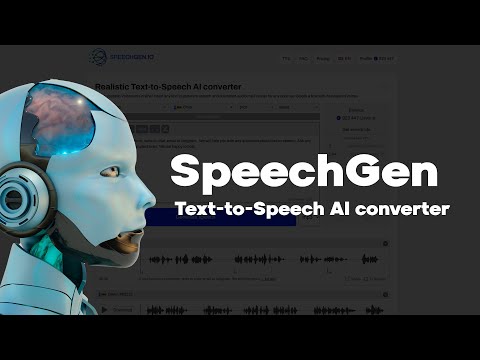
play How to generate speech from text with SpeechGen - TTS Manual
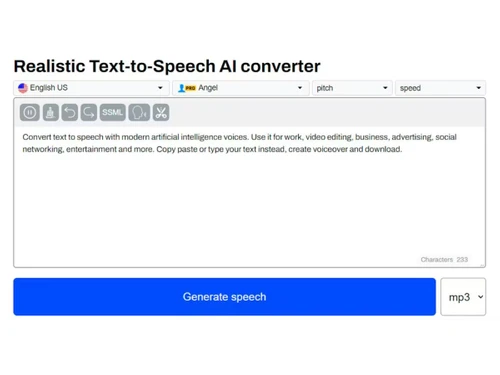
SpeechGen io-dashboard
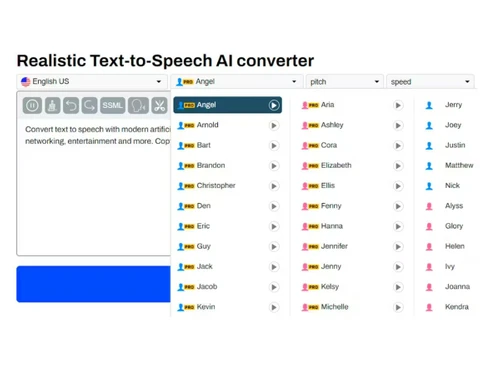
SpeechGen io-multi voice

SpeechGen io

Brand: SpeechGen

  • No Ratings & Reviews

A text-to-speech software that gives your content a voice that connects naturally. It turns text into lifelike audio with unprecedented ease.

See More

Have you used SpeechGen io before?

Share your insights for better experience

Add a Review
Starting Price
$5

View plans

100% Genuine
Products
Best Price
Guaranteed
Safe & Secure
Payment
  • Description

  • Pricing

  • Features

  • Specification

  • Review

  • FAQ

Starting at $5

SpeechGen io Software Overview

What is SpeechGen.io?

SpeechGen.io is a text-to-speech software designed for speech and audio creation. It converts written text into clear and natural-sounding spoken output. The system is built for users who work with voice-based content regularly. It supports digital communication simply and effectively. Its design reflects the growing need for audio-driven content today.

The platform is widely used in content creation and learning environments. It helps turn written ideas into engaging spoken material. Many users rely on it to improve content delivery. Its role keeps expanding as audio content becomes more popular. In short, it stands as a reliable tool for modern communication needs.

Why Choose SpeechGen io Software?

  • Extensive Voice Library: A large collection of voices fits different project needs naturally. It adds variety to audio content creation.
  • Multi-Speaker Support: Different voices can be assigned within one script. Users can create natural-sounding dialogues with ease.
  • Detailed Speech Control: Customizable settings allow control over tone and delivery. This certainly improves the final audio output quality.
  • Flexible Audio Formats: Output can be saved in common file formats. The system ensures compatibility across platforms.
  • Easy System Integration: API support allows smooth connection with other applications. This improves workflow and usability.
  • Online Platform Access: The web-based system removes installation needs. It makes usage simpler and more convenient than ever.

Benefits of SpeechGen io Software

  • Faster Content Creation: Audio can be generated in almost no time from written material. This saves a lot of work hours during content production work.
  • Consistent Voice Output: Uniform speech quality remains steady across different projects. This maintains a professional feel in content.
  • Better Content Scalability: Large projects become easier to manage over time. This supports growing content demands efficiently.
  • Improved Workflow Speed: Tasks move faster without repeated manual effort. This increases overall productivity levels.
  • Clear Pronunciation Handling: Words are spoken clearly with better accuracy. This reduces confusion during listening.
  • Useful For Training Material: Audio helps explain concepts in a simple manner. This supports effective learning experiences.
  • Content Repurposing Ease: Written content can be reused in audio form. This increases content value across platforms.
  • Time-Saving Production: Less (or no) manual recording effort is required. This reduces overall production workload.

SpeechGen.io Pricing

SpeechGen.io price starts at USD 5.00 at techjockey.com. The pricing model is based on different parameters, including extra features, deployment type, and the total number of users. For further queries about the product, you can contact our product team to learn more about pricing and offers.

Read more

SpeechGen io Pricing & Plans

25k Limits Pack
Key Features
  • 25 000 chars for Pro Voices
  • or 50 000 chars for Standard Voices
  • or 179 minutes for transcriptions
  • 1000+ voices available
  • 150+ languages available
Starting at $5
    • Quantity (Characters)

      Quantity (Characters)
      Quantity (Characters)

Key Features

  • 25 000 chars for Pro Voices

  • or 50 000 chars for Standard Voices

  • or 179 minutes for transcriptions

  • 1000+ voices available

  • 150+ languages available

SpeechGen io Features

  • icon_check Text-to-Speech
    Convert written text into natural-sounding speech using advanced neural voice synthesis technology.
  • icon_check Multi-Language Support
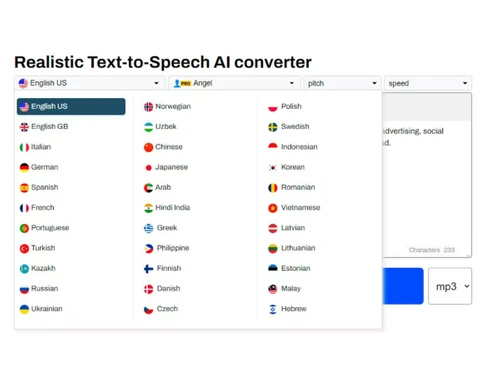
    Generate audio in 150+ languages and accents, enabling global content creation and localization.
  • icon_check Voice Library
    Access a wide collection of male and female AI voices with varied tones, styles, and accents.
  • icon_check Speech Customization
    Adjust pitch, speed, pauses, and emphasis to create more expressive and human-like voice output.
  • icon_check SSML Support
    Use Speech Synthesis Markup Language to fine-tune pronunciation, pauses, and speech delivery.
  • icon_check Audio Export
    Download generated speech in formats like MP3 or WAV for use across different media platforms.
  • icon_check Multi-Speaker Support
    Create dialogues by assigning different voices to text segments within a single project.
  • icon_check Batch Processing
    Convert large volumes of text into speech in one go, improving efficiency for bulk content creation.
  • icon_check Cloud Storage
    Save projects and generated audio securely in the cloud for easy access and reuse anytime.
  • icon_check API Integration
    Integrate text-to-speech capabilities into apps, websites, or workflows using developer APIs.
  • icon_check Subtitle Generation
    Automatically create subtitle files synchronized with audio for videos and accessibility needs.
  • icon_check Text Segmentation
    Split long text into smaller sections for better control, editing, and structured voice output.
  • icon_check Cost Optimization Cache
    Avoid reprocessing unchanged text segments, saving usage limits and reducing costs efficiently.
SpeechGen io Demo Video play icon

Get SpeechGen io Demo

Watch the demo video to explore key features, real workflows, and how the software fits your business needs.

Understand
Key Features
Personal
Demo Insights
Interactive
Demo Support

SpeechGen io Specifications

Supported Platforms
Windows Windows MacOS MacOS
Devices
Desktop Desktop
Deployment
Cloud-Based Cloud-Based
Suitable For
All Industries
Business Specific
All Businesses
Business Size
Small Business Startups Medium Business Enterprises
Customer Support
Email Communities
Language
English
Training Resources
Videos

SpeechGen io Review

Be the First to Review

This product has no reviews yet. Be the first to leave your feedback.

Add Review

Articles for SpeechGen io

See All Related Articles

How much does SpeechGen.io cost?

The software price starts at USD 5.00 (per 25,000 characters) at techjockey.com. Final pricing mostly depends on features, usage, and number of users.

Who uses SpeechGen io Software?

The platform can be used by content creators, educators, and businesses. Many use it for videos, learning material, and audio content.

Is there a mobile app available for SpeechGen io Software?

Yes, a mobile app is available for users. It allows easy access to create audio content on the go.

Which operating systems are compatible with SpeechGen io Software?

It works on Windows and MacOS systems. This makes it usable across common desktop platforms.

Does SpeechGen io Software offer a free trial?

Yes, a free trial is available for users. It allows testing the software before making a purchase.

How does SpeechGen io Software function?

It converts written text into spoken audio using artificial intelligence. This helps users create realistic voice output from text.

20,000+ Software Listed

Best Price Guranteed

Free Expert Consultation

2M+ Happy Customers

Terms and Condtions

close

Users with registered businesses can purchase goods from merchants on the platform to satisfy their business needs. Users are not permitted to utilize any products acquired through the platform for resale, advertising, business, or further distribution.

For each purchase made, users will receive a Tax Invoice (or 'GST invoice') that includes specific details such as:

  • the GSTIN of the user associated with their registered business, and

  • the specified Entity Name for their business.

It should be noted that not all products are eligible for GST Invoice. Only the products displayed by participating sellers with the 'GST-based Invoice Available' callout on the product description page would qualify.

Certain goods and services are not eligible to get a GST Invoice, including items with VAS, i.e., Value Added Services (e.g., Total Mobile Protection/Assured Buyback) and those involving an exchange offer at the time of purchase.

Users must ensure the accuracy of the GSTIN, and business entity name provided for the GST Invoice. Requests for corrections into GST Invoice would not be accommodated by Techjockey.com or any Seller, and any issues arising from user-provided information are the sole responsibility of users.

Techjockey.com is not liable for the GST Invoice or any associated input tax credit. To efficiently claim an input tax credit, users should select the registered place of business address as per the GST authority's data and follow the provisions of the GST Act and rules.

To claim an input tax credit, the delivery and billing addresses must match. Furthermore, input tax credits will not be granted if the delivery address and GSTIN on the invoice are from different states. In case of incorrect GST details provided during the order placement, the order will be canceled automatically.