linkedin
Stripe logo
play How Stripe Works | The Online Payment Platform Dashboard Overview
stripe benefits
stripe traffic

Stripe

Brand: STRIPE

  • 3.8

  • 16 Ratings & 16 Reviews

Stripe is an all-in-one solution for secure, global, and seamless payment processing. Effortlessly manage transactions, accept multiple currencies, and gain insightful analytics with its advanced features and user-friendly interface.

See More

Have you used Stripe before?

Share your insights for better experience

Add a Review

Price Available on Request

Questions about pricing or customization? We’re here to help, just a click away.

100% Genuine
Products
Best Price
Guaranteed
Safe & Secure
Payment
  • Description

  • Pricing

  • Features

  • Specification

  • Review

  • Compare

  • Alternatives

  • FAQ

  • Questions

Stripe Software Overview

What is Stripe Payment Gateway?

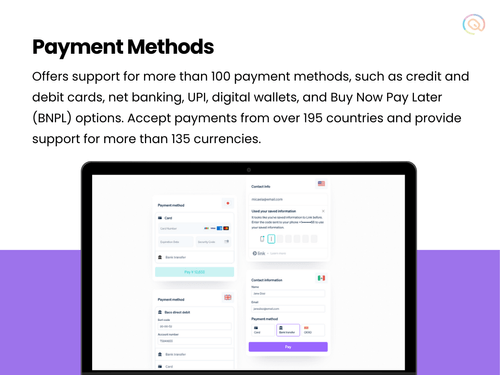
Stripe is a leading payment service provider that enables businesses to accept a wide range of payment methods, including credit and debit cards, mobile wallets, and buy now, pay later services. It offers a secure environment for businesses to accept payments, supporting various methods such as credit/debit cards, ACH transfers, and digital wallets.

Stripe's sophisticated dashboard provides a comprehensive view of your financial transactions, making it easy to monitor and manage your payments. The platform's intuitive interface ensures a smooth user experience, enabling businesses to efficiently process payments and reconcile accounts.

One of Stripe's key strengths is its global reach, with support for multiple currencies and payment methods, making it ideal for businesses with international customers. Stripe also offers extensive customization options, allowing you to create a payment experience that aligns with your brand.

In addition to its core payment processing capabilities, Stripe provides additional services such as billing, invoicing, and sales tax automation. For businesses that also require in-person payment solutions, Stripe Terminal offers a comprehensive point-of-sale system. Overall, Stripe is an all-encompassing platform ideal for managing both online and offline payment needs.

Why Choose Stripe Payment Gateway?

Stripe stands out for its seamless integration, top-notch security features, and extensive support for global payment methods. Here are the key reasons why users choose Stripe:

  • 135+ Currency Support: Stripe allows businesses to accept payments in over 130 different currencies so that it is easy to sell products to customers from all around the world.
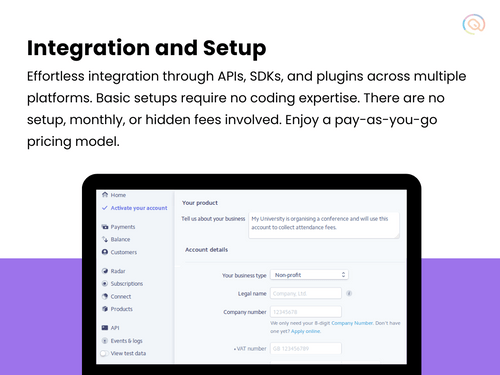
  • Easy Integration & Setup: Stripe provides comprehensive documentation, SDKs, and plugins, making integration straightforward and quick. Start processing payments with minimal effort.
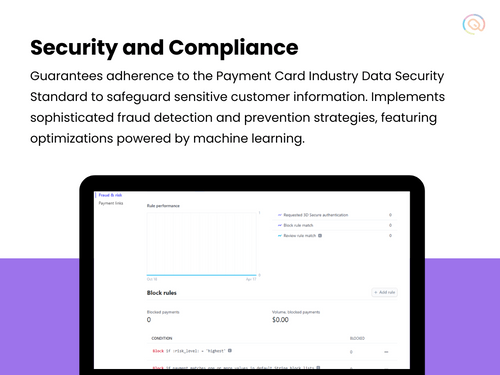
  • Advanced Security Measures: Stripe employs state-of-the-art security protocols, including PCI-DSS compliance, encryption, and machine learning-based fraud detection, ensuring your transactions are safe and secure.
  • Comprehensive Documentation: Extensive guides, code samples, and API references to help developers integrate and customize Stripe’s products.
  • Pre-built Integrations: Ready-to-use plugins for popular platforms like Shopify, WooCommerce, Magento, and more.
  • Flexible & Customizable: Stripe offers extensive customization options, allowing you to tailor the payment process to your specific needs and brand identity.

Additional Features of Stripe Payment Gateway

Stripe offers a variety of advanced features to streamline your payment processing tasks, including:

  • Stripe Sigma: Stripe Sigma is an advanced reporting tool that uses SQL for custom data queries and insights.
  • No-code Payments: Stripe’s Checkout is a pre-built payment form that can be customized and embedded into your website, or hosted on a Stripe page.
  • Collaboration notes: Attach notes for your teammates on payments and refunds to give them context when they jump into the Dashboard.
  • Stripe Storefront: Stripe storefront helps businesses to easily create and manage online stores. I also offer seamless integration with Stripe’s payment processing and additional tools to optimize the e-commerce experience.
  • Subscription Billing: Easily set up and manage recurring billing for subscription-based services, with flexible billing intervals and payment options.
  • Smart Payment Routing: Optimize transaction success rates with intelligent routing through the most efficient payment processors.
  • Invoice Generation: Create and send professional invoices directly from the Stripe dashboard, simplifying your billing process.
  • Stripe Terminal: Stripe Terminal allows businesses to offer seamless and custom in-person payments for a unified commerce experience.

Pricing Of Stripe Payment Gateway

Stripe's pricing is built for businesses of all sizes, offering a complete payments platform with simple, pay-as-you-go rates. Standard pricing includes 2% for cards issued in India and 3% for international cards, with custom packages available for high-volume businesses. No setup or hidden fees are charged.

Read more

STRIPE Company Details

Founded Year:  2010

Stripe Billing lets you bill and manage customers however you want—from simple recurring billing to usage-based billing and sales-negotiated contracts.

Director/Founders Patrick Collison, John Collison
Company Size 1000+ Employees

Stripe Pricing & Plans

Looking for The Right Pricing?

Share your requirements and get a plan built around your business.

  • Define your business needs
  • Get customised pricing
  • Choose features that fit your workflow

Price Available on Request

Get personalised Stripe pricing that fits your needs. Our team will connect with you.

Stripe Features

Core Functionalities

  • icon_check Dedicated Account Manager
    A payment gateway's dedicated account manager provides one-on-one assistance for any questions or problems you may have.
  • icon_check Dedicated POS
    Dedicated POS Payments in a payment gateway allow merchants to process payments independently using hardware and software. It
  • icon_check Multi Currency Support
    Accept payments from all over the world with different currencies
  • icon_check Pre-onboarding Assistance
    Helping businesses with the process of setting up a merchant account and integrating payment processing into their business.
  • icon_check Branding & Customization
    The ability to customize the look and feel of the payment process to match your brand.
  • icon_check Currency Conversion
    The ability to process payments in different currencies and automatically convert them to your desired currency.
  • icon_check Coupons and Offers Engine
    A Coupons and Offers creation feature within a payment gateway allows merchants to directly design and manage discount promotions
  • icon_check Mobile Responsiveness
    Ensuring that the payment process is optimized for mobile devices.
  • icon_check Payment Links
    Payment processing solutions that don't require a website. payments can be made through a link by sending it via SMS, Email etc.
  • icon_check Guest Checkout
    Allowing customers to make purchases without creating an account.
  • icon_check Multi-Language Checkout
    The ability to process payments and display information in multiple languages.
  • icon_check Store Creation
    Tools and features to create an online store within the payment gateway app
  • icon_check Landing Page Creation
    The landing page creation feature in a payment gateway allows users to create custom web pages for initiating and processing
  • icon_check Split Payments
    Split payment in a payment gateway allows a single payment transaction to be divided and distributed to multiple recipients, such
  • icon_check Instant Settlements
    The process of settling transactions with your bank account instantly
  • icon_check Automated Reconciliation
    Automatic reconciliation uses software to match transactions between your bank and accounting records, saving time and minimizing
  • icon_check Loyalty Management
    Loyalty management in payment gateways involves integrating features that allow businesses to reward and retain customers through

Payment Methods

  • icon_check QR Code Based Payments
    A QR code payment method is a way to make payments using a smartphone by scanning a special type of barcode called a QR code.
  • icon_check Digital Wallet
    It is an electronic device or online service that allows individuals to make electronic transactions.
  • icon_check UPI
    However, Stripe's UPI is not supporting invoicing and subscription payments as of now.
  • icon_check Debit / Credit Cards
    Accept various payment methods, including credit cards, debit cards,
  • icon_check Net Banking
    Stripe doesn't support local payment methods (LPMs) in India
  • icon_check Buy Now, Pay Later (BNPL)
    Buy Now, Pay Later (BNPL) in a payment gateway is a feature that allows customers to purchase items immediately but pay for them
  • icon_check Cryptocurrency
    Stripe supports USDC only
  • icon_check ACH Payments
    ACH or Automated Clearing House payments, are electronic money transfers between banks and credit unions through a computer
  • icon_check Cardless EMI
    Cardless EMI is similar to traditional EMI but doesn't require a credit or debit card. It's facilitated through a partnership

Subscription Management

  • icon_check Reccuring Payments
    Recurring payments, also known as subscription payments, auto-debit, or automatic payments, occur when a customer authorizes a
  • icon_check Proration
    Proration is a billing model that adjusts a customer's bill to reflect changes to their plan during a billing cycle.
  • icon_check Dunning
    Dunning refers to the process of communicating with customers to collect overdue payments.

Administrative Features

  • icon_check Tax Management
    Tax Automation (in around 50 countries including India and USA)
  • icon_check Invoice Generation
    Automatically creates invoices for transactions, saving time and reducing errors. It includes all necessary details such as the
  • icon_check Reporting & Analytics
    Tools that allow merchants to track their payment activity, generate reports, and gain insights into their sales data.
  • icon_check User Access Management
    User, role, and access management in a payment gateway are ways to control who can access what features and data in the system
  • icon_check Merchant Portal
    A web interface that allows merchants to manage their payment accounts, view transactions, and access other features.

Security Features

  • icon_check Two-Factor Authentication (2FA)
    Two-factor authentication in a payment gateway adds an extra layer of security by requiring users to verify their identity
  • icon_check PCI DSS Compliance
    Ensures a business adheres to Payment Card Industry Data Security Standards to protect cardholder information.
  • icon_check Fraud Detection & Prevention
    Systems that analyze transactions for suspicious patterns to identify and block fraudulent activity.
  • icon_check Tokenization
    Replaces sensitive data (like credit card numbers) with a unique identifier (token) for secure storage and processing.
  • icon_check Risk Management
    Managing risks in payment gateways involves identifying, assessing, and minimizing potential issues associated with processing
  • icon_check Multi-Factor Authentication (MFA)
    Multi-Factor Authentication (MFA) refers to an authentication process that requires two or more verification factors to gain
  • icon_check Automatic Device Recognition
    Automatic device recognition is a security feature used by payment gateways to identify and authenticate devices that initiate

Integrations Supported

  • icon_check Order Management
    Order management is the process of handling customer orders from placement to delivery. It's a crucial part of a business's
  • icon_check CRM Integration
    CRM integration with a payment gateway connects a CRM system to a payment gateway, allowing businesses to merge customer data
  • icon_check API Integration
    Integrating an API into a payment gateway platform connects your website or app to securely process payments, handle
  • icon_check Third Party Integration
    Integrating a 3rd party plugin into a payment gateway platform allows you to accept payments directly on your site without
  • icon_check E-Commerce Integration
    E-commerce integration in a payment gateway platform means connecting the payment system with an online store.
  • icon_check POS Integration
    A hardware and software solution used in retail environments to process sales transactions, manage inventory, and handle customer
  • icon_check SDK Integration
    SDK integration in a payment gateway platform involves incorporating the payment gateway's software development kit (SDK) into

Alerts & Notifications

  • icon_check Downtime Alerts
    A message that tells you when the payment system is not working or is down. It helps you know immediately when there’s a
  • icon_check Transaction Notifications
    Tells you about transactions happening on your system, such as when a payment is successful or fails.
  • icon_check Security Alerts
    An alert that warns you about potential security threats, such as suspicious activities or attempts to hack into the system.
  • icon_check Discrepancy Alerts
    A notification that notifies you when there are inconsistencies or mismatches in transaction details, such as differences in
  • icon_check Custom Event Notifications
    Personalized messages set up to alert you about specific events or actions that you consider important, such as a high-value
Stripe Demo Video play icon

Get Stripe Demo

Watch the demo video to explore key features, real workflows, and how the software fits your business needs.

Understand
Key Features
Personal
Demo Insights
Interactive
Demo Support

Stripe Specifications

Supported Platforms
Windows Windows Android Android MacOS MacOS
Devices
Desktop Desktop Mobile Mobile
Deployment
Cloud-Based Cloud-Based
Suitable For
All Industries
Business Specific
All Businesses
Business Size
Small Business Startups Medium Business Enterprises SMBs SMEs MSMBs MSMEs
Customer Support
Email Communities
Language
English Italiano Español
Integration
API Integration
Training Resources
Documentation Videos

Explore the Best Alternative Solutions Similar to Your Business Size and Needs

Small Business

Designed for startups and growing businesses

BillDesk

3.6

MaxelPay

4.3

UnPay

4.3

See More

Enterprises

Designed for complex and large-scale business needs

PayG

3.7

Cashfree

4.3

airpay

4.2

See More

Stripe Reviews

3.8

Out of 5

img

Overall Rating

Based on
16 Verified Reviews

Rating Breakdown

  • Features 3.7
  • Value for Money 3.7
  • Ease of Use 4.0
  • Customer Support 3.9

78% Recommend this Product

Add Review

Pros

  • "I can't think of anything positive to say about Stripe. My experience was horrible from start to finish."

    Janvi SumanJul 1, 2024

  • "Honestly, there are no pros to using Stripe. Any small benefit they offer is completely overshadowed by the huge risks involved."

    Manvinder Jun 26, 2024

Cons

  • "It’s a bit pricier compared to some other payment gateways out there."

    Nandini Sharma Jul 1, 2024

  • "I haven't come across any drawbacks with Stripe Payments. It fulfills all my needs effortlessly. "

    Rohit Banodha Jun 21, 2024

  • "There's nothing wrong with it. The dashboard is user-friendly and convenient. I just need to spend a bit of time learning how to use all its features."


    Janvii KheraJun 21, 2024

Stripe Video Reviews

youtubeVideoId

4.6

“Stripe Payment Automation Honest Review - Watch Before Using”

Review by: Smart Format

youtubeVideoId

4.3

“What is Stripe and How Does it Work?”

Review by: Merchant Maverick

youtubeVideoId

4.1

“Stripe Payment gateway Setup and Review in Hindi”

Review by: Anantplus

Vaibhav Gaur

IT Manager

Industry: Banking User since: 6-12 months

4.8

Reviewed on: Sep 13, 2022

Techjockey Verified

“Stripe- a simple and scalable way of accepting payments online.”

Pros

Stripe is one of the best payment gateway software that I've seen so far. It provides an easy way to incorporate online payments while reducing the risk of fraud. This is a developer-friendly solution that allows you to easily integrate Stripe into any website making your tasks smooth.

Cons

I believe that they can offer a few more functionalities that would make it really amazing.

Switched from Cashfree

Reason to switch

It doesn’t have an intuitive dashboard and the success rate is also very low for payments made.

Gaurav Gupta

Digital Marketer

Industry: E-Learning User since: 1-2 years

4.8

Reviewed on: Sep 18, 2022

Techjockey Verified

“A great companion for any business.”

Pros

I have been using Stripe and the best thing I like about it is that it is really fast, secure, convenient, and easy to integrate with. It supports multiple methods of payment, including credit and debit cards, along with other online payment modes. It also offers data analytics and fraud prevention tools to assist online businesses in increasing sales and minimizing online fraud.

Cons

It can offer more accurate data for analysis.

Switched from PayKun

Reason to switch

Every time there was a delay in getting the email for transactions that have taken place.

pankaj sharma

Accountant

Industry: Logistics and Supply Chain User since: 6-12 months

5

Reviewed on: Sep 16, 2022

Techjockey Verified

“The best payment gateway software available in the market.”

Pros

I have used Stripe to collect payments for my store several times. It is great for anyone who wants to start a business online. If you have a store, you must use Stripe! I highly recommend it for any business looking to collect payments online, and I think its pricing is also very competitive.

Cons

If they offer some discounts, that would be great.

Switched from Electra

Reason to switch

Large files used to lag a lot, many a times crash also, and then they didn’t even reopen.

See All Stripe Reviews

Compare Stripe With other Payment Gateway

Products
Ratings
Pricing
Device Supported
Deployment
Supported Platforms
  • img

    Stripe

  • 3.8

  • Price On Request

  • Desktop

    Mobile

  • Web based

    On Premises

  • Windows

    Mac OS

  • img

    airpay

  • 4.2

  • Price On Request

  • Desktop

    Mobile

  • Web based

    On Premises

  • Windows

    Mac OS

  • img

    Touras

  • 4.0

  • Price On Request

  • Desktop

    Mobile

  • Web based

    On Premises

  • Windows

    Mac OS

  • img

    UnPay

  • 4.3

  • Price On Request

  • Desktop

    Mobile

  • Web based

    On Premises

  • Windows

    Mac OS

  • img

    Razorpay

  • 4.4

  • Price On Request

  • Desktop

    Mobile

  • Web based

    On Premises

  • Windows

    Mac OS

  • img

    Cashfree

  • 4.3

  • Price On Request

  • Desktop

    Mobile

  • Web based

    On Premises

  • Windows

    Mac OS

  • img

    Paytm for Business

  • 4.2

  • Price On Request

  • Desktop

    Mobile

  • Web based

    On Premises

  • Windows

    Mac OS

  • img

    PayU

  • 4.1

  • Price On Request

  • Desktop

    Mobile

  • Web based

    On Premises

  • Windows

    Mac OS

  • img

    Verifone

  • 4.4

  • Price On Request

  • Desktop

    Mobile

  • Web based

    On Premises

  • Windows

    Mac OS

  • img

    PayDollar

  • 4.5

  • ₹ 10000

  • Desktop

    Mobile

  • Web based

    On Premises

  • Windows

    Mac OS

  • img

    Worldline

  • 3.9

  • Price On Request

  • Desktop

    Mobile

  • Web based

    On Premises

  • Windows

    Mac OS

(0) Product(s) selected

Stripe Alternatives

See All Stripe Alternatives

Available

Price on Request

PayU

4.1

Available

Price on Request

Available

Price on Request

Available

Price on Request

Starting Price:

$25 /Month

Available

Price on Request

Available

Price on Request

Available

Price on Request

Articles for Stripe

See All Related Articles

What is Stripe Payment Gateway?

Stripe Payment Gateway is a comprehensive payment processing platform that supports various payment methods and offers robust security features.

How do I integrate Stripe Payment Gateway with my website?

Stripe offers detailed documentation, SDKs, and plugins for various platforms, making integration quick and easy.

Is Stripe secure?

Yes, Stripe employs advanced security measures including PCI-DSS compliance, encryption, and machine learning-based fraud detection to ensure the safety of your transactions.

What payment methods does Stripe support?

Stripe supports credit/debit cards, ACH transfers, and digital wallets, among other methods.

Can I accept international payments with Stripe?

Yes, Stripe supports multiple currencies and international payment methods, allowing you to accept payments from customers worldwide.

Does Stripe offer recurring payment options?

Yes, Stripe provides robust support for setting up and managing recurring payments for subscription-based services.

Is there a mobile app for Stripe?

Yes, Stripe offers a mobile app available on both Android and iOS devices.

What kind of analytics does Stripe provide?

Stripe offers comprehensive payment analytics and reporting tools to help you track and analyze your transactions.

What is the setup fee for Stripe Payment Gateway?

Stripe does not charge any setup fees. You only pay for the transactions you process.

Stripe Questions

Q:

How to set up a webhook in Stripe?

Darsh Suchak • Oct 6, 2025
A:

In Stripe, go to Developers > Webhooks in the dashboard and click Add Endpoint. Enter the URL where your server will receive events. Choose the specific events to monitor (e.g., payment_intent.succeeded) and save the endpoint. Stripe will generate a webhook secret—copy this for signature verification.

In your app (e.g., Node.js), create an endpoint to receive POST requests. Use express.raw({ type: 'application/json' }) middleware to capture the raw body. Verify the event.

This ensures the webhook is from Stripe. Test using Stripe’s test mode or the Stripe CLI (stripe trigger <event>) for local development.

View delivery logs and retry failed events under Developers > Events. Always validate input and handle retries gracefully.

Talha Rasool • Oct 24, 2025
A:

While transferring a Stripe account to a different organization because of a business sale or acquisition, the process varies depending on whether the new owner is in the same nation or not. follow the steps given below depending on the criteria:

  • Same country

Simply update the account details in Stripe, including the owner’s details, company URL, bank account information, and credit card statement information. Stripe support can confirm the information that needs to be updated.

  • Different country

The new owner must open a fresh Stripe account for the new country. After which, a data transfer from the old account to the new one can be requested by contacting Stripe Support.

  • Non-user

If the new owner does not use Stripe, invite them to join the account with Admin rights. Ownership can be passed to them after they accept the invitation.

  • Existing user without Administrator permissions

Transfer the ownership to the existing user after granting them the admin privileges.

  • Inaccessible Owner Administrator account

Request support from Stripe by contacting them and providing them with the names and dates of birth of the previous and new owners and the new owner's email address.

  • Removing a Company Representative

To prevent payments from being paused, designate a replacement representative within seven days.

Kishan Chaurasiya • Sep 26, 2024
A:

To transfer Stripe account ownership to someone who doesn't have access to the account yet, follow the steps given below:

  • Open your Stripe account as the current owner
  • Navigate to ‘Team settings’
  • Hit ‘+New Member’
  • Input the new owner's email address and give them the Administrator role
  • Return to the ‘Team settings’ once the new owner accepts the invitation
  • Click on the ‘Edit button’ next to the new owner's name
  • In the pop-up choose to Transfer ownership to this user
  • Click Save
Syed Nizamuddin • Sep 26, 2024
A:

To add funds to your Stripe platform balance to send to connected accounts, follow the steps given below:

  • Open your Stipe account
  • Go to the Balance section
  • Press on the ‘Add to balance’ option
  • Select the reason for adding funds
  • Hit the ‘Pay out connected accounts’ option
  • Input the amount and press Connect payouts in the ‘Add to balance’ tab
  • Verify the amount
  • Hit ‘Add funds’
Ramesh • Sep 26, 2024
A:

To disconnect a Stripe account from a third-party platform, follow the steps given below:

  • Open your Stripe account
  • Click on Settings
  • Select Installed Apps
  • Choose Team and Security
  • Click on Installed Apps again
  • Click on Revoke access on the platform you wish to disconnect
  • In the pop-up, hit Revoke
jafarsiddik • Sep 26, 2024
See All Stripe Questions

20,000+ Software Listed

Best Price Guranteed

Free Expert Consultation

2M+ Happy Customers

Terms and Condtions

close

Users with registered businesses can purchase goods from merchants on the platform to satisfy their business needs. Users are not permitted to utilize any products acquired through the platform for resale, advertising, business, or further distribution.

For each purchase made, users will receive a Tax Invoice (or 'GST invoice') that includes specific details such as:

  • the GSTIN of the user associated with their registered business, and

  • the specified Entity Name for their business.

It should be noted that not all products are eligible for GST Invoice. Only the products displayed by participating sellers with the 'GST-based Invoice Available' callout on the product description page would qualify.

Certain goods and services are not eligible to get a GST Invoice, including items with VAS, i.e., Value Added Services (e.g., Total Mobile Protection/Assured Buyback) and those involving an exchange offer at the time of purchase.

Users must ensure the accuracy of the GSTIN, and business entity name provided for the GST Invoice. Requests for corrections into GST Invoice would not be accommodated by Techjockey.com or any Seller, and any issues arising from user-provided information are the sole responsibility of users.

Techjockey.com is not liable for the GST Invoice or any associated input tax credit. To efficiently claim an input tax credit, users should select the registered place of business address as per the GST authority's data and follow the provisions of the GST Act and rules.

To claim an input tax credit, the delivery and billing addresses must match. Furthermore, input tax credits will not be granted if the delivery address and GSTIN on the invoice are from different states. In case of incorrect GST details provided during the order placement, the order will be canceled automatically.