linkedin
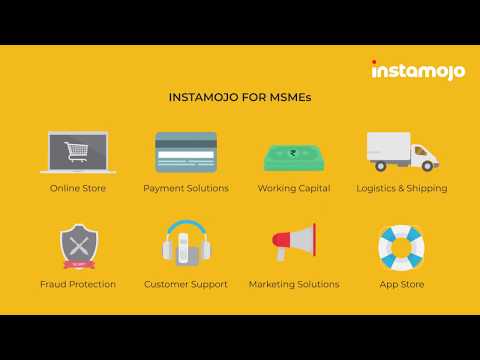
Instamojo logo
play How can Instamojo help your Business?
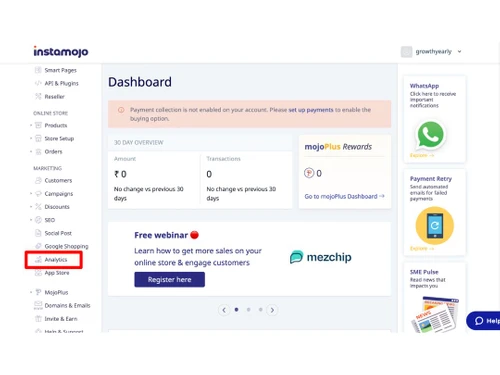
Instamojo dashboard
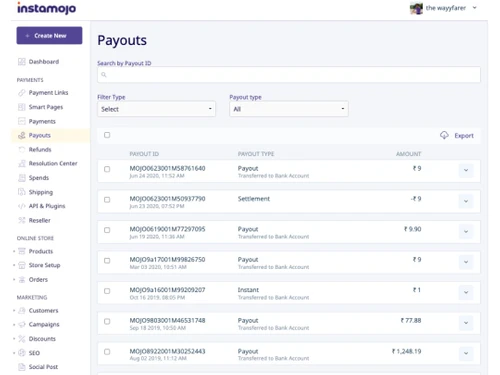
Instamojo payouts

Instamojo

Brand: Instamojo

  • 4.3

  • 14 Ratings & 14 Reviews

Simplify your payment processes with Instamojo Payment Gateway, offering features like instant payment links, multi-channel support, and detailed analytics.

See More

Have you used Instamojo before?

Share your insights for better experience

Add a Review
Starting Price
₹6,999 excl.GST
₹ 8,259 incl. GST

View plans

offer Save upto 18%, Get GST Invoice on your business purchase T&C
offer Buy Now & Pay Later, Check offer on payment page.
Buy Now
100% Genuine
Products
Best Price
Guaranteed
Safe & Secure
Payment
  • Description

  • Pricing

  • Features

  • Specification

  • Review

  • Compare

  • Alternatives

  • FAQ

  • Questions

Starting at ₹6,999
Buy Now

Instamojo Software Overview

What is Instamojo Payment Gateway?

Instamojo Payment Gateway is a robust and secure platform designed to meet the diverse payment processing needs of businesses. It enables you to accept payments via various methods such as credit/debit cards, UPI, net banking, and digital wallets, all within a user-friendly interface.

Instamojo's intuitive dashboard provides a comprehensive view of your transactions, facilitating easy tracking and management. The platform is designed to integrate seamlessly with websites, apps, and social media channels, ensuring you can collect payments from multiple sources effortlessly.

One of Instamojo's key features is its ability to create instant payment links, making it easy for businesses to request payments without needing a website or app. Additionally, Instamojo supports multiple currencies, allowing you to expand your business globally.

Why Choose Instamojo Payment Gateway?

Instamojo stands out for its simplicity, security, and flexibility. Here are the key reasons why users choose Instamojo:

  • User-Friendly Interface: Instamojo provides an intuitive and easy-to-navigate platform, making it simple for merchants to set up and manage their online payments without any technical expertise.
  • Multiple Payment Options: Instamojo supports a wide range of payment methods, including credit/debit cards, net banking, UPI, and popular digital wallets, ensuring convenience for your customers and higher conversion rates.
  • Quick and Easy Integration: With ready-to-use APIs and plugins for popular platforms like WordPress, Shopify, and Magento, Instamojo allows seamless integration with your website or app, enabling you to start accepting payments quickly.
  • Affordable Pricing: Instamojo offers competitive pricing with transparent fee structures and no hidden charges, making it a cost-effective solution for businesses of all sizes.
  • Security and Compliance: Instamojo is PCI-DSS compliant and employs advanced security measures to protect your transactions and customer data, providing peace of mind for both you and your customers.
  • Comprehensive Analytics and Reports: Instamojo provides detailed analytics and reporting tools that help you track your sales, understand customer behavior, and make informed business decisions to drive growth.
  • Customer Support: With dedicated customer support available via chat, email, and phone, Instamojo ensures that any issues or queries are resolved promptly, helping you maintain smooth operations and a positive customer experience.

Additional Features of Instamojo Payment Gateway

Instamojo offers a range of advanced features to streamline your payment processing tasks. These include:

  • Online store creation: Instamojo removes the technical barrier of building a website from scratch. Their platform allows you to create a basic online store directly within their interface.
  • Product Listings and Management: Instamojo's product listing and management tools allow you to showcase your products with clear descriptions, high-quality images, and pricing information. This creates a professional storefront for your customers.
  • Order management: Instamojo also helps businesses with managing orders. It can Manage product-wise orders, Export order details and Filter orders by order details and payment status.
  • Embed Pay Button on Your Pages: Effortlessly collect payments by simply pasting a one-line code on your web pages or blogs. This feature is designed for instant setup, ensuring a seamless and convenient checkout experience for your customers.
  • Smart Pages: Instamojo Smart Pages is a landing page builder specifically designed to be easy to use and affordable for small businesses and individuals. It allows you to create a simple one-page website.

Pricing of Instamojo Payment Gateway

Instamojo offers cost-effective plans for online businesses. The Basic plan is free with a 5% + INR 3 transaction fee.

The Starter plan costs INR 6,999/year, while the Growth plan starts at INR 14,999/year with 2% + INR 3 transaction fee.

Read more

Instamojo Company Details

Founded Year:  2012

Instamojo is the one-stop D2CTech platform company that provides D2C brands everything they need to start and scale their businesses online.

Director/Founders Aditya Sengupta, Akash Gehani, Harshad Sharma, Sampad Swain
Company Size 101-500 Employees

Instamojo Pricing & Plans

Starter

Calculated Price

6999 Exclusive of all taxes
    • Licenses

      Licenses
      Licenses
    • Yearly

      Yearly
      Yearly

Key Features

  • 5% + Rs.3 transaction fee

  • Custom Domain Linking

  • 19+ Premium Themes

  • 3 Images per product

Growth

Calculated Price

14999 Exclusive of all taxes
    • Licenses

      Licenses
      Licenses
    • Yearly

      Yearly
      Yearly

Key Features

  • Everything in Starter

  • 2% + Rs.3 transaction fee

  • Abandoned Cart Recovery

  • Whatsapp Integration

Instamojo Features

Core Functionalities

  • icon_check Pre-onboarding Assistance
    Helping businesses with the process of setting up a merchant account and integrating payment processing into their business.
  • icon_check Branding & Customization
    The ability to customize the look and feel of the payment process to match your brand.
  • icon_check Coupons and Offers Engine
    A Coupons and Offers creation feature within a payment gateway allows merchants to directly design and manage discount promotions
  • icon_check Mobile Responsiveness
    Ensuring that the payment process is optimized for mobile devices.
  • icon_check Payment Links
    Payment processing solutions that don't require a website. payments can be made through a link by sending it via SMS, Email etc.
  • icon_check Guest Checkout
    Allowing customers to make purchases without creating an account.
  • icon_check Store Creation
    Tools and features to create an online store within the payment gateway app
  • icon_check Landing Page Creation
    The landing page creation feature in a payment gateway allows users to create custom web pages for initiating and processing
  • icon_check Split Payments
    Split payment in a payment gateway allows a single payment transaction to be divided and distributed to multiple recipients, such
  • icon_check Instant Settlements
    The process of settling transactions with your bank account instantly
  • icon_check Dedicated POS
    Dedicated POS Payments in a payment gateway allow merchants to process payments independently using hardware and software. It
  • icon_check Multi Currency Support
    Accept payments from all over the world with different currencies
  • icon_check Currency Conversion
    The ability to process payments in different currencies and automatically convert them to your desired currency.
  • icon_check Multi-Language Checkout
    The ability to process payments and display information in multiple languages.
  • icon_check Dedicated Account Manager
    A payment gateway's dedicated account manager provides one-on-one assistance for any questions or problems you may have.
  • icon_check Automated Reconciliation
    Automatic reconciliation uses software to match transactions between your bank and accounting records, saving time and minimizing
  • icon_check Loyalty Management
    Loyalty management in payment gateways involves integrating features that allow businesses to reward and retain customers through

Payment Methods

  • icon_check QR Code Based Payments
    A QR code payment method is a way to make payments using a smartphone by scanning a special type of barcode called a QR code.
  • icon_check Digital Wallet
    It is an electronic device or online service that allows individuals to make electronic transactions.
  • icon_check UPI
    Unified Payments Interface is an instant real-time payment system developed by NPCI to facilitate inter-bank transactions through
  • icon_check Debit / Credit Cards
    Accept various payment methods, including credit cards, debit cards,
  • icon_check Net Banking
    It is a convenient and secure way for customers to manage their bank accounts and perform financial transactions over the
  • icon_check Buy Now, Pay Later (BNPL)
    Buy Now, Pay Later (BNPL) in a payment gateway is a feature that allows customers to purchase items immediately but pay for them
  • icon_check Cardless EMI
    Cardless EMI is similar to traditional EMI but doesn't require a credit or debit card. It's facilitated through a partnership
  • icon_check Cryptocurrency
    The ability to accept payments in cryptocurrency.
  • icon_check ACH Payments
    ACH or Automated Clearing House payments, are electronic money transfers between banks and credit unions through a computer

Subscription Management

  • icon_check Reccuring Payments
    Recurring payments, also known as subscription payments, auto-debit, or automatic payments, occur when a customer authorizes a
  • icon_check Proration
    Proration is a billing model that adjusts a customer's bill to reflect changes to their plan during a billing cycle.
  • icon_check Dunning
    Dunning refers to the process of communicating with customers to collect overdue payments.

Administrative Features

  • icon_check Tax Management
    Tax management involves automatically calculating, applying, and handling taxes during transactions.
  • icon_check Invoice Generation
    Automatically creates invoices for transactions, saving time and reducing errors. It includes all necessary details such as the
  • icon_check Reporting & Analytics
    Tools that allow merchants to track their payment activity, generate reports, and gain insights into their sales data.
  • icon_check Merchant Portal
    A web interface that allows merchants to manage their payment accounts, view transactions, and access other features.
  • icon_check User Access Management
    User, role, and access management in a payment gateway are ways to control who can access what features and data in the system

Security Features

  • icon_check Two-Factor Authentication (2FA)
    Two-factor authentication in a payment gateway adds an extra layer of security by requiring users to verify their identity
  • icon_check PCI DSS Compliance
    Ensures a business adheres to Payment Card Industry Data Security Standards to protect cardholder information.
  • icon_check Fraud Detection & Prevention
    Systems that analyze transactions for suspicious patterns to identify and block fraudulent activity.
  • icon_check Tokenization
    Replaces sensitive data (like credit card numbers) with a unique identifier (token) for secure storage and processing.
  • icon_check Multi-Factor Authentication (MFA)
    Multi-Factor Authentication (MFA) refers to an authentication process that requires two or more verification factors to gain
  • icon_check Risk Management
    Managing risks in payment gateways involves identifying, assessing, and minimizing potential issues associated with processing
  • icon_check Automatic Device Recognition
    Automatic device recognition is a security feature used by payment gateways to identify and authenticate devices that initiate

Integrations Supported

  • icon_check Order Management
    Order management is the process of handling customer orders from placement to delivery. It's a crucial part of a business's
  • icon_check CRM Integration
    CRM integration with a payment gateway connects a CRM system to a payment gateway, allowing businesses to merge customer data
  • icon_check API Integration
    Integrating an API into a payment gateway platform connects your website or app to securely process payments, handle
  • icon_check Third Party Integration
    Integrating a 3rd party plugin into a payment gateway platform allows you to accept payments directly on your site without
  • icon_check E-Commerce Integration
    E-commerce integration in a payment gateway platform means connecting the payment system with an online store.
  • icon_check POS Integration
    A hardware and software solution used in retail environments to process sales transactions, manage inventory, and handle customer
  • icon_check SDK Integration
    SDK integration in a payment gateway platform involves incorporating the payment gateway's software development kit (SDK) into

Alerts & Notifications

  • icon_check Downtime Alerts
    A message that tells you when the payment system is not working or is down. It helps you know immediately when there’s a
  • icon_check Transaction Notifications
    Tells you about transactions happening on your system, such as when a payment is successful or fails.
  • icon_check Security Alerts
    An alert that warns you about potential security threats, such as suspicious activities or attempts to hack into the system.
  • icon_check Discrepancy Alerts
    A notification that notifies you when there are inconsistencies or mismatches in transaction details, such as differences in
  • icon_check Custom Event Notifications
    Personalized messages set up to alert you about specific events or actions that you consider important, such as a high-value
Instamojo Demo Video play icon

Get Instamojo Demo

Watch the demo video to explore key features, real workflows, and how the software fits your business needs.

Understand
Key Features
Personal
Demo Insights
Interactive
Demo Support

Instamojo Specifications

Supported Platforms
Windows Windows Android Android Linux Linux
Devices
Desktop Desktop Mobile Mobile
Deployment
Cloud-Based Cloud-Based
Suitable For
All Industries
Business Specific
All Businesses
Business Size
Small Business Startups Medium Business Enterprises SMBs SMEs MSMBs MSMEs
Customer Support
Email Communities
Language
English
Integration
API Integration
Training Resources
Documentation Videos

Explore the Best Alternative Solutions Similar to Your Business Size and Needs

Small Business

Designed for startups and growing businesses

BillDesk

3.6

MaxelPay

4.3

UnPay

4.3

See More

Enterprises

Designed for complex and large-scale business needs

PayG

3.7

Cashfree

4.3

airpay

4.2

See More

Instamojo Reviews

4.3

Out of 5

img

Overall Rating

Based on
14 Verified Reviews

Rating Breakdown

  • Features 4.3
  • Value for Money 4.3
  • Ease of Use 4.3
  • Customer Support 4.5

87% Recommend this Product

Add Review

Pros

  • "ProfitBooks uses Instamojo to generate payment links from invoices. Setting it up is simple. It has a neat user interface. The UPI payment possibilities are appealing to me."

    Yashit KapoorJul 13, 2022

  • "Our day begins when we receive payment through Instamojo. Easy and secure method of transaction."

    2GM KRISHNASCHOOLJul 13, 2022

Cons

  • "Some features could be better, like adding more design and interaction options for customers. It would be great to have more themes or customization choices."

    Anjan Jul 4, 2024

  • "Offers limited features in comparison to others. It should look into this issue."

    Sachin VermaSep 5, 2022

  • "Nothing bad about it but it should also look into expanding its service out of India too."

    Anand Deo PrasadSep 1, 2022

Instamojo Video Review

youtubeVideoId

4.3

“Instamojo Review Simplifying Payments and Empowering Entrepreneurs”

Review by: The Inventar

abhinav sinha

Industry: Education User since: 1-2 years

4.7

Reviewed on: Sep 4, 2022

Techjockey Verified

“The easiest and fastest way to collect money from customers is Instamojo.”

Pros

I have been using Instamojo for my online store and I have to say it is one of the best payment gateways available in the market. It is really easy to use, and it offers good services. I am really impressed with it. It's very easy to use and offers a lot of features and options to choose from.

Cons

It processes all its payments in Indian rupees only.

Switched from Electra

Reason to switch

Transaction emails and alerts used to pop up really late.

Sachin Verma

4.5

Reviewed on: Sep 5, 2022

Techjockey Verified

“A great payment gateway for small business owners.”

Pros

I have been using Instamojo for a while now and I must say that it is a simple, yet powerful tool that is used by almost all types of businesses. It offers features such as one-click payments, a custom logo, detailed reports, and many more. Instamojo is super easy to use, and it can be utilized for accepting payments for both offline and online businesses.

Cons

Offers limited features in comparison to others. It should look into this issue.

Switched from PayKun

Reason to switch

There is no free trial and also no free version available for PayKun.

Anand Deo Prasad

4.7

Reviewed on: Sep 1, 2022

Techjockey Verified

“A Great Platform to Make Payments!”

Pros

Instamojo is a great tool for starting a business. It makes the payment process very easy and secure. It is very useful for a small business and is very easy to use. It has made my life easier. Thanks to Instamojo, I have been able to make many online transactions and get my payments easily. I highly recommend it to others.

Cons

Nothing bad about it but it should also look into expanding its service out of India too.

Switched from Cashfree

Reason to switch

Cashfree is very expensive in comparison to other similar payment gateways.

See All Instamojo Reviews

Compare Instamojo With other Payment Gateway

Products
Ratings
Pricing
Device Supported
Deployment
Supported Platforms
  • img

    Instamojo

  • 4.3

  • ₹ 6999.00 excl. GST

  • Desktop

    Mobile

  • Web based

    On Premises

  • Windows

    Mac OS

  • img

    airpay

  • 4.2

  • Price On Request

  • Desktop

    Mobile

  • Web based

    On Premises

  • Windows

    Mac OS

  • img

    Touras

  • 4.0

  • Price On Request

  • Desktop

    Mobile

  • Web based

    On Premises

  • Windows

    Mac OS

  • img

    UnPay

  • 4.3

  • Price On Request

  • Desktop

    Mobile

  • Web based

    On Premises

  • Windows

    Mac OS

  • img

    Razorpay

  • 4.4

  • Price On Request

  • Desktop

    Mobile

  • Web based

    On Premises

  • Windows

    Mac OS

  • img

    Cashfree

  • 4.3

  • Price On Request

  • Desktop

    Mobile

  • Web based

    On Premises

  • Windows

    Mac OS

  • img

    Paytm for Business

  • 4.2

  • Price On Request

  • Desktop

    Mobile

  • Web based

    On Premises

  • Windows

    Mac OS

  • img

    PayU

  • 4.1

  • Price On Request

  • Desktop

    Mobile

  • Web based

    On Premises

  • Windows

    Mac OS

  • img

    Verifone

  • 4.4

  • Price On Request

  • Desktop

    Mobile

  • Web based

    On Premises

  • Windows

    Mac OS

  • img

    PayDollar

  • 4.5

  • ₹ 10000

  • Desktop

    Mobile

  • Web based

    On Premises

  • Windows

    Mac OS

  • img

    Worldline

  • 3.9

  • Price On Request

  • Desktop

    Mobile

  • Web based

    On Premises

  • Windows

    Mac OS

(0) Product(s) selected

Instamojo Alternatives

See All Instamojo Alternatives

Available

Price on Request

PayU

4.1

Available

Price on Request

Available

Price on Request

Available

Price on Request

Available

Price on Request

Starting Price:

$25 /Month

Available

Price on Request

Available

Price on Request

Available

Price on Request

Articles for Instamojo

See All Related Articles

What is Instamojo Payment Gateway?

Instamojo Payment Gateway is a comprehensive payment processing solution that supports various payment methods and provides robust security features.

How do I integrate Instamojo Payment Gateway with my website?

Instamojo offers detailed documentation, SDKs, and plugins for various platforms, making integration quick and easy.

What payment methods does Instamojo support?

Instamojo supports credit/debit cards, UPI, net banking, and digital wallets.

Does Instamojo offer subscription billing options?

Yes, Instamojo provides support for setting up and managing recurring payments for subscription-based services.

What kind of analytics does Instamojo provide?

Instamojo offers comprehensive payment analytics and reporting tools to help you track and analyze your transactions.

Can I process refunds through Instamojo?

Yes, Instamojo allows you to process refunds easily and efficiently through the dashboard.

What is the setup fee for Instamojo Payment Gateway?

Instamojo does not charge any setup fee. You only pay for the transactions you process.

How much does Instamojo cost?

The pricing of Instamojo is available at INR 6999 per year at techjockey.com.

How much does Instamojo cost?

The pricing of Instamojo is available at INR 6999 per year at techjockey.com.

Instamojo Questions

Q:

How to request payments in bulk on Instamojo?

Shubham dhimanb Sep 28, 2024
A:

To send bulk payment requests on Instamojo, follow the steps given below:

  • Open your Instamojo account
  • Navigate to the Request a Payment form
  • Press Send Bulk Requests
  • Upload a CSV file containing the customer list
  • Choose whether to add phone, email or both
  • Upload and send the requests
Shrikant Chandrakar Sep 28, 2024
A:

To accept online payments on your grocery website using Instamojo, you can embed a payment button or use a payment link. To embed a payment button, follow the steps given below:

  • Open your Instamojo account and make sure that your KYC has been verified
  • In your dashboard, press the ‘Create new’ option
  • Choose Payment link
  • Input the amount and item name
  • Choose the ‘Use as Pay button on the website’ option
  • Customize the button's text, style and behavior
  • Copy the provided HTML code and paste it into your website's code.
Tanu Sep 28, 2024
A:

Instamojo offers a payment gateway integration that allows customers to make payments on a website. To integrate, follow the steps given below:

  • Open your Instamojo account
  • Navigate to > Dashboard > Create Payment Link
  • Hit the Embed Button to customize the button's text, style and behavior
  • Paste the given HTML code snippet into the blog or website
  • To make payments onsite, load the Instamojo product link on the website
  • Direct the user to the Instamojo payment page
L Ravi Kumar Sep 28, 2024
Q:

How do I manage orders in Instamojo?

Ranchhod Soni Sep 28, 2024
A:

One can manage orders in Insatmojo in the following ways:

  • Track orders
  • Open your Instamojo account
  • Go to the dashboard
  • Choose Online store
  • Click on Orders
  • Select the ‘All Orders’ option
  • Orders can be filtered based on product name, payment status, and shipment status. You can also look up orders using the buyer's name, email address, or order ID.
  • Manage abandoned carts
  • Go to the dashboard
  • Choose Online store
  • Press Orders
  • Choose the ‘Abandoned carts’ option
  • Clicking View will show the order information. If the customer does not finish the transaction within thirty minutes, you can get notified via email regarding abandoned carts.
  • Enable automatic order status tracking
  • Go to the dashboard
  • Hit Update Order Status
  • Check the toggle next to Tracking ID
  • Input the tracking ID
  • Choose the shipping provider
  • Click save
  • Issue refunds
  • Go to the Resolution Center to Issue refunds.
Porticozz YT Gaming Sep 28, 2024
A:

To receive payments using Instamojo Quick Links, follow the steps given below:

  • Open your Instamojo account
  • Press the ‘Create a Payment Link’ button
  • Select Quick Link
  • Input the amount and the payment reason
  • Now you can share the payment link.
ashok kokkula Sep 28, 2024
See All Instamojo Questions

20,000+ Software Listed

Best Price Guranteed

Free Expert Consultation

2M+ Happy Customers

Terms and Condtions

close

Users with registered businesses can purchase goods from merchants on the platform to satisfy their business needs. Users are not permitted to utilize any products acquired through the platform for resale, advertising, business, or further distribution.

For each purchase made, users will receive a Tax Invoice (or 'GST invoice') that includes specific details such as:

  • the GSTIN of the user associated with their registered business, and

  • the specified Entity Name for their business.

It should be noted that not all products are eligible for GST Invoice. Only the products displayed by participating sellers with the 'GST-based Invoice Available' callout on the product description page would qualify.

Certain goods and services are not eligible to get a GST Invoice, including items with VAS, i.e., Value Added Services (e.g., Total Mobile Protection/Assured Buyback) and those involving an exchange offer at the time of purchase.

Users must ensure the accuracy of the GSTIN, and business entity name provided for the GST Invoice. Requests for corrections into GST Invoice would not be accommodated by Techjockey.com or any Seller, and any issues arising from user-provided information are the sole responsibility of users.

Techjockey.com is not liable for the GST Invoice or any associated input tax credit. To efficiently claim an input tax credit, users should select the registered place of business address as per the GST authority's data and follow the provisions of the GST Act and rules.

To claim an input tax credit, the delivery and billing addresses must match. Furthermore, input tax credits will not be granted if the delivery address and GSTIN on the invoice are from different states. In case of incorrect GST details provided during the order placement, the order will be canceled automatically.