linkedin
Superleap logo
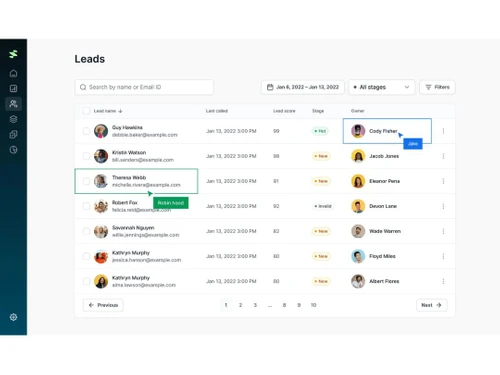
Superleap leads
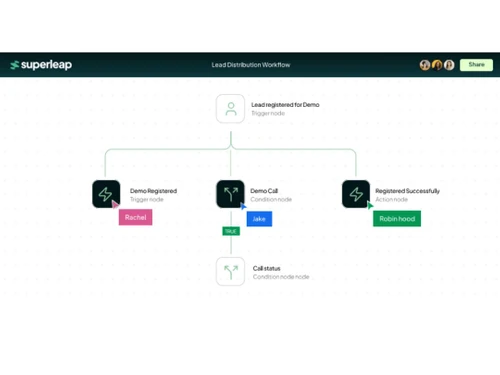
Superleap workflow
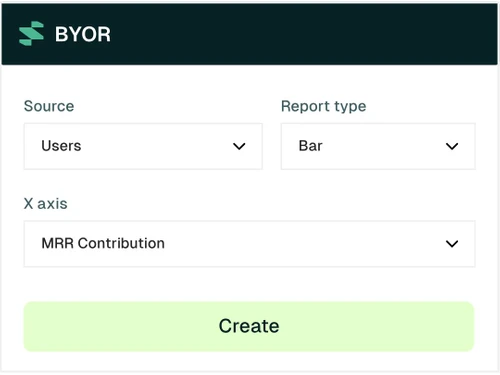
Superleap BYOR

Superleap

Brand: Mintiq Technologies

  • 4.1

  • 6 Ratings

Superleap helps businesses improve sales, marketing, and customer relationships through one easy-to-use CRM platform.

See More

Have you used Superleap before?

Share your insights for better experience

Add a Review

Price Available on Request

Questions about pricing or customization? We’re here to help, just a click away.

100% Genuine
Products
Best Price
Guaranteed
Safe & Secure
Payment
  • Description

  • Pricing

  • Features

  • Specification

  • Review

  • Compare

  • Alternatives

  • FAQ

Superleap Software Overview

What is Superleap?

Superleap is a modern business software made to simplify how you manage customers, sales, and marketing. It works as a full CRM solution to store customer data, track leads, automate tasks, and improve communication across teams. From contact management to lead scoring and predictive reports, it brings everything together so your team works faster and smarter.

This CRM software is useful for growing companies who want to handle daily operations digitally. It connects sales and marketing tasks, so you can run campaigns, manage pipelines, track performance, and keep an eye on future trends.

Why Choose Superleap?

  • Smart CRM management: Brings all customer data, activities, and history into one simple interface.
  • Improves sales process: From lead creation to final sale, every step is tracked and automated.
  • Marketing made easy: Helps you run and track email, social, and SMS campaigns smoothly.
  • Real-time performance updates: Know how your team, campaigns, or sales deals are doing with live dashboards.
  • AI-powered predictions: Uses machine learning to predict leads that are more likely to convert.

Benefits of Superleap

  • Faster lead conversion: Sales teams can follow up leads quickly with lead scoring and automation.
  • Saves time: Reduces manual work like data entry and follow-ups using automated workflows.
  • Improves team productivity: Everyone sees the same data and tasks, reducing confusion.
  • Clear customer journey: Track every stage a customer goes through, from inquiry to purchase.
  • Better campaign results: Know which marketing campaign worked best through smart analytics.

Superleap Pricing

Superleap pricing is available on request at Techjockey.com. The pricing model is based on different parameters, including extra features, deployment type, and the total number of users. For further queries related to the product, you can contact our product team and learn more about the pricing and offers.

Read more

Mintiq Technologies Company Details

Founded Year:  2024

Superleap is an AI-powered CRM platform to boost sales team productivity, for businesses in the global $65B+ CRM software market

Director/Founders Subham Kumar Boundia and Saurabh Maheshwari
Company Size 1-100 Employees

Superleap Pricing & Plans

Looking for The Right Pricing?

Share your requirements and get a plan built around your business.

  • Define your business needs
  • Get customised pricing
  • Choose features that fit your workflow

Price Available on Request

Get personalised Superleap pricing that fits your needs. Our team will connect with you.

Superleap Features

Customer Data Management (CDM)

  • icon_check Contact Management
    Organize and update client contact records in one place.
  • icon_check Account Management
    Store business-level customer data and transaction records.
  • icon_check Customer Profiles
    View full history, activity, and behavior of each customer.
  • icon_check Contact Segmentation
    Group contacts based on behavior, industry, or interests.
  • icon_check Activity History
    Track emails, calls, meetings, and updates in the timeline.

Sales Management

  • icon_check Lead Management
    Capture, assign, and follow up leads with smart tools
  • icon_check Sales Forecasting
    Predict future sales using AI-based insights.
  • icon_check Deal Management
    Manage ongoing deals and their progress
  • icon_check Sales Automation
    Automate sales tasks like follow-ups and reminders.
  • icon_check Workflow Automation and Management
    Create automated flows for sales actions.
  • icon_check Opportunity & Pipeline Management
    Track every deal stage from start to close.
  • icon_check Quote Management
    Generate accurate, branded quotes and proposals to accelerate sales processes.
  • icon_check Order Management
    Track and manage orders from customers to ensure timely fulfillment and accurate billing.
  • icon_check Contract Management
    Managing contracts from their creation, execution, and performance tracking to their eventual termination.
  • icon_check Territory Management
    Assign, monitor, and optimize sales territories to improve regional sales efforts.

Marketing Automation

  • icon_check Campaign Management
    Plan and run email or social campaigns
  • icon_check Lead Nurturing
    Send automatic follow-ups to keep leads engaged
  • icon_check Customer Journey Tracking
    Watch how a lead moves from interest to buying.
  • icon_check Customer Segmentation
    Target groups based on behavior or demographics.
  • icon_check Event-Triggered Workflows
    Start workflows based on customer actions.
  • icon_check Automated Campaigns
    Send pre-set emails and messages at the right time.
  • icon_check Email Marketing
    Design and send personalized email campaigns, track opens, clicks, and conversions.

Data Sourcing / Integrations

  • icon_check Data Import/Export
    Easily bring in or send out data from other tools.
  • icon_check Calendar Integration
    Sync tasks, reminders, and meetings with calendars
  • icon_check Social Media Integration
    Manage social media accounts and track customer engagement directly within the CRM.
  • icon_check Email Marketing Tools Integration
    Connect CRM with email platforms like Mailchimp or SendGrid for seamless campaigns.
  • icon_check Marketing Tools Integration
    Integrate with marketing platforms (e.g., Google Ads, HubSpot) to enhance campaign effectiveness.
  • icon_check Third Party Integrations
    Connect CRM with a variety of third-party tools and services to enhance functionality.
  • icon_check API Access
    Customizable API for integrating with other business applications or extending CRM capabilities.
  • icon_check eCommerce Integrations
    Sync CRM with eCommerce platforms like Shopify, WooCommerce for a unified customer experience.
  • icon_check Interactive Voice Response (IVR) Integration
    Integrate CRM with IVR systems to manage customer calls and enhance support.

Collaboration Tools

  • icon_check Team Communication
    Message or comment within the platform
  • icon_check Task / Activity Management
    Assign and track tasks for teammates
  • icon_check Document Sharing & File Storage
    Upload and share files securely.
  • icon_check Omnichannel Support & Engagement
    Provide consistent customer support across multiple channels, including email, chat, and social media.

Security & Compliance

  • icon_check Role-Based Access Control (RBAC)
    Control user access based on their roles, limiting access to sensitive data.
  • icon_check Data Encryption
    Encrypt data both at rest and in transit to safeguard customer information.
  • icon_check Backup & Disaster Recovery
    Ensure business continuity with secure backups and disaster recovery plans.
  • icon_check GDPR & Data Privacy
    Comply with regulations such as GDPR, HIPAA, and CCPA. to protect customer privacy.
  • icon_check Audit Trail
    Track changes and updates within the system for enhanced security and transparency.

AI & Machine Learning

  • icon_check Predictive Analytics
    Uses past data to guess future trends
  • icon_check Lead Scoring
    Ranks leads based on chance to convert
  • icon_check Chatbots
    Automate customer interactions with AI-driven chatbots to assist or direct inquiries efficiently.

Reporting & Analytics

  • icon_check Predictive Analytics
    Uses past data to guess future trends
  • icon_check Real Time Analytics
    See up-to-date results and progress
  • icon_check Campaign Performance
    Measures campaign success
  • icon_check Custom Dashboards
    Personalize your own dashboard layout.
  • icon_check Sales Performance Reports
    See how each rep or team is doing.
  • icon_check Customer Insights
    Learn customer behavior and preferences
  • icon_check Forecasting & Trends
    Predict what’s coming next in sales.
  • icon_check Performance Tracking
    View tasks done and goals met

Alerts & Notifications

  • icon_check Event-Triggered Notifications
    Alerts based on customer activity
  • icon_check Custom Workflow Alerts
    Get updates when workflows reach key points.
  • icon_check Customer Interaction Alerts
    Know when a customer opens emails or replies.
  • icon_check Workflow Trigger Alerts
    Notifications for completed actions
  • icon_check Lead Activity Alerts
    Know when a lead takes any new step.
  • icon_check System Errors/Failures
    Receive immediate notifications for any system failures or errors for quick resolution.
  • icon_check SLA Violations
    Receive notifications when service level agreements are breached or approaching deadlines.

Superleap Specifications

Supported Platforms
Ubuntu Ubuntu Windows Windows MacOS MacOS Linux Linux
Devices
Desktop Desktop
Deployment
Cloud-Based Cloud-Based
Suitable For
All Industries
Business Specific
All Businesses
Business Size
Small Business Startups Medium Business Enterprises SMBs SMEs MSMBs MSMEs Freelancers
Customer Support
Email Communities
Language
English
Training Resources
Videos

Explore the Best Alternative Solutions Similar to Your Business Size and Needs

Superleap Review

4.1

Out of 5

img

Overall Rating

Based on
6 Verified Ratings

Rating Breakdown

  • Features 4.5
  • Value for Money 4.0
  • Ease of Use 3.9
  • Customer Support 4

86% Recommend this Product

Add Review

Techjockey Trusted Reviews from Verified Users

No reviews are currently available for Superleap. Discover similar CRM Software reviews

  • Kylas CRM

    4.1

    Whats great - Allowed me to track everything I needed to succeed. With Kylas, I now have all the information at hand and can use that data ... read more

  • NCH Reflect CRM

    4.2

    Whats great - The fields you require can be modified by adding additional fields and can customize them. read more

  • Salesforce CRM

    4.3

    Whats great - Salesforce CRM’s beat notification feature ensures timely updates, helping sales teams stay on top of their schedules and cli... read more

Compare Superleap With other CRM Software

Products
Ratings
Pricing
Device Supported
Deployment
Supported Platforms
  • img

    Superleap

  • 4.1

  • Price On Request

  • Desktop

    Mobile

  • Web based

    On Premises

  • Windows

    Mac OS

  • img

    Bitrix24

  • 4.3

  • ₹ 2390

  • Desktop

    Mobile

  • Web based

    On Premises

  • Windows

    Mac OS

  • img

    Zoho CRM

  • 4.4

  • ₹ 1300

  • Desktop

    Mobile

  • Web based

    On Premises

  • Windows

    Mac OS

  • img

    Odoo CRM

  • 4.4

  • ₹ 760

  • Desktop

    Mobile

  • Web based

    On Premises

  • Windows

    Mac OS

  • img

    CrmOne

  • 4.9

  • Price On Request

  • Desktop

    Mobile

  • Web based

    On Premises

  • Windows

    Mac OS

  • img

    Kylas CRM

  • 4.1

  • ₹ 12999

  • Desktop

    Mobile

  • Web based

    On Premises

  • Windows

    Mac OS

  • img

    Zendesk Sell

  • 4.3

  • Price On Request

  • Desktop

    Mobile

  • Web based

    On Premises

  • Windows

    Mac OS

  • img

    Cleomitra

  • 4.8

  • ₹ 999

  • Desktop

    Mobile

  • Web based

    On Premises

  • Windows

    Mac OS

  • img

    In-Sync CRM

  • 4.2

  • ₹ 5000

  • Desktop

    Mobile

  • Web based

    On Premises

  • Windows

    Mac OS

  • img

    HighLevel

  • 4.2

  • Price On Request

  • Desktop

    Mobile

  • Web based

    On Premises

  • Windows

    Mac OS

(2) Product(s) selected

Superleap Alternatives

See All Superleap Alternatives

Starting Price:

$99 /Month

Starting Price:

₹999 /Month ₹2,000

SAVE UPTO 50%

Starting Price:

$97 /Month

Starting Price:

€300 /User/Year
SAVE UPTO 20%

Available

Price on Request

Articles for Superleap

See All Related Articles

How much does Superleap cost?

Superleap pricing is available on request at techjockey.com. This business software is ideal for sales, marketing, and CRM teams.

How does Superleap work?

Superleap manages leads, sales, and campaigns through one dashboard with automation and AI-driven insights to improve performance.

Who uses Superleap?

It is used by small and mid-sized businesses, startups, and sales teams that want to simplify customer management.

Can Superleap help with marketing too?

Yes, it lets you run automated marketing campaigns, send emails, and track campaign performance easily.

Does it have lead scoring?

Yes, it uses AI to rank leads by quality and conversion chance, helping sales teams focus on hot leads first.

20,000+ Software Listed

Best Price Guranteed

Free Expert Consultation

2M+ Happy Customers

Terms and Condtions

close

Users with registered businesses can purchase goods from merchants on the platform to satisfy their business needs. Users are not permitted to utilize any products acquired through the platform for resale, advertising, business, or further distribution.

For each purchase made, users will receive a Tax Invoice (or 'GST invoice') that includes specific details such as:

  • the GSTIN of the user associated with their registered business, and

  • the specified Entity Name for their business.

It should be noted that not all products are eligible for GST Invoice. Only the products displayed by participating sellers with the 'GST-based Invoice Available' callout on the product description page would qualify.

Certain goods and services are not eligible to get a GST Invoice, including items with VAS, i.e., Value Added Services (e.g., Total Mobile Protection/Assured Buyback) and those involving an exchange offer at the time of purchase.

Users must ensure the accuracy of the GSTIN, and business entity name provided for the GST Invoice. Requests for corrections into GST Invoice would not be accommodated by Techjockey.com or any Seller, and any issues arising from user-provided information are the sole responsibility of users.

Techjockey.com is not liable for the GST Invoice or any associated input tax credit. To efficiently claim an input tax credit, users should select the registered place of business address as per the GST authority's data and follow the provisions of the GST Act and rules.

To claim an input tax credit, the delivery and billing addresses must match. Furthermore, input tax credits will not be granted if the delivery address and GSTIN on the invoice are from different states. In case of incorrect GST details provided during the order placement, the order will be canceled automatically.