linkedin
Textla logo
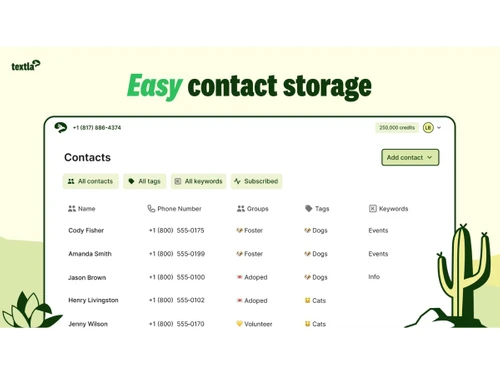
Textla-contacts
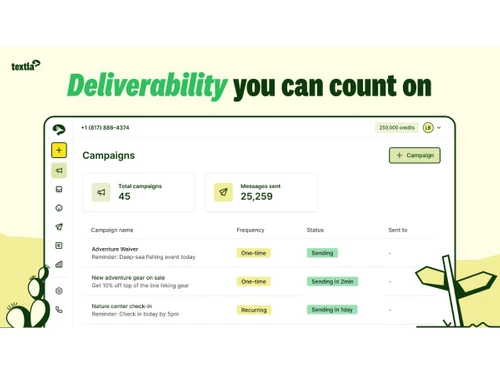
Textla-campaigns
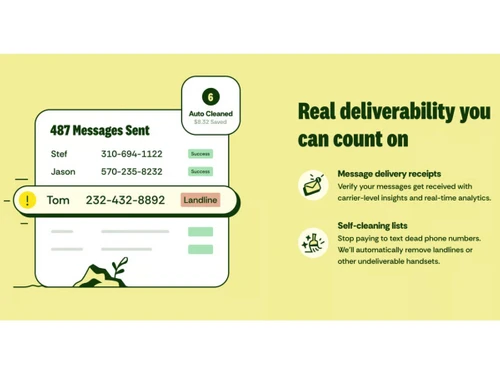
Textla-deliverability

Textla

Brand: Textla

  • No Ratings & Reviews

Textla makes business texting quick, simple, and highly effective. It keeps conversations flowing while reaching every customer at the right time.

See More

Have you used Textla before?

Share your insights for better experience

Add a Review
Starting Price
$25

View plans

100% Genuine
Products
Best Price
Guaranteed
Safe & Secure
Payment
  • Description

  • Pricing

  • Features

  • Specification

  • Review

  • FAQ

Starting at $25

Textla Software Overview

What is Textla Software?

Textla is a business bulk SMS software designed for fast and simple communication. It allows companies to send messages directly to customers without delays. Communication feels more personal and honest when messages reach customers at the right time. The platform keeps everything structured and easy to manage every day. It works smoothly without requiring any complex setup or effort.

It is used mostly by businesses that want clear and direct customer interaction. The system helps manage conversations without losing track of messages. Teams can stay perfectly organized while handling multiple customer responses. It supports steady communication without unnecessary complications. In short, the widely trusted bulk text software solution helps build stronger connections with customers.

Why Choose Textla Software?

  • Direct Customer Reach: Messages land straight in customer inboxes without delay. Communication feels quick and immediate every time.
  • Strong Engagement Levels: Text messages grab attention quickly. Customers tend to reply sooner and more frequently.
  • Two-Way Communication: Conversations flow naturally between businesses and customers. Every interaction feels more personal and direct.
  • Affordable Communication Tool: Costs stay lower compared to many similar platforms. Businesses can manage messaging without heavy spending.
  • Easy Campaign Planning: Messages can be planned and sent at the right time. Work feels more organized and controlled.
  • Clear Message Tracking: Performance stays visible through simple tracking tools. Teams can easily understand what works better.
  • Flexible Business Use: It suits both small teams and growing businesses. Communication stays smooth at every single stage.

Benefits of Textla Software

  • Strong Message Delivery Rate: Messages reach customers reliably without frequent failures. Communication stays dependable across campaigns.
  • Quick Campaign Launch: Bulk messaging allows campaigns to start without delay. Businesses can act fast when needed.
  • Clear Delivery Insights: Reports show message delivery status clearly. Teams stay informed about campaign performance.
  • Organized Contact Storage: Customer information remains structured and easy to access. Teams can steer clear of confusion during communication.
  • Instant Auto Responses: Automated replies handle customer messages quickly. Customers receive timely responses without waiting.
  • Controlled Subscriber Lists: Contact lists stay clean and well managed. Businesses can easily avoid sending messages to wrong users (or numbers).
  • Live Activity Updates: Notifications show real-time message activity. Teams stay aware of ongoing communication flow.

Textla Software Pricing

Textla Software price starts at USD 25.00 per month at techjockey.com.

The pricing model is based on different parameters, including extra features, deployment type, and the total number of users. For further queries related to the product, you can contact our product team and learn more about the pricing and offers.

Read more

Textla Company Details

Founded Year:  2022

No-code, intelligent messaging platform for SMBs & low tech teams that unlocks enterprise, wholesale pricing.

Director/Founders Ethan Parker, Luke Brickman
Company Size 1-100 Employees

Textla Pricing & Plans

Starter
Starting at $25
    • Licenses

      Licenses
      Licenses
    • Monthly

      Monthly
      Monthly

Key Features

  • Send bulk messages

  • Direct messages

  • Contact list segmentation

  • Bulk Messaging

Professional
Starting at $50
    • Licenses

      Licenses
      Licenses
    • Monthly

      Monthly
      Monthly

Key Features

  • Everything Starter has and more

  • Scheduled and recurring campaigns

  • Multiple team members

  • Personalized message fields

  • Bulk Messaging

Textla Features

  • icon_check Bulk Messaging
    Send high-volume SMS campaigns to thousands of contacts instantly for promotions, alerts, and announcements.
  • icon_check Two-Way Messaging
    Enable real-time conversations by allowing recipients to reply to messages for support or engagement.
  • icon_check Contact Management
    Organize contacts into lists, groups, and tags for targeted messaging and better audience segmentation.
  • icon_check Message Scheduling
    Schedule SMS campaigns in advance to ensure timely delivery based on business needs or peak hours.
  • icon_check Personalization
    Customize messages using dynamic fields like names to increase engagement and improve response rates.
  • icon_check Auto Replies
    Set up automated responses to incoming messages for instant engagement and better customer experience.
  • icon_check Campaign Analytics
    Track delivery rates, open rates, and engagement metrics to evaluate SMS campaign performance.
  • icon_check Delivery Reports
    Monitor message status including delivered, failed, or pending to ensure communication reliability.
  • icon_check Drip Campaigns
    Create automated message sequences sent over time to nurture leads and maintain engagement.
  • icon_check Opt-Out Management
    Automatically manage unsubscribe requests to stay compliant with messaging regulations.
  • icon_check MMS Support
    Send multimedia messages including images, links, and promotions for richer communication.
  • icon_check API Access
    Integrate SMS functionality into apps and systems using APIs for automation and custom workflows.
  • icon_check Zapier Integration
    Connect with third-party apps via Zapier to automate workflows and sync data across platforms.
  • icon_check Templates
    Save and reuse message templates to speed up campaign creation and maintain consistency.
  • icon_check Real-Time Notifications
    Get alerts for incoming messages or campaign updates to respond quickly and stay informed.
  • icon_check Import/Export Management
    Upload or download contact lists easily using CSV files for quick data management.

Textla Specifications

Supported Platforms
Windows Windows MacOS MacOS
Devices
Desktop Desktop
Deployment
Cloud-Based Cloud-Based
Suitable For
All Industries
Business Specific
All Businesses
Business Size
Small Business Startups Medium Business Enterprises
Customer Support
Email Communities
Language
English
Integration
API Integration
Training Resources
Videos

Textla Review

Techjockey Trusted Reviews from Verified Users

No reviews are currently available for Textla. Discover similar Bulk SMS Software reviews

  • MsgClub Bulk SMS

    4.1

    Whats great - The platform is super easy to use. It provides the best services to its users. The features are so many and the interface is ... read more
  • MediaTech Bulk SMS

    4.9

    Whats great - Functionality of Mediatech has a lot of amazing features, but its biggest and useful advantage that I have used is an all-in... read more

  • Campaign Labs

    4.7

    Whats great - It's really good for UI and all these functionality is easy and simple to starting over work it's faster simpler and attracti... read more

Articles for Textla

See All Related Articles

How much does Textla Software cost?

It starts at USD 25 (per license) per month at techjockey.com. The final cost may vary based on features, users, and setup type.

Who uses Textla Software?

The software is used by businesses that want to manage customer communication through text messaging. Marketing and support teams are its most common users.

Is there a mobile app available for Textla Software?

No, there is no dedicated mobile app available for this software. It is mainly accessed through its web-based interface.

Which operating systems are compatible with Textla Software?

It is compatible with Windows and macOS systems. Users can access it through supported desktop environments.

Does Textla Software offer a free trial?

Yes, a free trial is available for users. It allows businesses to test the software before purchasing.

How does Textla Software function?

It works by allowing businesses to send and manage text messages from one platform. Messages can be sent in bulk or as one-on-one conversations.

20,000+ Software Listed

Best Price Guranteed

Free Expert Consultation

2M+ Happy Customers

Terms and Condtions

close

Users with registered businesses can purchase goods from merchants on the platform to satisfy their business needs. Users are not permitted to utilize any products acquired through the platform for resale, advertising, business, or further distribution.

For each purchase made, users will receive a Tax Invoice (or 'GST invoice') that includes specific details such as:

  • the GSTIN of the user associated with their registered business, and

  • the specified Entity Name for their business.

It should be noted that not all products are eligible for GST Invoice. Only the products displayed by participating sellers with the 'GST-based Invoice Available' callout on the product description page would qualify.

Certain goods and services are not eligible to get a GST Invoice, including items with VAS, i.e., Value Added Services (e.g., Total Mobile Protection/Assured Buyback) and those involving an exchange offer at the time of purchase.

Users must ensure the accuracy of the GSTIN, and business entity name provided for the GST Invoice. Requests for corrections into GST Invoice would not be accommodated by Techjockey.com or any Seller, and any issues arising from user-provided information are the sole responsibility of users.

Techjockey.com is not liable for the GST Invoice or any associated input tax credit. To efficiently claim an input tax credit, users should select the registered place of business address as per the GST authority's data and follow the provisions of the GST Act and rules.

To claim an input tax credit, the delivery and billing addresses must match. Furthermore, input tax credits will not be granted if the delivery address and GSTIN on the invoice are from different states. In case of incorrect GST details provided during the order placement, the order will be canceled automatically.