linkedin
THEO For Legal Profession logo
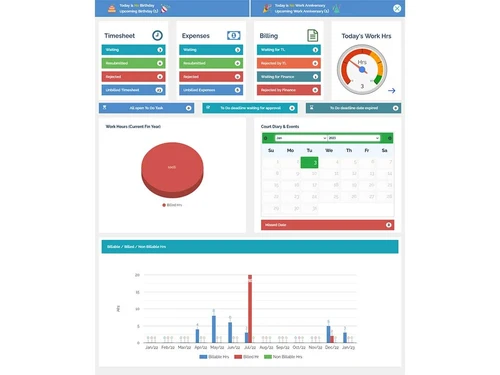
theo timesheet
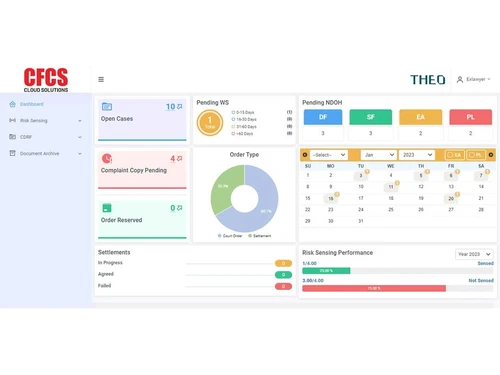
theo dashboard
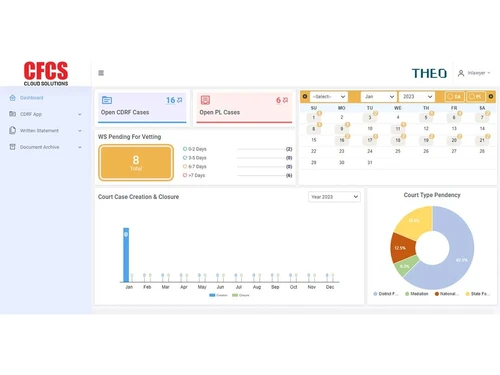
theo cdrf

THEO For Legal Profession

Brand: CFCS

  • 4.3

  • 4 Ratings

THEO for legal profession streamlines legal operations, thereby enhancing efficiency for law firms, and corporate legal departments by seamlessly automating case management, and document tracking.

See More

Have you used THEO For Legal Profession before?

Share your insights for better experience

Add a Review
Starting Price 10% OFF
₹2,250 ₹2,500

View plans

100% Genuine
Products
Best Price
Guaranteed
Safe & Secure
Payment
  • Description

  • Pricing

  • Features

  • Specification

  • Review

  • Compare

  • Alternatives

  • FAQ

Starting at ₹2,250

THEO For Legal Profession Software Overview

What is THEO for Legal Profession Software?

THEO for legal profession is a cloud-based legal practice management software developed by CFCS to help law firms and corporate legal departments streamline their workflows, and improve efficiency. The software enhances overall efficiency by facilitating the retrieval, archiving, and storage of critical client case history data, including case management details, case dates, time allocations for cases or clients, associates' time histories, billing records, and more.

It is a law firm software that is designed to carry out all the essential functions of a law firm, from managing various aspects of law firms to facilitating client interactions and court diary updates. It covers all the tasks crucial for the efficient functioning of law firms. The software simplifies the billing process by automatically tracking time spent on cases and generating accurate invoices.

The software also helps in sorting out all the paperwork that is associated with a client or a case. With THEO for the legal profession, you can easily upload files of heavy volume, and each file can be of up to 2GB. You don’t even have to worry about the safety and security of the data you upload. THEO for legal profession uses cloud-based data storage, so you can easily share and retrieve data from any location without worrying about the document's safety. Contact management, court diary management, reminders, and group scheduling are some of the major features which make THEO for legal profession a valuable resource for the law firms.

Apart from helping law firms, THEO for legal profession allows legal corporate departments to manage their legal processes efficiently, maintain client-centric customization, and access case details from any location or device with an internet connection.

It helps corporate legal departments mitigate risk by ensuring compliance with legal regulations and best practices. The software ensures seamless documentation management, thereby enabling the users to easily access all the documents about a case, like documents received from external lawyers, case-wise documents, documents sent to external lawyers, etc. Users can also access legal notices that are sent on behalf of any client.

You don't even have to worry about the details of a case filed. With THEO for the legal profession, you can easily access data like the court in which the case was filed, lawyers looking after a case, hearing details, details of the judgment if settled, details of the appeals if appealed, etc.

How THEO for Legal Profession Helps Law Firms?

With seamless integration of back-end and front-end processes, law firm management software allows legal professionals to streamline their workflow effectively. The software ensures that law firms can easily access and manage information related to case dates, time allocations for cases or clients, time history for associates, billing records, and more.

How THEO for Legal Profession Helps Corporate Legal Departments?

For corporate legal departments, it offers a cloud-based solution that prioritizes client customization, responsiveness, and accessibility. Corporate entities can benefit from the flexibility of deploying the software on their internal servers or opting for a separate cloud resource provided by CFCS. This strategic approach ensures enhanced security measures, as it eliminates data or resource sharing between entities.

Why Choose THEO for Legal Profession Software?

  • The law firm management software by CFCS allows you to track and manage the count of new cases initiated within the current month.
  • It allows you to capture essential information regarding legal notices, including town of origin, sending lawyer's name, client's name, and scanned notice copies.
  • The legal practice management software facilitates easy retrieval and linking with external document storage services like OneDrive or Google Docs.
  • It allows you to archive and manage client case history data, including contact details, accessible through name, email, or phone number searches.
  • The law firm management software enables the calculation of interest related to specific cases.
  • Theo plays a critical role in simplifying the billing process by seamlessly tracking the total time spent on cases by law firms, and based on that, it generates accurate invoices.

Benefits of THEO for Legal Profession Law Firm Software

  • The law firm management software provides comprehensive information on filed cases, their court categories, locations, associated lawyers, and case status.
  • It keeps law firms and corporate legal departments updated through emails on various aspects of firm activity, including court dates, matter updates, and unbilled matters.
  • The platform allows you to log and approve paid-out expenses for clients, including court fees, stamp duty, and miscellaneous expenses.
  • It acts as a repository for emails related to specific cases, with an AI system tagging and organizing emails automatically.
  • The legal practice management software by CFCS provides an auto-reminder calendar for court dates and other case-related appointments.
  • THEO Law Firm software is a great choice for legal corporate departments as it helps reduce risk by ensuring compliance with legal rules and regulations.

THEO for Legal Profession Law Firm Platform Pricing

THEO For Legal Profession pricing starts from INR 2,500 at techjockey.com. It comes with multiple pricing plans and caters to a diverse customer base. For subscription-related details and offers on premium packages, please request a call back from our product experts.

Read more

THEO For Legal Profession Pricing & Plans

Bronze (265.5/U/M)
Key Features
  • Time Sheet Management
  • Case Management
  • Easy Access Dashboard
  • Case File Library
  • Details of Legal Notices Received
Starting at ₹2250 ₹2500 SAVE UPTO 10%
    • Users

      Users
      Users
    • Monthly

      Monthly
      Monthly

Key Features

  • Time Sheet Management

  • Case Management

  • Easy Access Dashboard

  • Case File Library

  • Details of Legal Notices Received

THEO For Legal Profession Features

  • icon_check Time Sheet Management
    Enables the associates to fill in their daily time sheets through the software.
  • icon_check Case Expense Management
    Details about the expenses associated with the client are recorded here for internal approval.
  • icon_check Easy Access Dashboard
    It has a user-friendly interface that makes retrieving data related to your firm's activity easy.
  • icon_check Case File Library
    THEO for Legal Profession consists of all the details of the external cases filed by the company.
  • icon_check Details of Legal Notices Received
    Easily access all data related to legal notices, including scanned copies of notices, names of the lawyers who sent them.
  • icon_check Details of Summons Received
    Gain easy access to the location of the court, case details on which summons were sent, and more.
  • icon_check Details of legal notices sent on behalf of the com
    Track the reasons for sending legal notices, issuing lawyers, & the town from where notice was sent.
  • icon_check Details of risk sensing information submitted
    THEO for legal profession will help you assess lawyer details, nature of risk, and more.
  • icon_check Interest Calculator
    It ensures precise computation, automating interest accruals for financial transparency & accurate billing in legal matters.
  • icon_check Closure
    Consists of data related to in-court settlement, out-of-court settlement, payouts, penalties, and more.
  • icon_check Client Servicing & Management
    Organize contact details, cases, billing history, and documents for each client in one place.
  • icon_check Matter / Case Management & Updates
    Track case progress, deadlines, tasks, and communications with easy updates.
  • icon_check Time Sheet Management
    Enables the associates to fill in their daily time sheets through the software.
  • icon_check Case Expenses Management
    Expenses including court fees, stamp duty, etc. are collated for internal approval for client billing & reimbursements.
  • icon_check Document Management
    Store, categorize, and search documents securely with version control and access control.
  • icon_check Court Diary Management
    Schedule court appearances, hearings, and deadlines with reminders and conflict checks.
  • icon_check Invoicing & Bill Generation
    Generate and send invoices efficiently for multiple clients or matters simultaneously.
  • icon_check Team mates work performance Tracking
    Monitor individual and team productivity through time tracking and case assignments.
  • icon_check Runs on Mobile, Tab & Modern Web Browser
    THEO for Legal Profession runs across all web-based platforms.

THEO For Legal Profession Specifications

Supported Platforms
Windows Windows iOS iOS Android Android Linux Linux
Devices
Desktop Desktop Mobile Mobile Tablet Tablet iPad iPad
Deployment
Cloud-Based Cloud-Based Perpetual Perpetual
Suitable For
Law Firms
Business Specific
Law Firm
Language
English

Explore the Best Alternative Solutions Similar to Your Business Size and Needs

THEO For Legal Profession Review

4.3

Out of 5

img

Overall Rating

Based on
4 Verified Ratings

Rating Breakdown

  • Features 4
  • Value for Money 4.2
  • Ease of Use 4.3
  • Customer Support 4.7

92% Recommend this Product

Add Review

Techjockey Trusted Reviews from Verified Users

No reviews are currently available for THEO For Legal Profession. Discover similar Law Firm Software reviews

  • Lexzur (App4Legal)

    4.4

    Whats great - Affordable, feature-packed, and easy to use. read more

  • MyKase

    4.3

    Whats great - Affordable, feature-packed, and user-friendly. read more

  • Manage My Lawsuits

    4.6

    Whats great - Manage My Law Suits is Smart and efficient solution for legal services read more

Compare THEO For Legal Profession With other Law Firm Software

Products
Ratings
Pricing
Device Supported
Deployment
Supported Platforms
  • img

    THEO For Legal Profession

  • 4.3

  • ₹ 2250.00 excl. GST

  • Desktop

    Mobile

  • Web based

    On Premises

  • Windows

    Mac OS

  • img

    DoNotPay

  • 4.2

  • Price On Request

  • Desktop

    Mobile

  • Web based

    On Premises

  • Windows

    Mac OS

  • img

    Legal XGen

  • 4.4

  • ₹ 2000

  • Desktop

    Mobile

  • Web based

    On Premises

  • Windows

    Mac OS

  • img

    Lexzur (App4Legal)

  • 4.4

  • Price On Request

  • Desktop

    Mobile

  • Web based

    On Premises

  • Windows

    Mac OS

  • img

    RazorLex

  • 4.0

  • Price On Request

  • Desktop

    Mobile

  • Web based

    On Premises

  • Windows

    Mac OS

  • img

    CASEpeer

  • 4.6

  • Price On Request

  • Desktop

    Mobile

  • Web based

    On Premises

  • Windows

    Mac OS

  • img

    AI Lawyer

  • 4.5

  • Price On Request

  • Desktop

    Mobile

  • Web based

    On Premises

  • Windows

    Mac OS

(2) Product(s) selected

THEO For Legal Profession Alternatives

See All THEO For Legal Profession Alternatives

Available

Price on Request

Starting Price:

$69 /month

Starting Price:

$10 /month

Available

Price on Request

Available

Price on Request

Starting Price:

$149 /Year

Starting Price:

$89 /Month

Which operating system does THEO support?

THEO law firm management software is compatible with Windows, iOS, and Linux operating systems.

What is deployment type of THEO-Law Firm Management Software?

THEO legal compliance management software supports web-based deployment type.

Who are the potential users of THEO-Law Firm Management Software?

THEO law firm software is typically used by small & big law firms as well as corporates. THEO helps them to streamline all the tasks related to cases/matters, or the law.

Is there any THEO-Law Firm Management Software demo or free trial?

THEO law firm management solution’s demo is available for free with techjockey.com.

Is THEO-Law Firm Management Software free?

THEO software solution offers a free trial. However, the premium plan with advanced features is available at techjockey.com with exciting deals.

How can you download THEO-Law Firm Management Software?

For THEO-Law Firm Management Software installation, insert the given CD/USB flash storage in your system and open the Setup Wizard to get started. The web-based version can be accessed directly through THEO-Law Firm Management Software portal.

How does THEO-Law Firm Management Software work?

THEO for legal profession is a cloud-based software for law firms and corporate entities that manages everything from contacts and cases to billing and court dates. When it comes to the law firms, THEO’s auto reminder calendar sends out updates in advance to the users to remind them about their court dates and other court-related appointments thereby making it a vital tool for the people.

Are there any hidden charges for THEO-Law Firm Management Software updates?

THEO-Law Firm Management Software regular updates are available free of cost. There are no hidden software update charges.

What is THEO-Law Firm Management Software used for?

THEO-Law Firm Management Software Law Firm Software used for Client Management,Global Matter Management,Contact Management and Subsidiary Management.

How do I contact THEO-Law Firm Management Software support?

You can directly visit THEO-Law Firm Management Software portal and get in touch with THEO-Law Firm Management Software customer support for any software-related query.

How to get THEO-Law Firm Management Software lifetime deal?

Please contact our product experts to get THEO-Law Firm Management Software lifetime deal with exclusive offers.

20,000+ Software Listed

Best Price Guranteed

Free Expert Consultation

2M+ Happy Customers

Terms and Condtions

close

Users with registered businesses can purchase goods from merchants on the platform to satisfy their business needs. Users are not permitted to utilize any products acquired through the platform for resale, advertising, business, or further distribution.

For each purchase made, users will receive a Tax Invoice (or 'GST invoice') that includes specific details such as:

  • the GSTIN of the user associated with their registered business, and

  • the specified Entity Name for their business.

It should be noted that not all products are eligible for GST Invoice. Only the products displayed by participating sellers with the 'GST-based Invoice Available' callout on the product description page would qualify.

Certain goods and services are not eligible to get a GST Invoice, including items with VAS, i.e., Value Added Services (e.g., Total Mobile Protection/Assured Buyback) and those involving an exchange offer at the time of purchase.

Users must ensure the accuracy of the GSTIN, and business entity name provided for the GST Invoice. Requests for corrections into GST Invoice would not be accommodated by Techjockey.com or any Seller, and any issues arising from user-provided information are the sole responsibility of users.

Techjockey.com is not liable for the GST Invoice or any associated input tax credit. To efficiently claim an input tax credit, users should select the registered place of business address as per the GST authority's data and follow the provisions of the GST Act and rules.

To claim an input tax credit, the delivery and billing addresses must match. Furthermore, input tax credits will not be granted if the delivery address and GSTIN on the invoice are from different states. In case of incorrect GST details provided during the order placement, the order will be canceled automatically.