 USA
USA UAE
UAESmall Business
Designed for startups and growing businesses


See More





Brand: Think-cell
Think-Cell is one of the best productivity software that helps with charting and graphical layout designing. It assists in the improvement of charting solutions for PowerPoint work. Think-Cell offers clustered stacked bar that increases the efficiency in creating a slide and its quality. It is one of the best software for PowerPoint consultation, as it automatically saves all the work and offers...
See MoreHave you used think cell before?
Share your insights for better experience
Brand: Think-cell
Founded Year: 2001
Think-cell is a developer of graphics software to improve professional slide production in Microsoft PowerPoint.
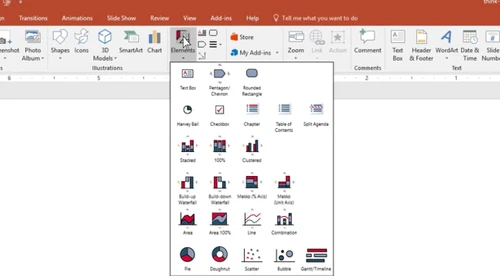
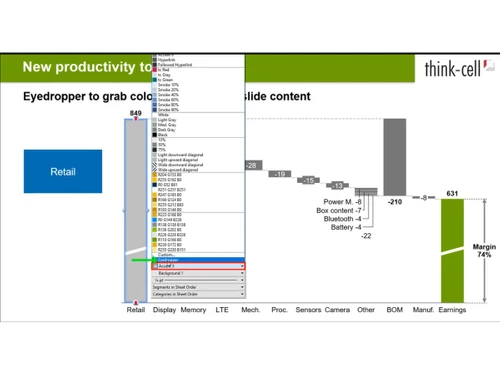
 Page Layout Integration & Automation Charting Multi Language Support Multiple Font Support PDF manipulation Automated Gantt Charts Smart Waterfall Charts Excel Linking Custom Style Manager Smart Process Flows Data-Driven Agenda Responsive Scatter Plots Dynamic Growth Arrows

Watch the demo video to explore key features, real workflows, and how the software fits your business needs.
 Windows
  MacOS
MacOS  Desktop
  Perpetual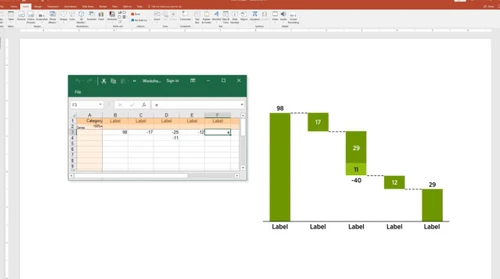
Small Business
Designed for startups and growing businesses
Medium Business
Built for business growth and flexibility
Enterprises
Designed for complex and large-scale business needs
4.7
Out of 5

Overall Rating
Based on
4 Verified Reviews
Rating Breakdown
87% Recommend this Product
Add ReviewUsers generally appreciate think-cell for its user-friendly interface and efficient functionality, particularly praising its integration with PowerPoint for easy chart updates. Many find it valuable for daily reporting, noting the convenience it offers in managing data presentations. Positive sentiments are echoed across reviews, highlighting a reliable service experience. However, the reviews do not mention any significant drawbacks, indicating a strong overall satisfaction among users.


Dec 6, 2018
Techjockey Verified
“Good design”
Pros
My present partners with perpetual designer positions have completed a magnificent activity in their glassdoor surveys, depicting every one of the reasons why they like working at think-cell. I can basically buy in to what they stated, and I would prefer not to rehash everything.
Cons
NO CONS
Oct 8, 2018
Techjockey Verified
“Plugin powerpoint is best”
Pros
This software is user friendly with great UI experience. Easy to change data on charts. I use this for daily reports and I find it easy to just update the necessary information daily or weekly.
Cons
NO CONS
Aug 14, 2018
Techjockey Verified
“A fast reliable service”
Pros
I had a good experience with this service. I found it very convenient to have a list of possibilities presented to me instead of searching all over the place.
Cons
N/A

think cell
Price On Request
Desktop
Mobile
Web based
On Premises
Windows
Mac OS

Google Workspace
₹ 325
Desktop
Mobile
Web based
On Premises
Windows
Mac OS

Cold Turkey
Price On Request
Desktop
Mobile
Web based
On Premises
Windows
Mac OS

Office 365 E3
₹ 1740
Desktop
Mobile
Web based
On Premises
Windows
Mac OS

InboxPro
Price On Request
Desktop
Mobile
Web based
On Premises
Windows
Mac OS

Snippets AI
Price On Request
Desktop
Mobile
Web based
On Premises
Windows
Mac OS

Office 365 E5
₹ 3240
Desktop
Mobile
Web based
On Premises
Windows
Mac OS

Raycast
Price On Request
Desktop
Mobile
Web based
On Premises
Windows
Mac OS

Microsoft 365 F3
₹ 996
Desktop
Mobile
Web based
On Premises
Windows
Mac OS

Microsoft 365 F1
₹ 300
Desktop
Mobile
Web based
On Premises
Windows
Mac OS

SmartPanels
Price On Request
Desktop
Mobile
Web based
On Premises
Windows
Mac OS
(0) Product(s) selected
Starting Price:
₹2,499 /One-Time
Starting Price:
$24
Starting Price:
$6 /User/Month
Starting Price:
$10 /Month
Starting Price:
$40 /Year

Starting Price:
$4 /Monthly

Starting Price:
$7 /Month

Starting Price:
$10

Starting Price:
$8 /Monthly

Starting Price:
$60

Starting Price:
$17 /Month








You will get free online demo for Think-Cell, to help you understand its features.
Yes, the updates are covered under your yearly subscription plan.
For the transfer of licenses to new user or computer, just make sure that Think-Cell is completely inaccessible from the old system. Then download the software on your new PC and use the same license key.
Yes, you can use the Think-Cell license for commercial purposes.
Think-Cell uses the standard PowerPoint storage system to save all the PPT files. It includes OneDrive cloud storage system and on-premise storage.
Think-Cell productivity software is available at USD 107 per year/user for an Essential plan at techjockey.com.
20,000+ Software Listed
Best Price Guranteed
Free Expert Consultation
2M+ Happy Customers
Terms and Condtions

Users with registered businesses can purchase goods from merchants on the platform to satisfy their business needs. Users are not permitted to utilize any products acquired through the platform for resale, advertising, business, or further distribution.
For each purchase made, users will receive a Tax Invoice (or 'GST invoice') that includes specific details such as:
the GSTIN of the user associated with their registered business, and
the specified Entity Name for their business.
It should be noted that not all products are eligible for GST Invoice. Only the products displayed by participating sellers with the 'GST-based Invoice Available' callout on the product description page would qualify.
Certain goods and services are not eligible to get a GST Invoice, including items with VAS, i.e., Value Added Services (e.g., Total Mobile Protection/Assured Buyback) and those involving an exchange offer at the time of purchase.
Users must ensure the accuracy of the GSTIN, and business entity name provided for the GST Invoice. Requests for corrections into GST Invoice would not be accommodated by Techjockey.com or any Seller, and any issues arising from user-provided information are the sole responsibility of users.
Techjockey.com is not liable for the GST Invoice or any associated input tax credit. To efficiently claim an input tax credit, users should select the registered place of business address as per the GST authority's data and follow the provisions of the GST Act and rules.
To claim an input tax credit, the delivery and billing addresses must match. Furthermore, input tax credits will not be granted if the delivery address and GSTIN on the invoice are from different states. In case of incorrect GST details provided during the order placement, the order will be canceled automatically.


