linkedin
Timereaction logo
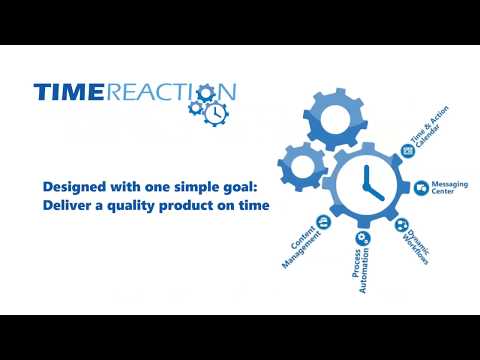
play Timereactions' teaser video
Timereaction production
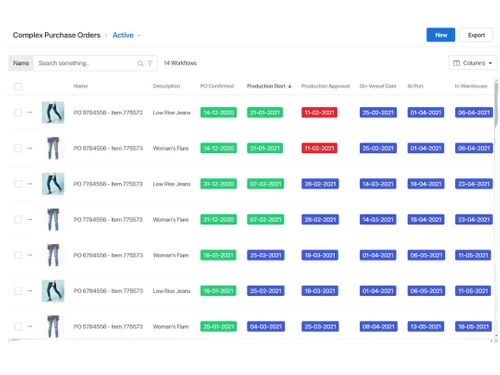
Timereaction orders

Timereaction

Brand: Timereaction

  • 4.2

  • 3 Ratings

Timereaction is an advanced workflow automation software that optimizes business processes with automation and collaboration tools.

See More

Have you used Timereaction before?

Share your insights for better experience

Add a Review

Price Available on Request

Questions about pricing or customization? We’re here to help, just a click away.

100% Genuine
Products
Best Price
Guaranteed
Safe & Secure
Payment
  • Description

  • Pricing

  • Features

  • Specification

  • Review

  • Compare

  • Alternatives

  • FAQ

Timereaction Software Overview

What is Timereaction?

Timereaction is a workflow automation software designed to centralize, manage operations and enhance supply chain processes productivity. It automates workflows by assigning, tracking, and organizing tasks through user-friendly dashboards. Its purpose is to address production delays, and make better communication across teams and suppliers.

The software supports drag-and-drop task management and integrates with existing systems, optimizing workflow and improving user experience. Its user-friendly approach makes it accessible to professionals and beginners alike.

Timereaction provides workflow automation, which simplifies complex processes by dynamically predicting and adjusting timelines. It uses a predictive scheduling engine that gives real-time visibility into task progress, flagging delays and recalculating timelines.

Why choose Timereaction Workflow Management Software?

  • Workflow Automation: Simplifies complex processes by dynamically adjusting timelines, reducing manual effort, and enhancing operational efficiency.
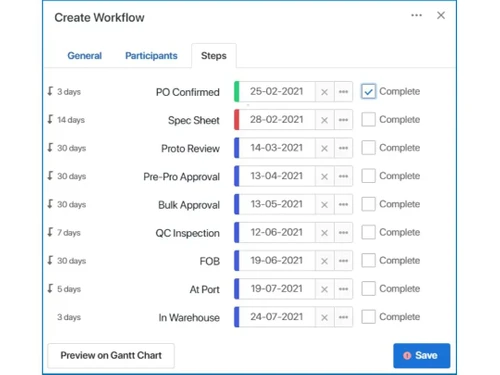
  • Time & Action Calendar: Tracks milestones, flags overdue tasks, and ensures deadlines are met for seamless project management.
  • Real-time Notifications: Keeps teams updated on progress and changes, fostering accountability and timely decision-making.
  • Document Management: Provides centralized file sharing and access, improving collaboration and reducing time spent searching for critical information.
  • Predictive Scheduling Engine: Flags delays, recalculates timelines, and aligns team actions to ensure projects stay on track.

Benefits of Timereaction Workflow Automation Software

  • Improved Workflow Management: It helps in organizing tasks effectively, ensuring timely project completion.
  • Better Collaboration: Mnges team communication, ensuring seamless coordination and reducing miscommunication errors.
  • Time Efficiency: Automated workflows help in saving time by reducing manual tasks and repetitive processes.
  • Real-Time Updates: Provides instant notifications, keeping everyone informed about task progress and changes.
  • Improved Accountability: Tracks tasks and deadlines, ensuring team members remain focused and responsible.
  • Centralized Management: Combines task tracking, document sharing, and reporting in one platform for better organization.
  • Dynamic Scheduling: Adjusts timelines automatically, addressing delays and maintaining project momentum effectively.

Pricing of Timereaction

Timereaction price details are available on request at techjockey.com.

Timereaction price in India may vary based on factors like customization, additional features required, number of users, and the deployment type. Please request a call back for subscription-related details and to avail offers on premium packages.

Read more

Timereaction Company Details

Founded Year:  2010

Timereaction creates a transparent work space that allows team members, customers and suppliers to communicate, collaborate and manage business processes in real time.

Director/Founders Allan Diamond
Company Size 1-100 Employees

Timereaction Pricing & Plans

Looking for The Right Pricing?

Share your requirements and get a plan built around your business.

  • Define your business needs
  • Get customised pricing
  • Choose features that fit your workflow

Price Available on Request

Get personalised Timereaction pricing that fits your needs. Our team will connect with you.

Timereaction Features

  • icon_check Milestone Management
    Defines and tracks key production milestones to ensure timely delivery and proactive issue resolution.
  • icon_check Order Management
    Centralizes purchase orders, tracking details, updates, and status across the entire production lifecycle.
  • icon_check Document Management
    Stores and organizes files like specs, designs, and contracts for easy access and collaboration.
  • icon_check Vendor Management
    Manages vendor relationships, performance, and communication in a centralized platform.
  • icon_check Audit Trail
    Maintains a complete history of actions and changes for accountability and compliance tracking.
  • icon_check Workflow Management
    Mnges supply chain workflow processes by automating and optimizing workflows for better efficiency.
  • icon_check Communication
    Enhances team collaboration with real-time messaging and integrated communication tools.
  • icon_check SMS Integration & Notification
    Ensures timely updates and alerts with automated SMS notifications.
  • icon_check Time and Action Calendar
    Helps in scheduling and tracking tasks for efficient time management.
  • icon_check Document Integration
    Simplifies document handling by providing seamless file storage and sharing options.
  • icon_check Workflow Automation
    Reduces manual intervention by automating repetitive business operations.
  • icon_check Predictive Scheduling
    Uses AI-driven analytics to forecast and optimize project timelines.
Timereaction Demo Video play icon

Get Timereaction Demo

Watch the demo video to explore key features, real workflows, and how the software fits your business needs.

Understand
Key Features
Personal
Demo Insights
Interactive
Demo Support

Timereaction Specifications

Supported Platforms
Windows Windows
Devices
Desktop Desktop
Deployment
Cloud-Based Cloud-Based
Suitable For
All Industries
Business Specific
All Businesses
Business Size
Small Business Startups Medium Business Enterprises SMBs SMEs
Customer Support
Phone Email Live Chat
Language
English
Integration
API Integration
Training Resources
Live Online Webinars Documentation Videos
AI Features
AI Integrated
Technology
Next Generation

Explore the Best Alternative Solutions Similar to Your Business Size and Needs

Timereaction Review

4.2

Out of 5

img

Overall Rating

Based on
3 Verified Ratings

Rating Breakdown

  • Features 4.1
  • Value for Money 4.5
  • Ease of Use 4.1
  • Customer Support 4.3

96% Recommend this Product

Add Review

Techjockey Trusted Reviews from Verified Users

No reviews are currently available for Timereaction. Discover similar Workflow Automation Software reviews

  • Pipefy

    4.3

    Whats great - Great company! Excellent customer service and just generally smooth sailing. Would highly recommend. read more

  • Monday.com

    4.0

    Whats great - monday.com’s design and functionality make it a perfect choice for managing projects. read more

  • Wrike

    4.0

    Whats great - ssions and manage user rights, ensuring that sensitive information is only available to the right people. Further, the two-fa... read more

Compare Timereaction With other Workflow Automation Software

Products
Ratings
Pricing
Device Supported
Deployment
Supported Platforms
  • img

    Timereaction

  • 4.2

  • Price On Request

  • Desktop

    Mobile

  • Web based

    On Premises

  • Windows

    Mac OS

  • img

    Qntrl

  • 4.2

  • ₹ 1200

  • Desktop

    Mobile

  • Web based

    On Premises

  • Windows

    Mac OS

  • img

    Zoho Flow

  • 4.1

  • ₹ 1740

  • Desktop

    Mobile

  • Web based

    On Premises

  • Windows

    Mac OS

  • img

    Pipedream

  • 4.2

  • Price On Request

  • Desktop

    Mobile

  • Web based

    On Premises

  • Windows

    Mac OS

  • img

    n8n

  • 4.2

  • Price On Request

  • Desktop

    Mobile

  • Web based

    On Premises

  • Windows

    Mac OS

  • img

    Zapier

  • 4.4

  • Price On Request

  • Desktop

    Mobile

  • Web based

    On Premises

  • Windows

    Mac OS

  • img

    Pipefy

  • 4.3

  • Price On Request

  • Desktop

    Mobile

  • Web based

    On Premises

  • Windows

    Mac OS

  • img

    Quickwork

  • 4

  • Price On Request

  • Desktop

    Mobile

  • Web based

    On Premises

  • Windows

    Mac OS

  • img

    Levity

  • 4.5

  • Price On Request

  • Desktop

    Mobile

  • Web based

    On Premises

  • Windows

    Mac OS

  • img

    Integrately

  • 4.1

  • Price On Request

  • Desktop

    Mobile

  • Web based

    On Premises

  • Windows

    Mac OS

  • img

    Cflow

  • 4.1

  • Price On Request

  • Desktop

    Mobile

  • Web based

    On Premises

  • Windows

    Mac OS

(0) Product(s) selected

Timereaction Alternatives

See All Timereaction Alternatives

n8n

4.2

Starting Price:

€20 /Month

Starting Price:

$30 /Month

Available

Price on Request

Starting Price:

$49

Starting Price:

$11 /Month

Starting Price:

$20 /Month

Starting Price:

$108

Available

Price on Request

Available

Price on Request

How can a user track task progress in Timereaction?

Users can track task progress using the Time & Action Calendar and real-time notifications.

Can a user install Timereaction on multiple devices?

Yes, Timereaction allows installation on multiple devices based on the chosen subscription plan.

How Much Does Timereaction Cost?

Timereaction price details are available on request at techjockey.com.

What operating systems does Timereaction Workflow Management Software support?

Timereaction is compatible with Windows, macOS, and Linux platforms.

Who uses Timereaction?

Timereaction is used by businesses managing supply chains, production workflows, and collaborative projects.

Is there a demo available for Timereaction Workflow Management Software?

Yes, a free demo can be requested from the official website.

Can Timereaction handle large data sets?

Yes, Timereaction is built to efficiently manage and process large volumes of data.

Can a user generate reports in Timereaction?

Yes, Timereaction provides reporting tools for data-driven insights and performance analysis.

Can I access Timereaction on mobile devices?

Yes, Timereaction is compatible with mobile devices, ensuring accessibility on the go.

Can a user collaborate with a team using Timereaction Workflow Management Software?

Yes, Timereaction supports real-time collaboration, allowing teams to work together seamlessly.

How does Timereaction benefit supply chain management?

Timereaction helps supply chain management by centralizing workflows, automates processes, and enhances collaboration, ensuring timely deliveries and reducing production delays.

What visuals does Timereaction provide for workflow tracking?

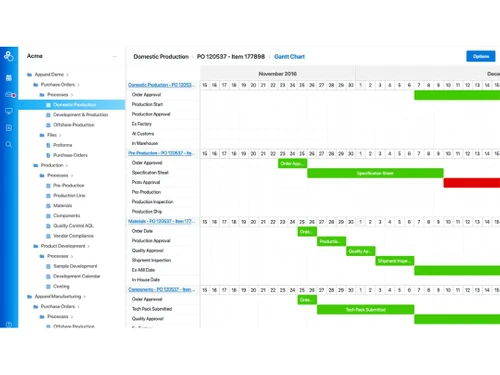
Timereaction offers Gantt charts, Time & Action Calendars, and real-time dashboards for clear process visualization.

20,000+ Software Listed

Best Price Guranteed

Free Expert Consultation

2M+ Happy Customers

Terms and Condtions

close

Users with registered businesses can purchase goods from merchants on the platform to satisfy their business needs. Users are not permitted to utilize any products acquired through the platform for resale, advertising, business, or further distribution.

For each purchase made, users will receive a Tax Invoice (or 'GST invoice') that includes specific details such as:

  • the GSTIN of the user associated with their registered business, and

  • the specified Entity Name for their business.

It should be noted that not all products are eligible for GST Invoice. Only the products displayed by participating sellers with the 'GST-based Invoice Available' callout on the product description page would qualify.

Certain goods and services are not eligible to get a GST Invoice, including items with VAS, i.e., Value Added Services (e.g., Total Mobile Protection/Assured Buyback) and those involving an exchange offer at the time of purchase.

Users must ensure the accuracy of the GSTIN, and business entity name provided for the GST Invoice. Requests for corrections into GST Invoice would not be accommodated by Techjockey.com or any Seller, and any issues arising from user-provided information are the sole responsibility of users.

Techjockey.com is not liable for the GST Invoice or any associated input tax credit. To efficiently claim an input tax credit, users should select the registered place of business address as per the GST authority's data and follow the provisions of the GST Act and rules.

To claim an input tax credit, the delivery and billing addresses must match. Furthermore, input tax credits will not be granted if the delivery address and GSTIN on the invoice are from different states. In case of incorrect GST details provided during the order placement, the order will be canceled automatically.