USA
USA UAE
UAESmall Business
Designed for startups and growing businesses



See More





Brand: ZAPIER
Zapier is an automation tool that helps users in integrating different work apps and automating workflows without any code. It creates multiple Zaps (customized workflows) for different tasks to automatically perform actions for a particular activity. By creating and turning on the Zaps, actions will be automatically configured for a specific activity. With different zaps, users can create and au...
See MoreHave you used Zapier before?
Share your insights for better experience
Brand: ZAPIER
Founded Year: 2011
Zapier allows its users to easily connect and automate the apps they use.
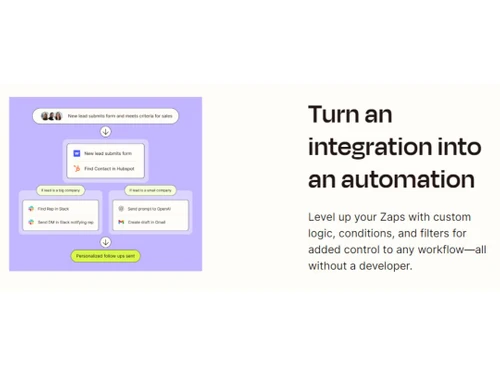
 Filters Formatters Connections via Webhooks Custom Logic - Paths Auto Reply Unlimited User Folder Permissions Advanced Admin Permissions Apps Restrictions Custom Data Retention

Watch the demo video to explore key features, real workflows, and how the software fits your business needs.
 Windows
  MacOS
MacOS  Linux
Linux  Desktop
  Cloud-Based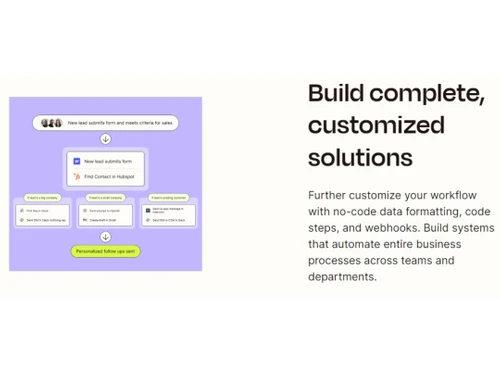
Small Business
Designed for startups and growing businesses
Medium Business
Built for business growth and flexibility
Enterprises
Designed for complex and large-scale business needs
4.4
Out of 5

Overall Rating
Based on
1 Verified Review
Rating Breakdown
93% Recommend this Product
Add Review

Zapier
Price On Request
Desktop
Mobile
Web based
On Premises
Windows
Mac OS

n8n
Price On Request
Desktop
Mobile
Web based
On Premises
Windows
Mac OS

Pipefy
Price On Request
Desktop
Mobile
Web based
On Premises
Windows
Mac OS

Qntrl
₹ 1200
Desktop
Mobile
Web based
On Premises
Windows
Mac OS

Zoho Flow
₹ 1740
Desktop
Mobile
Web based
On Premises
Windows
Mac OS

Pipedream
Price On Request
Desktop
Mobile
Web based
On Premises
Windows
Mac OS

Quickwork
Price On Request
Desktop
Mobile
Web based
On Premises
Windows
Mac OS

Levity
Price On Request
Desktop
Mobile
Web based
On Premises
Windows
Mac OS

Cflow
Price On Request
Desktop
Mobile
Web based
On Premises
Windows
Mac OS

Integrately
Price On Request
Desktop
Mobile
Web based
On Premises
Windows
Mac OS

Relay App
Price On Request
Desktop
Mobile
Web based
On Premises
Windows
Mac OS
(0) Product(s) selected
Starting Price:
€20 /Month
Available
Price on Request
Starting Price:
$49
Starting Price:
$11 /Month

Starting Price:
$20 /Month

Starting Price:
$108

Available
Price on Request

Available
Price on Request

Available
Price on Request

Available
Price on Request

Available
Price on Request
Zapier Marketing automation tool demo is available for free with techjockey.com.
Zapier Marketing automation software offers a free trial. However, the premium plan with advanced features is available at techjockey.com.
Zapier Marketing automation tool is web-based and compatible with all operating systems.
Zapier Marketing automation software app is not available.
Zapier Marketing automation solution supports web-based deployment type.
Zapier Marketing automation tool pricing details are available on request at techjockey.com.
Zapier is typically used in marketing, IT, social technology industries, etc.
Zapier Marketing automation solution helps in automating workflows, managing app permissions, integrating apps, etc. It's a complete solution for securing data, exchanging data across multiple apps, and more.
Zapier automation platform connects all the apps and performs repetitive tasks. It automates the work through apps connection and moving data between them depending upon the set rules.
Yes, Zapier is a good tool to automate various repetitive tasks. You can easily integrate it with almost 4000+ applications that automate tasks. It creates zaps (automated workflows) to easily exchange data and tasks within applications.
Yes, Zapier store all the data related to its services and customers in safe and secure AWS servers situated the United States.
Here’s how you can set up a trigger in Zapier:
0 0
To set up a webhook in Zapier you should:
0 0
The error 'ReferenceError: fetch is not defined' can come up if you are trying to make use of 'fetch ()' in places where it doesn't work, such as Node.js. Therefore, you must add the node-fetch package to Node.js to fix this error.
0 0
Yes, it is possible to check the availability of team members across separate calendars and trigger another Zap in Zapier based on their availability. Zapier can monitor trigger events in calendars and initiate actions accordingly through regular polling or instantly via webhooks.
0 0
One of the major reasons could be that your username/email address is incorrect. So, you are supposed to go to the Forgot password page and try entering a different email address. Once that is done, you'll receive an email from Zapier where you can choose the email address that will work correctly with your Zapier account.
0 0
20,000+ Software Listed
Best Price Guranteed
Free Expert Consultation
2M+ Happy Customers
Terms and Condtions

Users with registered businesses can purchase goods from merchants on the platform to satisfy their business needs. Users are not permitted to utilize any products acquired through the platform for resale, advertising, business, or further distribution.
For each purchase made, users will receive a Tax Invoice (or 'GST invoice') that includes specific details such as:
the GSTIN of the user associated with their registered business, and
the specified Entity Name for their business.
It should be noted that not all products are eligible for GST Invoice. Only the products displayed by participating sellers with the 'GST-based Invoice Available' callout on the product description page would qualify.
Certain goods and services are not eligible to get a GST Invoice, including items with VAS, i.e., Value Added Services (e.g., Total Mobile Protection/Assured Buyback) and those involving an exchange offer at the time of purchase.
Users must ensure the accuracy of the GSTIN, and business entity name provided for the GST Invoice. Requests for corrections into GST Invoice would not be accommodated by Techjockey.com or any Seller, and any issues arising from user-provided information are the sole responsibility of users.
Techjockey.com is not liable for the GST Invoice or any associated input tax credit. To efficiently claim an input tax credit, users should select the registered place of business address as per the GST authority's data and follow the provisions of the GST Act and rules.
To claim an input tax credit, the delivery and billing addresses must match. Furthermore, input tax credits will not be granted if the delivery address and GSTIN on the invoice are from different states. In case of incorrect GST details provided during the order placement, the order will be canceled automatically.