 USA
USA UAE
UAESmall Business
Designed for startups and growing businesses

See More





Brand: Urkund
Urkund Plagiarism Software is an efficient and reliable plagiarism checking solution, that checks the uploaded document against millions of sources and assures its authenticity.
See MoreHave you used Urkund before?
Share your insights for better experience
Brand: Urkund
Founded Year: 2000
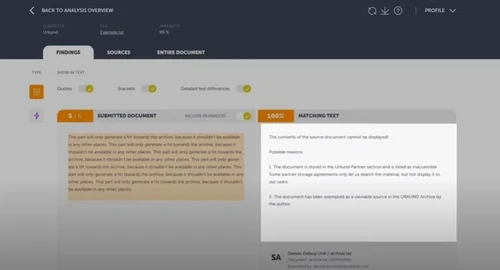
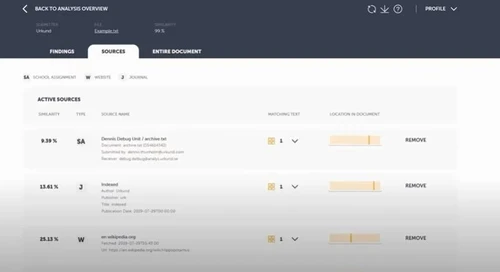
Urkund software is easy to use, fully integrated in all major learning management systems, and uses advanced machine learning to deliver test winning accuracy.
Looking for The Right Pricing?
Share your requirements and get a plan built around your business.
Price Available on Request
Get personalised Urkund pricing that fits your needs. Our team will connect with you.
Core Detection Features
 Multi Language Support API Access Plagiarism Detection Source Matching Paraphrase Detection AI Detection
 Document Management
Multi Format Support File Upload Management Bulk Document Checking Document Retention and History Performance and Security
Data Security Multi Device Compatibility Automated Alerts and Monitoring Scan Speed Branding & Marketing
White Label Solution PDF Reports Custom Branding Client Based Reporting Productivity and Enhancements
Collaboration Grammar Checker Citation Generation Integrations and Extensions
API Integration Microsoft Office Integration Browser Extension Google Docs Integration Administrative Features
User Access Management Domain Filtering Content Filtering Global Content Access Report and Analysis
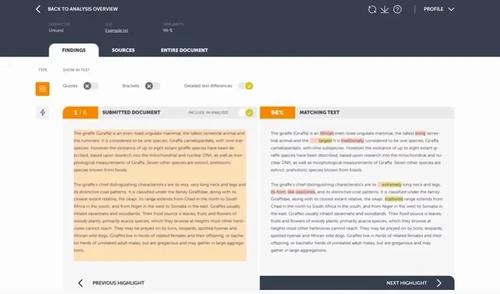
Data Export Plagiarism Reports Writing Statistics Side-by-Side Comparison Customizable Exclusion Originality Score Paraphrasing Score 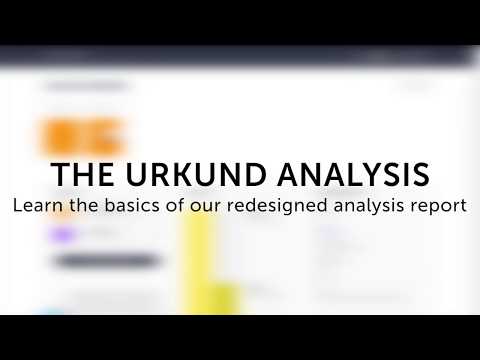

Watch the demo video to explore key features, real workflows, and how the software fits your business needs.
 Ubuntu
  Windows
  MacOS
MacOS  Linux
Linux  Desktop
  Cloud-Based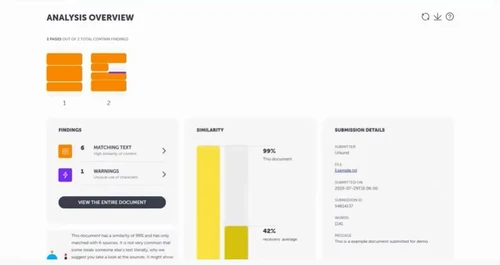
Small Business
Designed for startups and growing businesses
Medium Business
Built for business growth and flexibility
Enterprises
Designed for complex and large-scale business needs
4.4
Out of 5

Overall Rating
Based on
9 Verified Reviews
Rating Breakdown
87% Recommend this Product
Add ReviewUsers generally appreciate Urkund for its detailed reports and effective integration with Learning Management Systems, which streamline the process of submitting assignments and checking for plagiarism. The tool's accuracy in detecting similarities is frequently highlighted, though some users note that it can sometimes flag non-plagiarized content or lack specific source matching. Additionally, the limitations of the free version and occasional delays in processing larger documents are common concerns. Overall, the software is seen as beneficial, particularly for educational institutions.
Pros
"The reports are detailed; it highlights exact matches and gives sources to help me understand where the similarities are."
"It integrates well with Learning Management Systems. It is seamless for submitting assignments and running checks."
"The interface is user friendly and simple to navigate. It makes it easy to submit document and check reports."
Cons
"Sometimes it shows similarities, but it does not give me an exact source for every match. This makes it hard to verify."
"It can take a while to process longer documents so I might have to wait."
"It sometimes flags content that is not plagiarized. This is annoying when reviewing papers."

Oct 4, 2024
Techjockey Verified
“Detailed Reports but Lacks Exact Source Matching”
I can better grasp the origins of the content because to Urkund's incredibly thorough reports. It can be challenging to verify when it displays similarities but fails to provide a specific source for each match.
Pros
The reports are detailed; it highlights exact matches and gives sources to help me understand where the similarities are.
Cons
Sometimes it shows similarities, but it does not give me an exact source for every match. This makes it hard to verify.
Reason to switch
Urkund offered a higher level of detail in its reports which made the switch worth it.
Aug 15, 2024
Techjockey Verified
“Great Integration but Takes Time for Larger Files”
Due to Urkund's excellent integration with our LMS, submitting assignments and running plagiarism checks is made easier. Although the process is smooth, processing larger papers can occasionally take a little longer.
Pros
It integrates well with Learning Management Systems. It is seamless for submitting assignments and running checks.
Cons
It can take a while to process longer documents so I might have to wait.
Reason to switch
I moved from Plagiarism Detector Pro to Urkund since it has a better integration with our LMS.
Jun 7, 2024
Techjockey Verified
“Easy to Use but Can Be Too Sensitive at Times”
The layout of Urkund is incredibly user-friendly, which makes checking reports and submitting papers a breeze. I really like how easy it is to use the tool. When reading papers, it might be unpleasant when it identifies text that is not truly plagiarized.
Pros
The interface is user friendly and simple to navigate. It makes it easy to submit document and check reports.
Cons
It sometimes flags content that is not plagiarized. This is annoying when reviewing papers.
Reason to switch
Plagiarism Checker X was good, but Urkund’s interface was much easier to use and navigate.

Urkund
Price On Request
Desktop
Mobile
Web based
On Premises
Windows
Mac OS

DrillBit Plagiarism Checker
₹ 4500
Desktop
Mobile
Web based
On Premises
Windows
Mac OS

Plagiarism Detector Pro
₹ 3729
Desktop
Mobile
Web based
On Premises
Windows
Mac OS

Plagiarism Checker X
₹ 3700
Desktop
Mobile
Web based
On Premises
Windows
Mac OS

CopyLeaks
Price On Request
Desktop
Mobile
Web based
On Premises
Windows
Mac OS

iThenticate Plagiarism
Price On Request
Desktop
Mobile
Web based
On Premises
Windows
Mac OS

PlagAware
Price On Request
Desktop
Mobile
Web based
On Premises
Windows
Mac OS

DupliChecker
Price On Request
Desktop
Mobile
Web based
On Premises
Windows
Mac OS

Unicheck
Price On Request
Desktop
Mobile
Web based
On Premises
Windows
Mac OS

Plag AI
Price On Request
Desktop
Mobile
Web based
On Premises
Windows
Mac OS

Crossplag
Price On Request
Desktop
Mobile
Web based
On Premises
Windows
Mac OS
(0) Product(s) selected
Starting Price:
€13 /License
Starting Price:
$10 /Month
Available
Price on Request
Available
Price on Request

Starting Price:
€30 /License

Starting Price:
$20 /Month

Starting Price:
$10 /Month

Available
Price on Request

Available
Price on Request

Starting Price:
$15 /Month $30

Available
Price on Request





No, Urkund Plagiarism Software does not have a mobile app as of now.
Urkund is a plagiarism detection system that works by analyzing submitted documents and comparing them to a vast database of academic papers, online sources, and publications.
To download Urkund software, you need the Urkund license after contacting their sales team. Once your university gets Urkund license, it can generate user ID and password for students. Once your account is activated with the given credentials, you can login and get started.
Urkund will ask you to ‘Proceed to Your Account’. Click on it and then enter your analysis address. This is where you have to send texts for analysis. Plagiarism result will be shown on your page and account.
Your university coordinator will generate username and password. Once your account is activated, you can use the given credentials to login to your Urkund account.
Strategies like paraphrasing, changing the format of your document can help in reducing the Urkund score. However, the best way to avoid plagiarism score on Urkund is to write a plagiarism free content.
Your university can decide the acceptable Urkund similarity score. However, if your Turnitin score shows red colour, it indicates that your text has higher plagiarism and is not fit for submission.
Urkund is not available for free. It is offered as a subscription service.
No, Urkund is designed primarily for detecting plagiarism, it does detect AI-generated content.
Urkund pricing is subscription-based, and the cost varies depending on the size of the institution or organization using it.
As a student, you can send in a document for analysis as an email attachment via a valid email address or a web inbox portal that belongs to your school or any particular teacher.
0 0
If you have to test any document for plagiarism, send an email to the analysis address that you must have got at the time of registration. Results for the documents submitted to the Urkund analysis address is sent to the same email, such as, jyoti.garguniv@analysis.urkund.com.
0 0
Urkund Plagiarism Software supports file formats like .docx, .tiff, .pdf, .swx, .txt, .odp and more.
0 0
Urkund (it is also known as Ouriginal) is an online plagiarism checker thus has no actual installer as such like a standard application and is operated online via a web browser.
You also require a registered account (which is often given to you by your school, university, or organisation) to be able to use it on the official portal.
In case your school/college is utilizing Urkund/Ouriginal, they will provide you with logins or invitation links to use the tool.
In case you are not able, call your admin or library at the institution to request an account.
0 0
Analysis address is generated for every student on Urkund by their university administrator. You can send your documents to the given analysis address to get the similarity result
0 0
20,000+ Software Listed
Best Price Guranteed
Free Expert Consultation
2M+ Happy Customers
Terms and Condtions

Users with registered businesses can purchase goods from merchants on the platform to satisfy their business needs. Users are not permitted to utilize any products acquired through the platform for resale, advertising, business, or further distribution.
For each purchase made, users will receive a Tax Invoice (or 'GST invoice') that includes specific details such as:
the GSTIN of the user associated with their registered business, and
the specified Entity Name for their business.
It should be noted that not all products are eligible for GST Invoice. Only the products displayed by participating sellers with the 'GST-based Invoice Available' callout on the product description page would qualify.
Certain goods and services are not eligible to get a GST Invoice, including items with VAS, i.e., Value Added Services (e.g., Total Mobile Protection/Assured Buyback) and those involving an exchange offer at the time of purchase.
Users must ensure the accuracy of the GSTIN, and business entity name provided for the GST Invoice. Requests for corrections into GST Invoice would not be accommodated by Techjockey.com or any Seller, and any issues arising from user-provided information are the sole responsibility of users.
Techjockey.com is not liable for the GST Invoice or any associated input tax credit. To efficiently claim an input tax credit, users should select the registered place of business address as per the GST authority's data and follow the provisions of the GST Act and rules.
To claim an input tax credit, the delivery and billing addresses must match. Furthermore, input tax credits will not be granted if the delivery address and GSTIN on the invoice are from different states. In case of incorrect GST details provided during the order placement, the order will be canceled automatically.


