linkedin
Vowel logo
play Use the My Clip folder
Vowel Host meetings
Vowel Insant AI powered summary

Vowel

Brand: Vowel

  • 4.7

  • 3 Ratings

Vowel Video Conferencing Software will help you experience crystal-clear video and audio quality, interactive screen sharing, and robust collaboration tools.

See More

Have you used Vowel before?

Share your insights for better experience

Add a Review
Starting Price
$20

View plans

100% Genuine
Products
Best Price
Guaranteed
Safe & Secure
Payment
  • Description

  • Pricing

  • Features

  • Specification

  • Review

  • Compare

  • Alternatives

  • FAQ

Starting at $20

Vowel Software Overview

What is Vowel Software?

Vowel video conferencing software is the ultimate tool for teams seeking seamless collaboration in video meetings. With Vowel, you can effortlessly host and share meetings without the need for any additional add-ons. Powered by artificial intelligence (AI), Vowel takes your meetings to the next level, ensuring that every call is optimized for productivity and efficiency.

Vowel provides instant AI-powered summaries, real-time AI action items, transcripts, and recordings, ensuring no important detail is missed. Say goodbye to optional meetings as you catch up later with MeetingGPT, or easily revisit any conversation to get the TL; DR in seconds. You can host meetings that your team wants to attend. With Vowel's feature-rich platform, you can utilize agendas, timers, emojis, and notes that are visible to everyone, eliminating any confusion about the meeting's purpose.

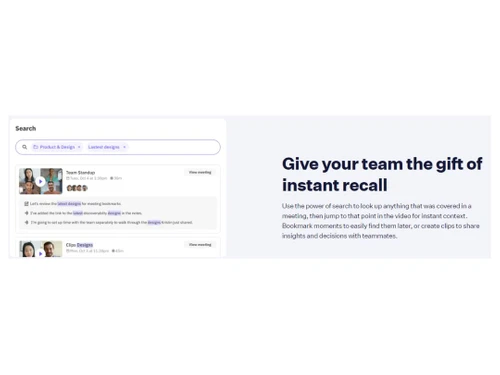
The software will help you activate live transcription with a single click, all without the need for clunky add-ons. Users can effortlessly look up any topic covered in a meeting and quickly jump to the relevant part of the video for immediate context. You can bookmark crucial moments for easy retrieval and create clips to share valuable insights and decisions with your teammates.

The software will help reduce the number of tools in your tech stack by embracing Vowel as your all-in-one meeting solution. You can keep notes, agendas, recordings, transcripts, and summaries in a single location, eliminating the need for additional cloud storage or costly third-party tools.

Why Choose Vowel?

Vowel is a powerful software designed for teams and professionals who value efficient and productive collaboration in their meetings. It empowers teams to optimize meetings, enhance collaboration, and streamline knowledge sharing. With Vowel, individuals and teams can save time, increase productivity, and achieve better client outcomes. It is an essential tool for any organization or professional seeking to enhance their meeting experience.

Benefits of Vowel Video Conferencing Software

  • Vowel maximizes meeting efficiency by providing AI-powered features such as instant summaries, real-time action items, and searchable transcripts. This eliminates manual notetaking and follow-ups, ensuring that every meeting is productive and time efficient.
  • You can effortlessly manage meetings using features like agendas, live transcription, timers, and shared notes. This promotes organization, clarity, and collaboration, resulting in more focused discussions and better outcomes.
  • It enables seamless collaboration by allowing team members to share notes, bookmarks, and meeting clips. This fosters knowledge sharing, facilitates easy reference, and ensures that insights and decisions are effectively communicated within the team.
  • It caters to various meetings, including one-on-one sessions, research discussions, sales calls, design reviews, and weekly team meetings. Its tailored features and functionalities for each meeting type ensure that all interactions are optimized for productivity and desired outcomes.
  • The platform prioritizes user-friendliness, offering an intuitive and easy-to-use interface. No add-ons or additional tools are required, making it convenient for teams to adapt and integrate into their existing workflows.

Pricing of Vowel Video Conferencing Software

Vowel video conferencing solution pricing starts at $20 at techjockey.com.

The overall pricing model is based on different factors such as personalization, extra features required, total users, and the deployment type. Please feel free to request a call from our product experts if you want to learn more about our subscription plans or premium package deals.

Read more

Vowel Company Details

Founded Year:  2019

AI-powered meetings for fast-moving teams. Vowel is an AI-powered video-conferencing tool that helps remote teams 10x the value of their meetings by turning them into searchable, shareable knowledge.

Director/Founders Andrew Berman
Company Size 1-100 Employees

Vowel Pricing & Plans

Business
Key Features
  • No time limit on meetings
  • Rewatch and search through past meetings forever
  • Up to 50 participants per meeting
  • MeetingGPT (Q&A)
  • AI-powered meeting summaries
  • AI action items
  • Zapier integration
  • Priority support
  • Advanced transcription
  • Non-English transcription languages
Starting at $20
    • Licenses

      Licenses
      Licenses
    • Monthly

      Monthly
      Monthly

Key Features

  • No time limit on meetings

  • Rewatch and search through past meetings forever

  • Up to 50 participants per meeting

  • MeetingGPT (Q&A)

  • AI-powered meeting summaries

  • AI action items

  • Zapier integration

  • Priority support

  • Advanced transcription

  • Non-English transcription languages

Vowel Features

  • icon_check AI Based Video conferencing
    Harness the power of AI for enhanced video conferencing experiences that streamline collaboration and productivity.
  • icon_check Meeting Management
    Effectively manage your meetings with features like agendas, timers, notes, and live transcription.
  • icon_check One-on-One
    Create structured and productive one-on-one meetings with customizable agenda templates for effective communication.
  • icon_check Research Sessions
    Transform conversations into a searchable knowledge base, connecting dots across projects and enabling quick onboarding.
  • icon_check Sales call
    Keep track of feedback, agreements, and action items during sales calls, gaining valuable insights into your product.
  • icon_check Design Review
    Collaborate and take notes during design reviews, capturing critical feedback to enhance future iterations.
  • icon_check Weakly team meetings
    Collaborate on agendas to maximize discussion time and minimize status updates in weekly team meetings.
  • icon_check No Add-ons Required
    Enjoy the convenience of using Vowel without additional add-ons, ensuring a streamlined experience.
  • icon_check Efficient
    Optimize your meetings with AI-powered summaries, real-time action items, and searchable transcripts.
  • icon_check Easy to Use
    Vowel's user-friendly interface makes it simple and intuitive to host, manage, and share meetings.
Vowel Demo Video play icon

Get Vowel Demo

Watch the demo video to explore key features, real workflows, and how the software fits your business needs.

Understand
Key Features
Personal
Demo Insights
Interactive
Demo Support

Vowel Specification

Supported Platforms
Ubuntu Ubuntu Windows Windows MacOS MacOS Linux Linux
Devices
Desktop Desktop Mobile Mobile Tablet Tablet iPad iPad
Deployment
Web-Based Web-Based
Suitable For
All Industries
Business Specific
All Businesses
Business Size
Small Business Startups Medium Business Enterprises
Customer Support
Email Communities
Language
English
Integration
API Integration
Training Resources
Videos
AI Features
AI Integrated

Explore the Best Alternative Solutions Similar to Your Business Size and Needs

Vowel Review

4.7

Out of 5

img

Overall Rating

Based on
3 Verified Ratings

Rating Breakdown

  • Features 4.6
  • Value for Money 4.8
  • Ease of Use 4.8
  • Customer Support 4.6

93% Recommend this Product

Add Review

Techjockey Trusted Reviews from Verified Users

No reviews are currently available for Vowel. Discover similar Video Conferencing Software reviews

  • AONMeetings

    4.8

    Whats great - AONMeetings is easy to use, affordable, and straightforward for regular online meetings. Its simple interface makes joining a... read more
  • Bluejeans Network

    4.7

    Whats great - Overall, the experience with this software is superb. As a frequent user of the program myself, I’ve found that it actually m... read more

  • Uberconference

    4.5

    Whats great - I love the software as it comes with a friendly user interface. It supports both audio and video calling. UberConference is c... read more

Compare Vowel With other Video Conferencing Software

Products
Ratings
Pricing
Device Supported
Deployment
Supported Platforms
  • img

    Vowel

  • 4.7

  • Price On Request

  • Desktop

    Mobile

  • Web based

    On Premises

  • Windows

    Mac OS

  • img

    Cisco Webex

  • 4.6

  • ₹ 950

  • Desktop

    Mobile

  • Web based

    On Premises

  • Windows

    Mac OS

  • img

    Tencent RTC

  • 4.0

  • Price On Request

  • Desktop

    Mobile

  • Web based

    On Premises

  • Windows

    Mac OS

  • img

    Interactio

  • 4.5

  • Price On Request

  • Desktop

    Mobile

  • Web based

    On Premises

  • Windows

    Mac OS

  • img

    AONMeetings

  • 4.7

  • ₹ 152

  • Desktop

    Mobile

  • Web based

    On Premises

  • Windows

    Mac OS

  • img

    Pexip

  • 4.2

  • Price On Request

  • Desktop

    Mobile

  • Web based

    On Premises

  • Windows

    Mac OS

  • img

    VideoMeet

  • 4.5

  • ₹ 499

  • Desktop

    Mobile

  • Web based

    On Premises

  • Windows

    Mac OS

  • img

    JioMeet

  • 3.6

  • Price On Request

  • Desktop

    Mobile

  • Web based

    On Premises

  • Windows

    Mac OS

  • img

    GoToMeeting

  • 4.1

  • Price On Request

  • Desktop

    Mobile

  • Web based

    On Premises

  • Windows

    Mac OS

  • img

    xpression camera

  • 4.4

  • Price On Request

  • Desktop

    Mobile

  • Web based

    On Premises

  • Windows

    Mac OS

  • img

    Vidyo

  • 4.4

  • Price On Request

  • Desktop

    Mobile

  • Web based

    On Premises

  • Windows

    Mac OS

(0) Product(s) selected

Vowel Alternatives

See All Vowel Alternatives

Starting Price:

$125 /Month

Available

Price on Request

Starting Price:

₹1,299 /Month

Starting Price:

$849 /Month

Starting Price:

$99 /Month

Available

Price on Request

Available

Price on Request

Available

Price on Request

Articles for Vowel

See All Related Articles

Which operating system does the Vowel Software Support?

Vowel software is compatible with Windows and macOS operating systems.

Is there any Vowel App?

The Vowel Video Conferencing app is unavailable on Android and iOS devices.

What is the deployment type of the Vowel Software?

Vowel system supports web-based deployment.

How much does the Vowel cost?

Vowel pricing starts from $20 at techjockey.com.

Who are the potential users of the Vowel?

Vowel can be used by HRs, offices, educational institutions, healthcare professionals, and organizations seeking seamless collaboration and communication across different locations.

Is there any free trial or demo for Vowel Software?

Vowel system demo is available for free with techjockey.com.

Is the Vowel Solution free?

Vowel Video does offer a free trial.

How can you download the Vowel software?

Vowel is a web-based platform. So, you need not download any software or app to use it.

How does the Vowel Software work?

Vowel is a cutting-edge video conferencing software designed to streamline meetings for dynamic teams. Its AI-powered features allow teams to effortlessly host, summarize, search, and share video meetings, eliminating the need for additional add-ons or complicated processes.

20,000+ Software Listed

Best Price Guranteed

Free Expert Consultation

2M+ Happy Customers

Terms and Condtions

close

Users with registered businesses can purchase goods from merchants on the platform to satisfy their business needs. Users are not permitted to utilize any products acquired through the platform for resale, advertising, business, or further distribution.

For each purchase made, users will receive a Tax Invoice (or 'GST invoice') that includes specific details such as:

  • the GSTIN of the user associated with their registered business, and

  • the specified Entity Name for their business.

It should be noted that not all products are eligible for GST Invoice. Only the products displayed by participating sellers with the 'GST-based Invoice Available' callout on the product description page would qualify.

Certain goods and services are not eligible to get a GST Invoice, including items with VAS, i.e., Value Added Services (e.g., Total Mobile Protection/Assured Buyback) and those involving an exchange offer at the time of purchase.

Users must ensure the accuracy of the GSTIN, and business entity name provided for the GST Invoice. Requests for corrections into GST Invoice would not be accommodated by Techjockey.com or any Seller, and any issues arising from user-provided information are the sole responsibility of users.

Techjockey.com is not liable for the GST Invoice or any associated input tax credit. To efficiently claim an input tax credit, users should select the registered place of business address as per the GST authority's data and follow the provisions of the GST Act and rules.

To claim an input tax credit, the delivery and billing addresses must match. Furthermore, input tax credits will not be granted if the delivery address and GSTIN on the invoice are from different states. In case of incorrect GST details provided during the order placement, the order will be canceled automatically.