linkedin
Xenia POS logo
play Xenia POS PRO R2 Financial Year Closing
xenia pos
xenia-pos-product

Xenia POS

Brand: Xenia Technology

  • 4.5

  • 3 Ratings

Xenia POS is a powerful and user-friendly point-of-sale (POS) system designed to streamline retail and hospitality operations. It offers seamless inventory management, real-time sales tracking, and secure payment processing to enhance business efficiency.

See More

Have you used Xenia POS before?

Share your insights for better experience

Add a Review
Starting Price
₹9,900 excl.GST
₹ 11,682 incl. GST

View plans

offer Save upto 18%, Get GST Invoice on your business purchase T&C
offer Buy Now & Pay Later, Check offer on payment page.
Buy Now
100% Genuine
Products
Best Price
Guaranteed
Safe & Secure
Payment
  • Description

  • Pricing

  • Features

  • Specification

  • Review

  • Compare

  • Alternatives

  • FAQ

Starting at ₹9,900
Buy Now

Xenia POS Software Overview

What is Xenia POS?

Xenia POS is a restaurant management software that helps to streamline operations, enhance customer service, and optimize business efficiency. It helps restaurants manage orders, track sales, process payments, and handle inventory seamlessly.

With features like table management, staff coordination, and real-time reporting, Xenia POS ensures smooth day-to-day operations, making it an ideal solution for restaurants, cafes, and food service businesses.

Why Choose Xenia POS Restaurant Management Software?

  • Comprehensive Restaurant Management: Xenia POS streamlines all aspects of restaurant operations, from order taking and billing to kitchen coordination and staff management, ensuring a seamless dining experience for customers.
  • User-Friendly Interface: Designed with an intuitive and easy-to-navigate interface, Xenia POS allows restaurant staff to take orders, process payments, and manage tables efficiently, reducing training time and improving service speed.
  • Multi-Platform Accessibility: The software is compatible with multiple devices, including tablets, desktops, and smartphones, allowing restaurant staff to take orders from anywhere on the premises and business owners to monitor operations remotely.
  • Real-Time Sales Tracking: Xenia POS provides real-time insights into sales, revenue, and customer preferences. The analytics dashboard helps restaurant owners track peak hours, best-selling items, and overall business performance for better decision-making.
  • Seamless Payment Processing: Supports a wide range of payment methods, including cash, credit/debit cards, digital wallets, and contactless payments, offering customers a hassle-free checkout experience and reducing wait times.
  • Table and Order Management: Efficiently manages table reservations, waitlists, and order processing. The system ensures that staff can assign tables, update order statuses, and improve table turnover rates to maximize revenue.
  • Inventory and Stock Control: Tracks ingredient usage, notifies staff about low stock levels, and prevents overstocking or wastage. Automated inventory updates help maintain a balanced supply chain, reducing costs and inefficiencies.
  • Customer Loyalty and Promotions: Enables restaurants to create personalized promotions, discount offers, and loyalty programs to attract repeat customers. The system keeps track of customer purchase history, allowing for targeted marketing campaigns.
  • Cloud-Based and Secure: Xenia POS operates on a secure cloud-based platform, allowing restaurant owners to access data, generate reports, and manage their business remotely. Advanced security measures protect against data breaches and unauthorized access.
  • Third-Party Integrations: Seamlessly integrates with popular accounting software, CRM systems, and food delivery apps to enhance overall efficiency. Restaurants can connect Xenia POS with platforms like QuickBooks, Uber Eats, and online ordering systems for better workflow automation.

Benefits of Xenia POS Restaurant Management Software

  • Faster Order Processing: Xenia POS optimizes the order-taking process by enabling quick entry, seamless communication with the kitchen, and efficient payment processing. This reduces wait times, enhances table turnover, and improves customer satisfaction.
  • Enhanced Staff Productivity: By automating time-consuming tasks such as billing, inventory tracking, and order management, Xenia POS allows staff to focus on delivering better service, leading to a more efficient and well-managed restaurant operation.
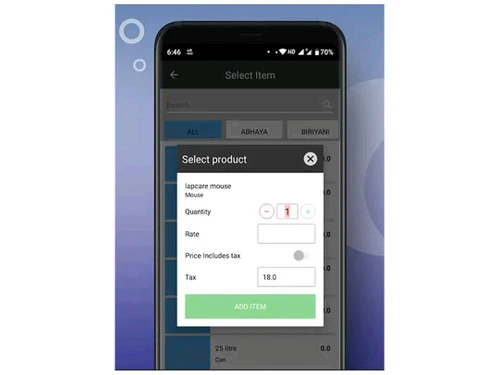
  • Customizable Menu Management – Restaurants can easily update menu items, modify pricing, and introduce daily specials with just a few clicks. This flexibility helps businesses adapt to seasonal changes, customer preferences, and promotional offers without hassle.
  • Multi-Location Management: Xenia POS enables restaurant chains and multi-branch businesses to manage all outlets from a single dashboard. Business owners can monitor real-time sales, inventory, and staff performance across different locations without needing to be physically present.
  • Offline Functionality: Even if the internet goes down, Xenia POS ensures uninterrupted operations by storing transaction data locally and syncing it with the cloud once the connection is restored. This prevents business disruptions and maintains smooth service.
  • Comprehensive Reporting and Analytics: The system generates in-depth reports on sales, revenue trends, best-selling items, and customer behavior. These insights help business owners identify opportunities for growth, reduce wastage, and make data-driven decisions to maximize profits.
  • Tax and Compliance Management: Xenia POS simplifies tax calculations, invoice generation, and adherence to local regulatory requirements. By automating tax processes, businesses can reduce manual errors, maintain compliance, and streamline financial reporting.
  • Employee Performance Tracking: The system tracks staff activity, monitors sales performance, and records working hours, allowing restaurant managers to evaluate employee efficiency. This helps in performance-based incentives and better workforce management.
  • Multi-Language and Multi-Currency Support: Xenia POS supports multiple languages and currencies, making it an ideal solution for restaurants catering to a diverse customer base or operating in different regions with varying payment preferences.
  • Reduced Human Errors: By automating calculations and reducing the need for manual input, Xenia POS minimizes billing mistakes, incorrect order entries, and stock discrepancies. This ensures a smoother workflow and better accuracy in daily operations.

Xenia POS Pricing

Xenia POS pricing starts at INR 9900 at techjockey.com.

The pricing model is based on different parameters, including the amount of bandwidth you need, the number of servers you need, and the features you need. For further queries related to the product, you can contact our product team and learn more about the pricing and offers.

Read more

Xenia Technology Company Details

Founded Year:  2005

Since founding in 2005, Xenia has become one of the leaders in Billing Software and Hardware Products. Xenia has provided extensive support to clients from different business verticals and segments around the world.

Director/Founders Arun Mohan
Company Size 1-100 Employees

Xenia POS Pricing & Plans

XENIA POS Lite
Key Features
  • Basic Product for all General Trading Retail & Who
  • Grocery & Super Markets
  • All Reports
  • Limited Accounts

Calculated Price

9900 Exclusive of all taxes
    • Quantity

      Quantity
      Quantity

Key Features

  • Basic Product for all General Trading Retail & Who

  • Grocery & Super Markets

  • All Reports

  • Limited Accounts

Xenia POS Features

  • icon_check Billing & Invoicing
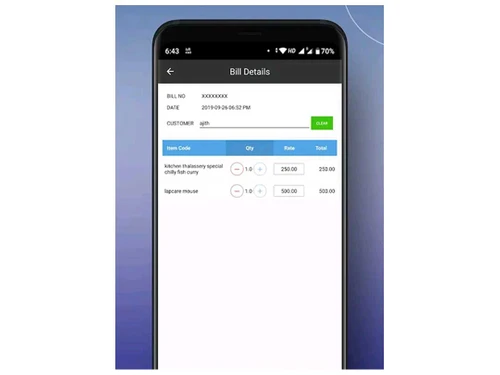
    Automates the billing process with accurate calculations, customizable invoices, and multiple payment options.
  • icon_check Inventory Management
    Tracks stock levels, monitors ingredient usage, and sends alerts for low-stock items to prevent shortages and wastage.
  • icon_check Restaurant POS
    Provides POS system tailored for restaurants, supporting dine-in, takeaway, and online orders.
  • icon_check Order Management
    Streamlines order processing by ensuring seamless communication between the front-of-house staff and the kitchen.
  • icon_check Dashboards
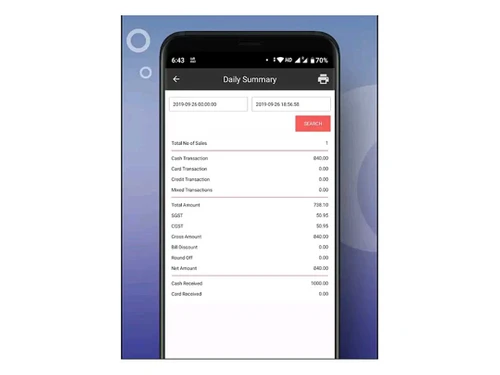
    Offers real-time insights into sales, expenses, and customer trends through interactive dashboards.
  • icon_check Online Payment
    Supports various digital payment methods, including credit/debit cards, UPI, mobile wallets, and contactless payments.
  • icon_check Expense Management
    Helps track and categorize business expenses, reducing financial mismanagement and improving overall profitability.
  • icon_check Purchase Order
    Simplifies vendor management by allowing restaurants to create, track, and manage purchase orders.
Xenia POS Demo Video play icon

Get Xenia POS Demo

Watch the demo video to explore key features, real workflows, and how the software fits your business needs.

Understand
Key Features
Personal
Demo Insights
Interactive
Demo Support

Xenia POS Specifications

Supported Platforms
Ubuntu Ubuntu Windows Windows MacOS MacOS Linux Linux
Devices
Desktop Desktop Mobile Mobile Tablet Tablet iPad iPad
Deployment
Cloud-Based Cloud-Based
Suitable For
Restaurant Cafe & Restaurants
Business Specific
Restaurants
Business Size
Small Business Startups Medium Business SMBs SMEs
Customer Support
Phone Email Communities
Language
English
Training Resources
Videos

Explore the Best Alternative Solutions Similar to Your Business Size and Needs

Xenia POS Review

4.5

Out of 5

img

Overall Rating

Based on
3 Verified Ratings

Rating Breakdown

  • Features 4.3
  • Value for Money 4.6
  • Ease of Use 4.1
  • Customer Support 5

96% Recommend this Product

Add Review

Techjockey Trusted Reviews from Verified Users

No reviews are currently available for Xenia POS. Discover similar Restaurant Management Software reviews

  • Microtech POS

    4.5

    Whats great - Access to real-time data allows for better decision-making. Many billing software solutions offer mobile apps for on-the-go ... read more

  • Limetray

    4.5

    Whats great - Limetray has proved to be very profitable for us. It offers multiple user login facilities, which saves huge operational cost... read more

  • POSist

    4.5

    Whats great - It was one of the best investments we made. POSist helped us analyse all the loopholes and barriers in our operations and cut... read more

Compare Xenia POS With other Restaurant Management Software

Products
Ratings
Pricing
Device Supported
Deployment
Supported Platforms
  • img

    Xenia POS

  • 4.5

  • ₹ 9900.00 excl. GST

  • Desktop

    Mobile

  • Web based

    On Premises

  • Windows

    Mac OS

  • img

    POSist

  • 4.4

  • ₹ 36800

  • Desktop

    Mobile

  • Web based

    On Premises

  • Windows

    Mac OS

  • img

    Limetray

  • 4.6

  • Price On Request

  • Desktop

    Mobile

  • Web based

    On Premises

  • Windows

    Mac OS

  • img

    eRe4u

  • 4.6

  • ₹ 4000

  • Desktop

    Mobile

  • Web based

    On Premises

  • Windows

    Mac OS

  • img

    Eatlot

  • 4.1

  • Price On Request

  • Desktop

    Mobile

  • Web based

    On Premises

  • Windows

    Mac OS

  • img

    OrderSeva

  • 4.1

  • ₹ 2000

  • Desktop

    Mobile

  • Web based

    On Premises

  • Windows

    Mac OS

  • img

    HDRestaurant

  • 4.4

  • Price On Request

  • Desktop

    Mobile

  • Web based

    On Premises

  • Windows

    Mac OS

  • img

    FoodBox

  • 4.5

  • ₹ 61654

  • Desktop

    Mobile

  • Web based

    On Premises

  • Windows

    Mac OS

  • img

    Smart Dine-in

  • 4.2

  • Price On Request

  • Desktop

    Mobile

  • Web based

    On Premises

  • Windows

    Mac OS

(0) Product(s) selected

Xenia POS Alternatives

See All Xenia POS Alternatives

Available

Price on Request

Available

Price on Request

SAVE UPTO 40%

Available

Price on Request

Starting Price:

$330 /Month/Location

Articles for Xenia POS

See All Related Articles

How much does Xenia POS cost?

Xenia POS pricing starts at INR 9900 at techjockey.com. Pricing is customized based on specific business needs.

Which operating system does Xenia POS Restaurant Management Software support?

Xenia POS is compatible with Windows, macOS, and cloud-based systems, accessible via web browsers and mobile devices.

How does Xenia POS Restaurant Management Software work?

It functions as a centralized restaurant management system, handling orders, billing, inventory, and reporting while ensuring seamless communication between staff and the kitchen.

Is Xenia POS suitable for small businesses?

Yes, Xenia POS is ideal for small and mid-sized restaurants, cafes, and food trucks, offering cost-effective solutions tailored to their needs.

Does Xenia POS Restaurant Management Software offer a free trial or a demo?

Yes, Xenia POS provides a free trial or demo so businesses can explore its features before committing.

What features does Xenia POS Restaurant Management Software offer?

Key features include billing & invoicing, inventory management, order tracking, dashboards, online payments, expense management, and purchase order management.

Is there any Xenia POS App?

Yes, Xenia POS offers a mobile app for both Android and iOS, allowing restaurant owners to manage operations on the go.

Who are the potential users of Xenia POS?

Restaurants, cafes, food trucks, cloud kitchens, and multi-location restaurant chains can benefit from Xenia POS.

How secure is Xenia POS Restaurant Management Software?

Xenia POS uses advanced encryption, data backups, and access controls to ensure transaction security and data protection.

What is Xenia POS used for?

It is used for restaurant operations management, including billing, inventory tracking, order processing, financial reporting, and business analytics.

20,000+ Software Listed

Best Price Guranteed

Free Expert Consultation

2M+ Happy Customers

Terms and Condtions

close

Users with registered businesses can purchase goods from merchants on the platform to satisfy their business needs. Users are not permitted to utilize any products acquired through the platform for resale, advertising, business, or further distribution.

For each purchase made, users will receive a Tax Invoice (or 'GST invoice') that includes specific details such as:

  • the GSTIN of the user associated with their registered business, and

  • the specified Entity Name for their business.

It should be noted that not all products are eligible for GST Invoice. Only the products displayed by participating sellers with the 'GST-based Invoice Available' callout on the product description page would qualify.

Certain goods and services are not eligible to get a GST Invoice, including items with VAS, i.e., Value Added Services (e.g., Total Mobile Protection/Assured Buyback) and those involving an exchange offer at the time of purchase.

Users must ensure the accuracy of the GSTIN, and business entity name provided for the GST Invoice. Requests for corrections into GST Invoice would not be accommodated by Techjockey.com or any Seller, and any issues arising from user-provided information are the sole responsibility of users.

Techjockey.com is not liable for the GST Invoice or any associated input tax credit. To efficiently claim an input tax credit, users should select the registered place of business address as per the GST authority's data and follow the provisions of the GST Act and rules.

To claim an input tax credit, the delivery and billing addresses must match. Furthermore, input tax credits will not be granted if the delivery address and GSTIN on the invoice are from different states. In case of incorrect GST details provided during the order placement, the order will be canceled automatically.