linkedin
Zoho Domains logo
play Buy Zoho Domain Easily | Zoho Domain Purchase Tutorial
Basic Office Software

Zoho Domains

Brand: Zoho Corporation

  • 4.5

  • 4 Ratings

Register your domain and get preconfigured business email, an ad-free mailbox, and powerful tools with Zoho Domains, your all-in-one branding solution.

See More

Have you used Zoho Domains before?

Share your insights for better experience

Add a Review

Price Available on Request

Questions about pricing or customization? We’re here to help, just a click away.

100% Genuine
Products
Best Price
Guaranteed
Safe & Secure
Payment
  • Description

  • Pricing

  • Features

  • Specification

  • Review

  • Compare

  • Alternatives

  • FAQ

Zoho DomainsSoftware Overview

What is Zoho Domains?

Zoho Domains is an integrated domain registration service offered within the Zoho Mail suite. It is designed to streamline the process of establishing a professional online presence. Instead of using separate providers for domain registration and email hosting, Zoho allows users to purchase a new domain name directly and have it automatically configured for use with Zoho's powerful business email platform. When you register a domain with Zoho, critical DNS settings like MX and CNAME records are preconfigured, eliminating technical hurdles and enabling you to create custom, brand-centric email addresses like you@yourdomain.com with minimal effort.

Why Choose Zoho Domains?

  • Brand Visibility & Credibility: A custom domain email address (e.g., contact@yourcompany.com) instantly makes your business look more official and trustworthy compared to generic email addresses, reinforcing your brand with every message sent.
  • Unified Management: By purchasing your domain through Zoho, you manage both your domain and your business email from a single, integrated control panel, simplifying administration and support.
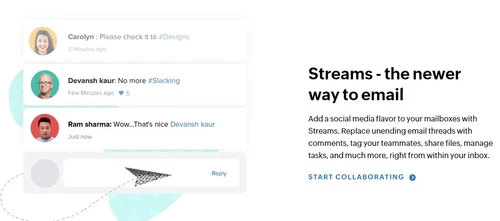
  • Seamless Collaboration: The service is deeply integrated with Zoho Mail's collaboration tools, including Calendar, Tasks, Notes, and Streams, empowering your team to work productively with a guaranteed 99.9% uptime.
  • Privacy and Security: Zoho Mail offers a completely ad-free experience, ensuring your business communications remain private. Your data is never mined for advertising, and multiple security layers protect your accounts from spoofing and other threats.
  • Scalability: As your business grows, you can easily add more users, create group addresses (e.g., support@yourdomain.com), and manage multiple email accounts under a single domain through the Zoho Mail Admin App.
  • Dedicated Support: Zoho provides 24/7 technical support, ensuring that any questions or issues related to your domain or email service are addressed promptly.

Advanced Features of Zoho Domains

  • Ad-Free User Interface: Experience a clean, professional, and distraction-free mailbox environment, even on the free plan, allowing your team to focus on what matters.
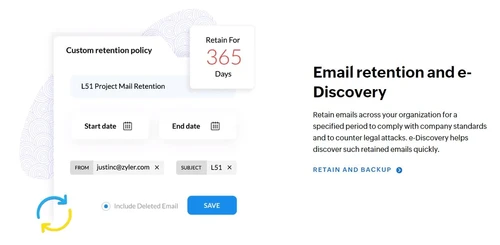
  • Email Retention Policies: Configure specific timeframes for retaining company emails. This is crucial for meeting legal and compliance requirements and ensuring that vital data is securely archived.
  • Integrated Calendar: Schedule meetings, manage group events, and share your availability seamlessly without leaving your inbox, creating a unified workflow for planning and communication.
  • Robust eDiscovery: For legal audits or internal investigations, the eDiscovery tool allows administrators to quickly search for and retrieve specific emails across all user mailboxes in the organization.
  • Email Recall Function: Mitigate errors by retrieving a sent message from a recipient's inbox, provided they have not yet opened it. This feature is invaluable for correcting mistakes or retracting sensitive information.
  • Customizable Workflows: Utilize a powerful system of filters and folders to automatically sort incoming mail, helping users organize their inboxes and prioritize communications efficiently.

Key Capabilities of Zoho Domains

  1. Domain Registration: Search for and purchase new domain names directly from the Zoho Mail interface, choosing from a wide variety of TLDs (Top-Level Domains).
  2. Custom Email Address Creation: Effortlessly set up professional, domain-based email accounts for all employees, enhancing brand consistency and credibility.
  3. Automated DNS Configuration: When a domain is purchased through Zoho, essential DNS records (MX, CNAME) for email delivery are automatically configured, removing a common technical barrier.
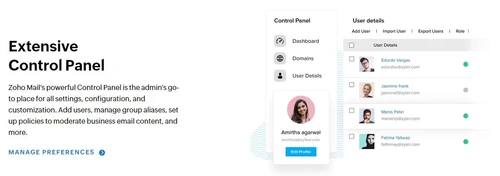
  4. User and Group Management: The Admin Console allows for easy addition of new users, creation of group email addresses (distribution lists), and management of permissions across the organization.
  5. Seamless Email Migration: Zoho provides tools to migrate emails from your previous provider with no downtime, ensuring a smooth transition for all your users.

How to Use Zoho Domains?

  1. Add or Buy a Domain: Begin by either adding a domain you already own and verifying it, or by purchasing a new domain directly through Zoho.
  2. Add Users: Add employees to your organization and create their custom domain email accounts. You can do this manually or import users in bulk from a CSV file or Active Directory.
  3. Create Group Accounts: Set up domain-based group email addresses, such as info@yourdomain.com or sales@yourdomain.com, using distribution lists to direct emails to multiple team members.
  4. Configure MX Records: If you're using an existing domain, update its MX records in your registrar's control panel to point to Zoho Mail's servers. This step is automated for domains purchased via Zoho.
  5. Migrate Existing Email: Initiate the email migration process for your users to transfer their old emails and data to their new Zoho Mail accounts without any service interruption.

Zoho Domains Price

Zoho Domain price is available on request at Techjockey. The pricing model is based on different parameters, including extra features, deployment type, and the total number of users. For further queries related to the product, you can contact our product expert and learn more about the pricing and offers.

Read more

Zoho Corporation Company Details

Founded Year:  1996

Zoho Corporation is an Indian multinational company that specialises in software development, cloud computing, and web-based business tools. It is best known for Zoho Office suite and its enterprise IT management division, ManageEngine

Director/Founders Sridhar Vembu / Tony Thomas
Company Size 1000+ Employees

Zoho Domains Pricing & Plans

Looking for The Right Pricing?

Share your requirements and get a plan built around your business.

  • Define your business needs
  • Get customised pricing
  • Choose features that fit your workflow

Price Available on Request

Get personalised Zoho Domains pricing that fits your needs. Our team will connect with you.

Zoho Domains Features

  • icon_check User Interface
    Experience a completely clean and distraction-free mailbox environment with zero advertisements even on the free plan.
  • icon_check Email Retention Policy
    Set specific timeframes for retaining company emails to meet legal requirements and ensure crucial data is never deleted.
  • icon_check Integrated Calendar App
    Schedule meetings, share your availability, and manage group events seamlessly within a unified email and calendar view.
  • icon_check Robust eDiscovery Tool
    Search and discover specific emails across all user mailboxes quickly for legal audits and internal investigations today.
  • icon_check Email Recall Function
    Retrieve sent messages from the recipient's inbox if they have not been opened yet to fix mistakes or remove sensitive info.
  • icon_check Customizable Workflows
    Use the filter and folder system to automatically sort incoming mail into specific categories for better daily organization.
  • icon_check Control Panel
  • icon_check Integrated Task Manager
    Convert any incoming email into a trackable task with a due date and priority level to manage your daily project workload.
  • icon_check Custom Domain
  • icon_check Enterprise Email
  • icon_check Security
  • icon_check Collaboration
  • icon_check Easy Migration
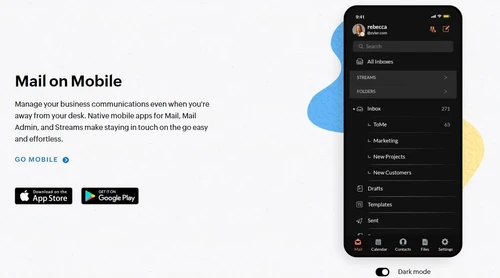
  • icon_check Mobile Access
  • icon_check Email Privacy
Zoho Domains Demo Video play icon

Get Zoho Domains Demo

Watch the demo video to explore key features, real workflows, and how the software fits your business needs.

Understand
Key Features
Personal
Demo Insights
Interactive
Demo Support

Zoho Domains Specification

Supported Platforms
Windows Windows iOS iOS Android Android
Devices
Desktop Desktop Mobile Mobile
Deployment
Web-Based Web-Based
Suitable For
All Industries
Business Specific
All Businesses
Business Size
Small Business Startups Medium Business Enterprises SMBs SMEs MSMBs MSMEs
Customer Support
Email Live Chat Communities
Language
English
Integration
API Integration
Training Resources
Documentation Videos
AI Features
AI Integrated

Zoho Domains Review

4.5

Out of 5

img

Overall Rating

Based on
4 Verified Ratings

Rating Breakdown

  • Features 4
  • Value for Money 4.6
  • Ease of Use 4.6
  • Customer Support 4.7

90% Recommend this Product

Add Review

Be the First to Review

This product has no reviews yet. Be the first to leave your feedback.

Add Review

Compare Zoho Domains With other Domain Registration Providers

Products
Ratings
Pricing
Device Supported
Deployment
Supported Platforms
  • img

    Zoho Domains

  • 4.5

  • Price On Request

  • Desktop

    Mobile

  • Web based

    On Premises

  • Windows

    Mac OS

  • img

    Gandi.net

  • 4.4

  • Price On Request

  • Desktop

    Mobile

  • Web based

    On Premises

  • Windows

    Mac OS

  • img

    SAV

  • 4.2

  • Price On Request

  • Desktop

    Mobile

  • Web based

    On Premises

  • Windows

    Mac OS

  • img

    Network Solutions

  • Price On Request

  • Desktop

    Mobile

  • Web based

    On Premises

  • Windows

    Mac OS

(0) Product(s) selected

Zoho Domains Alternatives

See All Zoho Domains Alternatives

Available

Price on Request

SAV

4.2

Available

Price on Request

Articles for Zoho Domains

See All Related Articles

Which operating system does Zoho Domain support?

Zoho Domain is compatible with Windows, IOS and Android operating systems.

Is there any Zoho Domain app?

Zoho Domain app is available for and Mobile.

What is deployment type of Zoho Domain?

Zoho Domain supports Web-Based.

Who are the potential users of Zoho Domain?

Zoho Domain is typically used in All Industries.

Is there any free trial or demo for Zoho Domain?

Zoho Domain demo is available for free at Techjockey.com.

Is Zoho Domain free?

Zoho Domain offers a free trial. However, the premium plan with advanced features available at Techjockey.

How can you download Zoho Domain ?

For Zoho Domain installation, insert the given CD/USB flash storage in your system and open the Setup Wizard to get started.

How does Zoho Domain work?

Zoho Domain helps with Control Panel,Custom Domain,Enterprise Email and Security. It's a complete solution for Collaboration,Easy Migration,Mobile Access and Email Privacy.

Is Zoho domain free?

While Zoho offers a free email hosting plan for up to five users with a custom domain, the domain registration itself is not free and must be purchased separately.

Is Zoho a good domain registrar?

Zoho is considered a good choice as it integrates domain registration directly with its business email suite, providing an ad-free experience, 24/7 tech support, and automatic DNS configuration for its services.

How do I transfer my domain to Zoho?

To use your existing domain with Zoho, you add and verify the domain in your Zoho Mail account and then configure your domain's MX records to point to Zoho's mail servers.

How much does a Zoho domain cost?

Zoho Domains pricing starts at INR 58 at techjockey.com.

What happens to DNS settings when I register a domain with Zoho?

When you register a new domain directly with Zoho, the DNS settings, such as MX and CNAME records, are automatically preconfigured to work seamlessly with Zoho Mail.

Can I create group email addresses like support@mydomain.com?

Yes, you can create domain-based email accounts for groups using distribution lists, allowing multiple members to receive emails from common accounts like info@yourdomain.com.

Does Zoho show ads in its email service for custom domains?

No, Zoho Mail provides a completely clean and distraction-free mailbox environment with zero advertisements, even on its free plan for custom domains.

Can I recall an email sent from my Zoho domain account?

Yes, Zoho features an email recall function that allows you to retrieve sent messages from the recipient's inbox if they have not yet been opened.

Who Uses Zoho Domains?

Zoho Domains is used by startups, small businesses, and growing enterprises looking to establish a professional online presence with custom domain-based email addresses managed seamlessly within the Zoho Mail ecosystem.

20,000+ Software Listed

Best Price Guranteed

Free Expert Consultation

2M+ Happy Customers

Terms and Condtions

close

Users with registered businesses can purchase goods from merchants on the platform to satisfy their business needs. Users are not permitted to utilize any products acquired through the platform for resale, advertising, business, or further distribution.

For each purchase made, users will receive a Tax Invoice (or 'GST invoice') that includes specific details such as:

  • the GSTIN of the user associated with their registered business, and

  • the specified Entity Name for their business.

It should be noted that not all products are eligible for GST Invoice. Only the products displayed by participating sellers with the 'GST-based Invoice Available' callout on the product description page would qualify.

Certain goods and services are not eligible to get a GST Invoice, including items with VAS, i.e., Value Added Services (e.g., Total Mobile Protection/Assured Buyback) and those involving an exchange offer at the time of purchase.

Users must ensure the accuracy of the GSTIN, and business entity name provided for the GST Invoice. Requests for corrections into GST Invoice would not be accommodated by Techjockey.com or any Seller, and any issues arising from user-provided information are the sole responsibility of users.

Techjockey.com is not liable for the GST Invoice or any associated input tax credit. To efficiently claim an input tax credit, users should select the registered place of business address as per the GST authority's data and follow the provisions of the GST Act and rules.

To claim an input tax credit, the delivery and billing addresses must match. Furthermore, input tax credits will not be granted if the delivery address and GSTIN on the invoice are from different states. In case of incorrect GST details provided during the order placement, the order will be canceled automatically.