USA
USA UAE
UAESmall Business
Designed for startups and growing businesses
See More




Brand: ABBYY
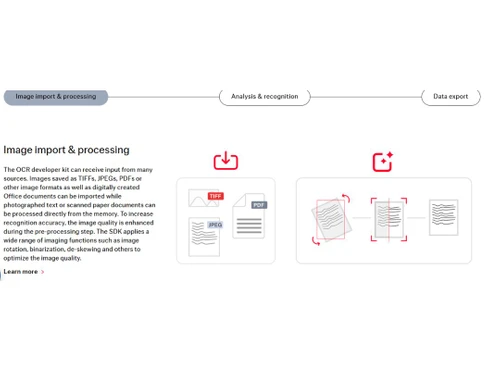
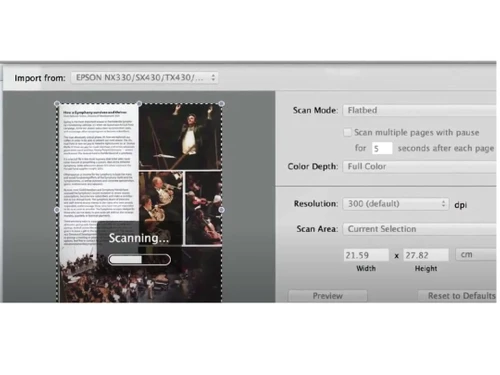
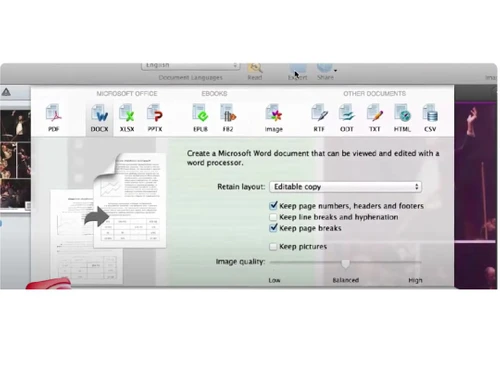
ABBY FineReader Engine is online productivity software that allows developers, integrators, and BPOs to integrate Optical Text Recognition (OTR) technologies into their application. ABBY FineReader offers viable integration solutions for SDKs and enables scanning documents and images to be transformed into searchable and editable document formats. It can convert documents to Word, Apache, Apple P...
See MoreHave you used ABBYY FineReader Engine before?
Share your insights for better experience
Brand: ABBYY
Founded Year: 1989
ABBYY is a Digital Intelligence company. We provide a Digital Intelligence platform that enables organizations to gain a complete understanding of their business. The platform is designed to allow organizations to deploy solutions in standalone configurations or as a tightly integrated extension.
 Parallel processing Recognition profiles Image preprocessing PDF conversion Code samples library Visual components Detailed Documentation Professional Support Automatic document classification Redundant network license manager Business card recognition Enhance Documents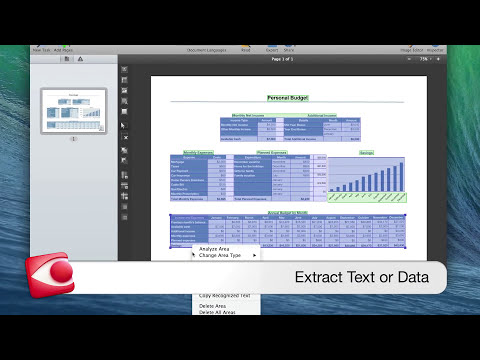

Watch the demo video to explore key features, real workflows, and how the software fits your business needs.
 Ubuntu
  Windows
  MacOS
MacOS  Desktop
  Mobile
  Perpetual
Small Business
Designed for startups and growing businesses
Medium Business
Built for business growth and flexibility
Enterprises
Designed for complex and large-scale business needs
4.7
Out of 5

Overall Rating
Based on
1 Verified Review
Rating Breakdown
90% Recommend this Product
Add Review
Jul 18, 2018
Techjockey Verified
“Powerfull tool for document archiving, document conversion, OCR and digitalization.”
Pros
It is easy to use, with the simplified interface, one can work fast, through materials.
Cons
NO CONS

ABBYY FineReader Engine
Price On Request
Desktop
Mobile
Web based
On Premises
Windows
Mac OS

ABBYY FineReader Pro for Mac
Price On Request
Desktop
Mobile
Web based
On Premises
Windows
Mac OS

Invoice OCR Software
Price On Request
Desktop
Mobile
Web based
On Premises
Windows
Mac OS

CamScanner
Price On Request
Desktop
Mobile
Web based
On Premises
Windows
Mac OS

Snoh Fusion
₹ 243750
Desktop
Mobile
Web based
On Premises
Windows
Mac OS

Microsoft Office Lens
Price On Request
Desktop
Mobile
Web based
On Premises
Windows
Mac OS

Algodocs
Price On Request
Desktop
Mobile
Web based
On Premises
Windows
Mac OS

TextSnap
Price On Request
Desktop
Mobile
Web based
On Premises
Windows
Mac OS

DAN - Data AI Ninja
Price On Request
Desktop
Mobile
Web based
On Premises
Windows
Mac OS

Readiris
Price On Request
Desktop
Mobile
Web based
On Premises
Windows
Mac OS

VisionERA
Price On Request
Desktop
Mobile
Web based
On Premises
Windows
Mac OS
(0) Product(s) selected
Starting Price:
$29 /Month
Starting Price:
$69 /License $99
No, there is no need for recurring payment for updates. An official update for macOS 10.13 High Sierra is available.
Yes. You can create task-specific apps with Automator actions that will convert images and PDF files dropped on to the app’s icon into editable documents of your choice. You can drop either individual files, or batches of them. For a detailed tutorial on using Automator actions visit our online knowledgebase. Please note that you need to install the latest version of FineReader Pro for Mac to use Automator actions.
ABBY FineReader Pro does not require internet connection to activate or install the software.
FineReader Pro for Mac does not allow support text editing in the software. However, you can edit the results in other applications like Apache OpenOffice Writer, Microsoft Word, Apple Pages, etc.
For the most part, these products are very similar. However, FineReader Pro for Mac differs from FineReader Professional for Windows in these ways: Pro for Mac supports ICA-compatible scanners, MFPs, cameras, and smartphones Converted documents can be edited only after their export to any of the preferred text editing applications.
20,000+ Software Listed
Best Price Guranteed
Free Expert Consultation
2M+ Happy Customers
Terms and Condtions

Users with registered businesses can purchase goods from merchants on the platform to satisfy their business needs. Users are not permitted to utilize any products acquired through the platform for resale, advertising, business, or further distribution.
For each purchase made, users will receive a Tax Invoice (or 'GST invoice') that includes specific details such as:
the GSTIN of the user associated with their registered business, and
the specified Entity Name for their business.
It should be noted that not all products are eligible for GST Invoice. Only the products displayed by participating sellers with the 'GST-based Invoice Available' callout on the product description page would qualify.
Certain goods and services are not eligible to get a GST Invoice, including items with VAS, i.e., Value Added Services (e.g., Total Mobile Protection/Assured Buyback) and those involving an exchange offer at the time of purchase.
Users must ensure the accuracy of the GSTIN, and business entity name provided for the GST Invoice. Requests for corrections into GST Invoice would not be accommodated by Techjockey.com or any Seller, and any issues arising from user-provided information are the sole responsibility of users.
Techjockey.com is not liable for the GST Invoice or any associated input tax credit. To efficiently claim an input tax credit, users should select the registered place of business address as per the GST authority's data and follow the provisions of the GST Act and rules.
To claim an input tax credit, the delivery and billing addresses must match. Furthermore, input tax credits will not be granted if the delivery address and GSTIN on the invoice are from different states. In case of incorrect GST details provided during the order placement, the order will be canceled automatically.