linkedin
ABBYY FineReader Pro for Mac logo
play ABBYY FineReader Pro for Mac Demo
abby
abby

ABBYY FineReader Pro for Mac

Brand: ABBYY

  • 4.2

  • 3 Ratings

About ABBYY FineReader Pro for Mac ABBYY FineReader Pro for Mac is an advanced OCR software. Mac users can quickly transform their PDFs, digital photos of texts and other paper documents into searchable and editable files with ease. The software eliminates the tiresome process of manual reformatting...

See More

Have you used ABBYY FineReader Pro for Mac before?

Share your insights for better experience

Add a Review
Starting Price
$48

View plans

100% Genuine
Products
Best Price
Guaranteed
Safe & Secure
Payment
  • Description

  • Pricing

  • Features

  • Specification

  • Review

  • Compare

  • Alternatives

  • FAQ

Starting at $48

ABBYY FineReader Pro for Mac Software Overview

About ABBYY FineReader Pro for Mac

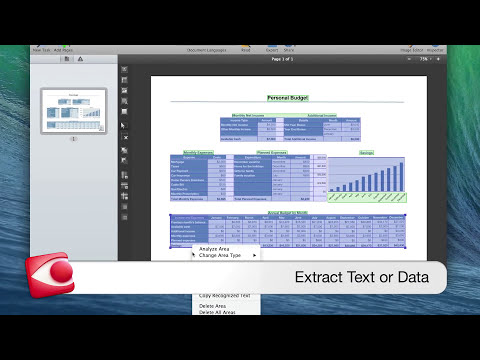
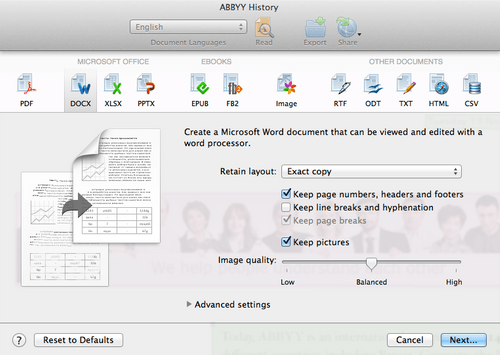
ABBYY FineReader Pro for Mac is an advanced OCR software. Mac users can quickly transform their PDFs, digital photos of texts and other paper documents into searchable and editable files with ease. The software eliminates the tiresome process of manual reformatting and retyping. It enables the users to share, copy, search, and archive information as per their requirement without any extra hassle. Users can save the formatted documents into multiple formats like TXT, ODT, PPTX, JPEG and more. Further, it provides a single platform for all the OCR related tasks, ensuring professional consistency. ABBYY FineReader Pro for Mac also supports multiple languages all around the globe, making it even more user-friendly.

How does ABBYY FineReader Pro for Mac help users increase their productivity?

ABBYY FineReader Pro for Mac features an intuitive and intelligent interface for evaluating quick tasks. With the help of AppleScript Commands Support and Automator actions, the software enables its users to convert the entire batches of documents at a time. Users can also preschedule all the OCR related tasks within a single platform. ABBYY FineReader Pro for Mac supports multiple document formats like Microsoft Word Document (DOCX) and OpenOffice.org Writer Document (ODT), enabling its users to export the documents directly into Microsoft Office, Numbers and Apple Pages for editing and reuse. The software quickly identifies changes within texts in multiple versions of the same document.

Pricing of ABBYY FineReader Pro for Mac

The price of ABBYY FineReader Pro for Mac is available on request. If you want to use the services provided by ABBYY FineReader Pro for Mac, send us a callback request. We can assist you with an activation key for the latest version of the software V.12.1.13 launched on the 7th of Feb 2020. 

Compatible platforms of ABBYY FineReader Pro for Mac

The software is only compatible with Mac operated platforms.
Versions 10.12 Sierra, 10.13 High Sierra, 10.14 Mojave and 10.15 Catalina. 

What are the benefits of using ABBYY FineReader Pro for Mac?

  1. Enhanced OCR: ABBYY FineReader Pro for Mac provides better layout retention for documents and tables with complex text flows and structures. The OCR accuracy rates can improve by up to 99.8%. Users can accurately reconstruct an entire document containing multiple pages with the help of ADRT (Adaptive Document Recognition Technology) provided by the software.
  2. Constructive Restructure and Reformatting of Documents: The Adaptive Document Recognition Technology provided by the software enables its users to precisely restructure and reformat columns, headers, footnotes, tables of contents and more. Formatted documents retain the native attributes that can be easily updated or changed as well.
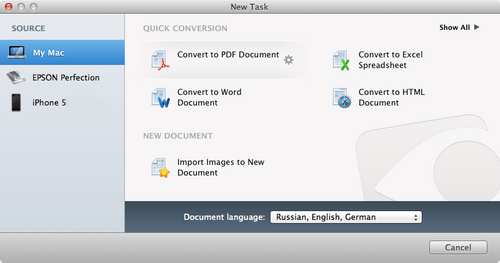
  3. Friendly Interface: The software features an intuitive interface along with predefined Quick Tasks. It automatically identifies the languages and layouts within a document and allows the users to manually adjust the settings as per the requirement of its users. 
  4. Advanced PDF Creation: ABBYY FineReader Pro for Mac allows its users to add various properties within a document. Users can create tagged PDFs for Screen readers and other portable devices. Further, users can also create PDF outlines to facilitate the faster rate of navigation across a document.
  5. Security: The software enables its users to save documents in PDF/A for long-term archiving. They can also reconstruct the outlines within a PDF and convert password-protected PDFs into readable files.
Read more

ABBYY Company Details

Founded Year:  1989

ABBYY is a Digital Intelligence company. We provide a Digital Intelligence platform that enables organizations to gain a complete understanding of their business. The platform is designed to allow organizations to deploy solutions in standalone configurations or as a tightly integrated extension.

Director/Founders David Yang
Company Size 1000+ Employees

ABBYY FineReader Pro for Mac Pricing & Plans

FineReader PDF for Mac
Key Features
  • 1 Standalone license
  • Multilingual
Starting at $48
    • Yearly

      Yearly
      Yearly

Key Features

  • 1 Standalone license

  • Multilingual

ABBYY FineReader Pro for Mac Features

  • icon_check Layout Management
    The software delivers digital copies of original text documents and layouts, that can be edited as per the requirement of the
  • icon_check Multilingual
    ABBYY FineReader Pro for Mac recognizes 180+ languages in the form of text documents.
  • icon_check Interface
    The software features a highly intuitive interface that guides its users through the entire process of converting and scanning of
  • icon_check Search Option
    Users can create searchable PDF files from random paper documents and even retrieve them as per their requirements.
  • icon_check Conversion
    The software enables its users to automatically convert images, document files and folders into PDF files with ease. They can
  • icon_check Photo Editing
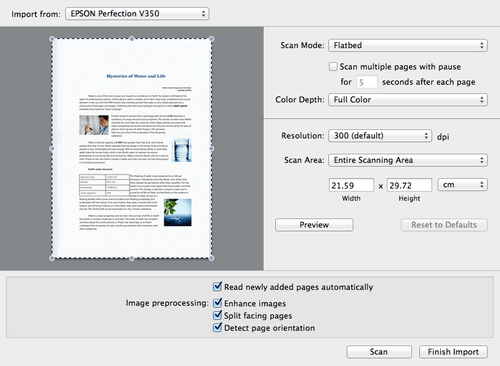
    Users get access to advanced image-editing tools that are capable of correcting distortions within an image and facilitates text
  • icon_check Digitization
    ABBYY FineReader Pro for Mac enables its users to digitize and improve the quality of multiple copies of documents with ease.
  • icon_check Text-to-Speech
    The software enables its users to get access to converted PDF documents in any supportable format via text-to-speech utilities.
  • icon_check OCR
    Users can seamlessly manage all the OCR related activities like managing documents, ratio control, editing tables, text
ABBYY FineReader Pro for Mac Demo Video play icon

Get ABBYY FineReader Pro for Mac Demo

Watch the demo video to explore key features, real workflows, and how the software fits your business needs.

Understand
Key Features
Personal
Demo Insights
Interactive
Demo Support

ABBYY FineReader Pro for Mac Specification

Supported Platforms
Windows Windows iOS iOS MacOS MacOS
Devices
Desktop Desktop Mobile Mobile
Deployment
Perpetual Perpetual
Suitable For
All Industries
Business Specific
All Businesses
Business Size
Small Business Startups Medium Business Enterprises SMBs SMEs MSMBs MSMEs
Customer Support
Phone Email Live Chat Communities
Language
English
Training Resources
Webinars Documentation Videos
AI Features
AI Integrated

Explore the Best Alternative Solutions Similar to Your Business Size and Needs

ABBYY FineReader Pro for Mac Review

4.2

Out of 5

img

Overall Rating

Based on
3 Verified Ratings

Rating Breakdown

  • Features 4.3
  • Value for Money 4.8
  • Ease of Use 3.8
  • Customer Support 4.1

93% Recommend this Product

Add Review

Techjockey Trusted Reviews from Verified Users

No reviews are currently available for ABBYY FineReader Pro for Mac. Discover similar OCR Software reviews

  • ABBYY FineReader Engine

    4.8

    Whats great - It is easy to use, with the simplified interface, one can work fast, through materials. read more

  • Adobe Acrobat Pro DC for teams

    4.6

    Whats great - The best thing about Acrobat Pro DC is that it is a Portable Documents Format Software which allows me to carry my creations ... read more

  • Adobe Acrobat Standard DC for teams

    4.7

    Whats great - I never knew there were so many different software systems out there, or where to start when I was looking for a system for ... read more

Compare ABBYY FineReader Pro for Mac With other OCR Software

Products
Ratings
Pricing
Device Supported
Deployment
Supported Platforms
  • img

    ABBYY FineReader Pro for Mac

  • 4.2

  • Price On Request

  • Desktop

    Mobile

  • Web based

    On Premises

  • Windows

    Mac OS

  • img

    Snoh Fusion

  • 4.3

  • ₹ 243750

  • Desktop

    Mobile

  • Web based

    On Premises

  • Windows

    Mac OS

  • img

    Algodocs

  • Price On Request

  • Desktop

    Mobile

  • Web based

    On Premises

  • Windows

    Mac OS

  • img

    TextSnap

  • 4.3

  • Price On Request

  • Desktop

    Mobile

  • Web based

    On Premises

  • Windows

    Mac OS

  • img

    Readiris

  • Price On Request

  • Desktop

    Mobile

  • Web based

    On Premises

  • Windows

    Mac OS

  • img

    CamScanner

  • 4.7

  • Price On Request

  • Desktop

    Mobile

  • Web based

    On Premises

  • Windows

    Mac OS

  • img

    VisionERA

  • 4.1

  • Price On Request

  • Desktop

    Mobile

  • Web based

    On Premises

  • Windows

    Mac OS

(0) Product(s) selected

ABBYY FineReader Pro for Mac Alternatives

See All ABBYY FineReader Pro for Mac Alternatives

Starting Price:

$69 /License $99

SAVE UPTO 30%

Articles for ABBYY FineReader Pro for Mac

See All Related Articles

Does ABBYY FineReader Pro for Mac allow its users to create E-books on the go?

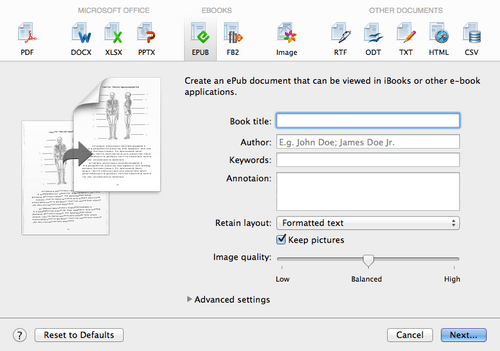
Users can convert printed documents and books into electronic files or E-books, that can be read on portable devices in EPUB and FB2 formats.

Does ABBYY FineReader Pro for Mac enable its users to schedule a particular folder for conversion?

Users can specify a folder and the software will automatically convert all the incoming files and batches of documents that get imported into it.

Can I get a demo of ABBYY FineReader Pro for Mac?

Yes, Techjockey provides an online demo for ABBYY FineReader Pro for Mac. You can send us a demo request including your preferable time and date.

What are the system requirements for using ABBYY FineReader Pro for Mac?

The software needs: ? 1.5GB of the total available space for program installation ? Extra 1GB for operation along with a ? Mac computer having an Intel processor.

Does ABBYY FineReader Pro for Mac have a mobile app?

Currently, ABBYY FineReader Pro for Mac is not available for Mobile OS.

20,000+ Software Listed

Best Price Guranteed

Free Expert Consultation

2M+ Happy Customers

Terms and Condtions

close

Users with registered businesses can purchase goods from merchants on the platform to satisfy their business needs. Users are not permitted to utilize any products acquired through the platform for resale, advertising, business, or further distribution.

For each purchase made, users will receive a Tax Invoice (or 'GST invoice') that includes specific details such as:

  • the GSTIN of the user associated with their registered business, and

  • the specified Entity Name for their business.

It should be noted that not all products are eligible for GST Invoice. Only the products displayed by participating sellers with the 'GST-based Invoice Available' callout on the product description page would qualify.

Certain goods and services are not eligible to get a GST Invoice, including items with VAS, i.e., Value Added Services (e.g., Total Mobile Protection/Assured Buyback) and those involving an exchange offer at the time of purchase.

Users must ensure the accuracy of the GSTIN, and business entity name provided for the GST Invoice. Requests for corrections into GST Invoice would not be accommodated by Techjockey.com or any Seller, and any issues arising from user-provided information are the sole responsibility of users.

Techjockey.com is not liable for the GST Invoice or any associated input tax credit. To efficiently claim an input tax credit, users should select the registered place of business address as per the GST authority's data and follow the provisions of the GST Act and rules.

To claim an input tax credit, the delivery and billing addresses must match. Furthermore, input tax credits will not be granted if the delivery address and GSTIN on the invoice are from different states. In case of incorrect GST details provided during the order placement, the order will be canceled automatically.