linkedin
AcaStat Software logo
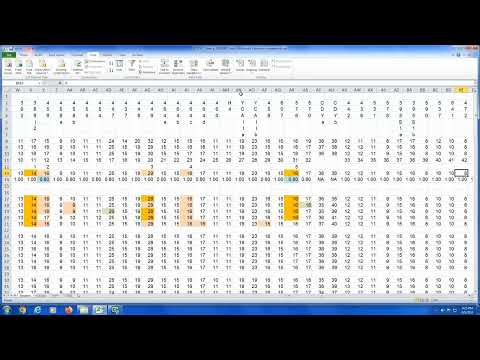
play BY23537 Demo - Step by Step using EXCEL and AcaStat
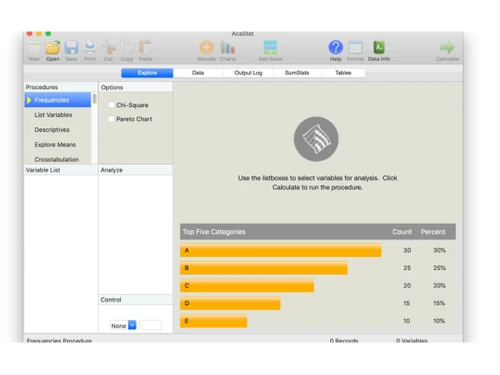
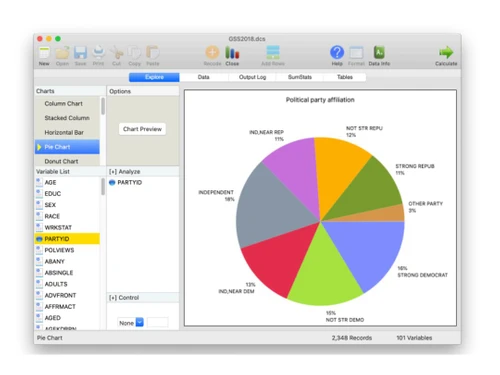
AcaSat Software Startup screen
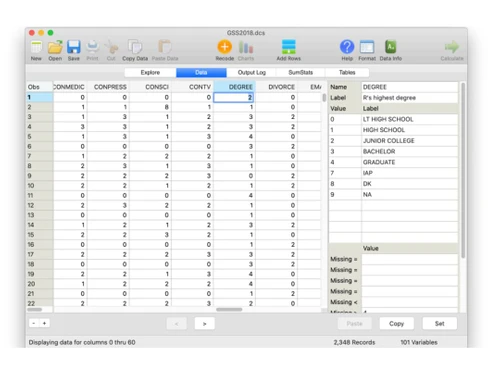
AcaSat Software Data module

AcaStat Software

Brand: AcaStat Software

  • 4.6

  • 3 Ratings

Uncover meaningful insights from your data, enhance research rigor, and promote data literacy.

See More

Have you used AcaStat Software before?

Share your insights for better experience

Add a Review
Starting Price
$10

View plans

100% Genuine
Products
Best Price
Guaranteed
Safe & Secure
Payment
  • Description

  • Pricing

  • Features

  • Specification

  • Review

  • Compare

  • Alternatives

  • FAQ

Starting at $10

AcaStat Software Overview

What is AcaStat Software?

AcaStat Software offers a user-friendly data analysis interface designed to empower researchers, educators, and professionals with comprehensive statistical analysis capabilities. With a range of powerful features, AcaStat facilitates in-depth exploration of data sets of any size or complexity. Its intuitive interface and drag-and-drop variable selection make it accessible to users of all levels, from beginners to seasoned statisticians, enabling efficient and accurate analysis.

From basic summary statistics to advanced correlation and hypothesis testing, AcaStat provides researchers with the tools they need to uncover meaningful insights from their data. Whether analyzing survey responses, experimental results, or observational data, AcaStat offers a comprehensive suite of analytical techniques to suit a wide range of research needs. With its random sampling simulation feature, users can explore the impact of sample size on statistical results, aiding in the design and interpretation of research studies.

Why Choose AcaStat Platform?

  • Unlock Advanced Analytical Capabilities: Access a wide range of statistical techniques, from basic summary statistics to advanced hypothesis testing, to uncover meaningful insights from your data.
  • Enhance Research Rigor: Ensure the validity and reliability of your research findings by utilizing AcaStat's robust analytical tools and methodologies.
  • Promote Data Literacy: Empower students and researchers with a user-friendly platform to develop their data analysis skills and enhance their understanding of statistical concepts.
  • Foster Collaboration: Facilitate collaboration and knowledge sharing among researchers and educators by providing a common data analysis and interpretation platform.
  • Drive Evidence-Based Decision-Making: Utilize AcaStat's insights to inform strategic decisions and policy-making, ensuring data-driven approaches to problem-solving and planning.
  • Streamline Data Analysis: Conduct thorough statistical analysis with ease using an intuitive interface and comprehensive feature set.

Benefits of AcaStat Software

  • Gain Insightful Visualizations: Generate frequency tables and summary statistics to visualize data distributions and characteristics for informed decision-making.
  • Conduct Advanced Statistical Tests: Perform advanced statistical tests such as Wilcoxon Signed-Rank and One-way ANOVA to evaluate relationships and assess group differences accurately.
  • Enhance Research Efficiency: Save time and effort with drag-and-drop variable selection and random sampling simulation features, facilitating efficient data analysis.
  • Empower Students: Provide students with a user-friendly platform to explore statistical concepts and methodologies, enhancing their understanding and learning outcomes.
  • Facilitate Informed Decision-Making: Utilize comprehensive analytical tools to uncover insights and confidently make data-driven decisions.

Pricing of AcaStat Data Analysis Platform

The pricing of AcaStat Software starts at $ 10 on techjockey.com.

The pricing model is based on different parameters, including extra features, deployment type, and total users. For further queries related to the AcaStat Software, you can contact our AcaStat Software team and learn more about the pricing and offers.

Read more

AcaStat Software Company Details

Founded Year:  1999

AcaStat Software develops innovative analytic solutions to make data analysis simple and affordable. Our mission is to encourage broader use of analytics worldwide by providing low-cost alternatives to expensive statistical software packages.

Director/Founders Phil Crewson
Company Size 1-100 Employees

AcaStat Software Pricing & Plans

Basic
Key Features
  • Data analysis interface
  • Frequencies tables
  • Descriptive statistics by subgroups
  • Wilcoxon Signed-Rank
  • One-way ANOVA
  • Bivariate Correlation
  • Point-Biserial Correlation
  • Random Sampling Simulation
  • Summary Statistics
  • Drag & drop variable selection
Starting at $10
    • Quantity

      Quantity
      Quantity

Key Features

  • Data analysis interface

  • Frequencies tables

  • Descriptive statistics by subgroups

  • Wilcoxon Signed-Rank

  • One-way ANOVA

  • Bivariate Correlation

  • Point-Biserial Correlation

  • Random Sampling Simulation

  • Summary Statistics

  • Drag & drop variable selection

AcaStat Software Features

  • icon_check Data analysis interface
    A user-friendly interface designed to simplify the process of conducting statistical analysis and exploring data sets.
  • icon_check Frequencies tables
    Generate tables that display the frequency distribution of categorical variables in your data, providing insights.
  • icon_check Descriptive statistics by subgroups
    Calculate descriptive statistics such as mean, median, and standard deviation for different subgroups within your data.
  • icon_check Wilcoxon Signed-Rank
    Conduct non-parametric hypothesis tests to compare paired samples and assess differences between related groups.
  • icon_check One-way ANOVA
    Perform analysis of variance to assess differences in means among multiple groups.
  • icon_check Bivariate Correlation
    Assess the strength and direction of linear relationships between pairs of continuous variables.
  • icon_check Point-Biserial Correlation
    Determine the correlation between continuous and binary variables.
  • icon_check Random Sampling Simulation
    Simulate random samples from your data set to explore the impact of sample size on statistical results.
  • icon_check Summary Statistics
    Calculate summary statistics for continuous variables in your data, providing a comprehensive overview of data distributions.
  • icon_check Drag & drop variable selection
    Easily select variables for analysis by simply dragging and dropping them into the desired analysis window.
AcaStat Software Demo Video play icon

Get AcaStat Software Demo

Watch the demo video to explore key features, real workflows, and how the software fits your business needs.

Understand
Key Features
Personal
Demo Insights
Interactive
Demo Support

AcaStat Software Specifications

Supported Platforms
Windows Windows MacOS MacOS
Devices
Desktop Desktop
Deployment
Perpetual Perpetual
Suitable For
Education Financial Institutions Governments Universities
Business Specific
All Businesses
Business Size
Small Business Startups Medium Business Enterprises
Customer Support
Email
Language
English
Training Resources
Documentation Videos

Explore the Best Alternative Solutions Similar to Your Business Size and Needs

AcaStat Software Review

4.6

Out of 5

img

Overall Rating

Based on
3 Verified Ratings

Rating Breakdown

  • Features 4.3
  • Value for Money 4.8
  • Ease of Use 4.6
  • Customer Support 4.6

80% Recommend this Product

Add Review

Techjockey Trusted Reviews from Verified Users

No reviews are currently available for AcaStat Software. Discover similar Data Analysis Software reviews

  • Perfios

    4.2

    Whats great - Makes it easy to check credit data and process loans faster. read more

  • Qlik Insight Bot

    4.1

    Whats great - Qlik Insight Bot generates data-oriented insights and findings, and delivers it in a conversational format. It makes it reall... read more

  • Microsoft Power BI

    4.4

    Whats great - Flexibility to connect multiple data sources and visualize data read more

Compare AcaStat Software With other Data Analysis Software

Products
Ratings
Pricing
Device Supported
Deployment
Supported Platforms
  • img

    AcaStat Software

  • 4.6

  • Price On Request

  • Desktop

    Mobile

  • Web based

    On Premises

  • Windows

    Mac OS

  • img

    Dovetail

  • 4.0

  • Price On Request

  • Desktop

    Mobile

  • Web based

    On Premises

  • Windows

    Mac OS

  • img

    Genstat

  • 4.5

  • Price On Request

  • Desktop

    Mobile

  • Web based

    On Premises

  • Windows

    Mac OS

  • img

    NVivo

  • 4.1

  • Price On Request

  • Desktop

    Mobile

  • Web based

    On Premises

  • Windows

    Mac OS

  • img

    InfraNodus

  • 4.6

  • Price On Request

  • Desktop

    Mobile

  • Web based

    On Premises

  • Windows

    Mac OS

  • img

    Displayr

  • 4.7

  • Price On Request

  • Desktop

    Mobile

  • Web based

    On Premises

  • Windows

    Mac OS

  • img

    Avanty

  • 4.6

  • Price On Request

  • Desktop

    Mobile

  • Web based

    On Premises

  • Windows

    Mac OS

  • img

    Scilab

  • 4.2

  • Price On Request

  • Desktop

    Mobile

  • Web based

    On Premises

  • Windows

    Mac OS

  • img

    Delve AI

  • 4.4

  • Price On Request

  • Desktop

    Mobile

  • Web based

    On Premises

  • Windows

    Mac OS

(0) Product(s) selected

AcaStat Software Alternatives

See All AcaStat Software Alternatives

Starting Price:

$20 /User/Month

Starting Price:

$2,889

Starting Price:

$10

Available

Price on Request

Available

Price on Request

Available

Price on Request

Available

Price on Request

Available

Price on Request

Available

Price on Request
Available

Price on Request
Articles for AcaStat Software

See All Related Articles

Which operating system does AcaStat Software support?

AcaStat Software is compatible with Windows and MacOS device systems.

Is there any AcaStat Software App?

AcaStat Software app is not available for Android and iOS devices.

What is the deployment type of AcaStat Software?

AcaStat Software supports on-premises deployment.

How much does AcaStat Software cost?

AcaStat Software pricing starts at $ 10 on techjockey.com.

Who are the potential users of AcaStat Software?

AcaStat Software caters to researchers, educators, and professionals at all skill levels, providing them with comprehensive statistical analysis tools for uncovering meaningful insights from various data types, from surveys to experimental results.

Is there any free trial or demo for AcaStat Software?

AcaStat Software platform demo is available for free with techjockey.com.

Is AcaStat Software Free?

AcaStat Software is not available for free. Its pricing starts from $10 at techjockey.com.

Does AcaStat Platform offer a free trial?

No, the AcaStat platform does not offer a free trial

How can you download AcaStat Software?

For AcaStat Software software installation, you can buy this solution directly from Techjockey's official website. Once purchased, you will receive a key to download the same via email.

How does AcaStat Software Work?

AcaStat Software simplifies statistical analysis with its user-friendly interface and powerful features, allowing researchers to explore and analyze data sets of any size or complexity efficiently and accurately.

20,000+ Software Listed

Best Price Guranteed

Free Expert Consultation

2M+ Happy Customers

Terms and Condtions

close

Users with registered businesses can purchase goods from merchants on the platform to satisfy their business needs. Users are not permitted to utilize any products acquired through the platform for resale, advertising, business, or further distribution.

For each purchase made, users will receive a Tax Invoice (or 'GST invoice') that includes specific details such as:

  • the GSTIN of the user associated with their registered business, and

  • the specified Entity Name for their business.

It should be noted that not all products are eligible for GST Invoice. Only the products displayed by participating sellers with the 'GST-based Invoice Available' callout on the product description page would qualify.

Certain goods and services are not eligible to get a GST Invoice, including items with VAS, i.e., Value Added Services (e.g., Total Mobile Protection/Assured Buyback) and those involving an exchange offer at the time of purchase.

Users must ensure the accuracy of the GSTIN, and business entity name provided for the GST Invoice. Requests for corrections into GST Invoice would not be accommodated by Techjockey.com or any Seller, and any issues arising from user-provided information are the sole responsibility of users.

Techjockey.com is not liable for the GST Invoice or any associated input tax credit. To efficiently claim an input tax credit, users should select the registered place of business address as per the GST authority's data and follow the provisions of the GST Act and rules.

To claim an input tax credit, the delivery and billing addresses must match. Furthermore, input tax credits will not be granted if the delivery address and GSTIN on the invoice are from different states. In case of incorrect GST details provided during the order placement, the order will be canceled automatically.