linkedin
Acronis logo
play How to install Acronis True Image demo
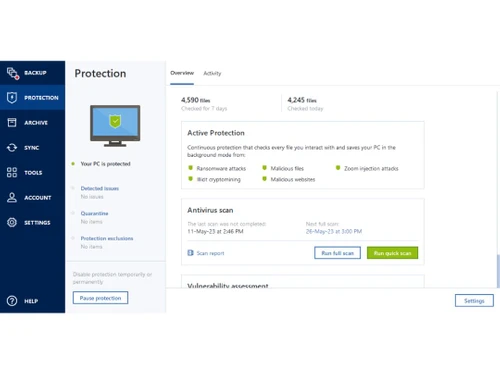
Acronis protection
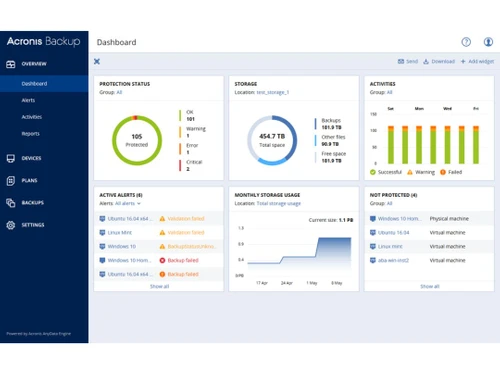
Acronis status

Acronis

Brand: Acronis

  • 4.5

  • 7 Ratings & 6 Reviews

Acronis is a data protection software that safeguards valuable files, backs them up, and provides disaster recovery. It secures data access for all kinds of consumers, ranging from MSMEs to big enterprises. This data recovery software provides physical as well as virtual server backup over Cloud. It ensures secure file transfer, storage management, and system deployment. This cyber protection sof...

See More

Have you used Acronis before?

Share your insights for better experience

Add a Review
Starting Price
$80

View plans

100% Genuine
Products
Best Price
Guaranteed
Safe & Secure
Payment
  • Description

  • Pricing

  • Features

  • Specification

  • Review

  • Compare

  • Alternatives

  • FAQ

Starting at $80

Acronis Software Overview

What is Acronis True Image?

Acronis is a data protection software that safeguards valuable files, backs them up, and provides disaster recovery. It secures data access for all kinds of consumers, ranging from MSMEs to big enterprises. This data recovery software provides physical as well as virtual server backup over Cloud. It ensures secure file transfer, storage management, and system deployment. This cyber protection software gives easy and comprehensive solutions to all types of devices, providing the highest level of security and authenticity.

Acronis True Image offers an easy to use, efficient, and cyber protection module to deliver high value work and creating reliable backups in case of system failure. The AI-based online security system provides ensures hassle-free working against ransomwares and cryptojacking plugins that can lead to slowing down of the system. Acronis True Image is used by over 5 million+ customers worldwide for their daily data protection tasks. 

Acronis True Image software provides backup for everything, it includes: 

  1. Operating Systems
  2. Applications
  3. Settings
  4. Photos
  5. Videos
  6. Files, and Office 365 accounts, and much more 

This data backup software works for all operating systems and mobile platforms. The software clones a system disk when it is in use and stores the backups anywhere users prefer to, such as local drives, external hard drives, NAS, and cloud.

How does Acronis True Image deliver cyber protection? 

Acronis True Image provides a fully integrated AI-powered cyberthreat detection system that impedes the activity of any ransomware in real-time. In addition to that the software automatically restores the affected files completely uncorrupted. In an outstanding feat, Acronis True Image defeated more than 400,000+ such attacks last year.  This data backup also prevents cryptomining malware infestation from system resources larceny, system slowdown, and injecting other malware. 

Anywhere data access with Acronis True Image 

Acronis True Image is designed to accommodate the modern necessity of seamless data accessibility. The software backs up all the data on Acronis Cloud for users to get access from any where at any time. It is directly available with the SaaS-license to Acronis True Image. This allows users to recapture any lost file or folder from any location with a stable internet connection. Plus, the best part about it is that Acronis True Image provides a multi-device licence. I.e., users can access through unlimited number of mobile devices with a single license. 

How does Acronis Detect File Authenticity?

Acronis uses its special Blockchain technology to generate a ‘fingerprint’ to protect the data of users. Moreover, it generates a certificate which gives an easy and genuine way to check data authenticity. Blockchain technology is a type of a distributed database that maintains a list of data transaction records. There is no official copy of the file stored but every portion of the decentralized system maintains the chain of records. In this way, the file remains secure.

What is the Hash Algorithm in Acronis True Image?

The software uses a hash algorithm to produce the same output for the same input file regardless of circumstances. Any change in the input alters the fingerprint. The algorithm is designed to work in one direction making it impossible to determine the original file inputs from the output. A hash table of the whole structure containing the fingerprint of the data is recorded in the blockchain. Authenticity is checked by any party that has access.

Pricing of Acronis True Image

There are 3 types of plans available in Acronis True Image. They include:

  1. Standard: The standard plan comes for $79.99 for 3 computers.It is for a one-year subscription.
  2. Advanced: The cost of this plan is $109.99 for 3 computers.It is for a one-year subscription. 
  3. Premium: The plan comes at a price of $189.99 for 3 computers.It is for a one-year subscription.

How does AnyData Engine Provide Data Protection in Acronis?

Acronis AnyData engine provides data protection to all types of data at any place and in any environment. Acronis data protection solution powered by AnyData is modular and scalable. Image-based backups are quickly captured and stored in a universal format, allowing recovery at any time and to any hardware or any virtual machine. This security engine is GDPR compliant and provides secure access to data. Customers can store their desired data with Acronis True Image, which will be secured by the AnyData Engine instantly.

Read more

Acronis Company Details

Founded Year:  2003

Acronis

Director/Founders Serg Bell
Company Size 1-100 Employees

Acronis Pricing & Plans

Acronis
Acronis
Essentials (For 3 Computers)
Starting at $80
    • Licenses

      Licenses
      Licenses
    • Yearly

      Yearly
      Yearly

Key Features

  • Flexible backups: full image to file-level

  • Active disk cloning

  • Universal restore and fast recovery

  • Ransomware protection

Advanced (For 3 Computers)
Starting at $110
    • Licenses

      Licenses
      Licenses
    • Yearly

      Yearly
      Yearly

Key Features

  • Active disk cloning

  • Flexible backups: full image to file-level

  • Block viruses and malware

  • Ransomware protection

  • Cloud Protection

  • Database Backup/Restore (Management)

  • Centralized Web Management Console

  • Reporting

  • Administrative Access

  • Web Protection

  • Encryption..

  • Cloud backup and features

  • Universal restore and fast recovery

Premium (For 3 Computers)
Starting at $190
    • Licenses

      Licenses
      Licenses
    • Yearly

      Yearly
      Yearly

Key Features

  • Active disk cloning

  • Flexible backups: full image to file-level

  • Block viruses and malware

  • Ransomware protection

  • Ability to add up to 5TB of cloud storage

  • Cloud Protection

  • Database Backup/Restore (Management)

  • Centralized Web Management Console

  • Reporting

  • Administrative Access

  • Web Protection

  • Encryption..

  • Cloud backup and features

  • Blockchain certification of files

  • Universal restore and fast recovery

  • Electronic signatures on files

Acronis Features

  • icon_check Data Recovery
    Acronis Notary improves the regulatory compliance and validity of recovery ensuring the backup’s authenticity.
  • icon_check Disk-Imaging Backup
    A disk image is a complete copy of everything on the hard drive which captures all files in the system and replicates them. This
  • icon_check Universal Recovery
     It dissociates the backup of users from hardware dependencies while retaining the system data.
  • icon_check Virtual Server
    The software reduces the risk of agentless as well as agent-based back-up and recovery of the hosts and virtual servers on any of
  • icon_check Ransomware Protection
    This feature grants protection from ransomware threats and data loss. It ensures complete data security for customers.
  • icon_check CryptoGuard
    Cryptoguard protects the users’ data from ransomware and data threats by identifying them and shutting them down and
  • icon_check Kernel Office 365 Backup & Restore
    The Kernel Office 365 Backup and Restore helps restore the data of users automatically and backs them up to a new PST file for
  • icon_check Electronic Signature
    This is primarily used to reduce miscommunication with users and customers. It also supports the authenticity of files with
  • icon_check SAN Storage Snapshots
    Users can offload VMWare VM backup snapshots to NetApp SAN storage, reducing the impact of backup.
  • icon_check Cloud Protection
    This feature increases the service availability by protecting Microsoft Azure VMs and Amazon EC2 workloads. It mitigates the
  • icon_check Database Backup/Restore (Management)
    The software has a universal backup which minimizes the downtime by restoring Windows and Linux systems to dissimilar hardware.
  • icon_check Centralized Web Management Console
    This feature allows the IT workload to be reduced with a touch-friendly web management console. It also reduces the RTOs by
  • icon_check Reporting
    Users can increase the infrastructure resilience with regular and customizable reports that focus on infrastructure
  • icon_check Administrative Access
    The feature allows IT teams to protect remote offices and departments with the ability to manage and delegate roles for multiple
  • icon_check Web Protection
     It proactively protects data and systems from ransomware attacks and reduces the need for recovery by detecting suspicious
  • icon_check Encryption..
    The software improves data security with AES-256 encryption of metadata. It remains protected by encrypted passwords which
Acronis Demo Video play icon

Get Acronis Demo

Watch the demo video to explore key features, real workflows, and how the software fits your business needs.

Understand
Key Features
Personal
Demo Insights
Interactive
Demo Support

Acronis Specifications

Supported Platforms
Ubuntu Ubuntu Windows Windows iOS iOS Android Android
Devices
Desktop Desktop Mobile Mobile
Deployment
Cloud-Based Cloud-Based Perpetual Perpetual
Suitable For
All Industries
Business Specific
All Businesses
Language
English

Acronis Reviews

4.5

Out of 5

img

Overall Rating

Based on
6 Verified Reviews

Rating Breakdown

  • Features 4.5
  • Value for Money 4.5
  • Ease of Use 4.5
  • Customer Support 4.5

88% Recommend this Product

Add Review

Pros

  • "It's easy to use and deploy, it has multiple features like protection and server protection and protection over cloud."

    Amar YadavApr 18, 2023

  • "it easily restores a failed drive without reinstalling any apps"

    Vineet VardhanAug 20, 2018

  • "Superb company and offers excellent customer support experience when in trouble."

    RAMESHKUMAR GAMIJun 30, 2016

Cons

  • "I don't have anything to complain now. Everything will be working fine for me."

    Amar YadavApr 18, 2023

  • "This product does not work for mac. The backups gets corrupted often"

    Vineet VardhanAug 20, 2018

Acronis Video Review

youtubeVideoId

4.3

“Acronis Review Is this all-in-one solution too good to be true?”

Review by: Cyber Lab

vineet vardhan

4.7

Reviewed on: Aug 20, 2018

Techjockey Verified

“Easy to use but doesnt work on mac”

Pros

it easily restores a failed drive without reinstalling any apps

Cons

This product does not work for mac. The backups gets corrupted often

RAMESHKUMAR GAMI

4.5

Reviewed on: Jun 30, 2016

Techjockey Verified

“Professsional and helpful”

Pros

Superb company and offers excellent customer support experience when in trouble.

Cons

N/A

Mitul Kotak

4.6

Reviewed on: Jul 7, 2016

Techjockey Verified

“gives best advice”

Pros

This company was very helpful! I was looking for a Software. They asked a few questions in a 5-10 minute phone call and then provided 4 useful and appropriate recommendations. They did not bombard me with any unwanted information. They did provide me with other useful tools such as links to demos and pricing, and a scorecard for rating the software. They worked quickly and did not waste any of my time. I highly recommend using Techjockey to help you find a solution to your needs!

Cons

N/A

See All Acronis Reviews

Compare Acronis With other Endpoint Backup Solution

Products
Ratings
Pricing
Device Supported
Deployment
Supported Platforms
  • img

    Acronis

  • 4.5

  • Price On Request

  • Desktop

    Mobile

  • Web based

    On Premises

  • Windows

    Mac OS

  • img

    Own Company

  • 4.1

  • Price On Request

  • Desktop

    Mobile

  • Web based

    On Premises

  • Windows

    Mac OS

(2) Product(s) selected

Acronis Alternatives

See All Acronis Alternatives

What is Acronis True Image?

Acronis True Image is a backup solution that lets you clone, mirror and restore data to and from cloud as well as local drives.

How to recover files in Acronis?

Start Acronis True Image > Click Backup > From the backup list select the file you want to recover and then open Recovery tab > Select the backup version (data state) > Select the file(s) you want to recover and click Next.

Can I clone or boot a dual boot machine?

Yes, you can clone a dual boot machine if both the operating systems are Windows. If your systems are on separate partitions of the same physical drive then cloning takes place uninterrupted, else there may be bootability issues.

How can I configure a backup to Cloud?

For backup, an active cloud storage subscription is essential. Create a new backup plan and choose ‘cloud storage’ as the destination in the ‘where to back up’ option.

What can be protected with Acronis Cyber Break-up?

Disks, Files, ESXi Configurations, SQL Databases and Office 365 mailboxes are protected with the Acronis Cyber Break-up.

20,000+ Software Listed

Best Price Guranteed

Free Expert Consultation

2M+ Happy Customers

Terms and Condtions

close

Users with registered businesses can purchase goods from merchants on the platform to satisfy their business needs. Users are not permitted to utilize any products acquired through the platform for resale, advertising, business, or further distribution.

For each purchase made, users will receive a Tax Invoice (or 'GST invoice') that includes specific details such as:

  • the GSTIN of the user associated with their registered business, and

  • the specified Entity Name for their business.

It should be noted that not all products are eligible for GST Invoice. Only the products displayed by participating sellers with the 'GST-based Invoice Available' callout on the product description page would qualify.

Certain goods and services are not eligible to get a GST Invoice, including items with VAS, i.e., Value Added Services (e.g., Total Mobile Protection/Assured Buyback) and those involving an exchange offer at the time of purchase.

Users must ensure the accuracy of the GSTIN, and business entity name provided for the GST Invoice. Requests for corrections into GST Invoice would not be accommodated by Techjockey.com or any Seller, and any issues arising from user-provided information are the sole responsibility of users.

Techjockey.com is not liable for the GST Invoice or any associated input tax credit. To efficiently claim an input tax credit, users should select the registered place of business address as per the GST authority's data and follow the provisions of the GST Act and rules.

To claim an input tax credit, the delivery and billing addresses must match. Furthermore, input tax credits will not be granted if the delivery address and GSTIN on the invoice are from different states. In case of incorrect GST details provided during the order placement, the order will be canceled automatically.