 USA
USA UAE
UAESmall Business
Designed for startups and growing businesses

See More


Brand: Adobe
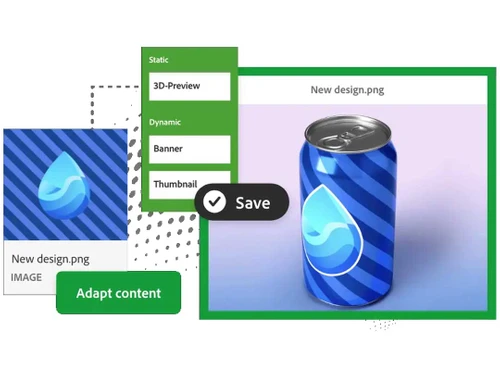
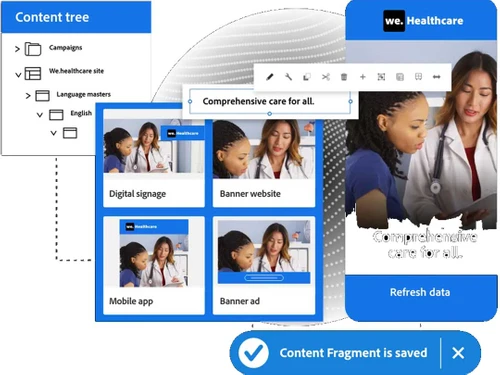
Adobe Experience Manager (AEM) is a leading CMS enabling businesses to deliver personalized, high-performance digital experiences. With advanced content creation, omnichannel support, AI-driven personalization, and seamless Adobe product integration, AEM powers global content management.
See MoreHave you used Adobe Experience Manager before?
Share your insights for better experience
Brand: Adobe
Founded Year: 1982
Adobe is the global leader in digital media and digital marketing solutions.
Looking for The Right Pricing?
Share your requirements and get a plan built around your business.
Price Available on Request
Get personalised Adobe Experience Manager pricing that fits your needs. Our team will connect with you.
 Page Creation and Management Revision History Content Versioning Multi-Language Content Workflow Management Media Optimization Multi-Site Management
  Windows
  MacOS
MacOS  Desktop
  Cloud-Based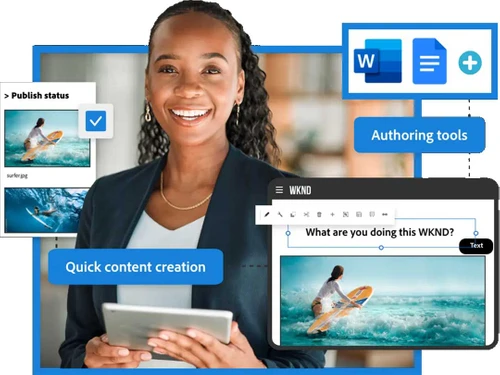

Small Business
Designed for startups and growing businesses
Medium Business
Built for business growth and flexibility
Enterprises
Designed for complex and large-scale business needs
3.8
Out of 5

Overall Rating
Based on
12 Verified Reviews
Rating Breakdown
85% Recommend this Product
Add ReviewUsers generally appreciate Adobe Experience Manager for its robust content management capabilities and seamless integration with other Adobe tools, making it particularly beneficial for larger projects. The software is noted for its ease of use, time-saving features, and responsive support team. However, some users express concerns about the steep learning curve and the complexity it presents, especially for smaller tasks. Additionally, cost is a consideration for startups, which may limit its accessibility for some potential users.
Pros
"Perfect software for handling the CMS without any hassle. Further, it allows to make instant edits. It is also easy to understand."
"Adobe Experience Manager (AEM) integrates well with the other Adobe tools I use. It’s been helpful in managing content."
"This is a perfect software stands out for it’s set of features. Further, it saves a lot of time. Additionally the support team is responsive always ready to assist."
Cons
"It’s not something you can just start using without some effort, and it might be more than you need if you’re dealing with smaller projects. "
"Adobe Experience Manager (AEM) integrates well with the other Adobe tools I use. It’s been helpful in managing content. "
"It took me some time to get the hang of it, and it might feel like too much if you’re working on smaller tasks. "


Sep 1, 2024
Techjockey Verified
“It is the reliable and time saving software”
Pros
Perfect software for handling the CMS without any hassle. Further, it allows to make instant edits. It is also easy to understand.
Cons
Cost is concern for me as we are a startup
Reason to switch
I wanted budget-friendly software.
Jul 8, 2024
Techjockey Verified
“A perfect CMS known for it’s ease of use and variety of features”
Pros
This is a perfect software stands out for it’s set of features. Further, it saves a lot of time. Additionally the support team is responsive always ready to assist.
Cons
No cons
Reason to switch
I was looking for a software that is easy to use.
Jun 18, 2024
Techjockey Verified
“All in one platform for managing the web content”
Pros
I’ve been using this software for more than 10 years now, and I really like the ease it provides. I can see the growth of my web-content.
Cons
No issues

Adobe Experience Manager
Price On Request
Desktop
Mobile
Web based
On Premises
Windows
Mac OS
Grav
Price On Request
Desktop
Mobile
Web based
On Premises
Windows
Mac OS
OpenText Web CMS
Price On Request
Desktop
Mobile
Web based
On Premises
Windows
Mac OS

Wix
Price On Request
Desktop
Mobile
Web based
On Premises
Windows
Mac OS
Cosmic AI
Price On Request
Desktop
Mobile
Web based
On Premises
Windows
Mac OS

Scrintal
Price On Request
Desktop
Mobile
Web based
On Premises
Windows
Mac OS

Contentful
Price On Request
Desktop
Mobile
Web based
On Premises
Windows
Mac OS

Wordable
Price On Request
Desktop
Mobile
Web based
On Premises
Windows
Mac OS
Bear CMS
Price On Request
Desktop
Mobile
Web based
On Premises
Windows
Mac OS

Genei
Price On Request
Desktop
Mobile
Web based
On Premises
Windows
Mac OS

Scalenut
Price On Request
Desktop
Mobile
Web based
On Premises
Windows
Mac OS
(0) Product(s) selected
Available
Price on Request
Available
Price on Request
Starting Price:
$99 /Month
Starting Price:
$5 /Month

Starting Price:
$149

Starting Price:
€29

Starting Price:
$5

Starting Price:
$99

Starting Price:
$170

Starting Price:
$18 /Month

Available
Price on Request



Yes, Adobe Experience Manager (AEM) offers headless CMS capabilities, allowing content to be delivered across various platforms and devices, providing flexibility in creating engaging digital experiences.
No, Adobe Experience Manager is not an open-source platform. It is a proprietary content management system offered by Adobe, designed for enterprises seeking advanced content management solutions.
While AEM simplifies content creation with an intuitive interface, some level of coding knowledge can be beneficial for advanced customization and development tasks, especially when creating complex digital experiences.
Yes, Adobe Experience Manager provides robust APIs that allow developers to integrate AEM with other systems, extend its capabilities, and deliver content across various channels and devices.
AEM uses Adobe’s AI technology to show personalized content to different users based on their interests and behavior. This means each visitor sees content that is relevant to them, making their experience better and more engaging.
AEM’s Headless CMS lets you deliver content to any device or platform without being tied to a traditional website setup. This gives you more flexibility to create unique digital experiences that work across different channels.
AEM is among the most expensive, using custom enterprise licensing, while Contentful, Contentstack, and WordPress VIP generally cost significantly less.
0 0
Contentful, Contentstack, Storyblok, and Sanity are leading headless CMS alternatives offering API-first content delivery and faster development.
0 0
To connect Adobe Campaign with Adobe Experience Manager (AEM), first, you need to add the AEM package to your Adobe Campaign. Then, set up a link in AEM to Adobe Campaign. After that, you can use email templates made in AEM for your Adobe Campaign emails, which lets you use AEM’s content in your email campaigns.
0 0
One can learn AEM in several ways including using Adobe’s official documentation, approaching the AEM Community, getting online courses like Adobe Experience League, and gaining hands-on experience by and experimenting with AEM’s features.
0 0
To find out if a website uses Adobe Experience Manager (AEM), you can check the website's code using the tools in your web browser. Look for certain file types, web addresses, or special code that is linked to AEM, such as cq-dam or cq-page within the HTML
0 0
20,000+ Software Listed
Best Price Guranteed
Free Expert Consultation
2M+ Happy Customers
Terms and Condtions

Users with registered businesses can purchase goods from merchants on the platform to satisfy their business needs. Users are not permitted to utilize any products acquired through the platform for resale, advertising, business, or further distribution.
For each purchase made, users will receive a Tax Invoice (or 'GST invoice') that includes specific details such as:
the GSTIN of the user associated with their registered business, and
the specified Entity Name for their business.
It should be noted that not all products are eligible for GST Invoice. Only the products displayed by participating sellers with the 'GST-based Invoice Available' callout on the product description page would qualify.
Certain goods and services are not eligible to get a GST Invoice, including items with VAS, i.e., Value Added Services (e.g., Total Mobile Protection/Assured Buyback) and those involving an exchange offer at the time of purchase.
Users must ensure the accuracy of the GSTIN, and business entity name provided for the GST Invoice. Requests for corrections into GST Invoice would not be accommodated by Techjockey.com or any Seller, and any issues arising from user-provided information are the sole responsibility of users.
Techjockey.com is not liable for the GST Invoice or any associated input tax credit. To efficiently claim an input tax credit, users should select the registered place of business address as per the GST authority's data and follow the provisions of the GST Act and rules.
To claim an input tax credit, the delivery and billing addresses must match. Furthermore, input tax credits will not be granted if the delivery address and GSTIN on the invoice are from different states. In case of incorrect GST details provided during the order placement, the order will be canceled automatically.



