 USA
USA UAE
UAESmall Business
Designed for startups and growing businesses

See More




Brand: AnyViewer
AnyViewer is a secure and efficient remote desktop software that enables users to access and control PCs from anywhere.
See MoreHave you used AnyViewer before?
Share your insights for better experience
Connection & Accessibility
 Cross-Platform Compatibility Mobile Access Support Multi-Window Control Persistent Session Multi-Monitor Navigation Unattended Access Browser-Based Access Clipboard Syncing Remote printing
 Session Management & Control
Multi Session Support Session Timeout & Auto-Lock Remote Reboot Options Blank Screen Mode Session Handover Queue & Schedule Sessions Real-Time Control Customization Session Recording & Playback System Management & Support
Two-Way File Transfer Bulk File Transfer Direct File Access Permissions Remote Task Manager System Health Monitoring Automated System Diagnostics Remote Command Prompt Access Session Note Taking File Sync & Auto Update Collaboration & Communication
In-Session Chat Screen Sharing with Control User Grouping & Management Video Conferencing Annotation & Drawing Tools Multiple Technician Access Shared Toolbox Two-Way Desktop Sharing Security & Compliance
End-to-End Encryption Role-Based Access Control (RBAC) Multi-Factor Authentication (MFA) Dynamic IP Whitelisting GDPR/CCPA Compliance HIPAA Compliance Audit Logs Customization & Personalization
Customizable Branding Customizable Toolbars Flexible UI Layout Session Scripting Custom Keyboard Mapping Language Localization Automation & Workflow
Scheduled Tasks Remote Wake-on-LAN Task Automation Workflow Automation Analytics & Reporting
Performance Metrics Detailed Session Reports User Activity Reports Error Logs Customizable Dashboards Integrations
Ticket Management API Integration Third Party Integration Patch Management Administrative Features
Access Logs Admin Console Patch Management Device Management Centralized Connection Management User Access Management 

Watch the demo video to explore key features, real workflows, and how the software fits your business needs.
 Ubuntu
  Windows
  iOS
iOS  Android MacOS
  Linux
Linux  Desktop
  Mobile
  Tablet
  iPad
iPad  Cloud-Based
  Perpetual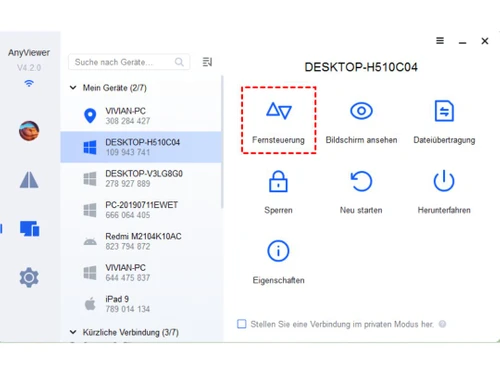
Small Business
Designed for startups and growing businesses
Medium Business
Built for business growth and flexibility
Enterprises
Designed for complex and large-scale business needs
3.9
Out of 5

Overall Rating
Based on
3 Verified Ratings
Rating Breakdown
90% Recommend this Product
Add ReviewTechjockey Trusted Reviews from Verified Users
No reviews are currently available for AnyViewer. Discover similar Remote Desktop Software reviews

AnyDesk
Whats great - Lightning-fast remote desktop connections, allowing you to access your computer from anywhere with minimal delay. read more

TeamViewer
Whats great - It is extremely easy to use and fast. It allows connecting to a computer from any device with a simple ID and password. It in... read more

Parsec
Whats great - Lightweight, runs smoothly even on weak devices. read more

AnyViewer
Price On Request
Desktop
Mobile
Web based
On Premises
Windows
Mac OS
AnyDesk
₹ 14580
Desktop
Mobile
Web based
On Premises
Windows
Mac OS
TeamViewer
₹ 8628
Desktop
Mobile
Web based
On Premises
Windows
Mac OS

UltraViewer
Price On Request
Desktop
Mobile
Web based
On Premises
Windows
Mac OS

TSplus Remote Support
Price On Request
Desktop
Mobile
Web based
On Premises
Windows
Mac OS

RustDesk
Price On Request
Desktop
Mobile
Web based
On Premises
Windows
Mac OS
Parsec
Price On Request
Desktop
Mobile
Web based
On Premises
Windows
Mac OS

Iperius Remote
Price On Request
Desktop
Mobile
Web based
On Premises
Windows
Mac OS

Apple Remote Desktop
Price On Request
Desktop
Mobile
Web based
On Premises
Windows
Mac OS

Impero Connect
Price On Request
Desktop
Mobile
Web based
On Premises
Windows
Mac OS

NoMachine
Price On Request
Desktop
Mobile
Web based
On Premises
Windows
Mac OS
(0) Product(s) selected
Starting Price:
$10 /Month
Starting Price:
€8 /Month
Starting Price:
$80 /Licenses
Available
Price on Request
Starting Price:
$45 /Year

Starting Price:
$50 /Year

Starting Price:
£3 /Month

Available
Price on Request

Starting Price:
$5 /Month

Starting Price:
$22

Starting Price:
$33 /Device/Year





AnyViewer supports various operating systems, including Ubuntu, Windows, iOS, Android, macOS, and Linux.
Yes, AnyViewer is available as a mobile app for both Android and iOS users, allowing remote access and control from mobile devices to PCs.
AnyViewer pricing starts at $43 at techjockey.com. For detailed pricing information, contact techjockey.com as pricing is customised based on specific business needs.
AnyViewer targets professionals and individuals who require efficient collaboration and content creation. It is suitable for all business sizes, including small businesses, startups, medium businesses, enterprises, SMBs, SMEs, MSMBs, and freelancers.
A demo of AnyViewer is available at techjockey.com. For more information, you can contact our product experts.
Yes, AnyViewer is suitable for small businesses, offering features like remote access, high performance, low latency, and secure data transfer that cater to the needs of small businesses for collaboration and productivity.
AnyViewer ensures data security through Elliptic Curve Cryptography (ECC) encryption, offering protection for remote desktop connections and data transfers.
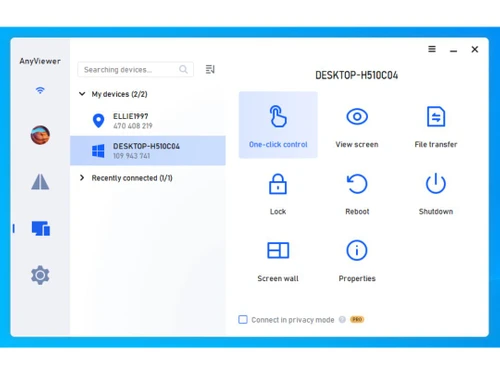
AnyViewer allows users to remotely access and control PCs from anywhere via the internet. It offers high performance, low latency, mobile access, and secure data transfer, enabling efficient collaboration and content creation for professionals and individuals.
AnyViewer offers features such as remote desktop connection, high performance, low latency, mobile access, secure data transfer, a user-friendly interface, and adaptability for both personal and professional use. For more information, contact our product experts.
In AnyViewer, Synchronize Connection History means syncing your past remote sessions across devices logged into the same account.
It lets you see previously connected PCs on any device after sign-in.
This helps with quick reconnection and device management.
The history syncs securely via AnyViewer’s cloud account system.
0 0
To create an AnyViewer account, visit the AnyViewer website and sign up. Once you have an account, you can log in to manage your account settings, subscriptions, and devices.
0 0
Yes, you can transfer files between your local computer and the remote computer using AnyViewer's built-in file transfer feature.
0 0
If you're using AnyViewer over the internet, you may need to forward certain ports on your router to allow incoming connections. The specific ports may vary depending on your network configuration.
0 0
There could be several reasons why AnyDesk might experience a network connection timeout:
0 0
20,000+ Software Listed
Best Price Guranteed
Free Expert Consultation
2M+ Happy Customers
Terms and Condtions

Users with registered businesses can purchase goods from merchants on the platform to satisfy their business needs. Users are not permitted to utilize any products acquired through the platform for resale, advertising, business, or further distribution.
For each purchase made, users will receive a Tax Invoice (or 'GST invoice') that includes specific details such as:
the GSTIN of the user associated with their registered business, and
the specified Entity Name for their business.
It should be noted that not all products are eligible for GST Invoice. Only the products displayed by participating sellers with the 'GST-based Invoice Available' callout on the product description page would qualify.
Certain goods and services are not eligible to get a GST Invoice, including items with VAS, i.e., Value Added Services (e.g., Total Mobile Protection/Assured Buyback) and those involving an exchange offer at the time of purchase.
Users must ensure the accuracy of the GSTIN, and business entity name provided for the GST Invoice. Requests for corrections into GST Invoice would not be accommodated by Techjockey.com or any Seller, and any issues arising from user-provided information are the sole responsibility of users.
Techjockey.com is not liable for the GST Invoice or any associated input tax credit. To efficiently claim an input tax credit, users should select the registered place of business address as per the GST authority's data and follow the provisions of the GST Act and rules.
To claim an input tax credit, the delivery and billing addresses must match. Furthermore, input tax credits will not be granted if the delivery address and GSTIN on the invoice are from different states. In case of incorrect GST details provided during the order placement, the order will be canceled automatically.



