linkedin
Artlantis 2021 logo
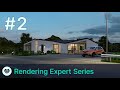
play Artlantis Rendering Expert Series: Exterior #2
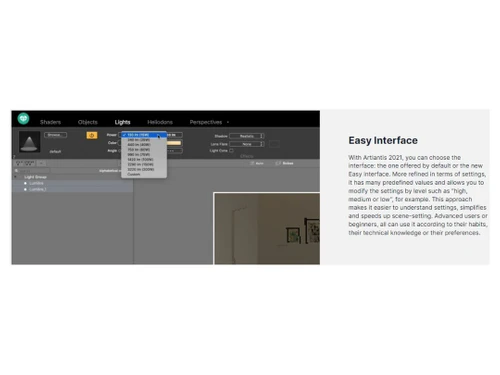
Artlantis 2021-Easy Interface
Artlantis 2021-IFC Import

Artlantis 2021

Brand: StudioBase2 (AV-Tech Group)

  • 4.1

  • 6 Ratings

Artlantis 2021 3D rendering software solution is a pioneer in 3D rendering and will work well with all 3D-based models.

See More

Have you used Artlantis 2021 before?

Share your insights for better experience

Add a Review

Price Available on Request

Questions about pricing or customization? We’re here to help, just a click away.

100% Genuine
Products
Best Price
Guaranteed
Safe & Secure
Payment
  • Description

  • Pricing

  • Features

  • Specification

  • Review

  • Compare

  • Alternatives

  • FAQ

Artlantis 2021 Software Overview

What is Artlantis Software?

Artlantis is a 3D animation and rendering software for users like moviemakers, VFX artists, architects, etc. The software has an easy learning curve with a comfortable User interface. The ease boosts users' ability to create high-resolution images or animations quickly.

The software is a leader in architectural design and visualization and is compatible with all the 3D modelling software available on the market. Artlantis 2021 is ranked one of the fastest and easiest solutions for creating photorealistic rendering and animation.

The software has a library of built-in BIM models for users to download and use in projects. Different light settings enhance the mode of the scenes. The Render Manager helps users to manage the system and reduces the rendering time. Artlantis makes it easier to add animations to clouds, fog, objects, charters, etc. Other key features of Artlantis are Denoiser, White Balance, ambient occlusion, adaptive antialiasing, global illumination, vegetation tool, 3D grass, MediaStore, Real-time Preview, etc.

Why Choose Artlantis Software?

  • Animations: Animate most components of the in-scene, like characters, objects, light sources, shades, and tones, etc.
  • Shaders & Textures: Change the tune settings and attributes of objects like tint, opacity, diffraction, colour, reflectiveness, shininess or more.
  • 3D Grass: Use 6 types of 3D grass with enhanced settings and calculate the size, colour and density.
  • MediaStore: The Mediastore allows hundreds of additional media like characters, plants, textures, materials, objects, etc.
  • Objects and 3D Characters: Use the object manager to set vibrant and realistic scenes and manipulate 3D and 2D objects.
  • 2D window: Set up panorama path, camera positioning, or sequences through the 2D window.
  • Pre-defined settings: Gain an optimal result by choosing pre-defined modes and different definitions of Speed, medium, and quality.
  • Adaptative antialiasing: Treat the image and improve the quality by reducing the noise effect and aliasing contours.

Benefits of Artlantis 3D Rendering System

  • Comfortable UI and easy to learn for users.
  • Produce high-quality and photorealistic images and animations.
  • Preview windows to navigate through scenes.
  • MediaStotre to download thousands of BIM models.
  • Different light settings enhance the scene.
  • Easy noise removal.
  • Render manager to reduce render time.
  • Add animations to anything.
  • Export the final output into multiple formats like JPEG, AVI, MPEG, etc.

Pricing of Artlantis Software

Artlantis 2021 Software pricing is available on request at techjockey.com.

The overall pricing model is based on different factors such as personalization, extra features required, total users, and the deployment type. Please feel free to request a call from our product experts if you want to learn more about our subscription plans or premium package deals.

Read more

StudioBase2 (AV-Tech Group) Company Details

Founded Year:  1985

Studio Base 2 (AV-Tech Group) is a leader in the fields of Open BIM technologies and services for architects and construction, design and urban planning professionals.

Director/Founders N/A
Company Size 1-100 Employees

Artlantis 2021 Pricing & Plans

Looking for The Right Pricing?

Share your requirements and get a plan built around your business.

  • Define your business needs
  • Get customised pricing
  • Choose features that fit your workflow

Price Available on Request

Get personalised Artlantis 2021 pricing that fits your needs. Our team will connect with you.

Artlantis 2021 Features

  • icon_check Graphical User Interface
    Customize the easy graphical user interface based on habits, technical knowledge, and preferences to simplify.
  • icon_check 3D Design Mode
    This mode enables users to open and navigate 3D scenes or change objects, lights, shaders, and 3D environments.
  • icon_check Real time data
    Get real-time data of scenes and improve it easily through the attractive user interface.
  • icon_check Performance Management
    Manage the performance of the set-up by adding and reducing libraries and functions.
  • icon_check 2D graphics
    The easily editable window helps users to edit 2D graphics by adjusting different attributes of the objects.
  • icon_check Drafting
    The AI GPU software can edit scene by scene with system management and optimization in draft mode.
  • icon_check Profile Modelling
    This 3D modelling software helps in creating profiles for objects, materials, and scenes with detailed added attributes.
  • icon_check 3D Simulation
    The preview window visualizes the 3D simulation of a scene after navigating it, changing shades, tones, colours and lights.
  • icon_check 3D Rendering & Virtual Tours
    The 3D rendering software allows users to create an in-depth scene and turn it into a virtual tour.
  • icon_check 2D Drawing
    The software offers a built-in graphics editor to draw 2D drawings and transform them into 3D images.
  • icon_check BIM Modelling
    Download tons of BIM models to enhance the scene by adding and editing them using colours, textures, lights, etc.
Artlantis 2021 Demo Video play icon

Get Artlantis 2021 Demo

Watch the demo video to explore key features, real workflows, and how the software fits your business needs.

Understand
Key Features
Personal
Demo Insights
Interactive
Demo Support

Artlantis 2021 Specifications

Supported Platforms
Windows Windows MacOS MacOS
Devices
Desktop Desktop
Deployment
Cloud-Based Cloud-Based Perpetual Perpetual
Suitable For
Designers
Business Specific
All Businesses
Business Size
Small Business Medium Business Enterprises
Customer Support
Email Forums
Language
English
Training Resources
Live Online Webinars Documentation Videos

Explore the Best Alternative Solutions Similar to Your Business Size and Needs

Artlantis 2021 Review

4.1

Out of 5

img

Overall Rating

Based on
6 Verified Ratings

Rating Breakdown

  • Features 4.0
  • Value for Money 4.2
  • Ease of Use 4.3
  • Customer Support 4.0

88% Recommend this Product

Add Review

Techjockey Trusted Reviews from Verified Users

No reviews are currently available for Artlantis 2021. Discover similar 3D Rendering Software reviews

  • Chaosgroup VRScans

    4.5

    Whats great - It is a kind of scanner that gives an incredible view to the photorealistic world that could give a special impact to a degre... read more

  • Chaosgroup V-Ray for 3ds Max

    4.5

    Whats great - Works in a hierarchical manner. Totally satisfied with the product. read more

  • Autodesk 3DS Max

    4.3

    Whats great - Received my order very quickly. The product worked initially, I then had some issues, but Techjockey were very quick with the... read more

Compare Artlantis 2021 With other 3D Rendering Software

Products
Ratings
Pricing
Device Supported
Deployment
Supported Platforms
  • img

    Artlantis 2021

  • 4.1

  • Price On Request

  • Desktop

    Mobile

  • Web based

    On Premises

  • Windows

    Mac OS

  • img

    Daz 3D

  • 4.3

  • Price On Request

  • Desktop

    Mobile

  • Web based

    On Premises

  • Windows

    Mac OS

  • img

    REDSHIFT

  • 4.6

  • ₹ 31820

  • Desktop

    Mobile

  • Web based

    On Premises

  • Windows

    Mac OS

  • img

    Blender

  • 4.7

  • Price On Request

  • Desktop

    Mobile

  • Web based

    On Premises

  • Windows

    Mac OS

  • img

    D5 Render

  • 4.7

  • Price On Request

  • Desktop

    Mobile

  • Web based

    On Premises

  • Windows

    Mac OS

  • img

    Verge3D

  • 4.5

  • Price On Request

  • Desktop

    Mobile

  • Web based

    On Premises

  • Windows

    Mac OS

  • img

    KeyShot

  • 4.4

  • Price On Request

  • Desktop

    Mobile

  • Web based

    On Premises

  • Windows

    Mac OS

  • img

    Home Design 3D

  • 4.3

  • Price On Request

  • Desktop

    Mobile

  • Web based

    On Premises

  • Windows

    Mac OS

  • img

    RenderMan

  • 4.1

  • Price On Request

  • Desktop

    Mobile

  • Web based

    On Premises

  • Windows

    Mac OS

  • img

    BioRender

  • 4.7

  • Price On Request

  • Desktop

    Mobile

  • Web based

    On Premises

  • Windows

    Mac OS

(2) Product(s) selected

Artlantis 2021 Alternatives

See All Artlantis 2021 Alternatives

Available

Price on Request

Available

Price on Request

Starting Price:

$175 /License
Starting Price:

$24 /Month

Articles for Artlantis 2021

See All Related Articles

Which operating system does the Artlantis 2021 Software Support?

Artlantis 2021 software is compatible with Windows and macOS operating systems.

Is there any Artlantis 2021 3D Rendering Software app?

Artlantis 2021 3D Rendering Software app is unavailable on Android and iOS devices.

What is the deployment type of the Artlantis 2021 3D Rendering Software platform?

Artlantis 2021 3D Rendering Software supports on-premises deployment.

How much does Artlantis 2021 cost?

Artlantis 2021 pricing is available on request at Techjockey.com.

Who are the potential users of the Artlantis 2021 System?

Artlantis 2021 system can be used by landscape designers, architects, designers, and artists; it offers a user-friendly interface and exceptional rendering speed, enabling the creation of stunningly realistic renderings and animations with ease.

Is there any free trial or demo for Artlantis 2021 3D Rendering Software Solution?

Artlantis 2021 3D Rendering Software solution demo is available for free with techjockey.com.

Is the Artlantis 2021 3D Rendering System Software free?

Artlantis 2021 system software does not offer a free trial.

How can you download the Artlantis 2021 3D Rendering software?

You can download the Artlantis 2021 software from their official website.

How does Artlantis 2021 work?

Artlantis 2021 is a cutting-edge architectural visualization tool that seamlessly integrates with all major 3D modelling software. It offers a user-friendly and efficient solution for generating stunningly realistic renderings and animations, making it the go-to choose for architects and designers.

20,000+ Software Listed

Best Price Guranteed

Free Expert Consultation

2M+ Happy Customers

Terms and Condtions

close

Users with registered businesses can purchase goods from merchants on the platform to satisfy their business needs. Users are not permitted to utilize any products acquired through the platform for resale, advertising, business, or further distribution.

For each purchase made, users will receive a Tax Invoice (or 'GST invoice') that includes specific details such as:

  • the GSTIN of the user associated with their registered business, and

  • the specified Entity Name for their business.

It should be noted that not all products are eligible for GST Invoice. Only the products displayed by participating sellers with the 'GST-based Invoice Available' callout on the product description page would qualify.

Certain goods and services are not eligible to get a GST Invoice, including items with VAS, i.e., Value Added Services (e.g., Total Mobile Protection/Assured Buyback) and those involving an exchange offer at the time of purchase.

Users must ensure the accuracy of the GSTIN, and business entity name provided for the GST Invoice. Requests for corrections into GST Invoice would not be accommodated by Techjockey.com or any Seller, and any issues arising from user-provided information are the sole responsibility of users.

Techjockey.com is not liable for the GST Invoice or any associated input tax credit. To efficiently claim an input tax credit, users should select the registered place of business address as per the GST authority's data and follow the provisions of the GST Act and rules.

To claim an input tax credit, the delivery and billing addresses must match. Furthermore, input tax credits will not be granted if the delivery address and GSTIN on the invoice are from different states. In case of incorrect GST details provided during the order placement, the order will be canceled automatically.