linkedin
Blender logo
play How to Create 3D Animation for FREE with BLENDER
play Cycles Shaders - Blender Fundamentals
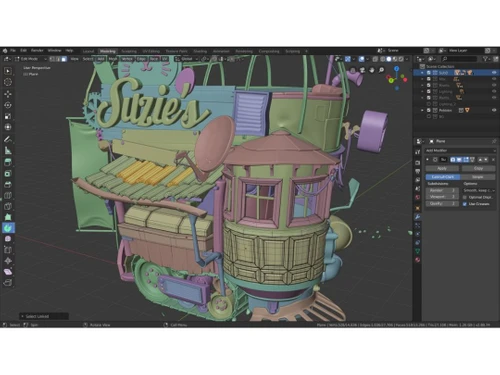
blender modeling

Blender

Brand: Blender

  • 4.7

  • 3 Ratings & 3 Reviews

Blender is a fully-featured video editing software. It facilitates 3D art rendering with a powerful “cycle rendering engine.” It is a robust objective path-tracing engine that provides beautiful and ultra-realistic art rendering. It offers a real-time viewport preview along with the preview of the final product. Blender’s “Cycle” render engine also facilitates CPU and GPU rendering. B...

See More

Have you used Blender before?

Share your insights for better experience

Add a Review

Free Forever

Get started immediately at no cost. Upgrade anytime if your business demand more.

100% Genuine
Products
Best Price
Guaranteed
Safe & Secure
Payment
  • Description

  • Pricing

  • Features

  • Specification

  • Review

  • Compare

  • Alternatives

  • FAQ

  • Questions

Blender Software Overview

What is Blender? 

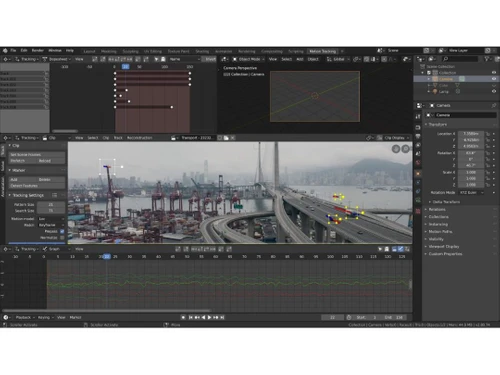
Blender is a fully-featured video editing software. It facilitates 3D art rendering with a powerful “cycle rendering engine.” It is a robust objective path-tracing engine that provides beautiful and ultra-realistic art rendering. It offers a real-time viewport preview along with the preview of the final product. Blender’s “Cycle” render engine also facilitates CPU and GPU rendering. 

Blender video editing software supports VR rendering. It is a high-end designing tool for illustrators in different fields. Blender video editor allows 3D designers to create models, sculptures, and digital UV art. Blender video editing software is a great tool to have, to pursue artistic endeavors.

Why should you use Blender Editing Software? 

Blender provides state of the art features for 3D art. Blender is one of the best animation software in the market, and it is widely used by media houses for animation and artistic rendering. Blender 3D design software can be used by a wide range of professionals from news media agencies to animators and video game studios. The 3D animation software allows you to add special effects in personalized video clips. 

What are the benefits of Blender Video Editing software?

Here are a few benefits Blender 3D software; for better acknowledgment with the product:

  1. The above mentioned “Cycle” engine improves rendering, in addition to pace. Designers get a better quality of artwork with quick rendering.
  2. Blender 3D designing software has a path-tracer engine that assists in the creation of beautiful keyframe animations. Working with Blender 3D software is simply a joyous experience for users. 
  3. Blender 3D does not limit to video editing and animation only. It has an added game engine that enables game developers to try their hands on crating interactive games with 3D interface. 
     

Who are the targeted users of Blender?

Blender software for video editing can be used by organizations and individuals alike. The 3D designing software can be used by art studios, artists, professionals, scientists, students, VFX experts, animators, game artists, game modders, and numerous other professions. If an individual seeks to unleash their creativity with 3D art, Blender is the tool for them. 

Blender Price

Blender editing software is free and open source.

For further price and features related queries, please request a call. Our sales team will get in touch with you at the earliest.

Read more

Blender Company Details

Founded Year:  2002

Blender.org offers Blender, professional open-source 3D computer graphics software for various applications.

Director/Founders Ton Roosendaal
Company Size 1-100 Employees

Blender Pricing & Plans

This Product is Available Free Forever.

Start instantly with no fees, no subscriptions, and no commitments.

  • Full access to basic version available
  • No credit card or sign-up required

Free Forever Plan

Get started immediately at no cost. Upgrade anytime if your business demand more.

Free Forever

Blender Features

  • icon_check Rendering
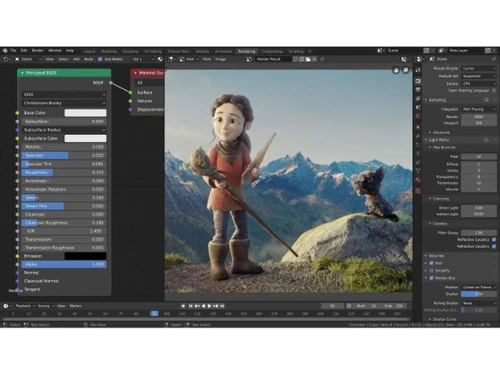
    Blender uses the “cycle” rendering engine for fast-paced work completion and provides the preview before finalizing.
  • icon_check Modeling
    The designing software facilitates 3D modeling for sculptures, buildings, 3D video games, etc. 
  • icon_check Rigging & Animation
    Animators can use Blender for the creation of keyframe animation in 3D. 
  • icon_check Cartoon and pencil effects
    Blender 3D designing software offers different brushes that give different types of effects. 
  • icon_check Simulation
    Designers can create simulation models for several purposes. It could be workflow presentation, educational diagrams, and many
  • icon_check Video Editing
    Blender 3D designing software facilitates video editing. Designers can add animated elements to personalized clips.
  • icon_check Interface
    Blender provides an easy to use interface for beginners to get started with the software. Users can access tutorial modules to
Blender Demo Video play icon

Get Blender Demo

Watch the demo video to explore key features, real workflows, and how the software fits your business needs.

Understand
Key Features
Personal
Demo Insights
Interactive
Demo Support

Blender Specifications

Supported Platforms
Windows Windows MacOS MacOS Linux Linux
Devices
Desktop Desktop
Deployment
Perpetual Perpetual
Suitable For
All Industries
Business Specific
All Businesses
Business Size
Small Business Startups Medium Business Enterprises SMBs SMEs MSMBs MSMEs
Customer Support
Email Communities Forums
Language
English
Integration
API Integration
Training Resources
Documentation Videos

Explore the Best Alternative Solutions Similar to Your Business Size and Needs

Blender Reviews

4.7

Out of 5

img

Overall Rating

Based on
3 Verified Reviews

Rating Breakdown

  • Features 4.8
  • Value for Money 4.6
  • Ease of Use 4.6
  • Customer Support 4.8

93% Recommend this Product

Add Review

Blender Video Reviews

youtubeVideoId

4.8

“This Is How Much You ACTUALLY Make With Blender”

Review by: Smeaf

youtubeVideoId

4.8

“I'm Ditching Blender for Onshape”

Review by: thenextlayer

youtubeVideoId

4.8

“Blender 3D Software Review”

Review by: softwarereviews

Compare Blender With other 3D Rendering Software

Products
Ratings
Pricing
Device Supported
Deployment
Supported Platforms
  • img

    Blender

  • 4.7

  • FREE

  • Desktop

    Mobile

  • Web based

    On Premises

  • Windows

    Mac OS

  • img

    D5 Render

  • 4.7

  • Price On Request

  • Desktop

    Mobile

  • Web based

    On Premises

  • Windows

    Mac OS

  • img

    REDSHIFT

  • 4.6

  • ₹ 31820

  • Desktop

    Mobile

  • Web based

    On Premises

  • Windows

    Mac OS

  • img

    Daz 3D

  • 4.3

  • Price On Request

  • Desktop

    Mobile

  • Web based

    On Premises

  • Windows

    Mac OS

  • img

    KeyShot

  • 4.4

  • Price On Request

  • Desktop

    Mobile

  • Web based

    On Premises

  • Windows

    Mac OS

  • img

    BioRender

  • 4.7

  • Price On Request

  • Desktop

    Mobile

  • Web based

    On Premises

  • Windows

    Mac OS

  • img

    Verge3D

  • 4.5

  • Price On Request

  • Desktop

    Mobile

  • Web based

    On Premises

  • Windows

    Mac OS

  • img

    Artlantis 2021

  • 4.1

  • Price On Request

  • Desktop

    Mobile

  • Web based

    On Premises

  • Windows

    Mac OS

  • img

    Home Design 3D

  • 4.3

  • Price On Request

  • Desktop

    Mobile

  • Web based

    On Premises

  • Windows

    Mac OS

  • img

    RenderMan

  • 4.1

  • Price On Request

  • Desktop

    Mobile

  • Web based

    On Premises

  • Windows

    Mac OS

(0) Product(s) selected

Blender Alternatives

See All Blender Alternatives

Available

Price on Request

Available

Price on Request

Starting Price:

$175 /License

Starting Price:

$24 /Month

Articles for Blender

See All Related Articles

Can I use Blender commercially?

Yes, you can use Blender commercially. You can use your license to create original characters, games, animated videos, and sell them. Or, you can use Blender for commission work.

Can organizations use Blender for teams?

Blender 3D design software provides a team license where a single license can be used with multiple user logins seamlessly.

Can Blender 3D design software be used on Android/iPhone devices?

No, Blender is a CPU/GPU intensive software that makes it unfeasible to run on Android or iPhone devices.

Can I integrate other art tools for better output?

Blender 3D design software provides integration with numerous tools such as gITF, Open EXR, Alembic, Collada, and many more to facilitate seamless working and better output.

Can I use Blender for 2D art?

Yes, Blender enables the user to create 2D images, animations, videos, etc. It also facilitates the conversion of 2D to 3D without redrawing. It is one for all tool for your art and animation.

How much does blender cost?

Blender is open source and free to use.

Blender Questions

Q:

How to fix texture issues in Blender?

Himanshu Dangwal • Sep 26, 2025
A:

To fix texture issues in Blender you should:

  • Ensure that texture coordinates are properly aligned and UV unwrapping is correct.
  • Modify texture settings, such as repeat and offset, to get the appropriate result.
  • Remove seams and improve texture by using texture atlasing.
  • Enhance details and reduce distortion by increasing texture resolution.
David Joshu • Oct 4, 2025
Q:

How to create a custom material in Blender?

Anjali Thete • Sep 18, 2025
A:

Here’s how you can create a custom material in Blender:

  • Open the Shader Editor
  • Add a New Material
  • Use the Principled BSDF Shader
  • Add Texture Maps
  • Apply Procedural Textures
  • Fine-Tune with Nodes
  • Render & Save
Deepesh Chopra • Sep 26, 2025
Q:

How to fix physics issues in Blender?

jitendra pandey • Sep 9, 2025
A:

If you're experiencing physics issues in Blender, here are some common fixes:

  • Check Object Scale & Transform
  • Adjust Rigid Body Settings
  • Fix Animation & Simulation Conflicts
  • Refresh Cache & Bake Simulation
kiran • Sep 18, 2025
Q:

How to fix animation issues in Blender?

Jitender Pandey • Aug 20, 2025
A:

To fix animation issues in Blender you should:

  • To fix keyframe issue:
    • Make sure the auto key is enabled.
    • Check placement of your keyframes in the timeline.
    • Make sure the keyframes type you are using are correct.
  • To fix object movement:
    • Ensure that location, keyframes and rotation are correctly placed.
    • Check object constraints are controlling movement.
    • Locked transformations are open.
  • To fix animation issues:
    • Adjust animation curves by using a Graph Editor.
    • Verify interpolation modes.
    • Modify curve handles.
Nikhil Jadhav • Aug 24, 2025
Q:

How to UV map in Blender?

Ritima Aggarwal • Apr 4, 2024
A:

To UV map in Blender, follow the steps given below:

  • Choose the object you want to map
  • Open the Edit menu and select the entire mesh
  • Change the mode to UV Editor and make UV seam
  • Make other changes like adding texture or text if required and then save changes.
Rakesh Tiwari • Apr 4, 2024
See All Blender Questions

20,000+ Software Listed

Best Price Guranteed

Free Expert Consultation

2M+ Happy Customers

Terms and Condtions

close

Users with registered businesses can purchase goods from merchants on the platform to satisfy their business needs. Users are not permitted to utilize any products acquired through the platform for resale, advertising, business, or further distribution.

For each purchase made, users will receive a Tax Invoice (or 'GST invoice') that includes specific details such as:

  • the GSTIN of the user associated with their registered business, and

  • the specified Entity Name for their business.

It should be noted that not all products are eligible for GST Invoice. Only the products displayed by participating sellers with the 'GST-based Invoice Available' callout on the product description page would qualify.

Certain goods and services are not eligible to get a GST Invoice, including items with VAS, i.e., Value Added Services (e.g., Total Mobile Protection/Assured Buyback) and those involving an exchange offer at the time of purchase.

Users must ensure the accuracy of the GSTIN, and business entity name provided for the GST Invoice. Requests for corrections into GST Invoice would not be accommodated by Techjockey.com or any Seller, and any issues arising from user-provided information are the sole responsibility of users.

Techjockey.com is not liable for the GST Invoice or any associated input tax credit. To efficiently claim an input tax credit, users should select the registered place of business address as per the GST authority's data and follow the provisions of the GST Act and rules.

To claim an input tax credit, the delivery and billing addresses must match. Furthermore, input tax credits will not be granted if the delivery address and GSTIN on the invoice are from different states. In case of incorrect GST details provided during the order placement, the order will be canceled automatically.