linkedin
KeyShot logo
play From Sketch to Shelf
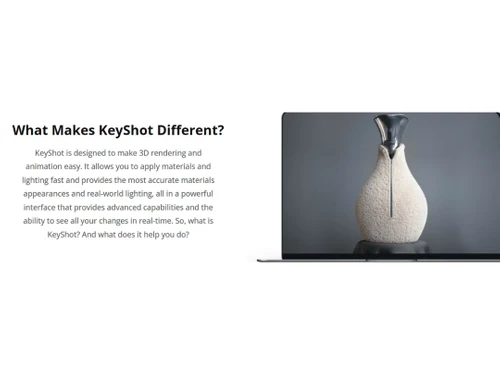
KeyShot Real world lighting
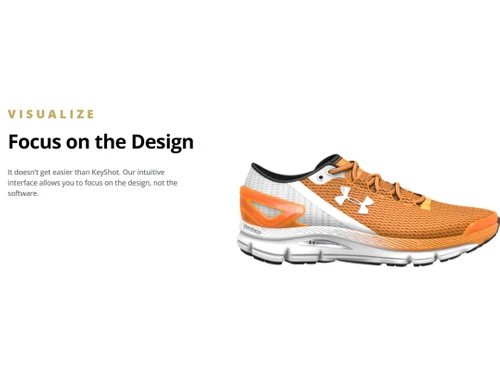
KeyShot Focus on the design

KeyShot

Brand: Luxion

  • 4.4

  • 4 Ratings

Redefine your three-dimensional interior design experience with KeyShot 3D Rendering software created for your design needs.

See More

Have you used KeyShot before?

Share your insights for better experience

Add a Review
Starting Price
$1188

View plans

100% Genuine
Products
Best Price
Guaranteed
Safe & Secure
Payment
  • Description

  • Pricing

  • Features

  • Specification

  • Review

  • Compare

  • Alternatives

  • FAQ

Starting at $1,188

KeyShot Software Overview

What is KeyShot 3D Rendering Software?

KeyShot is a powerful 3D real-time rendering software that can be used for various purposes, including product design, architecture, and engineering. Powered by a scientifically accurate render engine, it incorporates extensive research in material representation and global illumination to ensure unparalleled realism.

It is a robust Software that will enable the designers to achieve photo-like results within a few minutes. The 3D rendering software comes with an intuitive interface, making it easy for designers and beginners to master the basics of this software.

By simplifying the intricate process of transforming 3D digital data into visually striking photographic images and animations, KeyShot eliminates complexities and streamlines workflows. KeyShot is built to enable the user to connect easily with all the 3D applications and it also offers native support for 30+ different file formats.

Why Choose KeyShot Design System?

  • Global illumination: The 3D rendering software offers realistic lighting effects, such as soft shadows, color bleeding, and accurate reflections, to enhance the fidelity of rendered images.
  • Subsurface scattering: It accurately simulates the behavior of light passing through translucent materials, such as skin or wax.
  • Caustic effects: The platform replicates how light interacts with refractive surfaces to produce caustic effects like light bending and focusing through glass or water.
  • Motion blur: The 3D tool can simulate motion blur by adding a sense of movement and dynamic action to animated scenes or objects in motion.
  • Depth of field: It allows users to create a realistic focus effect where particular objects or areas are sharp while others appear blurred.
  • Anti-aliasing: The tool reduces jagged edges and smooths out the appearance of rendered images to create high-quality, clean, and visually pleasing output.

Benefits of KeyShot System Rendering Software

  • The 3D rendering software utilizes the power of graphics processing units to accelerate the rendering process and achieve faster results.
  • It allows users to create realistic lighting environments using panoramic images that capture a wide range of information.
  • The platform enables users to experience rendered scenes in an immersive, interactive VR environment for a more engaging and realistic presentation.
  • It allows users to create and control animations, such as object transformations, camera movements, and material changes.

Pricing of KeyShot Software

KeyShot pricing is available on request at techjockey.com.

The overall pricing model is based on different factors such as personalization, extra features required, total users, and deployment type. Please feel free to request a call from our product experts if you want to learn more about our subscription plans or premium package deals.

Read more

Luxion Company Details

Founded Year:  2003

Luxion is a developer of advanced 3D rendering and lighting technology including KeyShot and the Velux Daylighting Visualizer.

Director/Founders Claus Wann Jensen
Company Size 1-100 Employees

KeyShot Pricing & Plans

KeyShot Pro
Key Features
  • Drag and Drop Materials and Lighting
  • Create Your Own Materials and Lighting
  • Add Product and Studio Variations
  • Animate Cameras, Models, and Materials
  • Render on CPU or GPU in Minutes
Starting at $1188
    • Licenses

      Licenses
      Licenses
    • Yearly

      Yearly
      Yearly

Key Features

  • Drag and Drop Materials and Lighting

  • Create Your Own Materials and Lighting

  • Add Product and Studio Variations

  • Animate Cameras, Models, and Materials

  • Render on CPU or GPU in Minutes

KeyShot Features

  • icon_check 3D Real Time Rendering
    Provides real-time visualization of 3D models for users to see changes and adjustments immediately.
  • icon_check Collaboration Tools
    Enables multiple users to work on the same project simultaneously.
  • icon_check Data Visualizations
    Allows users to present complex information in an easy-to-understand manner.
  • icon_check Image Editor
    Enables users to fine-tune and enhance rendered images within the software.
  • icon_check Filters
    Provides a variety of filters to apply effects and adjustments to rendered images.
  • icon_check Customizable Branding
    Users can personalize their renderings by adding watermarks, logos, and other branding elements.
  • icon_check Drag & Drop
    Supports a drag-and-drop workflow to import 3D models, materials, and environments into the software.
  • icon_check Media Library
    Offers a media library with a vast collection of pre-built materials, textures, and environments.
  • icon_check Social Sharing
    Users can share their rendered images and animations directly to social media platforms.
  • icon_check Templates
    Offers pre-designed templates that users can use as a starting point for their projects to set up scenes and presentations.
KeyShot Demo Video play icon

Get KeyShot Demo

Watch the demo video to explore key features, real workflows, and how the software fits your business needs.

Understand
Key Features
Personal
Demo Insights
Interactive
Demo Support

KeyShot Specifications

Supported Platforms
Windows Windows MacOS MacOS
Devices
Desktop Desktop
Deployment
Cloud-Based Cloud-Based
Suitable For
Designers
Business Specific
All Businesses
Business Size
Small Business Medium Business Enterprises
Customer Support
Email Live Chat
Language
English
Training Resources
In Person Documentation

Explore the Best Alternative Solutions Similar to Your Business Size and Needs

KeyShot Review

4.4

Out of 5

img

Overall Rating

Based on
4 Verified Ratings

Rating Breakdown

  • Features 4.2
  • Value for Money 4.2
  • Ease of Use 4.7
  • Customer Support 4.5

85% Recommend this Product

Add Review

Techjockey Trusted Reviews from Verified Users

No reviews are currently available for KeyShot. Discover similar 3D Rendering Software reviews

  • Chaosgroup VRScans

    4.5

    Whats great - It is a kind of scanner that gives an incredible view to the photorealistic world that could give a special impact to a degre... read more

  • Chaosgroup V-Ray for 3ds Max

    4.5

    Whats great - Works in a hierarchical manner. Totally satisfied with the product. read more

  • Autodesk 3DS Max

    4.3

    Whats great - Received my order very quickly. The product worked initially, I then had some issues, but Techjockey were very quick with the... read more

Compare KeyShot With other 3D Rendering Software

Products
Ratings
Pricing
Device Supported
Deployment
Supported Platforms
  • img

    KeyShot

  • 4.4

  • Price On Request

  • Desktop

    Mobile

  • Web based

    On Premises

  • Windows

    Mac OS

  • img

    Daz 3D

  • 4.3

  • Price On Request

  • Desktop

    Mobile

  • Web based

    On Premises

  • Windows

    Mac OS

  • img

    REDSHIFT

  • 4.6

  • ₹ 31820

  • Desktop

    Mobile

  • Web based

    On Premises

  • Windows

    Mac OS

  • img

    Blender

  • 4.7

  • Price On Request

  • Desktop

    Mobile

  • Web based

    On Premises

  • Windows

    Mac OS

  • img

    D5 Render

  • 4.7

  • Price On Request

  • Desktop

    Mobile

  • Web based

    On Premises

  • Windows

    Mac OS

  • img

    Verge3D

  • 4.5

  • Price On Request

  • Desktop

    Mobile

  • Web based

    On Premises

  • Windows

    Mac OS

  • img

    Artlantis 2021

  • 4.1

  • Price On Request

  • Desktop

    Mobile

  • Web based

    On Premises

  • Windows

    Mac OS

  • img

    Home Design 3D

  • 4.3

  • Price On Request

  • Desktop

    Mobile

  • Web based

    On Premises

  • Windows

    Mac OS

  • img

    RenderMan

  • 4.1

  • Price On Request

  • Desktop

    Mobile

  • Web based

    On Premises

  • Windows

    Mac OS

  • img

    BioRender

  • 4.7

  • Price On Request

  • Desktop

    Mobile

  • Web based

    On Premises

  • Windows

    Mac OS

(0) Product(s) selected

KeyShot Alternatives

See All KeyShot Alternatives

Available

Price on Request

Available

Price on Request

Starting Price:

$175 /License
Starting Price:

$24 /Month

Articles for KeyShot

See All Related Articles

Which operating system does KeyShot software support??

KeyShot software is compatible with Windows, Linux, macOS operating systems.

Is there any Keyshot app?

Keyshot app is not available for Android and iOS mobile devices.

What is the deployment type of KeyShot System Software?

KeyShot system software supports web-based deployment.

How much does KeyShot System cost?

For KeyShot system price in India, please request a call back for subscription-related details and to avail offers on premium packages.

Who are the potential users of KeyShot 3D Rendering Software?

KeyShot 3D Rendering Software is used by interior designers, and architects.

Is there any free trial or demo for KeyShot 3D Rendering System?

KeyShot 3D rendering system demo is available for free with techjockey.com.

Is KeyShot free?

KeyShot rendering software does not offer a free trial. Please request a call back for subscription-related details and to avail offers on premium packages.

How can you download KeyShot Rendering System Software?

Installation is not required, as it is web-based. Just open the Setup Wizard to get started.

How does KeyShot Software Solution work?

KeyShot software solution enables users to fine-tune and enhance rendered images within the software. It offers pre-designed templates that users can use as a starting point for their projects to set up scenes and presentations. The software provides real-time visualization of 3D models for users to see changes and adjustments immediately.

20,000+ Software Listed

Best Price Guranteed

Free Expert Consultation

2M+ Happy Customers

Terms and Condtions

close

Users with registered businesses can purchase goods from merchants on the platform to satisfy their business needs. Users are not permitted to utilize any products acquired through the platform for resale, advertising, business, or further distribution.

For each purchase made, users will receive a Tax Invoice (or 'GST invoice') that includes specific details such as:

  • the GSTIN of the user associated with their registered business, and

  • the specified Entity Name for their business.

It should be noted that not all products are eligible for GST Invoice. Only the products displayed by participating sellers with the 'GST-based Invoice Available' callout on the product description page would qualify.

Certain goods and services are not eligible to get a GST Invoice, including items with VAS, i.e., Value Added Services (e.g., Total Mobile Protection/Assured Buyback) and those involving an exchange offer at the time of purchase.

Users must ensure the accuracy of the GSTIN, and business entity name provided for the GST Invoice. Requests for corrections into GST Invoice would not be accommodated by Techjockey.com or any Seller, and any issues arising from user-provided information are the sole responsibility of users.

Techjockey.com is not liable for the GST Invoice or any associated input tax credit. To efficiently claim an input tax credit, users should select the registered place of business address as per the GST authority's data and follow the provisions of the GST Act and rules.

To claim an input tax credit, the delivery and billing addresses must match. Furthermore, input tax credits will not be granted if the delivery address and GSTIN on the invoice are from different states. In case of incorrect GST details provided during the order placement, the order will be canceled automatically.