linkedin
Chaosgroup V-Ray for 3ds Max logo
play Realistic interior day lighting with V-Ray for 3ds Max
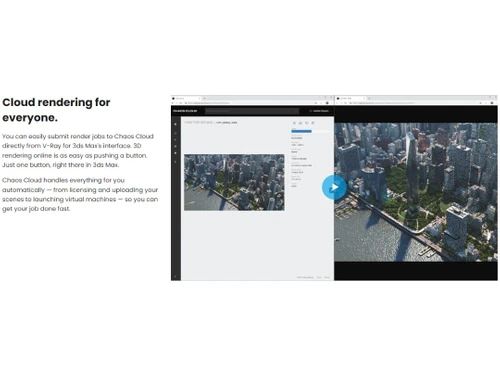
V-Ray for 3ds Max-Cloud Rendering
V-Ray for 3ds Max-Smart Content

Chaosgroup V-Ray for 3ds Max

Brand: Chaosgroup

  • 4.4

  • 2 Ratings & 2 Reviews

Chaosgroup's V-Ray 3D Rendering Software delivers unparalleled realism and speed, empowering artists with advanced materials and lighting for stunning visualizations.

See More

Have you used Chaosgroup V-Ray for 3ds Max before?

Share your insights for better experience

Add a Review
Starting Price
$78

View plans

100% Genuine
Products
Best Price
Guaranteed
Safe & Secure
Payment
  • Description

  • Pricing

  • Features

  • Specification

  • Review

  • Compare

  • Alternatives

  • FAQ

Starting at $78

Chaosgroup V-Ray for 3ds Max Software Overview

What is Chaosgroup V-Ray for 3Ds Max Software?

Chaosgroup V-Ray for 3ds Max is the world's most complete 3D rendering software designed for high-end visualization and production. Whether you're working on massive, dynamic scenes with thousands of lights or creating a stunning still life, V-Ray for 3ds Max is the go-to solution for artists and designers across various 3D industries.

With its Emmy and Academy Award-winning rendering technology, V-Ray delivers photorealistic renders with unmatched quality, speed, and scalability. It harnesses the power of your CPU and GPU hardware, offering lightning-fast interactive rendering and heavyweight production rendering. No scene is too big for V-Ray, as it effortlessly handles billions of polygons and thousands of lights, providing you with an arsenal of production-proven features like Adaptive Lights, Proxy Objects, and Distributed Rendering.

The redesigned V-Ray Frame Buffer allows for the post-processing of renders without the need for a separate tool, eliminating the back-and-forth between different apps. Moreover, V-Ray enables you to create interactive experiences in real-time within a 100% raytraced environment. Validate your designs on the spot, make changes directly in 3ds Max, and present your ideas in stunning ray-traced quality without extra optimizations or conversions.

V-Ray also boasts excellent compatibility with other software and popular 3ds Max plugins, ensuring a seamless workflow. It supports open standards such as Alembic, OSL, OpenColorIO, and ACEScg, making it the perfect fit for any pipeline. Whether you're rendering on your CPU or GPU, V-Ray's powerful rendering engine delivers outstanding results.

Why Choose Chaosgroup V-Ray for 3Ds Max?

Chaosgroup V-Ray for 3ds Max is the best-suited rendering software for artists and designers seeking the highest quality and versatility in their 3D projects. With its powerful features, seamless integration, and exceptional performance, V-Ray empowers you to create stunning visualizations and bring your ideas to life with unparalleled realism and efficiency.

Benefits of Chaosgroup V-Ray 3D Rendering Software

  • V-Ray for 3ds Max offers industry-leading rendering capabilities, delivering photorealistic and high-quality results. It incorporates advanced algorithms and features that produce accurate lighting, materials, and textures, resulting in stunning visual output.
  • It provides a wide range of tools and features that allow artists and designers to achieve their creative vision.
  • It supports various rendering methods, including CPU and GPU rendering, and offers extensive control over parameters, giving users the flexibility to customize and fine-tune their renders.
  • The platform utilizes the native features and functionalities of 3ds Max, allowing users to work with familiar tools while harnessing the power of V-Ray for rendering tasks. This integration enhances productivity and reduces the learning curve for users.
  • It offers a vast library of materials, shaders, and lighting options, enabling users to create realistic and visually compelling scenes.
  • It supports a wide range of materials and texture maps, including specialized materials for simulating glass, metal, fabric, and more.
  • V-Ray incorporates advanced optimization techniques to deliver efficient rendering performance. These optimization features help artists and designers to iterate quickly and meet tight deadlines, enhancing overall productivity.

V-Ray 3D Price

Chaosgroup V-Ray 3D Rendering software pricing starts at $18 at techjockey.com.

The overall pricing model is based on different factors such as personalization, extra features required, total users, and the deployment type. Please feel free to request a call from our product experts if you want to learn more about our subscription plans or premium package deals.

Read more

Chaosgroup Company Details

Founded Year:  1997

Chaos is a leading provider of innovative rendering solutions for the media, entertainment & design industries. Chaos rendering software, V-Ray®, has set the standard for speed, quality, reliability and ease of use, and it has become the rendering engine of choice for renowned international studios.

Director/Founders Peter Mitev & Vladimir Koylazov
Company Size 1-100 Employees

Chaosgroup V-Ray for 3ds Max Pricing & Plans

V-Ray Solo
Key Features
  • Fixed license on one computer
  • Includes all V-Ray integrations
  • Includes support
  • Chaos Cosmos content library
Starting at $78
    • Licenses

      Licenses
      Licenses
    • Monthly

      Monthly
      Monthly

Key Features

  • Fixed license on one computer

  • Includes all V-Ray integrations

  • Includes support

  • Chaos Cosmos content library

Chaosgroup V-Ray for 3ds Max Features

  • icon_check CPU & GPU Rendering
    Render your scenes using both CPU and GPU resources for faster and more efficient rendering.
  • icon_check Denoising
    Reduce noise and improve image quality in your renders using denoising algorithms.
  • icon_check Chaos Cloud Rendering
    Offload your rendering tasks to the cloud for faster and more scalable rendering.
  • icon_check Chaos Cloud Collaboration
    Collaborate with team members by sharing rendering projects and assets on the Chaos Cloud platform.
  • icon_check Ready-to-render assets
    Access a library of pre-made assets that are optimized and ready for rendering, saving you time and effort.
  • icon_check Resumable Rendering
    Pause and resume rendering at any time, allowing you to easily manage to render interruptions or prioritize other tasks.
  • icon_check Debug Shading
    Visualize and troubleshoot shading issues in your renders for accurate material and lighting adjustments.
  • icon_check Native ACEScg support
    Work with the ACEScg colour space natively in your renders, ensuring accurate and consistent colour representation.
  • icon_check Progressive caustics
    Achieve realistic light interactions progressively and iteratively for more accurate and visually appealing results.
  • icon_check Initial USD export & USD Stage support

    Export your scenes to the USD format and leverage the USD Stage for enhanced scene organization.
Chaosgroup V-Ray for 3ds Max Demo Video play icon

Get Chaosgroup V-Ray for 3ds Max Demo

Watch the demo video to explore key features, real workflows, and how the software fits your business needs.

Understand
Key Features
Personal
Demo Insights
Interactive
Demo Support

Chaosgroup V-Ray for 3ds Max Specifications

Supported Platforms
Windows Windows
Devices
Desktop Desktop
Deployment
Cloud-Based Cloud-Based
Suitable For
All Industries
Business Specific
All Businesses
Business Size
Small Business Startups Medium Business Enterprises SMBs SMEs MSMBs MSMEs
Customer Support
Email Forums
Language
English
Integration
API Integration
Training Resources
Webinars Documentation Videos

Explore the Best Alternative Solutions Similar to Your Business Size and Needs

Chaosgroup V-Ray for 3ds Max Reviews

4.4

Out of 5

img

Overall Rating

Based on
2 Verified Reviews

Rating Breakdown

  • Features 4.3
  • Value for Money 4.5
  • Ease of Use 4.6
  • Customer Support 4.5

95% Recommend this Product

Add Review

Manpreet Kaur

User

4.5

Reviewed on: Nov 21, 2018

Techjockey Verified

“Up to the mark”

Pros

Works in a hierarchical manner. Totally satisfied with the product.

Cons

NO CONS

Mukul Hembrom

User

4.4

Reviewed on: Jun 13, 2018

Techjockey Verified

“Totally satisfied, will visit again”

Pros

I stumbled on to Techjockey on the web. But I appreciated the service online and by phone that I received.

Cons

N/A

Compare Chaosgroup V-Ray for 3ds Max With other 3D Rendering Software

Products
Ratings
Pricing
Device Supported
Deployment
Supported Platforms
  • img

    Chaosgroup V-Ray for 3ds Max

  • 4.4

  • Price On Request

  • Desktop

    Mobile

  • Web based

    On Premises

  • Windows

    Mac OS

  • img

    Chaos Corona

  • Price On Request

  • Desktop

    Mobile

  • Web based

    On Premises

  • Windows

    Mac OS

  • img

    Chaosgroup VRScans

  • 4.4

  • Price On Request

  • Desktop

    Mobile

  • Web based

    On Premises

  • Windows

    Mac OS

  • img

    Daz 3D

  • 4.3

  • Price On Request

  • Desktop

    Mobile

  • Web based

    On Premises

  • Windows

    Mac OS

  • img

    REDSHIFT

  • 4.6

  • ₹ 31820

  • Desktop

    Mobile

  • Web based

    On Premises

  • Windows

    Mac OS

  • img

    D5 Render

  • 4.7

  • Price On Request

  • Desktop

    Mobile

  • Web based

    On Premises

  • Windows

    Mac OS

  • img

    Blender

  • 4.7

  • Price On Request

  • Desktop

    Mobile

  • Web based

    On Premises

  • Windows

    Mac OS

  • img

    Artlantis 2021

  • 4.1

  • Price On Request

  • Desktop

    Mobile

  • Web based

    On Premises

  • Windows

    Mac OS

  • img

    Verge3D

  • 4.5

  • Price On Request

  • Desktop

    Mobile

  • Web based

    On Premises

  • Windows

    Mac OS

  • img

    KeyShot

  • 4.4

  • Price On Request

  • Desktop

    Mobile

  • Web based

    On Premises

  • Windows

    Mac OS

  • img

    Home Design 3D

  • 4.3

  • Price On Request

  • Desktop

    Mobile

  • Web based

    On Premises

  • Windows

    Mac OS

(0) Product(s) selected

Chaosgroup V-Ray for 3ds Max Alternatives

See All Chaosgroup V-Ray for 3ds Max Alternatives

Available

Price on Request

Available

Price on Request

Starting Price:

$175 /License

Starting Price:

$24 /Month

Articles for Chaosgroup V-Ray for 3ds Max

See All Related Articles

Which operating system does the Chaosgroup V-Ray Software Support?

Chaosgroup V-Ray software is compatible with Windows and macOS operating systems.

Is there any Chaosgroup V-Ray App?

Chaosgroup V-Ray app is not available on Android and iOS devices.

What is the deployment type of the Chaosgroup V-Ray?

Chaosgroup V-Ray system supports on-premises deployment.

How much does the Chaosgroup V-Ray 3D Rendering Software Cost?

Chaosgroup V-Ray 3D Rendering software pricing starts at $18 at techjockey.com.

Who are the potential users of Chaosgroup V-Ray?

Chaosgroup V-Ray can be used by Movie producers, professional artists, animators, and visual effects studios seeking unparalleled realism and precision in their projects. Its versatility also attracts researchers and educators to explore advanced rendering techniques.

Is there any free trial or demo for the Chaosgroup V-Ray Software?

Chaosgroup V-Ray demo is available for free with techjockey.com.

Is the Chaosgroup V-Ray System Free?

Chaosgroup V-Ray 3D rendering System offers a 30-day free trial.

How can you download Chaosgroup V-Ray?

You can download the Chaosgroup V-Ray software from their official website.

How does Chaosgroup V-Ray Work?

Chaosgroup V-Ray for 3ds Max is highly regarded among artists and designers in the 3D industries. Renowned for its adaptability and capacity to handle diverse projects, from intricate and vibrant scenes with numerous light sources to breathtaking still-life compositions, it stands as the trusted rendering software of choice.

20,000+ Software Listed

Best Price Guranteed

Free Expert Consultation

2M+ Happy Customers

Terms and Condtions

close

Users with registered businesses can purchase goods from merchants on the platform to satisfy their business needs. Users are not permitted to utilize any products acquired through the platform for resale, advertising, business, or further distribution.

For each purchase made, users will receive a Tax Invoice (or 'GST invoice') that includes specific details such as:

  • the GSTIN of the user associated with their registered business, and

  • the specified Entity Name for their business.

It should be noted that not all products are eligible for GST Invoice. Only the products displayed by participating sellers with the 'GST-based Invoice Available' callout on the product description page would qualify.

Certain goods and services are not eligible to get a GST Invoice, including items with VAS, i.e., Value Added Services (e.g., Total Mobile Protection/Assured Buyback) and those involving an exchange offer at the time of purchase.

Users must ensure the accuracy of the GSTIN, and business entity name provided for the GST Invoice. Requests for corrections into GST Invoice would not be accommodated by Techjockey.com or any Seller, and any issues arising from user-provided information are the sole responsibility of users.

Techjockey.com is not liable for the GST Invoice or any associated input tax credit. To efficiently claim an input tax credit, users should select the registered place of business address as per the GST authority's data and follow the provisions of the GST Act and rules.

To claim an input tax credit, the delivery and billing addresses must match. Furthermore, input tax credits will not be granted if the delivery address and GSTIN on the invoice are from different states. In case of incorrect GST details provided during the order placement, the order will be canceled automatically.