USA
USA UAE
UAESmall Business
Designed for startups and growing businesses

See More


Brand: Autodesk
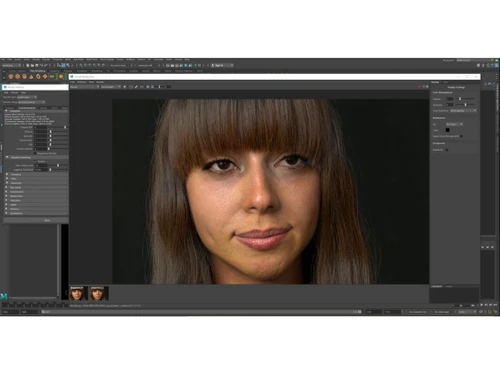
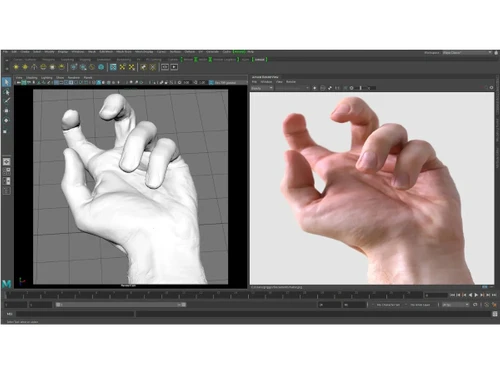
Autodesk Arnold is a professional 3D rendering software that creates highly realistic images and animations using advanced light simulation for films, games, and visual effects.
See MoreHave you used Autodesk Arnold before?
Share your insights for better experience
Brand: Autodesk
Founded Year: 1982
Autodesk makes software for people who make things. If you’ve ever driven a high-performance car, admired a towering skyscraper, used a smartphone, or watched a great film, chances are you’ve experienced what millions of Autodesk customers are doing with our software.
 Photorealistic Rendering GPU Rendering CPU Rendering Interactive Rendering Illumination Advanced Shading System Volumetric Rendering Motion Blur Procedural Geometry Scalability Cross-Platform Support Batch Rendering Integration with 3D Software
  Windows
  MacOS
MacOS  Desktop
  Cloud-Based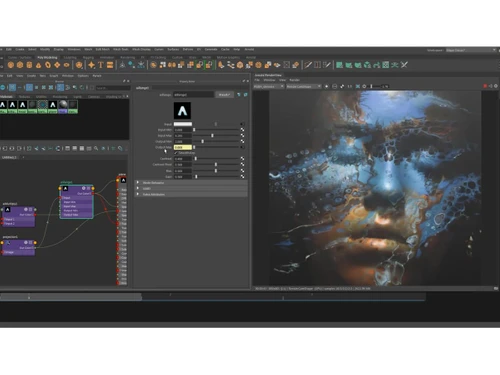
Small Business
Designed for startups and growing businesses
Medium Business
Built for business growth and flexibility
Enterprises
Designed for complex and large-scale business needs
Techjockey Trusted Reviews from Verified Users
No reviews are currently available for Autodesk Arnold. Discover similar 3D Rendering Software reviews

Chaosgroup VRScans
Whats great - It is a kind of scanner that gives an incredible view to the photorealistic world that could give a special impact to a degre... read more

Chaosgroup V-Ray for 3ds Max
Whats great - Works in a hierarchical manner. Totally satisfied with the product. read more

Autodesk 3DS Max
Whats great - Received my order very quickly. The product worked initially, I then had some issues, but Techjockey were very quick with the... read more
Autodesk Arnold
Price On Request
Desktop
Mobile
Web based
On Premises
Windows
Mac OS
Daz 3D
Price On Request
Desktop
Mobile
Web based
On Premises
Windows
Mac OS

REDSHIFT
₹ 31820
Desktop
Mobile
Web based
On Premises
Windows
Mac OS

Blender
Price On Request
Desktop
Mobile
Web based
On Premises
Windows
Mac OS

D5 Render
Price On Request
Desktop
Mobile
Web based
On Premises
Windows
Mac OS
Chaosgroup V-Ray for 3ds Max
Price On Request
Desktop
Mobile
Web based
On Premises
Windows
Mac OS

Verge3D
Price On Request
Desktop
Mobile
Web based
On Premises
Windows
Mac OS

Artlantis 2021
Price On Request
Desktop
Mobile
Web based
On Premises
Windows
Mac OS

KeyShot
Price On Request
Desktop
Mobile
Web based
On Premises
Windows
Mac OS

Home Design 3D
Price On Request
Desktop
Mobile
Web based
On Premises
Windows
Mac OS

RenderMan
Price On Request
Desktop
Mobile
Web based
On Premises
Windows
Mac OS
(0) Product(s) selected
Available
Price on Request
Available
Price on Request
Available
Price on Request
Available
Price on Request

Available
Price on Request

Available
Price on Request

Available
Price on Request

Starting Price:
$175 /License
Starting Price:
$24 /Month

Starting Price:
$70 /Month
Autodesk Arnold price starts at USD 55, as listed on techjockey.com.
No, the Autodesk Arnold mobile app is not available on iOS and Android.
Autodesk Arnold is compatible with Windows and MacOS operating systems.
Yes, Autodesk Arnold offers a free trial.
Autodesk Arnold works as a ray-tracing rendering engine that uses light simulation to create realistic 3D images and animations from digital scenes.
Autodesk Arnold is used by 3D artists, animators, VFX artists, and game studios in film, TV, animation, and design industries.
No, Autodesk Arnold is not fully free, but it is available only through paid subscription plans after the free trial.
Yes, Autodesk Arnold offers a free trial so users can test its features before purchasing.
20,000+ Software Listed
Best Price Guranteed
Free Expert Consultation
2M+ Happy Customers
Terms and Condtions

Users with registered businesses can purchase goods from merchants on the platform to satisfy their business needs. Users are not permitted to utilize any products acquired through the platform for resale, advertising, business, or further distribution.
For each purchase made, users will receive a Tax Invoice (or 'GST invoice') that includes specific details such as:
the GSTIN of the user associated with their registered business, and
the specified Entity Name for their business.
It should be noted that not all products are eligible for GST Invoice. Only the products displayed by participating sellers with the 'GST-based Invoice Available' callout on the product description page would qualify.
Certain goods and services are not eligible to get a GST Invoice, including items with VAS, i.e., Value Added Services (e.g., Total Mobile Protection/Assured Buyback) and those involving an exchange offer at the time of purchase.
Users must ensure the accuracy of the GSTIN, and business entity name provided for the GST Invoice. Requests for corrections into GST Invoice would not be accommodated by Techjockey.com or any Seller, and any issues arising from user-provided information are the sole responsibility of users.
Techjockey.com is not liable for the GST Invoice or any associated input tax credit. To efficiently claim an input tax credit, users should select the registered place of business address as per the GST authority's data and follow the provisions of the GST Act and rules.
To claim an input tax credit, the delivery and billing addresses must match. Furthermore, input tax credits will not be granted if the delivery address and GSTIN on the invoice are from different states. In case of incorrect GST details provided during the order placement, the order will be canceled automatically.