linkedin

Get Free Advice

Get Quote

Bandicut logo
Gallery How to Rotate or Flip a Video with ease - Bandicut Video Editor
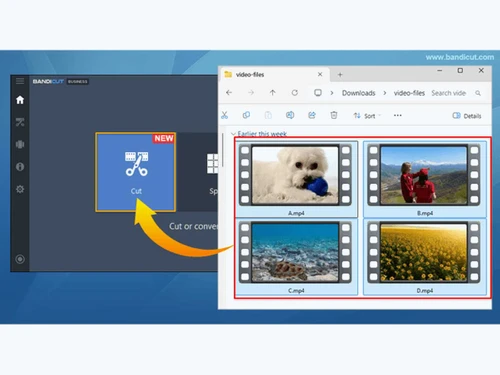
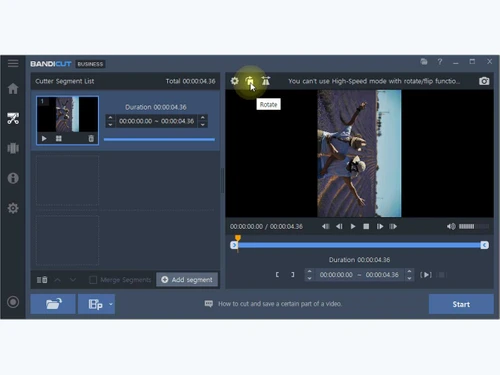
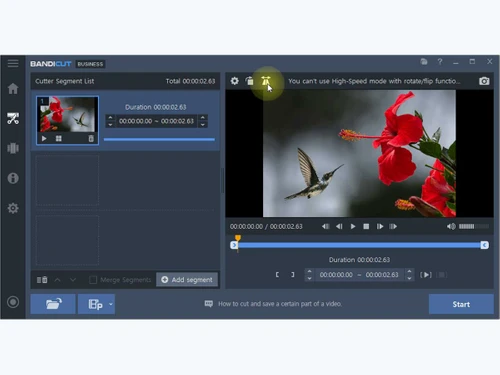
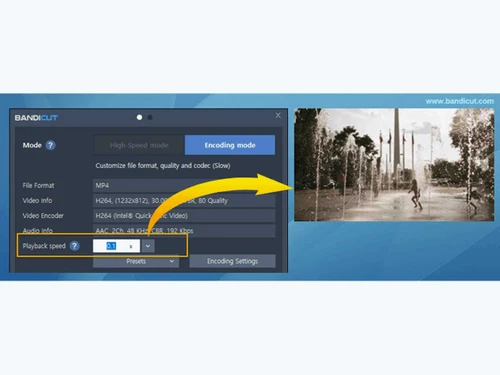
bandicut-Multi-Video Editing bandicut-Video Rotation bandicut-Video Horizontally bandicut-Slow Motion
play How to Rotate or Flip a Video with ease - Bandicut Video Editor
bandicut-Multi-Video Editing
bandicut-Video Rotation
bandicut-Video Horizontally
bandicut-Slow Motion

Bandicut

Brand : BandiCam

Starting at

$ 25 $ 28 10% off

Save Extra with 2 Offers

  • offer_icon Save upto 18%, Get GST Invoice on your business purchase |
  • offer_icon Buy Now & Pay Later, Check offer on payment page.

Bandicut allows users to cut, trim, split, and merge videos quickly without losing quality. ...Read more

  • AdviceGet Instant Expert
    Advice
  • PaymentSafe & Secure
    Payment
  • GuaranteedAssured Best Price
    Guaranteed

Bandicut Software Pricing, Features & Reviews

What is Bandicut?

Bandicut Video Cutter is a video editing software designed for cutting, trimming, splitting, and joining videos quickly and easily. It allows users to remove unwanted parts of a video without reducing the original quality. The software supports many popular video formats, including MP4, AVI, MOV, and MKV. Users can split large videos into smaller clips or combine multiple videos into a single file. Bandicut offers high-speed video processing, helping save time during editing.

It also supports frame-by-frame cutting for precise video editing. The software can extract audio tracks from video files and save them separately. Users can trim videos for social media, presentations, tutorials, and personal projects. Its simple interface makes it suitable for both beginners and experienced users. Bandicut is available for Windows and offers free and paid versions with different features.

Why Choose Bandicut Software?

  • Easy Video Cutting: Quickly trim and cut videos with simple controls.
  • High-Speed Processing: Edit videos faster without long rendering times.
  • No Quality Loss: Maintains original video quality during editing.
  • Supports Multiple Formats: Works with MP4, AVI, MOV, MKV, and more.
  • User-Friendly Interface: Simple layout suitable for beginners and professionals.
  • Video Splitting Feature: Divide large videos into smaller clips easily.
  • Merge Videos Quickly: Combine multiple video files into one.
  • Audio Extraction: Extract MP3 or audio tracks from videos.
  • Hardware Acceleration: Uses GPU acceleration for faster performance.
  • Frame-by-Frame Editing: Allows precise video trimming and editing.
  • Lightweight Software: Runs smoothly without consuming too many system resources.
  • Fast Upload Preparation: Helps create optimized videos for YouTube and social media.
  • Batch Processing Support: Edit multiple videos efficiently.

Benefits of Bandicut Software

  • Beginner-Friendly Tools: No advanced editing knowledge required.
  • Secure and Reliable: Provides stable video editing performance.
  • Preview Before Saving: Check edits before exporting the final video.
  • Compact Installation Size: Installs quickly and takes less storage space.
  • Compatible with Windows: Supports various Windows operating systems.
  • Professional Editing Results: Produces clean and polished video outputs.
  • Affordable Solution: Offers powerful video editing features at a reasonable price.

Bandicut Pricing

Bandicut price starts at USD 25 at techjockey.com.

The pricing model is based on different parameters, including extra features, deployment type, and the total number of users. For further queries related to the product, you can contact our product team and learn more about the pricing and offers.

Bandicut Pricing & Plans

Bandicut (Personal License)
  • Unlimited video editing
  • Free updates and tech support
  • Fast video editing without a watermark
    • Licenses
    • Yearly
Starting at
$25 $28

Get Bandicut Demo

We make it happen! Get your hands on the best solution based on your needs.

Interacted

Bandicut Features

Basic Editing Tools / Timeline Editing

  • icon_check Trim, Crop & Resize Precision trimming and cutting by frame; "Crop" refers to removing segments, not spatial cropping.
  • icon_check Split & Merge Core functionality; split one large file or merge multiple clips together.
  • icon_check Drag and Drop Functionality Supports easy importing of media by dragging files into the interface.
  • icon_check Preview Functionality Real-time preview of the selected segments before processing.
  • icon_check Speed Ramping and Speed Changing Allows changing playback speed to create slow-motion or time-lapse effects.
  • icon_check Non-Linear Editing (NLE) A digital video editing method to edit a video or audio project without considering a linear timeline.
  • icon_check Transition Effects Post-production tools used in video editing to connect one shot or scene to another.
  • icon_check Video Masking Video Masking is selecting a specific piece of a video or use video overlays to hide, duplicate, reveal, or modify the footage.
  • icon_check Video Overlays A tool for layering multiple video clips or images on top of each other to create a single video.
  • icon_check Scene Cut Detection A scene cut detection tool automatically gets the cut points in a video at the point where clip is changing, based on sudden

Color Correction & Enhancement

  • icon_check Color Grading and Correction Color grading enhances the visual aesthetics of video by adjusting brightness, contrast, saturation, and hue, while color
  • icon_check Color Blending and Filters Color blending combines two images in video editing, while filters adjust aspects like color balance, brightness, contrast, and
  • icon_check Color LUTs Color LUTs or Look up Tables contain an arrays of numbers that contain values for color input and output, used to change the
  • icon_check Video Enhancer Video enhancers improve the quality of videos by fixing common issues like low light and blurry video.

Advanced Editing Tools

  • icon_check Auto Reframe Auto Reframe uses artificial intelligence to identify the main action in a video, keep it within the frame, and ensure important
  • icon_check Key Frames and Animations Keyframes in video editing signal when to start and end an animation or function. Transitioning a property or element between two
  • icon_check Object Motion Tracking Object motion tracking is a video editing technique that detects and follows the movement of objects in a video or image sequence.
  • icon_check 3D Animations Using computer-generated imagery (CGI) to create and animate characters, objects, and props in 3D.
  • icon_check Background Removal A tool used in video editing to remove the background from a video and make it transparent.
  • icon_check Video Stabilization A feature used to reduce shakiness and movement in video footage.
  • icon_check Screen / Camera Recording Recording screen videos, camera footages, audios, and images directly on the application.
  • icon_check Proxy Tools Creates lower-resolution copies of media files for faster editing and smoother playback.
  • icon_check Nested Timelines This feature is to combine multiple timelines within a single sequence for more organized and complex editing.
  • icon_check Duplicate Detection A tool that identifies and highlights duplicate clips to prevent redundancy in the video project.

Visual Effects & Motion Graphics

  • icon_check Content Library and Elements A central location for storing, organizing, and accessing digital content like images, videos, audio files, and text.
  • icon_check Green Screen and Chroma Key / Luma Key A special effects technique that lets you remove a chosen color from a video clip and replace it with another video or image.
  • icon_check VFX Visual effects (VFX) are computer-generated or manipulated imagery blended with live-action footage to enhance reality onscreen.
  • icon_check SFX Sound effects (SFX) are used with special effects to influence the mood and reactions of the audience in a video.

Audio Editing Tools

  • icon_check Voiceovers, Subtitles and Transcripts Voiceover is off-screen narration, subtitles are auto-generated text of the audio, and transcripts are written records of a
  • icon_check Audio Waveforms Audio waveforms are two-dimensional graphs that represent how sound pressure changes in a video.
  • icon_check Silence Remover A tool to detect and remove silent parts or dead air in audio tracks
  • icon_check Audio Denoise A tools to remove unwanted background noise from an audio signal in video editing
  • icon_check Audio Stretching A tool to adjust the length of an audio clip to match the duration of a video without changing the pitch of the audio.
  • icon_check Auto Synchronization A tool to automatically adjust the volume of audio tracks to make one sound more prominent than another, highlight a narrative,
  • icon_check Audio Mixing A technique to combine individual tracks, audio, and sound effects by manipulating signal levels, frequency contents, dynamics,
  • icon_check Beat Synchronization A tool that syncs video clips, footage, and other elements to the rhythm of music.

Image Editing Tools

  • icon_check Image Stabilization A specialized tool for correcting shaky footage to produce smooth and stable videos.
  • icon_check Noise Removal A tool to reduce unwanted visual noise to enhance image clarity.

File Storage and Management

  • icon_check File Rendering Features High-Speed Mode and Encoding Mode (rendering).
  • icon_check 4K and HD Export Supports high-resolution video formats including 4K UHD.
  • icon_check Automatic Project Backup The process of automatically saving video project files at a specified intervals.
  • icon_check Audio / Video Conversion A tool used to change the format of an audio/video file.

AI Video Creator / Editor

  • icon_check AI Co-Pilot Editing AI Co-Pilot Editing refers to the use of artificial intelligence to assist and enhance the video or audio editing process.
  • icon_check AI Text to Speech AI Text-to-Speech (TTS) is a technology that converts written text into spoken voice output using artificial intelligence.
  • icon_check AI Voice Changer An AI Voice Changer is a technology that uses artificial intelligence to modify a person's voice in real-time or during
  • icon_check AI Auto Face Blur AI Auto Face Blur is a technology that uses artificial intelligence to automatically detect and blur faces in images and videos.
  • icon_check AI Speech / Dialogue Enhancer AI Speech/Dialogue Enhancer is a tool or technology that uses artificial intelligence to improve the quality of spoken audio.
  • icon_check AI Text-To-Video AI text-to-video technology involves converting text inputs into video content using artificial intelligence.
  • icon_check AI Text-Based Editing The use of artificial intelligence to streamline and enhance the video editing process using text commands or text-based

Collaboration & Sharing

  • icon_check Social Media Integration Direct upload functionality for YouTube and Vimeo.
  • icon_check Multi Format Compatibility Importing/exporting, combining, and editing media files, such as videos, images, and audio in different formats.
  • icon_check Real Time Collaboration Allowing multiple users to edit a video simultaneously, regardless of their location.
  • icon_check Multi Device Compatibility Ability to use the video editing software on different devices and operating systems.
  • icon_check Video Brand Kit A toolkit in video editing software to store branding elements, such as fonts, logos, color schemes, etc.

Others

  • icon_check Audio Extraction Extract audio from videos and save it as MP3 files.
  • icon_check Batch Video Processing Process multiple clips efficiently in one workflow.
  • icon_check Lightweight & Easy Interface Clean interface suitable for beginners and professionals alike.
  • icon_check Remove Unwanted Segments Delete ads, errors, or unnecessary parts from videos easily.
  • icon_check Frame-Accurate Cutting Precisly cut videos frame by frame for exact editing control.

Bandicut Specifications

  • Supported Platforms :
  • Device:
  • Deployment :
  • Suitable For :
  • Business Specific:
  • Business Size:
  • Customer Support:
  • Training:
  • Language:
  • Windows
  • Desktop
  • Web-Based
  • All Industries
  • All Businesses
  • Small Business, Medium Business, Enterprises, Freelancers
  • Email, Forums
  • Documentation
  • English

Bandicut Reviews and Ratings

banner

Would you like to review this product?

Submit Reviews

Bandicut FAQ

A Bandicut pricing starts at USD 25 on techjockey.com.
A No, Bandicut Software is mainly available for Windows PCs and does not offer a mobile app.
A Bandicut Software is compatible with Windows operating systems.
A Yes, Bandicut Software offers a free trial version with limited features.
A Bandicut Software functions by allowing users to cut, split, merge, and trim videos without reducing quality.
A Content creators, video editors, YouTubers, and general users use Bandicut Software for video editing tasks.
A Yes, users can download and try the free demo version of Bandicut Software.
A Bandicut Software offers a free version, but advanced features require a paid license.

Bandicut Alternatives

See All
Why Choose Techjockey?

Software icon representing 20,000+ Software Listed 20,000+ Software Listed

Price tag icon for best price guarantee Best Price Guaranteed

Expert consultation icon Free Expert Consultation

Happy customer icon representing 2 million+ customers 2M+ Happy Customers