linkedin
DaVinci Resolve logo
play DaVinci Resolve 17 Color Training - Delivering Content - Blackmagic Design Demo
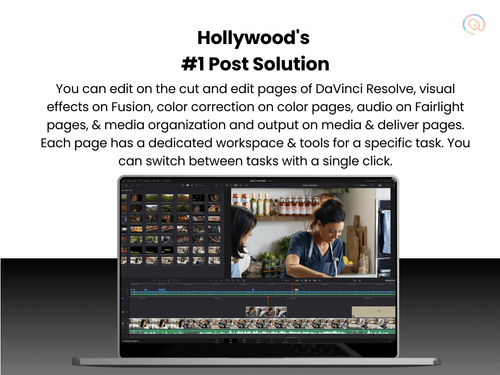
davinci resolve editing
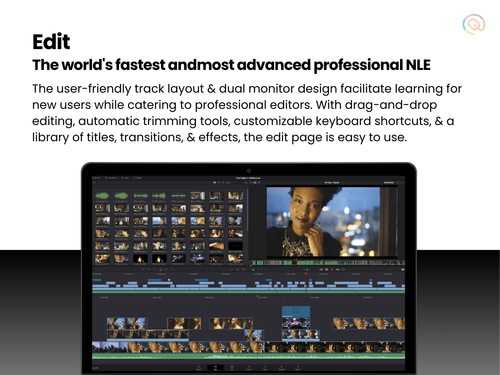
davinci resolve colorluts

DaVinci Resolve

Brand: Blackmagic Design

  • 4.3

  • 16 Ratings & 13 Reviews

DaVinci Resolve is a non-linear video editing software, equipped with advanced color correction, visual effects, motion graphics and audio post-production tools.

See More

Have you used DaVinci Resolve before?

Share your insights for better experience

Add a Review
Starting Price
₹29,980 excl.GST
₹ 35,376 incl. GST

View plans

offer Save upto 18%, Get GST Invoice on your business purchase T&C
offer Buy Now & Pay Later, Check offer on payment page.
Buy Now
100% Genuine
Products
Best Price
Guaranteed
Safe & Secure
Payment
  • Description

  • Pricing

  • Features

  • Specification

  • Review

  • Compare

  • Alternatives

  • FAQ

  • Questions

Starting at ₹29,980
Buy Now

DaVinci Resolve Software Overview

What is DaVinci Resolve?

DaVinci Resolve is a comprehensive video editing software that combines advanced tools for video editing, colour correction, visual effects, motion graphics, and audio post-production. The software supports various popular audio and video formats and is compatible with nearly all operating systems, making it a versatile solution for diverse editing needs.

Known for its professional-grade features and intuitive interface, Blackmagic DaVinci Resolve is a preferred choice for filmmakers, video editors, and content creators seeking fast, high-quality video production.

Why Choose DaVinci Resolve?

DaVinci Resolve offers features that fit the diverse needs of numerous industries and individuals with different skill sets. Listed below are the key factors that make DaVinci Resolve a top choice for users:

  • Non-Linear Editing: DaVinci Resolve is a non-linear video editing software with a flexible timeline. This offers users extensive control over the order and sequence of video clips, audio effects, transitions, and other elements.
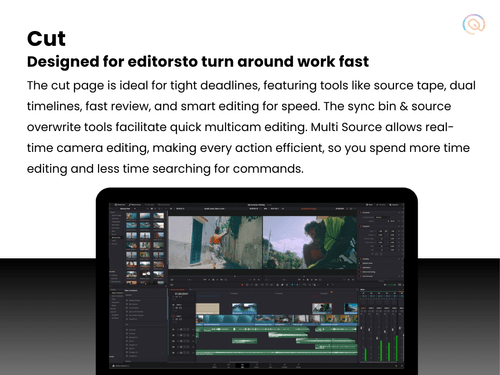
  • The dual timeline and auto-trim tools add precision to the entire video editing process. Additionally, the timeline of DaVinci Resolve supports multi-cam footage for the methodic synchronisation of different video clips.
  • Free Video Editing Tool: Blackmagic Designs offers DaVinci Resolve as free software with a generous range of powerful editing tools and capabilities. The free video editornot only fits the needs of professionals but also offers a platform for beginners to practice their editing skills.
  • DaVinci Resolve Studio comes at a one-time licensing fee for users who require an upgrade to the basic editing capabilities.
  • Intuitive Interface: DaVinci Resolve is designed to fit the needs of a diverse group of audience, including professionals as well as beginners. The software offers a segmented workflow, allowing users to navigate through the different stages of video editing.
  • While there might be an initial learning curve associated with the video editing software, DaVinci Resolve offers a rich library of tutorials to help users strengthen their skills.
  • Collaboration Features: DaVinci editing software supports collaborative workflows, allowing multiple users to work on the same project simultaneously. This is particularly beneficial for professional editing teams and large-scale productions, where collaboration and teamwork are essential.
  • The software is compatible with nearly all operating systems, including Windows, macOS, and Linux, strengthening team collaboration and flexibility.
  • AI Integrated Features: DaVinci Software offers AI integration with various features, such as auto-screen cut detection, auto-reframing, audio ducking, and AI dialogue enhancement. These AI tools automate repetitive tasks, allowing editors to focus on the creative aspects of their projects.
  • DaVinci AI neural engine acceleration uses advanced machine learning algorithms to boost performance in magic masks, smart reframes, and other features.

Additional Features of DaVinci Resolve Video Editing Software

In addition to the standard video editing tools, DaVinci Resolve offers an unbeatable range of advanced features and functionalities, including:

  • Stereoscopic 3D Projects: DaVinci Resolve offers a complete set of tools for editing and grading stereoscopic 3D projects, including control over convergence, floating windows, eye alignment, mastering, and output.
  • Text-Based Timeline Editing: The powerful AI engine of DaVinci Resolve offers text-based timeline editing with the help of an AI-generated transcript. This allows users to make changes to the timeline by directly altering parts of the transcribed text.
  • Automatic Depth Map: The depth map feature of DaVinci Resolve 18 allows users to visualize the background and foreground with the help of 3D depth matte. This is an especially helpful feature in bringing attention to the foreground, throwing a spotlight on the subject, or adding atmospheric elements to the background.
  • Ambisonic Surround Sound: Fairlight integration was introduced in DaVinci Resolve 18 Studio, offering powerful audio editing capabilities, such as ambisonic surround sound support. Users can record and edit full sphere ambisonic surround soundtracks with the help of features like native effects processing, 2D and 3D spherical panning, binaural and channel-based monitoring, dynamic in-viewer metering and head tracking support.
  • SuperScale: SuperScale is a recent addition to the elaborate list of features offered by DaVinci Resolve, enabling video editors to create new pixels when increasing the resolution of an image. This upscaling algorithm helps in non-destructive resizing, enabling users to maintain resolution quality.

Target Audience

  • Colour Correction and Grading: DaVinci Software is primarily used by professionals for its advanced color correction and grading functionalities. The software offers an extensive range of colour grading tools, including primary and secondary colour correction, curves, and colour wheels.It supports a wide range of LUT formats, including 3D LUTs (LUT3D), enabling detailed and realistic colour adjustments.
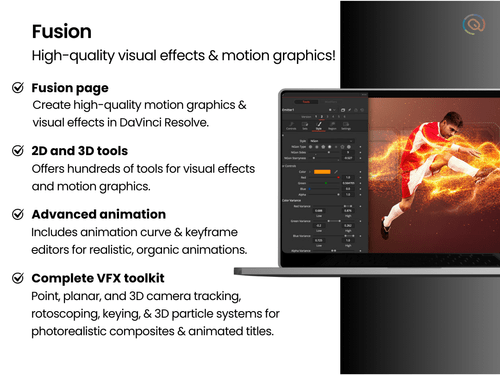
  • 3D Animators: For 3D animators, DaVinci Resolve offers a comprehensive set of tools to bring animations to life. The software offers a workspace for adding 3D models, objects, text or particles to video clips, enabling animators to create animations with realistic depth and detail.The spline and keyframe tools included in DaVinci Resolve allow animators to create and manipulate custom animation curves and position keyframes across the timeline.
  • VFX Artists: VFX artists optimise the powerful visual effects capabilities offered by DaVinci Resolve. The software includes a wide range of VFX tools, such as compositing, keying, and tracking, for professional visual effects.Additionally, the integration with Fusion, DaVinci Resolve’s VFX and motion graphics toolset, allows for the creation of intricate visual effects and animations directly within the editing software.
  • Social Media Content Creators: DaVinci Resolve supports the raging popularity of social media content across various platforms. The software includes features specifically designed for social media integration, such as optimised export settings for platforms like YouTube, Instagram, and Facebook.The auto reframing tool, vertical resolution support, and smart cut detection features are tailored to fit the specific requirements of content creators, enabling the generation of high-quality video content.
  • Live TV Production and Broadcast: Professionals in live TV production and broadcast rely on DaVinci Resolve for its advanced set of video editing features. The software provides a full multicam interface, making it easy to edit larger, more complex projects easily.The software offers a point-of-interest marker and replay palette to fit the needs of live TV broadcasts, requiring a quick turnaround time.
  • Post-Production Editing: DaVinci Resolve is an all-in-one software for all the post-production editing requirements of users.This includes centralised cloud storage to manage projects and files, a comprehensive suite of basic timeline editing features, advanced colour correction tools, Fairlight integration for audio editing, and a powerful rendering engine to speed up project delivery.

Davinci Resolve Free vs Davinci Resolve Studio (Updated for Version 19)

While the free version of DaVinci Resolve 19 offers various features needed for professional-level video editing, DaVinci Resolve introduces an additional set of over 50 advanced features to supercharge your project speed and quality. Listed below are some of the key differences between DaVinci Resolve Free vs Studio:

  • Resolutions Supported: The free version of DaVinci Resolve supports up to 60 fps in resolutions as high as Ultra HD 3840 x 2160 for professional video quality. DaVinci Resolve Studio, however, takes the resolution quality up a notch by supporting 120fps at a massive 32K resolution.
  • Noise Reduction Tools: The DaVinci Resolve 19 free version offers UltraNR noise reduction, which is a new DaVinci Neural Engine-driven denoise mode for spatial noise reduction. DaVinci Resolve Studio features Temporal and AI spatial noise reduction tools that can be combined to achieve natural video quality.
  • Stereoscopic 3D tools: DaVinci Resolve Studio exclusively offers a stereoscopic 3D workflow that is currently unavailable in the free version. This includes all the necessary tools for editing and grading stereoscopic 3D projects, including convergence, floating windows, eye alignment, mastering and output.
  • Audio Features: DaVinci Software free version offers Fairlight for integrating advanced audio post-production features into the video editing capabilities. DaVinci Resolve Studio offers immersive 3D audio features in addition to the basic set of tools. This includes Dolby Atmos and MPEG-H import and rendering support.
  • Resolve FX: In comparison to DaVinci Resolve free, DaVinci Resolve Studio includes 40+ additional video effects. These include lens flares and reflections, analogue damage, sharpening, etc.

DaVinci Resolve System Requirements

Listed below are DaVinci Resolve system requirements:

  • OS: Windows 10 or later
  • RAM: 16 GB for HD video editing and colour correction, 32 GB for 4K editing and Fusion, and 64 GB or more for 6K to 8K editing and heavy colour grading
  • CPU: Intel Core i7 or AMD Ryzen 7
  • GPU: Integrated or discrete GPU with at least 2 GB of VRAM and support for OpenCL 1.2 or CUDA 11
  • Drivers: Blackmagic Design Desktop Video 10.4.1 or later, and the NVIDIA/AMD/Intel GPU driver version required by your GPU
  • Storage: Fast Solid State Hard Drive (SSD)

DaVinci Resolve Pricing

DaVinci Resolve is a free software with a generous list of features for all your video editing needs.

DaVinci Resolve Studio is the paid version of the software with a one-time licensing fee of ₹ 28,980. While the free version covers most of the advanced features required by beginners as well as professionals, Resolve Studio comes with over 50 advanced features to streamline the editing process.

Read more

Blackmagic Design Company Details

Founded Year:  2002

Blackmagic Design was founded in November 2002 and develops audio visual hardware products for feature films, live streaming and television.

Director/Founders Grant Petty
Company Size 501-1000 Employees

DaVinci Resolve Pricing & Plans

DaVinci Resolve Studio
Key Features
  • Social Media Integration
  • Video Stabilization
  • Auto Reframe
  • File Rendering
  • Non-Linear Editing (NLE)
  • Split & Merge
  • Drag and Drop Functionality
  • Transition Effects
  • Video Masking
  • Video Overlays
  • Scene Cut Detection
  • Color Grading and Correction
  • Color Blending and Filters
  • Key Frames and Animations

Calculated Price

29980 Exclusive of all taxes
    • Licenses (Lifetime)

      Licenses (Lifetime)
      Licenses (Lifetime)

Key Features

  • Social Media Integration

  • Video Stabilization

  • Auto Reframe

  • File Rendering

  • Non-Linear Editing (NLE)

  • Split & Merge

  • Drag and Drop Functionality

  • Transition Effects

  • Video Masking

  • Video Overlays

  • Scene Cut Detection

  • Color Grading and Correction

  • Color Blending and Filters

  • Key Frames and Animations

DaVinci Resolve Features

Basic Editing Tools / Timeline Editing

  • icon_check Non-Linear Editing (NLE)
    A digital video editing method to edit a video or audio project without considering a linear timeline.
  • icon_check Split & Merge
    Splitting involves dividing a video clip into two or more segments. Merging combines different parts of the same video clip.
  • icon_check Drag and Drop Functionality
    To edit a video by dragging and dropping elements and clips onto a timeline or storyboard.
  • icon_check Transition Effects
    Post-production tools used in video editing to connect one shot or scene to another.
  • icon_check Video Masking
    Video Masking is selecting a specific piece of a video or use video overlays to hide, duplicate, reveal, or modify the footage.
  • icon_check Video Overlays
    A tool for layering multiple video clips or images on top of each other to create a single video.
  • icon_check Scene Cut Detection
    A scene cut detection tool automatically gets the cut points in a video at the point where clip is changing, based on sudden
  • icon_check Preview Functionality
    Viewing the final output of a video editing project before exporting the rendered file.
  • icon_check Speed Ramping and Speed Changing
    Speed ramping adjusts a clip's speed gradually, while speed changing makes a clip play faster or slower by altering the frame
  • icon_check Trim, Crop & Resize
    Trimming adjusts the size of images and videos, cropping removes unnecessary sections, and resizing modifies dimensions to comply

Color Correction & Enhancement

  • icon_check Color Grading and Correction
    Color grading enhances the visual aesthetics of video by adjusting brightness, contrast, saturation, and hue, while color
  • icon_check Color Blending and Filters
    Color blending combines two images in video editing, while filters adjust aspects like color balance, brightness, contrast, and
  • icon_check Color LUTs
    Color LUTs or Look up Tables contain an arrays of numbers that contain values for color input and output, used to change the
  • icon_check Video Enhancer
    Video enhancers improve the quality of videos by fixing common issues like low light and blurry video.

Advanced Editing Tools

  • icon_check Video Stabilization
    A feature used to reduce shakiness and movement in video footage.
  • icon_check Auto Reframe
    Auto Reframe uses artificial intelligence to identify the main action in a video, keep it within the frame, and ensure important
  • icon_check Key Frames and Animations
    Keyframes in video editing signal when to start and end an animation or function. Transitioning a property or element between two
  • icon_check Object Motion Tracking
    Object motion tracking is a video editing technique that detects and follows the movement of objects in a video or image sequence.
  • icon_check 3D Animations
    Using computer-generated imagery (CGI) to create and animate characters, objects, and props in 3D.
  • icon_check Background Removal
    A tool used in video editing to remove the background from a video and make it transparent.
  • icon_check Screen / Camera Recording
    Recording screen videos, camera footages, audios, and images directly on the application.
  • icon_check Proxy Tools
    Creates lower-resolution copies of media files for faster editing and smoother playback.
  • icon_check Nested Timelines
    This feature is to combine multiple timelines within a single sequence for more organized and complex editing.
  • icon_check Duplicate Detection
    A tool that identifies and highlights duplicate clips to prevent redundancy in the video project.

Visual Effects & Motion Graphics

  • icon_check Content Library and Elements
    A central location for storing, organizing, and accessing digital content like images, videos, audio files, and text.
  • icon_check Green Screen and Chroma Key / Luma Key
    A special effects technique that lets you remove a chosen color from a video clip and replace it with another video or image.
  • icon_check VFX
    Visual effects (VFX) are computer-generated or manipulated imagery blended with live-action footage to enhance reality onscreen.
  • icon_check SFX
    Sound effects (SFX) are used with special effects to influence the mood and reactions of the audience in a video.

Audio Editing Tools

  • icon_check Voiceovers, Subtitles and Transcripts
    Voiceover is off-screen narration, subtitles are auto-generated text of the audio, and transcripts are written records of a
  • icon_check Audio Waveforms
    Audio waveforms are two-dimensional graphs that represent how sound pressure changes in a video.
  • icon_check Silence Remover
    A tool to detect and remove silent parts or dead air in audio tracks
  • icon_check Audio Denoise
    A tools to remove unwanted background noise from an audio signal in video editing
  • icon_check Audio Stretching
    A tool to adjust the length of an audio clip to match the duration of a video without changing the pitch of the audio.
  • icon_check Auto Synchronization
    A tool to automatically adjust the volume of audio tracks to make one sound more prominent than another, highlight a narrative,
  • icon_check Audio Mixing
    A technique to combine individual tracks, audio, and sound effects by manipulating signal levels, frequency contents, dynamics,
  • icon_check Beat Synchronization
    A tool that syncs video clips, footage, and other elements to the rhythm of music.

Image Editing Tools

  • icon_check Image Stabilization
    A specialized tool for correcting shaky footage to produce smooth and stable videos.
  • icon_check Noise Removal
    A tool to reduce unwanted visual noise to enhance image clarity.

File Storage and Management

  • icon_check File Rendering
    Combining raw elements into a final video file that can be played on a display.
  • icon_check Automatic Project Backup
    The process of automatically saving video project files at a specified intervals.
  • icon_check 4K and HD Export
    4K and HD refer to the number of pixels that make up an image on a screen. 4K and HD export allows users to download
  • icon_check Audio / Video Conversion
    A tool used to change the format of an audio/video file.

AI Video Creator / Editor

  • icon_check AI Speech / Dialogue Enhancer
    AI Speech/Dialogue Enhancer is a tool or technology that uses artificial intelligence to improve the quality of spoken audio.
  • icon_check AI Co-Pilot Editing
    AI Co-Pilot Editing refers to the use of artificial intelligence to assist and enhance the video or audio editing process.
  • icon_check AI Text to Speech
    AI Text-to-Speech (TTS) is a technology that converts written text into spoken voice output using artificial intelligence.
  • icon_check AI Voice Changer
    An AI Voice Changer is a technology that uses artificial intelligence to modify a person's voice in real-time or during
  • icon_check AI Auto Face Blur
    AI Auto Face Blur is a technology that uses artificial intelligence to automatically detect and blur faces in images and videos.
  • icon_check AI Text-To-Video
    AI text-to-video technology involves converting text inputs into video content using artificial intelligence.
  • icon_check AI Text-Based Editing
    The use of artificial intelligence to streamline and enhance the video editing process using text commands or text-based

Collaboration & Sharing

  • icon_check Social Media Integration
    Uploading video projects to social media directly from the video editing software.
  • icon_check Real Time Collaboration
    Allowing multiple users to edit a video simultaneously, regardless of their location.
  • icon_check Multi Device Compatibility
    Ability to use the video editing software on different devices and operating systems.
  • icon_check Multi Format Compatibility
    Importing/exporting, combining, and editing media files, such as videos, images, and audio in different formats.
  • icon_check Video Brand Kit
    A toolkit in video editing software to store branding elements, such as fonts, logos, color schemes, etc.

Others

  • icon_check Stereoscopic Workflow
    DaVinci Resolve Studio features a complete set of tools for editing and grading stereoscopic 3D projects. You have total control
  • icon_check Multicamera Editing
    Multicam edit tools for fast turn around projects, the edit page features a full multicam interface with everything you need for
  • icon_check Audio Ducking
    Fairlight automates ducking with sidechain compression, which uses the signal from one track to automatically control the amount
  • icon_check Split Screen Effects
    Multiscreen template like Split Screen to create split screen effect
  • icon_check Fusion REST API
  • icon_check Multi User
DaVinci Resolve Demo Video play icon

Get DaVinci Resolve Demo

Watch the demo video to explore key features, real workflows, and how the software fits your business needs.

Understand
Key Features
Personal
Demo Insights
Interactive
Demo Support

DaVinci Resolve Specification

Supported Platforms
Windows Windows MacOS MacOS Linux Linux
Devices
Desktop Desktop
Deployment
Web-Based Web-Based Perpetual Perpetual
Suitable For
All Industries
Business Specific
All Businesses
Business Size
Small Business Startups Medium Business SMBs SMEs
Customer Support
Phone Email Live Chat Communities Forums
Language
English
Training Resources
Videos

Explore the Best Alternative Solutions Similar to Your Business Size and Needs

DaVinci Resolve Reviews

4.3

Out of 5

img

Overall Rating

Based on
13 Verified Reviews

Rating Breakdown

  • Features 4.3
  • Value for Money 4.4
  • Ease of Use 4.2
  • Customer Support 4.3

90% Recommend this Product

Add Review

Pros

  • "DaVinci Resolve is a Hollywood-grade software that can handle cinema, shorts, TV, and music videos. It's free with most Blackmagic products."

    SUNIL KUMARJul 4, 2024

  • "DaVinci Resolve is comprehensive and user-friendly, with fantastic color correction tools. It's easy to switch between editing, color correction, and audio editing."

    Namita AgrawalJul 4, 2024

  • "The free version of DaVinci Resolve is very powerful. I've been using the paid version, but the free one is sufficient for most needs. Plus, there’s no subscription!"

    Nandini RujJul 2, 2024

Cons

  • "The sound editing in Fairlight and graphics in Fusion are tricky to use. More accessible learning resources would be helpful. "

    Varsh KumariJul 5, 2024

  • "I wish there were more template options like those available in After Effects through Envato."

    Nandu Jul 5, 2024

  • "Honestly, there’s nothing much to dislike. They improved on Adobe Premiere and Final Cut Pro, and you don’t need to leave the software for graphics and sound editing."

    SUNIL KUMARJul 4, 2024

DaVinci Resolve Video Reviews

youtubeVideoId

4.8

“How Good Is DaVinci Resolve DaVinci Resolve Review”

Review by: EJ Tech

youtubeVideoId

4.4

“The best free video editing software for Mac and PC DaVinci Resolve Review”

Review by: Film Booth

youtubeVideoId

4.4

“Why i've FULLY switched to Davinci Resolve (and why you should too)”

Review by: Kold

Sanjeev Kumae

User

Industry: Graphic Design User since: 6-12 months

4.8

Reviewed on: Jun 14, 2024

Techjockey Verified

“Powerful and free”

DaVinci Resolve is an easy-to-start, powerful, and free editing tool.

Pros

It’s relatively easy to get started with simple projects on DaVinci Resolve.

Cons

Nothing significant to dislike.

Switched from Shotcut

Reason to switch

I needed a more powerful tool that was still easy to use for simple projects.

Nandini Ruj

User

Industry: Graphic Design User since: 1-2 years

4.1

Reviewed on: Jul 2, 2024

Techjockey Verified

“Easy to learn”

DaVinci Resolve is powerful and subscription-free, with a great free version.

Pros

The free version of DaVinci Resolve is very powerful. I've been using the paid version, but the free one is sufficient for most needs. Plus, there’s no subscription!

Cons

I wish the subtitle features were better for making YouTube and TikTok videos.

Reason to switch

The powerful free version and lack of subscription model made DaVinci Resolve a better choice.

SUNIL KUMAR

User

Industry: Marketing and Advertising User since: 1-2 years

4.7

Reviewed on: Jul 4, 2024

Techjockey Verified

“The BEST all-in-one editing solution”

DaVinci Resolve is a powerful, all-in-one editing solution that's free with Blackmagic products.

Pros

DaVinci Resolve is a Hollywood-grade software that can handle cinema, shorts, TV, and music videos. It's free with most Blackmagic products.

Cons

Honestly, there’s nothing much to dislike. They improved on Adobe Premiere and Final Cut Pro, and you don’t need to leave the software for graphics and sound editing.

Switched from Final Cut Pro

Reason to switch

I wanted an all-in-one solution that didn't require switching between different software.

See All DaVinci Resolve Reviews

Compare DaVinci Resolve With other Video Editing Software

Products
Ratings
Pricing
Device Supported
Deployment
Supported Platforms
  • img

    DaVinci Resolve

  • 4.3

  • ₹ 29980.00 excl. GST

  • Desktop

    Mobile

  • Web based

    On Premises

  • Windows

    Mac OS

  • img

    Final Cut Pro

  • 4.3

  • Price On Request

  • Desktop

    Mobile

  • Web based

    On Premises

  • Windows

    Mac OS

  • img

    Adobe Premiere Pro

  • 4.2

  • Price On Request

  • Desktop

    Mobile

  • Web based

    On Premises

  • Windows

    Mac OS

  • img

    Flixier

  • 4.1

  • ₹ 984

  • Desktop

    Mobile

  • Web based

    On Premises

  • Windows

    Mac OS

  • img

    InShot

  • 4.1

  • Price On Request

  • Desktop

    Mobile

  • Web based

    On Premises

  • Windows

    Mac OS

  • img

    KineMaster

  • 4.2

  • Price On Request

  • Desktop

    Mobile

  • Web based

    On Premises

  • Windows

    Mac OS

  • img

    FlexClip

  • 4.7

  • ₹ 1729

  • Desktop

    Mobile

  • Web based

    On Premises

  • Windows

    Mac OS

(0) Product(s) selected

DaVinci Resolve Alternatives

See All DaVinci Resolve Alternatives

Available

Price on Request

Starting Price:

$15 /Month

Starting Price:

$30 /Month

Starting Price:

$15 /Month

Starting Price:

$50 /Year

Starting Price:

$13 /Month

Starting Price:

$10 /Month

Articles for DaVinci Resolve

See All Related Articles

Is DaVinci Resolve completely free?

DaVinci Resolve offers a free version that covers nearly all the necessary features required for professional-grade video editing.

How much does DaVinci Resolve cost?

DaVinci Studio, the paid version of DaVinci Resolve, costs INR 28,980. It is available at techjockey.com.

What is the difference between DaVinci Resolve and DaVinci Studio?

DaVinci Resolve is a free video editing software that offers a wide spectrum of features and functionalities. DaVinci Resolve Studio is the paid version of Resolve with an additional set of features besides the core functionalities of the software.

What is DaVinci Resolve good for?

DaVinci Resolve is good for colour grading, post-production editing, VFX, social media content creation, and 3D animations.

What features are free in DaVinci Resolve?

The free version of DaVinci Resolve covers all the essential cut, trim, and merge functionality, colour correction and grading, VFX/SFX, keyframing and animation, transition effects, and so on.

How to install DaVinci Resolve?

To download the Blackmagic Design DaVinci Resolve, visit the download page. On the webpage, you'll see options for downloading both the free and studio versions. Choose the version you want to download and click the appropriate button. The website will guide you through the download process.

Does DaVinci Resolve work on iPad?

Yes, DaVinci Resolve for iPad is available for download.

Does DaVinci Resolve add a watermark?

No, DaVinci Resolve does not add watermarks to video projects.

DaVinci Resolve Questions

Q:

How to fix export errors in DaVinci Resolve 19?

NIKHAT PARVEEN Sep 17, 2025
A:

Export errors in DaVinci Resolve 19 can occur due to incorrect settings, missing media, or system limitations. Here are some common fixes:

  • Check Render Settings
  • Optimize Performance
  • Fix Missing Media Issues
  • Resolve GPU Errors
  • Restart & Reinstall
Jarod Sep 22, 2025
Q:

How to fix export errors in DaVinci Resolve?

Shannon Misquitta Aug 11, 2025
A:

To fix export errors in DaVinci Resolve, consider these steps: update DaVinci Resolve and graphics card drivers, change export codecs, and adjust timeline settings.

Karan........ Aug 18, 2025
A:
  • To add text to a video in Davinci Resolve, follow the steps given below:
  • Open DaVinci Resolve and create a new project
  • Import your video and drag it into the timeline
  • Navigate to ‘Effects Library’ in the upper left part of the screen
  • Under the ‘Titles’ option, drag and drop ‘Text’ onto the timeline above the video
  • Click on the text clip in the timeline
  • Navigate to the ‘Inspector’ on the right, Input the text and alter size and font
  • Set the length of the text clip by dragging its edges
  • Press the ‘Deliver’ option to export the video
JAYESH RAJAN PATIL Aug 30, 2024
Q:

How to import footage into DaVinci Resolve?

Govindarajan Jul 6, 2024
A:

To import footage into DaVinci Resolve, follow the steps given below:

  • Go to the location where the original files are stored
  • select all the files
  • right click and choose the ‘Add to Media Pool’ option or just click and drag them
  • A dialogue window from DaVinci will appear, asking if you wish to adjust your sequence settings to match.
sandesh agrawal Aug 30, 2024
Q:

How to make a logo in DaVinci Resolve?

Kajal Jul 5, 2024
A:
  • Go to the Fusion page.
  • Create a new Fusion composition.
  • Import your logo image (if pre-designed) or use Fusion's tools to build the logo from scratch using shapes, text, and effects.
  • Fusion offers a node-based workflow for building complex animations and effects.
Jagdish Roda Jul 22, 2024
See All DaVinci Resolve Questions

20,000+ Software Listed

Best Price Guranteed

Free Expert Consultation

2M+ Happy Customers

Terms and Condtions

close

Users with registered businesses can purchase goods from merchants on the platform to satisfy their business needs. Users are not permitted to utilize any products acquired through the platform for resale, advertising, business, or further distribution.

For each purchase made, users will receive a Tax Invoice (or 'GST invoice') that includes specific details such as:

  • the GSTIN of the user associated with their registered business, and

  • the specified Entity Name for their business.

It should be noted that not all products are eligible for GST Invoice. Only the products displayed by participating sellers with the 'GST-based Invoice Available' callout on the product description page would qualify.

Certain goods and services are not eligible to get a GST Invoice, including items with VAS, i.e., Value Added Services (e.g., Total Mobile Protection/Assured Buyback) and those involving an exchange offer at the time of purchase.

Users must ensure the accuracy of the GSTIN, and business entity name provided for the GST Invoice. Requests for corrections into GST Invoice would not be accommodated by Techjockey.com or any Seller, and any issues arising from user-provided information are the sole responsibility of users.

Techjockey.com is not liable for the GST Invoice or any associated input tax credit. To efficiently claim an input tax credit, users should select the registered place of business address as per the GST authority's data and follow the provisions of the GST Act and rules.

To claim an input tax credit, the delivery and billing addresses must match. Furthermore, input tax credits will not be granted if the delivery address and GSTIN on the invoice are from different states. In case of incorrect GST details provided during the order placement, the order will be canceled automatically.