linkedin
DBeaver logo
play DBeaver Enterprise Demo: DBeaver PRO features overview
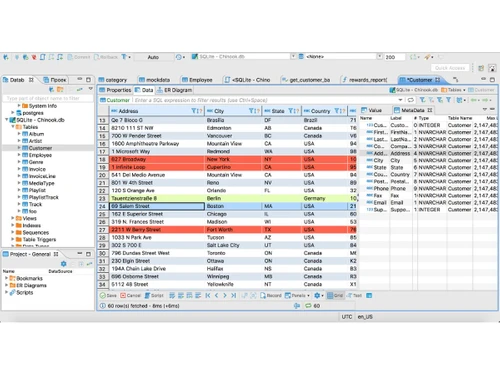
DBeaver-data editor
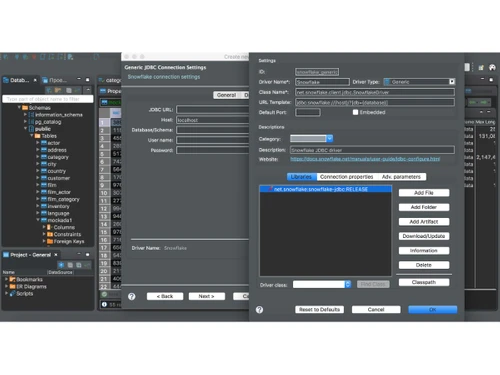
DBeaver-datasources

DBeaver

Brand: DBeaver

  • No Ratings & Reviews

DBeaver is a professional database management software that simplifies database development and administration across 100+ data sources.

See More

Have you used DBeaver before?

Share your insights for better experience

Add a Review
Starting Price
$205

View plans

100% Genuine
Products
Best Price
Guaranteed
Safe & Secure
Payment
  • Description

  • Pricing

  • Features

  • Specification

  • Review

  • Compare

  • Alternatives

  • FAQ

Starting at $205

DBeaver Software Overview

What is DBeaver?

DBeaver is a universal, cross-platform database management tool designed for anyone who works with data, including developers, database administrators (DBAs), data analysts, and business users. It serves as a single, unified interface to explore, process, and administer a wide array of data sources. With support for over 100 SQL, NoSQL, and cloud databases, DBeaver provides a comprehensive and professional software solution for all data-related tasks. Its architecture is built to simplify complex database operations, making it an adaptable and powerful tool for managing diverse data environments from one central application.

Why Choose DBeaver?

  • Comprehensive Data Management: DBeaver is more than just a query tool. It allows users to analyze, compare, visualize, and migrate data across various formats and sources. It also includes powerful features for database administration, schema design, and the automation of routine tasks.
  • High-Level Security: Security is a core component of DBeaver. The platform supports complex authorization mechanisms, including Single Sign-On (SSO) with providers like AWS, GCP, and Okta, as well as Kerberos and multi-factor authentication, ensuring secure access to your critical data.
  • Universal Compatibility: It offers a ready-to-go toolset that supports a wide range of SQL, NoSQL, and cloud databases, whether hosted on-premise or in the cloud. DBeaver provides integrated drivers for many databases, while additional drivers may need to be configured or downloaded.
  • Purpose-Built for All Users: The software is engineered to adapt to the specific needs of its users. Whether you are a technical expert performing complex administrative tasks or a business user analyzing sales data, DBeaver's intuitive interface simplifies your workflow.

Advanced Features of DBeaver

  • Data Editor: An intuitive and convenient editor for viewing and modifying data. It supports most data formats and includes features like custom filters, advanced sorting, multiple data views, and inline editing.
  • SQL Editor: A multifunctional SQL query tool for developing, executing, storing, and reusing scripts. It includes intelligent code completion, syntax highlighting, data profiling, and powerful formatting functions to improve script readability and development speed.
  • Administration Tools: A comprehensive set of features for database maintenance and analysis. Users can manage user sessions, analyze and manage locks, perform backups, and handle other critical administrative tasks directly within the application.
  • Visual Query Builder: An excellent tool for users who prefer a visual approach to building queries. You can construct complex SQL queries by dragging and dropping tables and defining relationships, then execute the query and view results instantly.
  • Data Transfer and Migration: Seamlessly import and export data to and from files or other databases. DBeaver supports a wide range of file formats, including CSV, HTML, XML, JSON, XLS, and XLSX.
  • Data and Schema Compare: A powerful utility to compare various database objects, such as tables and schemas, within the same database or across different databases. It can generate detailed reports of differences as DDL/changelists or SQL scripts.

Modules of DBeaver

  • Enterprise Edition: This is a full-featured desktop toolkit designed for comprehensive data management, SQL development, and database administration. It is best suited for DBAs, technical support staff, software developers, and QA engineers who require a complete set of professional tools.
  • Team Edition: A powerful, role-based solution built for data collaboration. It allows teams to collaborate on SQL scripts, tables, views, and datasets in real time, with role-based access controls and centralized resource sharing. This edition is ideal for development teams, operations teams, and groups of data analysts.
  • CloudBeaver: A browser-based database management application that provides secure access to databases without requiring a desktop application. Its convenient interface is perfect for roles like financial analysts, data analysts, and sales and marketing professionals who need to query and visualize data without a desktop client.
  • dbvr (CLI): A command-line interface tool for DevOps engineers, DBAs, and backend teams. It enables the execution of SQL scripts, data exports, and validations across multiple database environments without requiring a graphical user interface (GUI).

How to Use DBeaver?

  1. Download and Install: Visit the official DBeaver website and download the appropriate installer for your operating system (Windows, macOS, or Linux). Run the installer and follow the on-screen instructions.
  2. Create a New Connection: Launch DBeaver and open the "New Database Connection" wizard.
  3. Select a Database Driver: Choose your target database from the extensive list of supported drivers. DBeaver will automatically handle the driver download if needed.
  4. Configure Connection Details: Enter the necessary credentials for your database, such as the host, port, database name, username, and password. You can also configure advanced settings like SSL or SSH tunnels for secure connections.
  5. Test and Connect: Use the "Test Connection" button to verify that the settings are correct. Once successful, click "Finish" to save the connection. You can now browse the database schema, write queries in the SQL Editor, and use DBeaver's extensive features.

DBeaver Pricing

DBeaver price starts at USD 255 at techjockey.com.

The pricing model is based on different parameters, including extra features, deployment type, and the total number of users. For further queries related to the product, you can contact our product team and learn more about the pricing and offers.

Read more

DBeaver Company Details

Founded Year:  2017

IT company with 20 years of experience developing database management tools.

Director/Founders Serge Rider
Company Size 1-100 Employees

DBeaver Pricing & Plans

CloudBeaver
Starting at $205
    • Users

      Users
      Users
    • Yearly

      Yearly
      Yearly

Key Features

  • Financial analysis

  • Data analysis

  • Sales & Marketing

Enterprise Edition
Starting at $255
    • Users

      Users
      Users
    • Yearly

      Yearly
      Yearly

Key Features

  • DBA & Technical support

  • Software development

  • QA & DevOps

DBeaver Features

  • icon_check Database Connectivity
    Connects securely to 100+ relational and NoSQL databases using JDBC drivers from a single interface.
  • icon_check SQL Editor
    Provides an advanced SQL editor with syntax highlighting, auto-completion, formatting, and query execution tools.
  • icon_check Import & Export Data
    Imports and exports data in CSV, Excel, JSON, XML, SQL, and other widely used file formats efficiently.
  • icon_check Database Administration
    Manages database objects, users, schemas, permissions, sessions, and server configurations with ease.
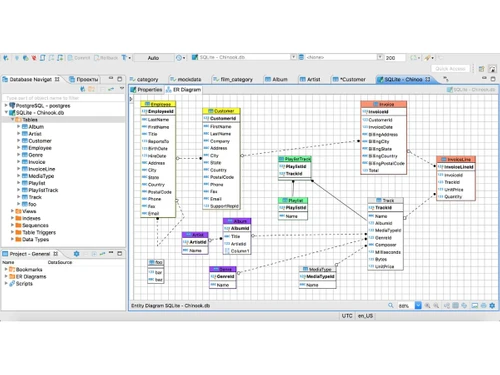
  • icon_check ER Diagram
    Generates interactive ER diagrams to visualize database relationships, tables, and schema structures clearly.
  • icon_check Metadata Explorer
    Browses tables, views, indexes, procedures, triggers, and other database metadata from one dashboard.
  • icon_check Data Editing
    Enables inline editing, filtering, sorting, and updating of database records directly within result grids.
  • icon_check Query Execution
    Executes single or multiple SQL queries with execution history, timing, and detailed error reporting.
  • icon_check Data Comparison
    Compares database schemas and datasets to identify structural or data differences between environments.
  • icon_check Secure Authentication
    Supports encrypted connections and multiple authentication methods for secure database access.
  • icon_check Multi-Database Support
    Works with MySQL, PostgreSQL, Oracle, SQL Server, MongoDB, SQLite, and many other database systems.
  • icon_check Backup & Restore
    Assists with database backup, restore, dump generation, and recovery using supported database utilities.
  • icon_check User Role Management
    Creates and manages database users, roles, privileges, and access permissions for secure administration.
  • icon_check Cross-Platform Support
    Runs seamlessly on Windows, macOS, and Linux, providing a consistent database management experience.
DBeaver Demo Video play icon

Get DBeaver Demo

Watch the demo video to explore key features, real workflows, and how the software fits your business needs.

Understand
Key Features
Personal
Demo Insights
Interactive
Demo Support

DBeaver Specifications

Supported Platforms
Ubuntu Ubuntu Windows Windows MacOS MacOS Linux Linux
Devices
Desktop Desktop
Deployment
Cloud-Based Cloud-Based Perpetual Perpetual
Suitable For
All Industries
Business Specific
All Businesses
Business Size
Individual Small Business Startups Medium Business Enterprises SMBs SMEs MSMBs MSMEs Freelancers
Customer Support
Email Communities Forums
Language
English
Integration
API Integration
Training Resources
Live Online Webinars Documentation Videos
Technology
Next Generation

Explore the Best Alternative Solutions Similar to Your Business Size and Needs

DBeaver Review

Techjockey Trusted Reviews from Verified Users

No reviews are currently available for DBeaver. Discover similar Database Management Software reviews

  • EDB Postgres

    4.8

    Whats great - Excellent experience, staff prepared and available a problem solved during the installation and activation of the software. I... read more

  • Simego Data Synchronisation Studio

    4.5

    Whats great - Easily exports to flat files, connects library with drag and drop system, provides user active directory. read more

  • MySQL enterprise Edition

    4.5

    Whats great - easy to use read more

Compare DBeaver With other Database Management Software

Products
Ratings
Pricing
Device Supported
Deployment
Supported Platforms
  • img

    DBeaver

  • Price On Request

  • Desktop

    Mobile

  • Web based

    On Premises

  • Windows

    Mac OS

  • img

    ClickHouse

  • 4.2

  • Price On Request

  • Desktop

    Mobile

  • Web based

    On Premises

  • Windows

    Mac OS

  • img

    Supabase

  • 4.5

  • Price On Request

  • Desktop

    Mobile

  • Web based

    On Premises

  • Windows

    Mac OS

  • img

    EDB Postgres

  • 4.8

  • Price On Request

  • Desktop

    Mobile

  • Web based

    On Premises

  • Windows

    Mac OS

  • img

    Lio

  • 4.8

  • Price On Request

  • Desktop

    Mobile

  • Web based

    On Premises

  • Windows

    Mac OS

  • img

    MongoDB Compass

  • 4.0

  • Price On Request

  • Desktop

    Mobile

  • Web based

    On Premises

  • Windows

    Mac OS

  • img

    Beekeeper Studio

  • 4.4

  • Price On Request

  • Desktop

    Mobile

  • Web based

    On Premises

  • Windows

    Mac OS

  • img

    Akkio

  • 4.5

  • Price On Request

  • Desktop

    Mobile

  • Web based

    On Premises

  • Windows

    Mac OS

  • img

    ArangoDB

  • 4.4

  • Price On Request

  • Desktop

    Mobile

  • Web based

    On Premises

  • Windows

    Mac OS

  • img

    CUBRID

  • 4.1

  • Price On Request

  • Desktop

    Mobile

  • Web based

    On Premises

  • Windows

    Mac OS

(0) Product(s) selected

DBeaver Alternatives

See All DBeaver Alternatives

Starting Price:

$28 /Month

Starting Price:

$25 /Monthly

Starting Price:

$49 /user/month

Available

Price on Request

Available

Price on Request

Available

Price on Request

Available

Price on Request

Available

Price on Request
Articles for DBeaver

See All Related Articles

What does DBeaver do?

DBeaver is a professional data management software that allows users to explore, process, and administer over 100 SQL, NoSQL, and cloud data sources from a single, unified tool. It is designed to simplify complex database work for various technical and business users.

How much does DBeaver cost?

DBeaver price starts at USD 255 at techjockey.com.

What are the main features of DBeaver?

DBeaver PRO offers a comprehensive set of features including a convenient Data Editor, a multifunctional SQL Editor, robust Administration tools, a visual Query Builder, Data Transfer capabilities for various formats, and Data Compare for objects and schemas.

Is there a free trial for DBeaver?

Yes, DBeaver PRO offers a 14-day free trial that does not require a credit card, allowing users to evaluate the software's full capabilities before purchasing a license.

Who can use DBeaver?

DBeaver PRO is designed for a wide range of users, including technical and business professionals, DBAs, software developers, QA and DevOps teams, data analysts, and financial analysts who work with various data sources.

What types of databases does DBeaver support?

DBeaver PRO supports over 100 data sources, including a wide array of SQL, NoSQL, and cloud databases, providing comprehensive connectivity for both on-premise and cloud environments with included drivers and extensions.

Does DBeaver offer advanced security features?

Yes, DBeaver PRO includes high-level security features, supporting complex authorization mechanisms such as Single Sign-On (AWS SSO, GCP SSO, Okta), Kerberos, and multi-factor authentication.

Can DBeaver be used for team collaboration?

Yes, DBeaver offers a Team Edition specifically designed for powerful role-based data collaboration across teams in real-time, and CloudBeaver provides a lightweight web application suitable for teams working with data in a browser.

What are the deployment options for DBeaver?

DBeaver PRO can be installed as a desktop application on Windows, Linux, or macOS, and is also available via AWS Marketplace; additionally, CloudBeaver offers a web-based solution, and dbvr provides a CLI tool for script execution.

20,000+ Software Listed

Best Price Guranteed

Free Expert Consultation

2M+ Happy Customers

Terms and Condtions

close

Users with registered businesses can purchase goods from merchants on the platform to satisfy their business needs. Users are not permitted to utilize any products acquired through the platform for resale, advertising, business, or further distribution.

For each purchase made, users will receive a Tax Invoice (or 'GST invoice') that includes specific details such as:

  • the GSTIN of the user associated with their registered business, and

  • the specified Entity Name for their business.

It should be noted that not all products are eligible for GST Invoice. Only the products displayed by participating sellers with the 'GST-based Invoice Available' callout on the product description page would qualify.

Certain goods and services are not eligible to get a GST Invoice, including items with VAS, i.e., Value Added Services (e.g., Total Mobile Protection/Assured Buyback) and those involving an exchange offer at the time of purchase.

Users must ensure the accuracy of the GSTIN, and business entity name provided for the GST Invoice. Requests for corrections into GST Invoice would not be accommodated by Techjockey.com or any Seller, and any issues arising from user-provided information are the sole responsibility of users.

Techjockey.com is not liable for the GST Invoice or any associated input tax credit. To efficiently claim an input tax credit, users should select the registered place of business address as per the GST authority's data and follow the provisions of the GST Act and rules.

To claim an input tax credit, the delivery and billing addresses must match. Furthermore, input tax credits will not be granted if the delivery address and GSTIN on the invoice are from different states. In case of incorrect GST details provided during the order placement, the order will be canceled automatically.