 USA
USA UAE
UAESmall Business
Designed for startups and growing businesses

See More


Brand: Decap
Decap CMS is a powerful content management software designed to streamline digital marketing efforts. It enables businesses to efficiently create, manage, and publish content across multiple channels while ensuring seamless brand consistency and messaging.
See MoreHave you used Decap CMS before?
Share your insights for better experience
This Product is Available Free Forever.
Start instantly with no fees, no subscriptions, and no commitments.
Free Forever Plan
Get started immediately at no cost. Upgrade anytime if your business demand more.
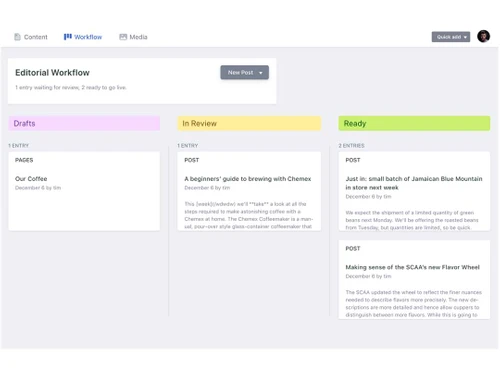
Free Forever Workflow Management Media Library Two-Factor Authentication (2FA) Custom themes and templates Multi-Site Management Content Versioning Performance Monitoring Tools User Interface
  Windows
  MacOS
MacOS  Desktop
  Cloud-Based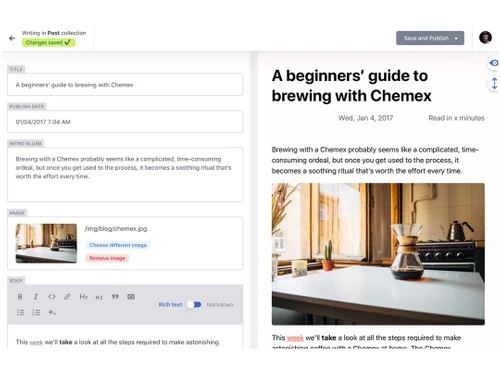
Small Business
Designed for startups and growing businesses
Medium Business
Built for business growth and flexibility
Enterprises
Designed for complex and large-scale business needs
4.1
Out of 5

Overall Rating
Based on
3 Verified Ratings
Rating Breakdown
90% Recommend this Product
Add ReviewTechjockey Trusted Reviews from Verified Users
No reviews are currently available for Decap CMS. Discover similar Content Management Software reviews

Wix
Whats great - Wix, I felt, can be symbolized as the Tesla among traditional website builders. It's reliable and packed with amazing feature... read more

Umbraco CMS
Whats great - Umbraco has been reliable for managing multiple websites. It’s flexible enough to handle different projects and makes it easy... read more

Wordpress
Whats great - Anyone can use it without having prior knowledge. Also, beginners can also create their own website within just a few hours. read more

Decap CMS
FREE
Desktop
Mobile
Web based
On Premises
Windows
Mac OS
Grav
Price On Request
Desktop
Mobile
Web based
On Premises
Windows
Mac OS

OpenText Web CMS
Price On Request
Desktop
Mobile
Web based
On Premises
Windows
Mac OS
Wix
Price On Request
Desktop
Mobile
Web based
On Premises
Windows
Mac OS

Cosmic AI
Price On Request
Desktop
Mobile
Web based
On Premises
Windows
Mac OS

Scrintal
Price On Request
Desktop
Mobile
Web based
On Premises
Windows
Mac OS

Contentful
Price On Request
Desktop
Mobile
Web based
On Premises
Windows
Mac OS

Wordable
Price On Request
Desktop
Mobile
Web based
On Premises
Windows
Mac OS
Bear CMS
Price On Request
Desktop
Mobile
Web based
On Premises
Windows
Mac OS

Genei
Price On Request
Desktop
Mobile
Web based
On Premises
Windows
Mac OS

Scalenut
Price On Request
Desktop
Mobile
Web based
On Premises
Windows
Mac OS
(0) Product(s) selected
Available
Price on Request
Available
Price on Request
Starting Price:
$99 /Month
Starting Price:
$5 /Month

Starting Price:
$149

Starting Price:
€29

Starting Price:
$5

Starting Price:
$99

Starting Price:
$170

Starting Price:
$18 /Month

Available
Price on Request





Decap CMS supports operating systems such as Windows, iOS, and MacOS.
Decap CMS does not have a mobile app for Android and iOS users.
Decap CMS pricing is available on request. For more information, please visit techjockey.com.
Decap CMS is designed for small businesses, medium-sized businesses, and enterprises, providing them with a unified platform for managing their content. This product helps them streamline their content creation, management, and deployment processes, ultimately improving their productivity and efficiency.
A demo of Decap CMS is available at techjockey.com. You can contact our product experts for more information.
Yes, Decap CMS is suitable for small businesses. It helps them manage their content effectively, making it an ideal solution for small businesses that need to streamline their content creation, management, and deployment processes.
Decap CMS provides robust security features, including two-factor authentication, custom themes and templates, and a self-service portal. These features help protect user data and ensure secure access to the platform.
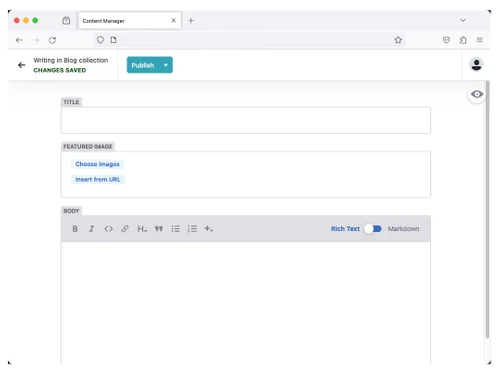
Decap CMS works by providing a unified platform for content creation, management, and deployment. Users can create and manage content, set up workflows, and control user access, all within a single platform. This helps to streamline their content creation and management processes, making it easier to create and deploy content efficiently.
20,000+ Software Listed
Best Price Guranteed
Free Expert Consultation
2M+ Happy Customers
Terms and Condtions

Users with registered businesses can purchase goods from merchants on the platform to satisfy their business needs. Users are not permitted to utilize any products acquired through the platform for resale, advertising, business, or further distribution.
For each purchase made, users will receive a Tax Invoice (or 'GST invoice') that includes specific details such as:
the GSTIN of the user associated with their registered business, and
the specified Entity Name for their business.
It should be noted that not all products are eligible for GST Invoice. Only the products displayed by participating sellers with the 'GST-based Invoice Available' callout on the product description page would qualify.
Certain goods and services are not eligible to get a GST Invoice, including items with VAS, i.e., Value Added Services (e.g., Total Mobile Protection/Assured Buyback) and those involving an exchange offer at the time of purchase.
Users must ensure the accuracy of the GSTIN, and business entity name provided for the GST Invoice. Requests for corrections into GST Invoice would not be accommodated by Techjockey.com or any Seller, and any issues arising from user-provided information are the sole responsibility of users.
Techjockey.com is not liable for the GST Invoice or any associated input tax credit. To efficiently claim an input tax credit, users should select the registered place of business address as per the GST authority's data and follow the provisions of the GST Act and rules.
To claim an input tax credit, the delivery and billing addresses must match. Furthermore, input tax credits will not be granted if the delivery address and GSTIN on the invoice are from different states. In case of incorrect GST details provided during the order placement, the order will be canceled automatically.



