USA
USA UAE
UAESmall Business
Designed for startups and growing businesses

See More


Brand: DeskShare
A smart and user-friendly desktop tool to translate entire websites or documents into multiple languages while preserving layout.
See MoreHave you used DeskShare Site Translator before?
Share your insights for better experience
View plans
 Save upto 18%, Get GST Invoice on your business purchase T&C Buy Now & Pay Later, Check offer on payment page.
 Brand: DeskShare
Founded Year: 2000
DeskShare
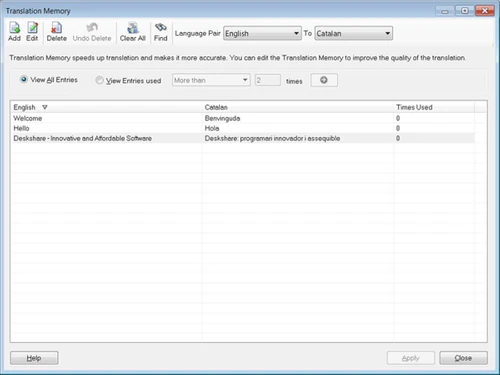
 Language Translator Omni Translator Language Manager Dictionary Manager Automatic Site Translation HTML File Compatibility PHP Script Integration Batch File Processing SEO Content Optimization RESX Resource Translation Unicode Support Folder Mirroring Script Protection
  Ubuntu
  Windows
  iOS
iOS  Desktop
  Cloud-Based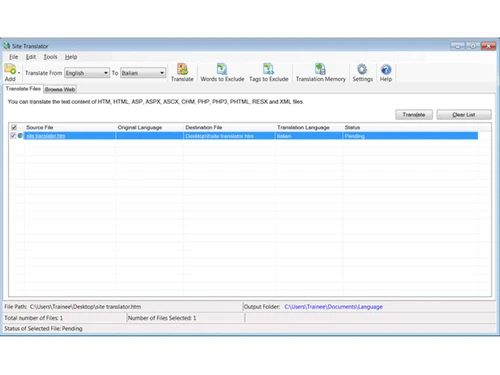
Small Business
Designed for startups and growing businesses
Medium Business
Built for business growth and flexibility
Enterprises
Designed for complex and large-scale business needs
4.3
Out of 5

Overall Rating
Based on
11 Verified Reviews
Rating Breakdown
85% Recommend this Product
Add ReviewUsers generally appreciate DeskShare Site Translator for its offline capabilities, privacy, and effectiveness in handling various file types and languages, making it a solid choice for web designers and developers. The command-line support and translation memory features are particularly valued for their efficiency. However, common complaints include the lack of cloud sync, a dated user interface, and the need for manual processes in certain areas, such as setting up translation memory and excluding tags. Overall, the software is well-regarded but could benefit from enhanced usability and speed for larger projects.
Pros
"Lets you exclude specific HTML/XML tags or words from translation"
"Includes a year subscription to English & Spanish dictionaries"
"Translates full HTML/ASP/PHP/RESX files, preserves source code"
Cons
"No sync means translating across machines needs manual folder moves"

Apr 8, 2025
Techjockey Verified
“Solid Offline Tool, But No Cloud Sync”
I like that everything happens on my local PC—no data stored in the cloud. But translating on two different computers requires manually copying the profile settings and files. It’s secure, but less convenient.
Pros
Fully offline—great for privacy and speed
Cons
No sync means translating across machines needs manual folder moves
Reason to switch
I switched to Crowdin for cloud-based team work, but miss the offline privacy of Site Translator.
Jun 2, 2025
Techjockey Verified
“One-Year Dictionary Subscription Is Fair”
Out of the box, I get English and Spanish—handy for most clients. But after that I had to subscribe to extra language packs, which felt like upsells. Overall fair pricing, though.
Pros
Includes a year subscription to English & Spanish dictionaries
Cons
Additional languages need separate paid packs
Reason to switch
Chose Site Translator because the base packs covered my core needs affordably.
Apr 16, 2025
Techjockey Verified
“Great Trial Limits, But No Live Preview”
The 200-word trial allowed me to trial translation quality before buying. But I had to export files and view locally—not like cloud tools that show live previews. It’s fine, but slower for testing changes.
Pros
Trial lets you test 200 words for free
Cons
No live browser preview—need local build and view
Reason to switch
I moved to Site Translator for longer-term cost savings, even if workflow is slower.

DeskShare Site Translator
₹ 18383.26 excl. GST
Desktop
Mobile
Web based
On Premises
Windows
Mac OS

TalkPal AI
Price On Request
Desktop
Mobile
Web based
On Premises
Windows
Mac OS

ELSA Speak
Price On Request
Desktop
Mobile
Web based
On Premises
Windows
Mac OS

Trados
Price On Request
Desktop
Mobile
Web based
On Premises
Windows
Mac OS

DubDub AI
Price On Request
Desktop
Mobile
Web based
On Premises
Windows
Mac OS

Vitra AI
Price On Request
Desktop
Mobile
Web based
On Premises
Windows
Mac OS

DLM Impact eLanguage Lab
₹ 250000
Desktop
Mobile
Web based
On Premises
Windows
Mac OS

DeepL
Price On Request
Desktop
Mobile
Web based
On Premises
Windows
Mac OS

Translate.Video
₹ 2385
Desktop
Mobile
Web based
On Premises
Windows
Mac OS

Translate.photo
Price On Request
Desktop
Mobile
Web based
On Premises
Windows
Mac OS

Dubpro AI
Price On Request
Desktop
Mobile
Web based
On Premises
Windows
Mac OS
(2) Product(s) selected
Available
Price on Request
Starting Price:
$30 /Month
Starting Price:
$10
Starting Price:
$9 /Month $19

Available
Price on Request

Starting Price:
$185

Starting Price:
$135

Available
Price on Request

Starting Price:
$140

Available
Price on Request

Starting Price:
$14
Businesses, developers, content managers, educators, and multilingual website owners.
Upload your HTML or website folder, pick the source and target languages, and the tool auto-translates everything.
DeskShare Site Translator pricing is INR 16264 per license at Techjockey.com.
Yes, a trial version is available for download to explore key features before purchase.
Yes, you can translate full website directories or multiple files in batch mode.
Yes, the tool only changes the content, leaving your site’s code and structure untouched.
Yes, it supports major languages including Spanish, French, German, Italian, Portuguese, and more.
Yes, it's a desktop tool, so no internet is required after installation.
20,000+ Software Listed
Best Price Guranteed
Free Expert Consultation
2M+ Happy Customers
Terms and Condtions

Users with registered businesses can purchase goods from merchants on the platform to satisfy their business needs. Users are not permitted to utilize any products acquired through the platform for resale, advertising, business, or further distribution.
For each purchase made, users will receive a Tax Invoice (or 'GST invoice') that includes specific details such as:
the GSTIN of the user associated with their registered business, and
the specified Entity Name for their business.
It should be noted that not all products are eligible for GST Invoice. Only the products displayed by participating sellers with the 'GST-based Invoice Available' callout on the product description page would qualify.
Certain goods and services are not eligible to get a GST Invoice, including items with VAS, i.e., Value Added Services (e.g., Total Mobile Protection/Assured Buyback) and those involving an exchange offer at the time of purchase.
Users must ensure the accuracy of the GSTIN, and business entity name provided for the GST Invoice. Requests for corrections into GST Invoice would not be accommodated by Techjockey.com or any Seller, and any issues arising from user-provided information are the sole responsibility of users.
Techjockey.com is not liable for the GST Invoice or any associated input tax credit. To efficiently claim an input tax credit, users should select the registered place of business address as per the GST authority's data and follow the provisions of the GST Act and rules.
To claim an input tax credit, the delivery and billing addresses must match. Furthermore, input tax credits will not be granted if the delivery address and GSTIN on the invoice are from different states. In case of incorrect GST details provided during the order placement, the order will be canceled automatically.