linkedin
Translate.photo logo
play Break Language Barriers: Instantly Translate Images & Campaign with Translate.Photo
translate-photo AI translation
translate-photo features

Translate.photo

Brand: Vitra.ai

  • No Ratings & Reviews

It is an AI-powered creative automation and localization platform that helps businesses create, translate, resize, and adapt visual content faster using a single unified workflow.

See More

Have you used Translate.photo before?

Share your insights for better experience

Add a Review
Starting Price 53% OFF
$9 $19

View plans

100% Genuine
Products
Best Price
Guaranteed
Safe & Secure
Payment
  • Description

  • Pricing

  • Features

  • Specification

  • Review

  • FAQ

Starting at $9

Translate.photo Software Overview

What is Translate.photo?

Translate.photo by itra.ai is an AI-powered creative automation and localization platform that helps businesses create, translate, resize, and adapt visual content faster using a single unified workflow. This language translation platform combines AI Image Creation, Creative Translation, Flat Image Translation, AI Localization, and Brand-Aware Content Generation to help teams scale multilingual creatives effortlessly.

With its AI chat-based interface, users can instantly generate marketing creatives, social media posts, banners, ad visuals, product images, and branded graphics by simply describing what they want in natural language. Translate.photo also enables 1-click translation of creatives, designs, documents, and flat images such as JPG and PNG files into 75+ languages while preserving layouts, branding, and visual consistency.

Why Choose Translate.photo?

Translate.photo is ideal for marketing teams, enterprises, creative agencies, eCommerce brands, and localization teams looking to automate creative production, multilingual localization, and campaign adaptation using AI.

The platform can intelligently adapt and resize creatives into multiple aspect ratios for platforms like Instagram, YouTube, Facebook, LinkedIn, display ads, websites, and mobile formats without manually redesigning assets. This allows brands to quickly repurpose campaigns across channels and regions.

Translate.photo integrates seamlessly with Adobe Photoshop, Illustrator, InDesign, Figma, Docs, Excel, and PowerPoint, allowing teams to localize designs directly inside their existing workflows. Powered by context-aware AI, Translation Memory, Glossary Management, AI Proofreading, and AI Quality Checks, the platform ensures translations remain accurate, culturally relevant, and brand-consistent across every campaign.

Benefits of Translate.photo Software

  • AI Image Creation with chat interface: It enables users to generate and edit images through a simple conversational AI, reducing the need for complex design tools or workflows.
  • JPG and PNG image translation: This platform allows seamless translation of text within common image formats while preserving original design quality.
  • 1-click translation into 75+ languages: Helps users instantly localize visuals for global audiences without manual effort.
  • AI-powered image resizing for multiple aspect ratios: Automatically adapts visuals for different platforms like social media, ads, and web without redesigning.
  • Context-aware AI translations: It ensures translations reflect meaning and intent, not just literal text, improving accuracy and readability.
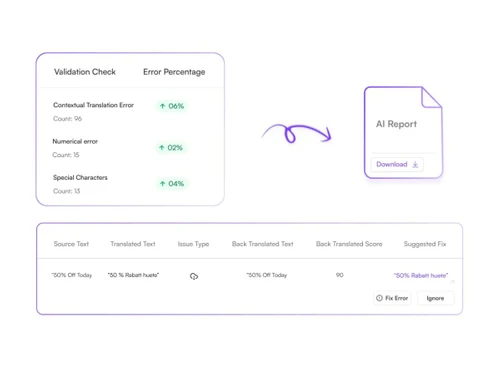
  • AI Proofreading and AI QC workflows: Enhances quality by detecting errors and ensuring consistency before final output.
  • Translation Memory and Glossary support: Maintains consistency across projects by reusing approved translations and brand terminology.
  • Adobe and Figma integrations: Streamlines creative workflows by allowing direct translation within popular design tools.
  • Automatic language detection: Simplifies workflow by identifying source language without manual selection.
  • Real-time collaboration workflows: Enables teams to work together simultaneously on multilingual creative projects from anywhere.
  • Brand-consistent multilingual creative production: Ensures all localized content stays aligned with brand voice, style, and visual identity across markets.

Pricing of Translate.photo Software

Translate.photo pricing plans start from USD 9 for the first month at Techjockey.com. Regular pricing applies from the second month onwards.

The pricing model is based on different parameters, including extra features, deployment type, and the total number of users. For further queries related to the product, you can contact our product team and learn more about the pricing and offers.

Read more

Vitra.ai Company Details

Founded Year:  2020

Vitra

Director/Founders Vitra
Company Size 1-100 Employees

Translate.photo Pricing & Plans

Standard Plan
Starting at $9 $19 SAVE UPTO 53%
    • Quantity

      Quantity
      Quantity
    • Monthly

      Monthly
      Monthly

Key Features

  • Credits - 5000

  • Storage - 2 GB

  • AI Translation

  • Image Translation

  • Adaptive Image Resizing

  • Image Creation

Pro Plan
Starting at $59
    • Quantity

      Quantity
      Quantity
    • Monthly

      Monthly
      Monthly

Key Features

  • Credits - 40000

  • Storage - 5 GB

  • All Features of Standard Plan

  • AI Proofreading

  • AI Translation Suggestions/AI Back Translation

  • AI QC Report

  • Transliteration Support

Enterprise Plan
Starting at $199
    • Quantity

      Quantity
      Quantity
    • Monthly

      Monthly
      Monthly

Key Features

  • Credits - 200000

  • Storage - 20 GB

  • All Features of Pro Plan

  • Compliance (SOC2, GDPR, etc.)

  • API

Translate.photo Features

  • icon_check Image Translation
    Translate photos, designs, and documents in a single click.
  • icon_check Language Support
    Instant translation across 75plus languages for global reach.
  • icon_check Contextual AI Engine
    Ensures translations match tone, intent, and brand voice.
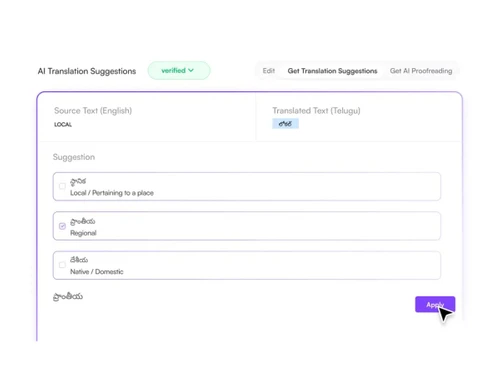
  • icon_check AI Translation Suggestions
    Get context-aware alternatives for better phrasing.
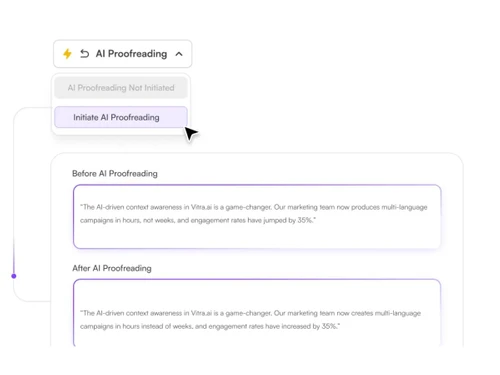
  • icon_check AI Proofreading
    Improves grammar, tone, and readability like a native speaker.
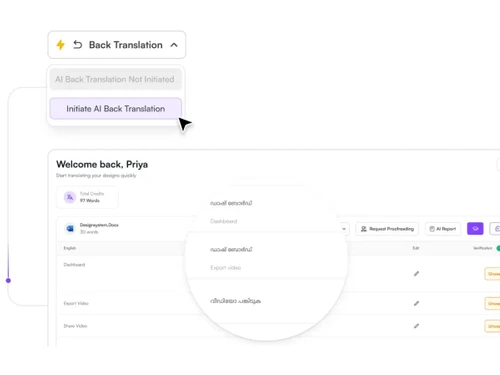
  • icon_check Back Translation Check
    Verifies meaning by translating content back to source language.
  • icon_check AI QC Reports
    Auto QC scan flags inconsistencies in numbers, symbols, and context.
  • icon_check Design Layout Preservation
    Maintains fonts, layout, and structure after translation.
  • icon_check Integrations
    Works inside Photoshop, Illustrator, InDesign, and Figma.
  • icon_check Translation Memory
    Stores past translations for consistent terminology reuse.
  • icon_check Real-Time Translation
    Converts content into multiple languages within seconds.
  • icon_check Team Collaboration
    Enables designers, translators, and marketers to work together.
  • icon_check Bulk Translation Support
    Translate multiple files simultaneously for faster workflows.
  • icon_check Multi-Format File Support
    Translate PSD, AI, PDF, Word, PPT, and more formats.
  • icon_check API Integration
    Connect with systems for automated translation workflows.
Translate.photo Demo Video play icon

Get Translate.photo Demo

Watch the demo video to explore key features, real workflows, and how the software fits your business needs.

Understand
Key Features
Personal
Demo Insights
Interactive
Demo Support

Translate.photo Specifications

Supported Platforms
Windows Windows MacOS MacOS Linux Linux
Devices
Desktop Desktop Tablet Tablet iPad iPad
Deployment
Cloud-Based Cloud-Based
Suitable For
All Industries
Business Specific
All Businesses
Business Size
Startups Enterprises SMBs SMEs
Customer Support
Email
Language
English
Integration
API Integration
Training Resources
Live Online Webinars Documentation
AI Features
AI Integrated

Translate.photo Review

Techjockey Trusted Reviews from Verified Users

No reviews are currently available for Translate.photo. Discover similar Language Translation Software reviews

  • TalkPal AI

    4.4

    Whats great - Offers a range of conversation styles and easy sharing options. read more

  • DeskShare Site Translator

    4.4

    Whats great - Fully offline—great for privacy and speed read more

  • ELSA Speak

    4.4

    Whats great - ELSA Speak provides encouraging feedback and helps track progress. read more

Articles for Translate.photo

See All Related Articles

How much does Translate.photo Software cost?

Translate.photo pricing plans start from USD 9 at techjockey.com.

Is there a mobile app available for Translate.photo?

No, Translate.photo doesn’t support any specific mobile app.

Which operating systems are compatible with Translate.photo?

Translate.photo is a desktop application designed for macOS and Windows (PC).

Does Translate.photo offer a free trial?

Translate.photo offers 7-day free trial to check features of premium plans.

How does Translate.photo Software work?

It specifically uses a Contextual Translation Engine that, unlike simple text translators, analyzes the visual context (objects, logos, layout) to ensure the translation is accurate and appropriate for the visual medium.

Who uses Translate.photo?

Translate.photo is ideal for marketing teams, enterprises, creative agencies, eCommerce brands, and localization teams looking to automate creative production, multilingual localization, and campaign adaptation using AI.

Is Translate.photo available for free?

Translate.photo offers a free plan.

20,000+ Software Listed

Best Price Guranteed

Free Expert Consultation

2M+ Happy Customers

Terms and Condtions

close

Users with registered businesses can purchase goods from merchants on the platform to satisfy their business needs. Users are not permitted to utilize any products acquired through the platform for resale, advertising, business, or further distribution.

For each purchase made, users will receive a Tax Invoice (or 'GST invoice') that includes specific details such as:

  • the GSTIN of the user associated with their registered business, and

  • the specified Entity Name for their business.

It should be noted that not all products are eligible for GST Invoice. Only the products displayed by participating sellers with the 'GST-based Invoice Available' callout on the product description page would qualify.

Certain goods and services are not eligible to get a GST Invoice, including items with VAS, i.e., Value Added Services (e.g., Total Mobile Protection/Assured Buyback) and those involving an exchange offer at the time of purchase.

Users must ensure the accuracy of the GSTIN, and business entity name provided for the GST Invoice. Requests for corrections into GST Invoice would not be accommodated by Techjockey.com or any Seller, and any issues arising from user-provided information are the sole responsibility of users.

Techjockey.com is not liable for the GST Invoice or any associated input tax credit. To efficiently claim an input tax credit, users should select the registered place of business address as per the GST authority's data and follow the provisions of the GST Act and rules.

To claim an input tax credit, the delivery and billing addresses must match. Furthermore, input tax credits will not be granted if the delivery address and GSTIN on the invoice are from different states. In case of incorrect GST details provided during the order placement, the order will be canceled automatically.