linkedin
Memoq logo
play Getting started with memoQ - a session for translators
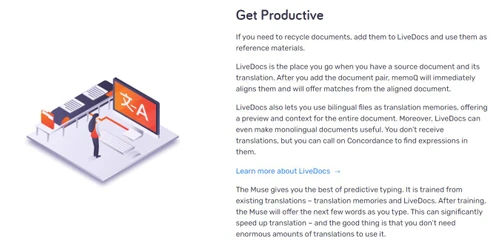
memoq-increase-produtivity
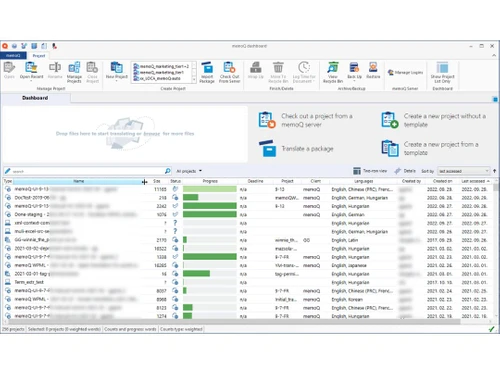
memoq dashboard

Memoq

Brand: Memoq

  • 4.2

  • 5 Ratings

Streamlines translation and localization processes for enterprises, language service providers, and translators with features like workflow automation, project tracking, and quality checks.

See More

Have you used Memoq before?

Share your insights for better experience

Add a Review
Starting Price
$185

View plans

100% Genuine
Products
Best Price
Guaranteed
Safe & Secure
Payment
  • Description

  • Pricing

  • Features

  • Specification

  • Review

  • Compare

  • Alternatives

  • FAQ

Starting at $185

Memoq Software Overview

What is Memoq?

memoQ is a language translation software designed to streamline translation and localization processes for enterprises, language service providers, and individual translators. It offers a robust translation management system that facilitates project tracking, workflow management, and automated quality checks.

With features tailored to meet the needs of different users, memoQ enhances collaboration among teams and improves efficiency in handling various file types and projects. The software also includes advanced reporting tools and customizable options to adapt to specific organizational requirements. Additionally, memoQ supports a wide range of languages and integrates with other tools, making it a versatile choice for managing translation tasks effectively.

Why Choose Memoq Software?

  • Tailored for Diverse Users: It is designed to meet the unique needs of enterprises, language service providers, and individual translators, offering customized solutions for each user group.
  • Efficient Workflow Management: The software provides flexible workflow management and easy project tracking, enabling users to streamline and automate their translation and localization processes.
  • Advanced Translation Memory (TM+): With the new TM+ as the default for Translation Memories, memoQ ensures enhanced accuracy and efficiency in reusing translated content.
  • Collaborative Environment: It fosters collaboration by providing a stable platform where teams can work together seamlessly on translation projects, saving time and reducing errors.
  • Automated Quality Checks: The software includes automated quality assurance tools to maintain high translation standards and reduce manual effort.
  • Wide File Format Support: memoQ supports a variety of file formats, making it versatile for handling different types of translation projects.
  • Accessibility Enhancements: The latest release (memoQ 11.2) introduces features like an inverted color scheme for improved accessibility, ensuring usability for all users.
  • Support for Global Languages: With the addition of Thai as a source language in its terminology base (TB) and translation memory (TM), memoQ continues to expand its language support.
  • Integration with Advanced Models: The integration of TAUS Generic Model v2 enhances quality estimation accuracy, improving the overall translation workflow.
  • Customizable and Scalable: It offers advanced reports, customizability, and scalability to adapt to both small-scale and global localization projects.

Benefits of Memoq Software

  • Cost-Effective Solutions: It offers a free trial that allows users to translate up to 1,000,000 characters at no cost, enabling potential customers to evaluate the software's capabilities before making a financial commitment.
  • Enhanced Accessibility Features: The latest version includes an inverted color scheme, making it easier for users with visual impairments to navigate and use the software effectively.
  • Support for New Languages: It has expanded its language support by including Thai as a source language, catering to a broader range of translation needs.
  • Advanced Reporting Capabilities: The software provides detailed reporting features that help users analyze project performance and make informed decisions based on data insights.
  • Seamless Integration Options: It allows integration with various third-party tools and platforms, enhancing workflow efficiency and connectivity across different systems.
  • User-Centric Design: The software is developed with input from actual translators, ensuring that its features align closely with the real-world needs and challenges faced by users in the translation industry.
  • Robust Terminology Management: It includes advanced terminology management tools that help maintain consistency in translations by managing and standardizing terms across projects.
  • Scalability for Large Projects: The platform is designed to handle large-scale translation projects efficiently, making it suitable for both small teams and large enterprises.
  • Community and Support Resources: It offers access to a community of users and extensive support resources, including documentation and tutorials, to assist users in maximizing their use of the software.
  • Regular Updates and Innovations: The software is continuously updated with new features and improvements based on user feedback, ensuring it remains relevant and effective in a rapidly changing industry.

Pricing of Memoq

Memoq price in India starts at $185 at techjockey.com.

The pricing model is based on different parameters, including extra features, deployment type, and the total number of users. For further queries related to the product, you can contact our product team and learn more about the pricing and offers.

Read more

Memoq Company Details

Founded Year:  2004

memoQ is among the world's leading translation environments.

Director/Founders Balázs Kis
Company Size 1-100 Employees

Memoq Pricing & Plans

TMS Cloud
Starting at $185
    • Licenses

      Licenses
      Licenses
    • Monthly

      Monthly
      Monthly

Key Features

  • Monthly or annual subscription

  • 5 web licenses with each Project Manager license

  • 10 GB storage

TMS Cloud+
Starting at $415
    • Licenses

      Licenses
      Licenses
    • Monthly

      Monthly
      Monthly

Key Features

  • Annual subscription

  • 5 web licenses with each Project Manager license

  • Extended data storage

  • Up to 20 GB storage

Memoq Features

  • icon_check Collaboration
    Enables seamless teamwork on translation projects.
  • icon_check Increase Productivity
    Enhances efficiency with automation tools.
  • icon_check Predictive Typing
    Suggests words and phrases for faster translation.
  • icon_check Multilingual
    Supports multiple languages for global projects.
  • icon_check Integration
    Connects with various third-party tools and platforms.
  • icon_check API Access
    Allows customization and automation via API.
Memoq Demo Video play icon

Get Memoq Demo

Watch the demo video to explore key features, real workflows, and how the software fits your business needs.

Understand
Key Features
Personal
Demo Insights
Interactive
Demo Support

Memoq Specifications

Supported Platforms
Ubuntu Ubuntu Windows Windows MacOS MacOS Linux Linux
Devices
Desktop Desktop
Deployment
Cloud-Based Cloud-Based
Suitable For
All Industries
Business Specific
All Businesses
Business Size
Small Business Startups Medium Business Enterprises
Customer Support
Email Communities
Language
English
Training Resources
Webinars Documentation Videos

Explore the Best Alternative Solutions Similar to Your Business Size and Needs

Memoq Review

4.2

Out of 5

img

Overall Rating

Based on
5 Verified Ratings

Rating Breakdown

  • Features 4.3
  • Value for Money 4.5
  • Ease of Use 4.1
  • Customer Support 4

94% Recommend this Product

Add Review

Techjockey Trusted Reviews from Verified Users

No reviews are currently available for Memoq. Discover similar Language Translation Software reviews

  • TalkPal AI

    4.4

    Whats great - Offers a range of conversation styles and easy sharing options. read more

  • DeskShare Site Translator

    4.4

    Whats great - Fully offline—great for privacy and speed read more

  • ELSA Speak

    4.4

    Whats great - ELSA Speak provides encouraging feedback and helps track progress. read more

Compare Memoq With other Language Translation Software

Products
Ratings
Pricing
Device Supported
Deployment
Supported Platforms
  • img

    Memoq

  • 4.2

  • Price On Request

  • Desktop

    Mobile

  • Web based

    On Premises

  • Windows

    Mac OS

  • img

    TalkPal AI

  • 4.4

  • Price On Request

  • Desktop

    Mobile

  • Web based

    On Premises

  • Windows

    Mac OS

  • img

    ELSA Speak

  • 4.3

  • Price On Request

  • Desktop

    Mobile

  • Web based

    On Premises

  • Windows

    Mac OS

  • img

    Trados

  • 4.2

  • Price On Request

  • Desktop

    Mobile

  • Web based

    On Premises

  • Windows

    Mac OS

  • img

    DubDub AI

  • 4.2

  • Price On Request

  • Desktop

    Mobile

  • Web based

    On Premises

  • Windows

    Mac OS

  • img

    Vitra AI

  • 4.4

  • Price On Request

  • Desktop

    Mobile

  • Web based

    On Premises

  • Windows

    Mac OS

  • img

    DeepL

  • 4.4

  • Price On Request

  • Desktop

    Mobile

  • Web based

    On Premises

  • Windows

    Mac OS

  • img

    Translate.Video

  • 4.4

  • ₹ 2385

  • Desktop

    Mobile

  • Web based

    On Premises

  • Windows

    Mac OS

  • img

    Translate.photo

  • Price On Request

  • Desktop

    Mobile

  • Web based

    On Premises

  • Windows

    Mac OS

(2) Product(s) selected

Memoq Alternatives

See All Memoq Alternatives

Starting Price:

$10 /Month

Available

Price on Request

Starting Price:

$30 /Month

Starting Price:

$10

SAVE UPTO 53%

Available

Price on Request

Starting Price:

$169

Starting Price:

$14

Articles for Memoq

See All Related Articles

What is the cost of MemoQ Software?

The price of MemoQ software in India starts at $185 on techjockey.com.

Is there a MemoQ Software app available?

No, MemoQ does not offer mobile apps for iOS and Android devices to manage translation projects on the go.

Which operating systems are supported by MemoQ Software?

MemoQ supports Ubuntu, Linux, Windows, and macOS operating systems, with limited support for other platforms through virtual machines or cloud.

Does MemoQ Software offer a free trial?

No, MemoQ does not offer a free trial.

How does MemoQ Software function?

MemoQ uses translation memory, terminology management, and collaboration tools to streamline translation projects and improve efficiency.

Who are the potential users of MemoQ Software?

MemoQ is primarily used by translators, translation agencies, multinational corporations, and project managers in the language industry.

Is there a free demo available for MemoQ Software?

Yes, MemoQ provides a free demo version of the software to showcase its features and functionalities.

Is MemoQ Software available for free?

No, MemoQ is a paid software, although it offers a free trial and demo versions for evaluation.

What types of licenses are available for MemoQ Software?

MemoQ offers both individual and enterprise licenses, including subscription-based and perpetual licenses, tailored to different user needs.

Can MemoQ Software integrate with other translation tools?

Yes, MemoQ integrates with various translation tools, including machine translation engines, CAT tools, and content management systems.

20,000+ Software Listed

Best Price Guranteed

Free Expert Consultation

2M+ Happy Customers

Terms and Condtions

close

Users with registered businesses can purchase goods from merchants on the platform to satisfy their business needs. Users are not permitted to utilize any products acquired through the platform for resale, advertising, business, or further distribution.

For each purchase made, users will receive a Tax Invoice (or 'GST invoice') that includes specific details such as:

  • the GSTIN of the user associated with their registered business, and

  • the specified Entity Name for their business.

It should be noted that not all products are eligible for GST Invoice. Only the products displayed by participating sellers with the 'GST-based Invoice Available' callout on the product description page would qualify.

Certain goods and services are not eligible to get a GST Invoice, including items with VAS, i.e., Value Added Services (e.g., Total Mobile Protection/Assured Buyback) and those involving an exchange offer at the time of purchase.

Users must ensure the accuracy of the GSTIN, and business entity name provided for the GST Invoice. Requests for corrections into GST Invoice would not be accommodated by Techjockey.com or any Seller, and any issues arising from user-provided information are the sole responsibility of users.

Techjockey.com is not liable for the GST Invoice or any associated input tax credit. To efficiently claim an input tax credit, users should select the registered place of business address as per the GST authority's data and follow the provisions of the GST Act and rules.

To claim an input tax credit, the delivery and billing addresses must match. Furthermore, input tax credits will not be granted if the delivery address and GSTIN on the invoice are from different states. In case of incorrect GST details provided during the order placement, the order will be canceled automatically.