linkedin
DigiSigner logo
play DigiSigner
digisigner-software-documents
digisigner-software-send

DigiSigner

Brand: DigiSigner

  • 4.1

  • 4 Ratings

  • DigiSigner is an electronic signature software.
  • It helps users sign and manage documents digitally.
  • The software simplifies secure online document signing.
  • It supports legally binding eSignatures and workflows.
See More

Have you used DigiSigner before?

Share your insights for better experience

Add a Review
Starting Price
$25

View plans

100% Genuine
Products
Best Price
Guaranteed
Safe & Secure
Payment
  • Description

  • Pricing

  • Features

  • Specification

  • Review

  • Compare

  • Alternatives

  • FAQ

Starting at $25

DigiSigner Software Overview

What is DigiSigner Electronic Signature?

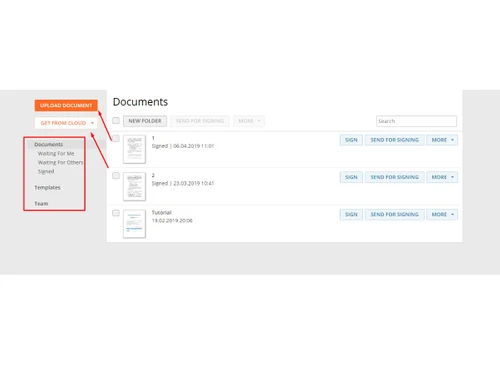
DigiSigner is an electronic signature application that enables individuals as well as businesses to sign documents electronically. It gives a secure and legally acceptable platform for users. It removes both printing and scanning, and the physical signature of papers. It also makes it possible to conduct entirely digital document workflows.

The software is compatible with the popular document formats like PDF, Word, and other document types. The users can upload the files, include signature fields, and send them to the recipients to sign. DigiSigner also comes with audit and encryption to guarantee the integrity and protection of documents.

What are the Benefits of Choosing DigiSigner Electronic Signature?

  • Legally Binding eSignatures: DigiSigner complies with the key eSignature laws, and hence, signed documents are legally binding.
  • Fast Document Signing: Consumers can sign documents online within minutes and can eliminate delays that would have occurred during printing or manual processes.
  • Secure Document Handling: The software involves the protection of documents through encryption and audit trails to monitor all signing activities.
  • Multiple File Format Support: It is compatible with PDF, Word Files, and other popular file formats. Thus, being versatile across a variety of types of documents.
  • Remote Signing: Documents can also be delivered to people in any location, and they can sign them using any device or even location.
  • Simple User Interface: It is easy to use the software because of its clean and intuitive layout for both individuals and teams.
  • Workflow Automation: Users can establish signing workflows, assign roles, and handle document approvals effectively.
  • Cloud-Based Access: DigiSigner is an online application that enables users to view and sign documents without any complicated programs.

DigiSigner Electronic Signature Pricing

DigiSigner pricing starts from USD 25 per month at Techjockey. For the latest pricing details and plan comparisons, users should visit our official website.

Read more

DigiSigner Company Details

Founded Year:  2014

Digisigner is a cloud-based electronic signature solution focused on ease of use, speed, and affordability. The service enables businesses and individuals to sign documents and agreements and close deals from anywhere in the world.

Director/Founders Jessica Kelly
Company Size 1-100 Employees

DigiSigner Pricing & Plans

Pro
Starting at $25
    • Licenses

      Licenses
      Licenses
    • Monthly

      Monthly
      Monthly

Key Features

  • Unlimited documents

  • 1 Sender

  • Multiple signers

  • Templates

  • Signing links

  • Branding

Team
Starting at $75
    • Licenses

      Licenses
      Licenses
    • Monthly

      Monthly
      Monthly

Key Features

  • Unlimited documents

  • Up to 5 Sender

  • Multiple signers

  • Templates

  • Team features

  • Branding

DigiSigner Features

  • icon_check Upload Document
    Supports the importation of various file formats including PDF, Word, and text files for immediate electronic processing.
  • icon_check Multi Recipient Workflow
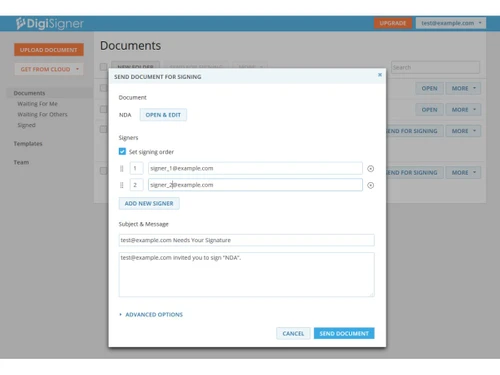
    Enables the distribution of a single document to multiple signers for sequential or simultaneous electronic execution.
  • icon_check Alerts & Notifications
    Sends systematic email notifications to the sender and signers regarding document views, completions, or pending actions.
  • icon_check Audit Logs
    Records and stores a detailed history of every document interaction, including unique IP addresses and specific timestamps.
  • icon_check Data Encryption
    Utilizes SSL encryption protocols to secure all document data during the transfer between the sender and the recipient.
  • icon_check Templates
    Permits the saving of frequently used document structures to streamline the preparation of recurring business contracts.
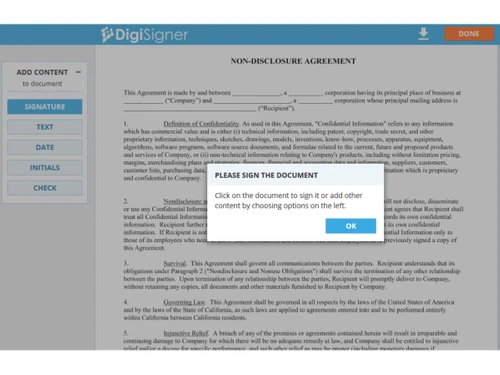
  • icon_check Drag and Drop Functionality
    Allows administrators to manually position signature, initial, and date fields anywhere on the document using a cursor tool.
  • icon_check Signature Verification
    Implements a unique document hash to verify the integrity of the signed file and ensure no unauthorized changes occurred.
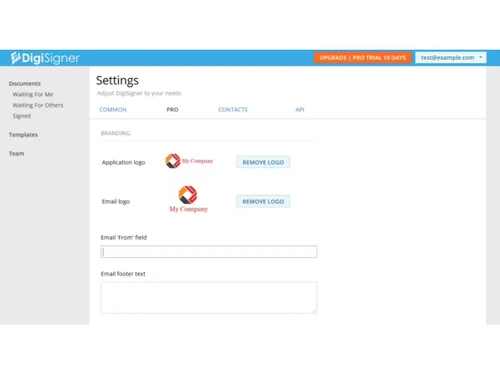
  • icon_check Custom Branding
    Enables organizations to add corporate logos and specific messaging to the document signing pages and outgoing emails.
  • icon_check Role-Based Access Control (RBAC)
    Manages user permissions within a team account to restrict document visibility to authorized personnel or departments.
  • icon_check Text Field Customization
    Allows senders to add editable text boxes, checkboxes, and radio buttons for signers to complete during the review phase.
  • icon_check Document Archiving
    Stores completed agreements in a protected cloud environment for future retrieval, download, or permanent deletion.
  • icon_check Progress Tracking
    Displays a dashboard view of all active documents, indicating which recipients have viewed or signed the current file.
DigiSigner Demo Video play icon

Get DigiSigner Demo

Watch the demo video to explore key features, real workflows, and how the software fits your business needs.

Understand
Key Features
Personal
Demo Insights
Interactive
Demo Support

DigiSigner Specifications

Supported Platforms
Ubuntu Ubuntu Windows Windows MacOS MacOS Linux Linux
Devices
Desktop Desktop
Deployment
Cloud-Based Cloud-Based
Suitable For
Real Estate Legal
Business Specific
All Businesses
Business Size
Individual Small Business Startups Medium Business Enterprises SMBs SMEs MSMBs MSMEs Freelancers
Customer Support
Email
Language
English
Integration
API Integration
Training Resources
Documentation Videos
Compliance Regulation
HIPAA CCPA

Explore the Best Alternative Solutions Similar to Your Business Size and Needs

DigiSigner Review

4.1

Out of 5

img

Overall Rating

Based on
4 Verified Ratings

Rating Breakdown

  • Features 3.8
  • Value for Money 4
  • Ease of Use 4.2
  • Customer Support 4.3

90% Recommend this Product

Add Review

Techjockey Trusted Reviews from Verified Users

No reviews are currently available for DigiSigner. Discover similar Digital Signature Software reviews
  • Adobe Acrobat Sign

    4.3

    Whats great - Professional, widely accepted. read more

  • Cygnature

    4.9

    Whats great - It is excellent software and very easy to use. It works great to create E-signatures for your documents. So I have recommend... read more

  • DocuSign

    4.6

    Whats great - Easy-to-use interface with robust functionality. read more

Compare DigiSigner With other Digital Signature Software

Products
Ratings
Pricing
Device Supported
Deployment
Supported Platforms
  • img

    DigiSigner

  • 4.1

  • Price On Request

  • Desktop

    Mobile

  • Web based

    On Premises

  • Windows

    Mac OS

  • img

    RSign

  • 4.5

  • Price On Request

  • Desktop

    Mobile

  • Web based

    On Premises

  • Windows

    Mac OS

  • img

    Dropbox Sign

  • 4.3

  • Price On Request

  • Desktop

    Mobile

  • Web based

    On Premises

  • Windows

    Mac OS

  • img

    Cygnature

  • 4.8

  • Price On Request

  • Desktop

    Mobile

  • Web based

    On Premises

  • Windows

    Mac OS

  • img

    Zoho Sign

  • 4.2

  • ₹ 800

  • Desktop

    Mobile

  • Web based

    On Premises

  • Windows

    Mac OS

  • img

    InstaSigner

  • 4.5

  • Price On Request

  • Desktop

    Mobile

  • Web based

    On Premises

  • Windows

    Mac OS

  • img

    BulkSigner

  • 4.4

  • ₹ 3500

  • Desktop

    Mobile

  • Web based

    On Premises

  • Windows

    Mac OS

  • img

    GreenSign

  • 4.1

  • Price On Request

  • Desktop

    Mobile

  • Web based

    On Premises

  • Windows

    Mac OS

  • img

    Certinal eSign

  • 4.4

  • Price On Request

  • Desktop

    Mobile

  • Web based

    On Premises

  • Windows

    Mac OS

  • img

    eSignly

  • 4.2

  • Price On Request

  • Desktop

    Mobile

  • Web based

    On Premises

  • Windows

    Mac OS

(2) Product(s) selected

DigiSigner Alternatives

See All DigiSigner Alternatives

Starting Price:

$1 /Envelope

Starting Price:

$15 /User/Month

Available

Price on Request

Starting Price:

₹799 /Month

Available

Price on Request
Starting Price:

€11 /User/Month

Articles for DigiSigner

See All Related Articles

How much does DigiSigner cost?

The pricing of DigiSigner starts from USD 25 per month at Techjockey.

What is DigiSigner used for?

It is used for signing, sending, and managing documents electronically.

Is DigiSigner legally valid?

Yes, it provides legally binding electronic signatures that comply with major eSignature laws.

How does DigiSigner Electronic Signature work?

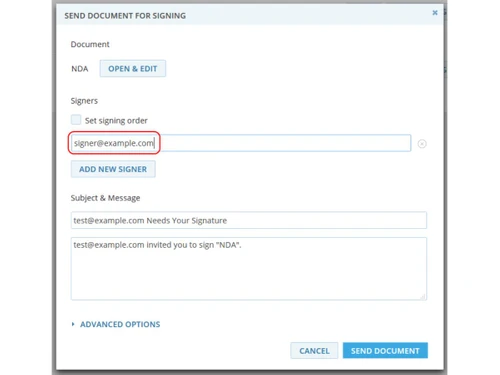
DigiSigner is an online app that enables users to attach their documents, design the signature fields, and forward them to the other parties to sign digitally. After signing, the system will safely store the document and will have an audit trail to ensure authenticity.

Who should use DigiSigner?

Businesses, freelancers, legal professionals, and teams that handle digital documents can benefit from it.

Does DigiSigner support PDF files?

Yes, it supports PDF and other common document formats.

Can documents be signed remotely?

Yes, recipients can sign documents from any device or location.

Is DigiSigner cloud-based?

Yes, it is an online solution that works without complex installations.

Does it provide audit trails?

Yes, it records all signing actions for security and compliance.

20,000+ Software Listed

Best Price Guranteed

Free Expert Consultation

2M+ Happy Customers

Terms and Condtions

close

Users with registered businesses can purchase goods from merchants on the platform to satisfy their business needs. Users are not permitted to utilize any products acquired through the platform for resale, advertising, business, or further distribution.

For each purchase made, users will receive a Tax Invoice (or 'GST invoice') that includes specific details such as:

  • the GSTIN of the user associated with their registered business, and

  • the specified Entity Name for their business.

It should be noted that not all products are eligible for GST Invoice. Only the products displayed by participating sellers with the 'GST-based Invoice Available' callout on the product description page would qualify.

Certain goods and services are not eligible to get a GST Invoice, including items with VAS, i.e., Value Added Services (e.g., Total Mobile Protection/Assured Buyback) and those involving an exchange offer at the time of purchase.

Users must ensure the accuracy of the GSTIN, and business entity name provided for the GST Invoice. Requests for corrections into GST Invoice would not be accommodated by Techjockey.com or any Seller, and any issues arising from user-provided information are the sole responsibility of users.

Techjockey.com is not liable for the GST Invoice or any associated input tax credit. To efficiently claim an input tax credit, users should select the registered place of business address as per the GST authority's data and follow the provisions of the GST Act and rules.

To claim an input tax credit, the delivery and billing addresses must match. Furthermore, input tax credits will not be granted if the delivery address and GSTIN on the invoice are from different states. In case of incorrect GST details provided during the order placement, the order will be canceled automatically.