linkedin
Domo logo
play The Domo Business Cloud: BI & Analytics
Domo Leadership
Domo overview

Domo

Brand: DOMO

  • 4.3

  • 6 Ratings & 1 Review

Domo is a cloud-based business intelligence platform that connects data from various sources, allowing users to analyze and visualize data, create custom dashboards, and share insights. It caters to businesses of all sizes, offering a range of features for data visualization, reporting, and collabor...

See More

Have you used Domo before?

Share your insights for better experience

Add a Review

Price Available on Request

Questions about pricing or customization? We’re here to help, just a click away.

100% Genuine
Products
Best Price
Guaranteed
Safe & Secure
Payment
  • Description

  • Pricing

  • Features

  • Specification

  • Review

  • Compare

  • Alternatives

  • FAQ

Domo Software Overview

What is Domo?

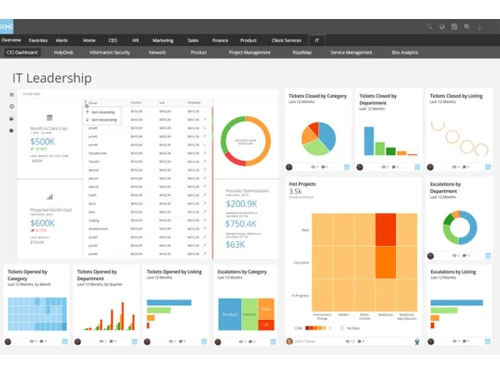
Domo is a cloud-based operating system for business, providing real-time data visualization and insights. It connects to various data sources, enabling users to monitor key performance indicators (KPIs), create interactive dashboards, and share data-driven stories. Domo's intuitive interface makes complex data analysis accessible to users of all technical levels.

This platform is utilized by businesses across various industries, from startups to large enterprises. It empowers decision-makers with the ability to access critical information, analyze trends, and identify opportunities for improvement. Domo's flexible architecture enables seamless integration with existing systems. Its user-friendly design ensures that even non-technical users can easily navigate and utilize the platform's powerful features.

Why Choose Domo?

  • Real-Time Data Insights: Imagine having your finger on the pulse of your business at all times. With Domo, you can access and analyze data from various sources in real-time, empowering you to make informed decisions, quickly and confidently. No more waiting for outdated reports!
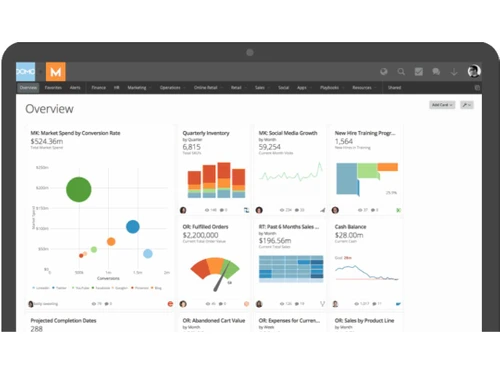
  • Interactive Data Visualization: Domo transforms raw data into compelling visual stories. Create interactive dashboards and visualizations to explore your data in depth, uncover hidden patterns, and gain a deeper understanding of your business. Think of it as turning spreadsheets into insightful works of art.
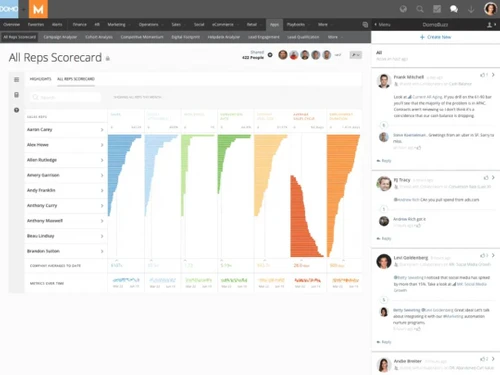
  • Simplified Data Sharing and Collaboration: Sharing is caring, especially when it comes to data insights. Domo makes it easy to share reports and dashboards with colleagues and stakeholders, fostering a culture of collaboration and data-driven decision-making.
  • User-Friendly Interface: You don't need a PhD in data science to use Domo. Its intuitive interface is designed for users of all technical skill levels, allowing everyone to quickly grasp and utilize the platform's powerful features. It's like having a personal data analyst at your fingertips.
  • Scalable Solution: Domo grows with you. Whether you're a small startup or a large enterprise, Domo can adapt to your evolving needs, providing a flexible and scalable solution for data management and analysis. It's a future-proof investment in your data strategy.

Benefits of Domo Business Intelligence Software

  • Improved Decision-Making: Say goodbye to gut feelings and hello to data-driven decisions. Domo provides access to real-time insights, giving you the confidence to make strategic decisions that drive results. It's like having a crystal ball, but powered by data.
  • Enhanced Collaboration: Break down data silos and foster a culture of collaboration. Domo's easy data sharing and reporting capabilities empower teams to work together more effectively, sharing insights and making decisions based on a shared understanding of the data.
  • Increased Efficiency: Domo streamlines data analysis processes, saving you valuable time and resources that can be better spent on other strategic initiatives. It's like having a super-efficient data assistant.
  • Better Business Performance: Domo allows you to identify trends, optimize operations, and uncover new opportunities for improvement, ultimately leading to better business performance. It's like having a secret weapon in the competitive landscape.
  • User Empowerment: Domo equips all employees with the ability to access and analyze data, promoting a data-driven culture across your entire organization. It's like giving everyone a superpower – the power of data.

Pricing Of Domo Business Intelligence Software

Domo price details are available on request at techjockey.com.

The pricing model is based on different parameters, including the amount of bandwidth you need, the number of servers you need, and the features you need. For further queries related to the product, you can contact our product team and learn more about the pricing and offers.

Read more

DOMO Company Details

Founded Year:  2010

Domo transforms business by putting data to work for everyone

Director/Founders Josh James
Company Size 501-1000 Employees

Domo Pricing & Plans

Looking for The Right Pricing?

Share your requirements and get a plan built around your business.

  • Define your business needs
  • Get customised pricing
  • Choose features that fit your workflow

Price Available on Request

Get personalised Domo pricing that fits your needs. Our team will connect with you.

Domo Features

  • icon_check On-premises Connectors
    Securely connect on-premises data sources to Domo using Workbench, enabling hybrid data integration without firewall changes.
  • icon_check Federated Data
    Access and query external data sources in real time without duplication, leveraging existing infrastructure investments.
  • icon_check SQL Dataflows
    Transform and prepare data within Domo using SQL-based pipelines, supporting MySQL and Redshift expressions for flexibility.
  • icon_check 7000+ custom maps
    Visualize geographic data with over 7,000 customizable maps, enhancing spatial analysis and location-based insights.
  • icon_check Beast Mode Manager
    Manage all Beast Mode calculations centrally, with bulk editing, duplication, and organization across datasets.
  • icon_check Scheduled Reports
    Automate report delivery at set intervals, ensuring stakeholders receive timely insights without manual intervention.
  • icon_check Automated Data Discovery
    Leverage AI and machine learning to automatically uncover patterns and insights, facilitating proactive decision-making.
  • icon_check Projects & Tasks
    Organize and manage projects within Domo, assigning tasks and tracking progress to align data initiatives with business goals.
  • icon_check Flexible Embedding
    Embed Domo visualizations into external platforms, providing interactive analytics within your existing applications.
  • icon_check Calculated Fields
    Create custom metrics directly in Domo using Beast Mode, enabling dynamic calculations without altering source data.
Domo Demo Video play icon

Get Domo Demo

Watch the demo video to explore key features, real workflows, and how the software fits your business needs.

Understand
Key Features
Personal
Demo Insights
Interactive
Demo Support

Domo Specifications

Supported Platforms
Ubuntu Ubuntu Windows Windows MacOS MacOS Linux Linux
Devices
Desktop Desktop Mobile Mobile Tablet Tablet iPad iPad
Deployment
Cloud-Based Cloud-Based
Suitable For
All Industries
Business Specific
All Businesses
Business Size
Small Business Startups Medium Business Enterprises
Customer Support
Email Live Chat Communities
Language
English français Deutsche Italiano Español
Integration
API Integration
Training Resources
Webinars Documentation Videos

Explore the Best Alternative Solutions Similar to Your Business Size and Needs

Domo Review

4.3

Out of 5

img

Overall Rating

Based on
1 Verified Review

Rating Breakdown

  • Features 4.3
  • Value for Money 4.2
  • Ease of Use 4.5
  • Customer Support 4.4

86% Recommend this Product

Add Review

Domo Video Review

youtubeVideoId

4.3

“Domo Customer Review: Danaher”

Review by: Danaher

Compare Domo With other Business Intelligence Software

Products
Ratings
Pricing
Device Supported
Deployment
Supported Platforms
  • img

    Domo

  • 4.3

  • Price On Request

  • Desktop

    Mobile

  • Web based

    On Premises

  • Windows

    Mac OS

  • img

    TeamOB

  • 5

  • ₹ 399

  • Desktop

    Mobile

  • Web based

    On Premises

  • Windows

    Mac OS

  • img

    Contify

  • 4.2

  • Price On Request

  • Desktop

    Mobile

  • Web based

    On Premises

  • Windows

    Mac OS

  • img

    Credhive

  • 4.3

  • Price On Request

  • Desktop

    Mobile

  • Web based

    On Premises

  • Windows

    Mac OS

  • img

    Magenta BI

  • 4.2

  • ₹ 36000

  • Desktop

    Mobile

  • Web based

    On Premises

  • Windows

    Mac OS

  • img

    Alphasheet

  • 4.4

  • Price On Request

  • Desktop

    Mobile

  • Web based

    On Premises

  • Windows

    Mac OS

  • img

    Tableau

  • 4.1

  • Price On Request

  • Desktop

    Mobile

  • Web based

    On Premises

  • Windows

    Mac OS

  • img

    Polymer BI

  • 4.4

  • Price On Request

  • Desktop

    Mobile

  • Web based

    On Premises

  • Windows

    Mac OS

  • img

    Holistics

  • 4.3

  • Price On Request

  • Desktop

    Mobile

  • Web based

    On Premises

  • Windows

    Mac OS

  • img

    Sigma

  • 4.2

  • Price On Request

  • Desktop

    Mobile

  • Web based

    On Premises

  • Windows

    Mac OS

(0) Product(s) selected

Domo Alternatives

See All Domo Alternatives

Available

Price on Request

Starting Price:

$50 /Month

Starting Price:

$960 /Month

Available

Price on Request

Starting Price:

$50 /Month

Available

Price on Request

Available

Price on Request

Available

Price on Request

Available

Price on Request

Starting Price:

$40 /Month

Articles for Domo

See All Related Articles

How much does Domo Software Platform Cost?

Domo price details are available on request at techjockey.com.

How does Domo software Work?

Domo works by connecting to various data sources, transforming the data, and visualizing it in dashboards. This helps users to understand their business data and make better decisions. The software is helpful for users in data visualization, data analysis and data management.

Is there any Domo Business Intelligence App?

Yes, Domo is available for Android and iOS app users.

Which operating system does Domo Software Support?

The software supports Windows, MacOS, Linux, Ubuntu operating systems.

Does Domo offer a free trial or a demo?

A demo of this Domo is available at techjockey.com. You can contact our product experts for more information.

Is Domo suitable for small businesses?

Yes, Domo is suitable for small businesses as it allows them to analyze their data, gain insights, and make informed decisions to improve their operations and grow their business.

What features does Domo offer?

Domo offers features like On-premises connectors, Federated Data, SQL dataflows, 7000+ custom maps, Beast Mode Manager, Scheduled Reports, Automated Data Discovery, Projects & Tasks, Flexible embedding, Calculated fields. You can contact our product experts for more information.

Who are the potential users of Domo Software?

Domo targets data analysts, business executives, and other professionals who need to analyze large amounts of data to make informed business decisions. It helps them by providing a platform to connect to various data sources, transform the data, and visualize it in interactive dashboards.

How secure is Domo?

Domo provides several security features, including data encryption, access controls, and regular security audits, to protect user data and ensure the confidentiality, integrity, and availability of information.

20,000+ Software Listed

Best Price Guranteed

Free Expert Consultation

2M+ Happy Customers

Terms and Condtions

close

Users with registered businesses can purchase goods from merchants on the platform to satisfy their business needs. Users are not permitted to utilize any products acquired through the platform for resale, advertising, business, or further distribution.

For each purchase made, users will receive a Tax Invoice (or 'GST invoice') that includes specific details such as:

  • the GSTIN of the user associated with their registered business, and

  • the specified Entity Name for their business.

It should be noted that not all products are eligible for GST Invoice. Only the products displayed by participating sellers with the 'GST-based Invoice Available' callout on the product description page would qualify.

Certain goods and services are not eligible to get a GST Invoice, including items with VAS, i.e., Value Added Services (e.g., Total Mobile Protection/Assured Buyback) and those involving an exchange offer at the time of purchase.

Users must ensure the accuracy of the GSTIN, and business entity name provided for the GST Invoice. Requests for corrections into GST Invoice would not be accommodated by Techjockey.com or any Seller, and any issues arising from user-provided information are the sole responsibility of users.

Techjockey.com is not liable for the GST Invoice or any associated input tax credit. To efficiently claim an input tax credit, users should select the registered place of business address as per the GST authority's data and follow the provisions of the GST Act and rules.

To claim an input tax credit, the delivery and billing addresses must match. Furthermore, input tax credits will not be granted if the delivery address and GSTIN on the invoice are from different states. In case of incorrect GST details provided during the order placement, the order will be canceled automatically.