linkedin
Pentaho logo
play Pentaho How-to: Building Data Pipelines
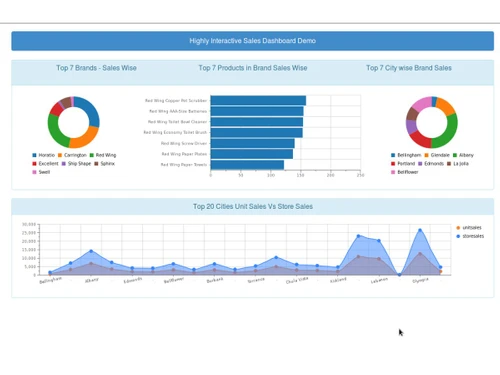
pentaho-dashboardpage
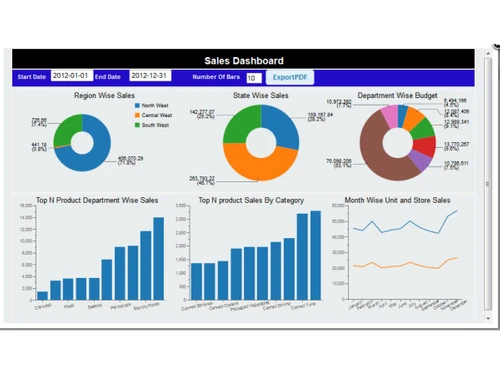
pentaho-salesdashboard

Pentaho

Brand: Hitachi

  • 3.9

  • 5 Ratings

Pentaho is a data integration platform, enabling users to blend, orchestrate, and analyze data from diverse sources through a user-friendly interface.

See More

Have you used Pentaho before?

Share your insights for better experience

Add a Review

Price Available on Request

Questions about pricing or customization? We’re here to help, just a click away.

100% Genuine
Products
Best Price
Guaranteed
Safe & Secure
Payment
  • Description

  • Pricing

  • Features

  • Specification

  • Review

  • Compare

  • Alternatives

  • FAQ

Pentaho Software Overview

What is Pentaho?

Pentaho is a data science platform developed by Hitachi Vantara. It enables organizations to efficiently extract, transform, and load (ETL) data from diverse sources using a user-friendly, drag-and-drop interface.

The platform offers tools for data visualization, reporting, and dashboard creation, facilitating informed decision-making. Additionally, Pentaho includes features for data cataloging, quality management, and optimization, ensuring reliable and streamlined data workflows.

Why Choose Pentaho Software?

  • ETL Capabilities: Pentaho offers robust Extract, Transform, Load (ETL) tools to handle complex data workflows efficiently.
  • Support for Diverse Data Sources: It seamlessly integrates with various data sources, including relational databases, big data platforms, and cloud services.
  • Visual Data Pipeline Design: The intuitive graphical interface allows users to design data pipelines without extensive coding knowledge.
  • OLAP Analysis: Perform multidimensional analysis using Pentaho OLAP capabilities for deeper data exploration.
  • Data Mining Tools: Utilize built-in data mining features to discover patterns and predictive insights.
  • Mobile Accessibility: Access reports and dashboards on mobile devices, ensuring insights are always at your fingertips.
  • Big Data Support: It handles large volumes of data efficiently, making it suitable for big data analytics.
  • Hadoop Integration: Pentaho works seamlessly with Hadoop ecosystems, enabling distributed data processing.

Benefits of Pentaho Software

  • Lower Total Cost of Ownership: Its affordability and ease of use contribute to a lower total cost of ownership compared to other BI tools.
  • Reduced Development Costs: The intuitive interface minimizes the need for extensive training or specialized developers.
  • Community Support: A vibrant open-source community provides continuous enhancements and support.
  • Flexible Licensing Options: Pentaho offers both community and enterprise editions to suit different organizational needs.
  • Data Cataloging: Pentaho Data Catalog automatically discovers and tags data, enhancing data governance.
  • Data Lineage Tracking: It provides visibility into data origins and transformations, ensuring transparency.
  • Data Quality Management: Pentaho includes tools for data cleansing and validation to maintain high data quality.
  • Flexible Deployment: Deploy Pentaho on-premises, in the cloud, or in hybrid environments as per your needs.
  • Extensibility: Its modular architecture allows for easy integration with other tools and platforms.
  • Customizable Workflows: Design and implement custom workflows to match specific business processes.
  • Continuous Updates: Regular updates and enhancements keep the platform aligned with evolving business needs.

Pentaho Pricing

Pentaho price details are available on request at Techjockey.com. The pricing model is based on different parameters, including extra features, deployment type, and the total number of users. For further queries related to the product, you can contact our product team and learn more about the pricing and offers.

Read more

Hitachi Company Details

Founded Year:  1959

Hitachi is engaged in the manufacture and sale of electronic and electrical products worldwide.

Director/Founders Namihei Odaira
Company Size 1000+ Employees

Pentaho Pricing & Plans

Looking for The Right Pricing?

Share your requirements and get a plan built around your business.

  • Define your business needs
  • Get customised pricing
  • Choose features that fit your workflow

Price Available on Request

Get personalised Pentaho pricing that fits your needs. Our team will connect with you.

Pentaho Features

  • icon_check Data Integration
    A drag-and-drop, codeless ETL engine that orchestrates, blends and transforms data for unified clarity.
  • icon_check Metadata Injection
    Accelerate onboarding by reusing transformation templates generated dynamically via metadata.
  • icon_check Plugins and Add-Ons
    Extend integration and reporting through enterprise-ready plugins for systems like SAP, Kafka, Salesforce.
  • icon_check Business Analytics
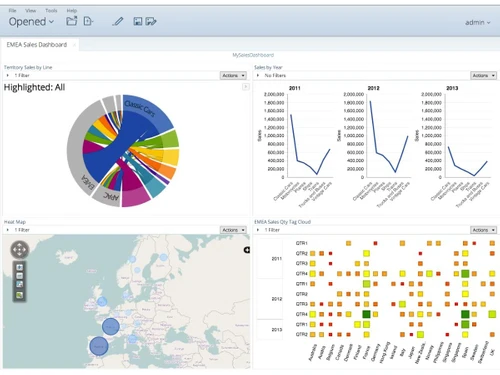
    Create visual reports, dashboards, and interactive insights to translate data into shared organizational action.
  • icon_check Data Catalog
    Centralize data discovery, lineage, metadata control, governance, and quality checks in one unified interface.
  • icon_check Data Quality Management
    Identify and resolve missing, inconsistent, inaccurate data to ensure accuracy and AI readiness for decisions.
  • icon_check Extensibility
    Allows customization and integration with third-party tools to suit specific business needs.
  • icon_check Data Optimizer
    Detect and eliminate redundant or trivial data, intelligently tier storage, and reduce data waste and cost.
  • icon_check Analyzer
    Enables users to build visualizations like maps, scatter charts, heat grids with drill-down, filtering, and formatting.
  • icon_check Dashboards
    Build visually attractive dashboards by combining reports and visualizations using templates and themes.
  • icon_check Aggregation Designer
    Build aggregate tables from dimensions to boost OLAP cube (Mondrian) query performance.
  • icon_check Schema Workbench
    Graphically create/edit multidimensional Mondrian schemas (OLAP cubes) via intuitive interface or XML.
  • icon_check Modular, Extensible Architecture
    Pentaho is built on modular components—Data Integration, Analytics, Catalog, Quality, Optimizer.
  • icon_check Governance and Lineage Tracking
    Embedded in Data Catalog to ensure trustworthy, governed data through end-to-end visibility.
  • icon_check Data Tiering and Purging
    Automatically tag moves, purge obsolete data, enabling auditable, reversible data handling.
Pentaho Demo Video play icon

Get Pentaho Demo

Watch the demo video to explore key features, real workflows, and how the software fits your business needs.

Understand
Key Features
Personal
Demo Insights
Interactive
Demo Support

Pentaho Specifications

Supported Platforms
Windows Windows MacOS MacOS Linux Linux
Devices
Desktop Desktop
Deployment
Cloud-Based Cloud-Based
Suitable For
All Industries
Business Specific
All Businesses
Business Size
Small Business Medium Business Enterprises SMEs MSMEs
Customer Support
Email Communities Forums
Language
English
Integration
API Integration
Training Resources
Videos

Explore the Best Alternative Solutions Similar to Your Business Size and Needs

Pentaho Review

3.9

Out of 5

img

Overall Rating

Based on
5 Verified Ratings

Rating Breakdown

  • Features 3.7
  • Value for Money 3.6
  • Ease of Use 4.5
  • Customer Support 4.1

90% Recommend this Product

Add Review

Techjockey Trusted Reviews from Verified Users

No reviews are currently available for Pentaho. Discover similar Business Intelligence Software reviews

  • Counts Tally on Mobile

    5.0

    Whats great - Real time Data, enhanced client transparency & trust, effortless data accessibility, easy to navigate. read more

  • TeamOB

    5.0

    Whats great - Reports give us a good narrative of how our people are giving extra efforts to make the workplace more productive and where t... read more

  • Locus

    4.4

    Whats great - Many users praise the platform’s evolving features, route optimization and usability. read more
Compare Pentaho With other Business Intelligence Software

Products
Ratings
Pricing
Device Supported
Deployment
Supported Platforms
  • img

    Pentaho

  • 3.9

  • Price On Request

  • Desktop

    Mobile

  • Web based

    On Premises

  • Windows

    Mac OS

  • img

    TeamOB

  • 5

  • ₹ 399

  • Desktop

    Mobile

  • Web based

    On Premises

  • Windows

    Mac OS

  • img

    Contify

  • 4.2

  • Price On Request

  • Desktop

    Mobile

  • Web based

    On Premises

  • Windows

    Mac OS

  • img

    Credhive

  • 4.3

  • Price On Request

  • Desktop

    Mobile

  • Web based

    On Premises

  • Windows

    Mac OS

  • img

    Magenta BI

  • 4.2

  • ₹ 36000

  • Desktop

    Mobile

  • Web based

    On Premises

  • Windows

    Mac OS

  • img

    Alphasheet

  • 4.4

  • Price On Request

  • Desktop

    Mobile

  • Web based

    On Premises

  • Windows

    Mac OS

  • img

    Tableau

  • 4.1

  • Price On Request

  • Desktop

    Mobile

  • Web based

    On Premises

  • Windows

    Mac OS

  • img

    Polymer BI

  • 4.4

  • Price On Request

  • Desktop

    Mobile

  • Web based

    On Premises

  • Windows

    Mac OS

  • img

    Holistics

  • 4.3

  • Price On Request

  • Desktop

    Mobile

  • Web based

    On Premises

  • Windows

    Mac OS

  • img

    Sigma

  • 4.2

  • Price On Request

  • Desktop

    Mobile

  • Web based

    On Premises

  • Windows

    Mac OS

(2) Product(s) selected

Pentaho Alternatives

See All Pentaho Alternatives

Available

Price on Request

Starting Price:

$50 /Month

Starting Price:

$960 /Month

Available

Price on Request

Starting Price:

$50 /Month
Available

Price on Request

Available

Price on Request

Available

Price on Request
Starting Price:

$40 /Month

Domo

4.3

Available

Price on Request

Articles for Pentaho

See All Related Articles

How much does Pentaho Software cost?

Pentaho pricing details are available upon request on Techjockey.com.

Is there a mobile app available for Pentaho Software?

No, Pentaho does not offer mobile apps.

Which operating systems are compatible with Pentaho Software?

Pentaho supports Ubuntu, Windows, Linux, and macOS platforms.

Does Pentaho Software offer a free trial?

Yes, Pentaho free trial is available through Pentaho upon request.

How does Pentaho Software function?

Pentaho extracts, transforms, and loads data, enabling analytics, reporting, and dashboards.

Who uses Pentaho Software?

Businesses, data analysts, and IT teams across industries use Pentaho for data integration and BI.

Is a free demo available for Pentaho Software?

Yes, Pentaho free demo can be scheduled through the official website.

Is Pentaho Software available for free?

Yes, Pentaho community (open-source) edition is available for free use.

Is Pentaho open source?

Yes, Pentaho offers a free open-source Community Edition alongside its Enterprise Edition.

Who owns Pentaho?

Pentaho is owned by Hitachi Vantara, a subsidiary of Hitachi, Ltd.

20,000+ Software Listed

Best Price Guranteed

Free Expert Consultation

2M+ Happy Customers

Terms and Condtions

close

Users with registered businesses can purchase goods from merchants on the platform to satisfy their business needs. Users are not permitted to utilize any products acquired through the platform for resale, advertising, business, or further distribution.

For each purchase made, users will receive a Tax Invoice (or 'GST invoice') that includes specific details such as:

  • the GSTIN of the user associated with their registered business, and

  • the specified Entity Name for their business.

It should be noted that not all products are eligible for GST Invoice. Only the products displayed by participating sellers with the 'GST-based Invoice Available' callout on the product description page would qualify.

Certain goods and services are not eligible to get a GST Invoice, including items with VAS, i.e., Value Added Services (e.g., Total Mobile Protection/Assured Buyback) and those involving an exchange offer at the time of purchase.

Users must ensure the accuracy of the GSTIN, and business entity name provided for the GST Invoice. Requests for corrections into GST Invoice would not be accommodated by Techjockey.com or any Seller, and any issues arising from user-provided information are the sole responsibility of users.

Techjockey.com is not liable for the GST Invoice or any associated input tax credit. To efficiently claim an input tax credit, users should select the registered place of business address as per the GST authority's data and follow the provisions of the GST Act and rules.

To claim an input tax credit, the delivery and billing addresses must match. Furthermore, input tax credits will not be granted if the delivery address and GSTIN on the invoice are from different states. In case of incorrect GST details provided during the order placement, the order will be canceled automatically.