 USA
USA UAE
UAESmall Business
Designed for startups and growing businesses


See More


Brand: PTmInd
An advanced business intelligence software that helps businesses monitor, visualize, and analyze their data in real time.
See MoreHave you used Datadeck before?
Share your insights for better experience
Brand: PTmInd
Founded Year: 2010
PTMIND creates user-friendly platforms that anyone can use for data analytics, data visualization, and data-driven conversion. We help your company achieve faster and sustainable growth by giving you the tools to capture a greater market share at lower costs.
Looking for The Right Pricing?
Share your requirements and get a plan built around your business.
Price Available on Request
Get personalised Datadeck pricing that fits your needs. Our team will connect with you.
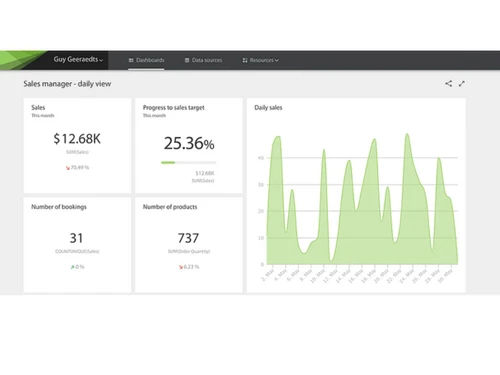
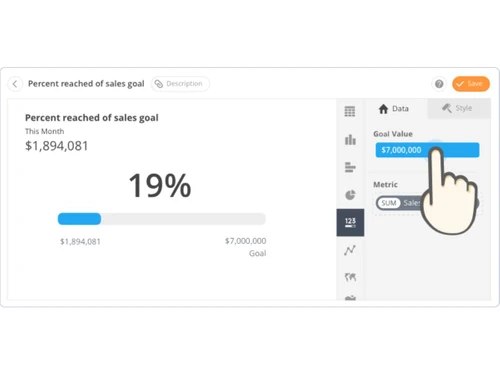
 Custom Dashboards Data Integration Automated Reporting Data Visualizations KPI Tracking Alerts & Notifications User Role Management White Labeling
  Ubuntu
  Windows
  MacOS
MacOS  Linux
Linux  Desktop
  Cloud-Based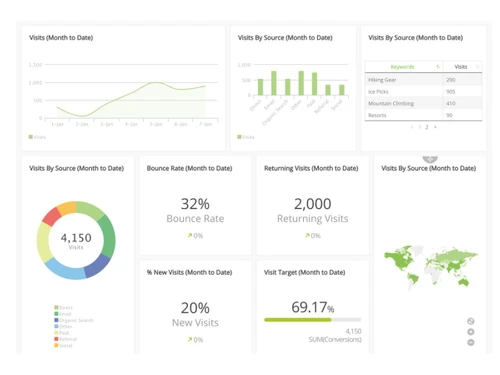
Small Business
Designed for startups and growing businesses
Medium Business
Built for business growth and flexibility
Enterprises
Designed for complex and large-scale business needs
4.2
Out of 5

Overall Rating
Based on
6 Verified Ratings
Rating Breakdown
88% Recommend this Product
Add ReviewTechjockey Trusted Reviews from Verified Users
No reviews are currently available for Datadeck. Discover similar Business Intelligence Software reviews

Counts Tally on Mobile
Whats great - Real time Data, enhanced client transparency & trust, effortless data accessibility, easy to navigate. read more

TeamOB
Whats great - Reports give us a good narrative of how our people are giving extra efforts to make the workplace more productive and where t... read more

Locus
Whats great - Many users praise the platform’s evolving features, route optimization and usability. read more

Datadeck
Price On Request
Desktop
Mobile
Web based
On Premises
Windows
Mac OS
Counts Tally on Mobile
₹ 2499
Desktop
Mobile
Web based
On Premises
Windows
Mac OS
TeamOB
₹ 399
Desktop
Mobile
Web based
On Premises
Windows
Mac OS

Contify
Price On Request
Desktop
Mobile
Web based
On Premises
Windows
Mac OS

Credhive
Price On Request
Desktop
Mobile
Web based
On Premises
Windows
Mac OS

Magenta BI
₹ 36000
Desktop
Mobile
Web based
On Premises
Windows
Mac OS

Alphasheet
Price On Request
Desktop
Mobile
Web based
On Premises
Windows
Mac OS

Tableau
Price On Request
Desktop
Mobile
Web based
On Premises
Windows
Mac OS

Polymer BI
Price On Request
Desktop
Mobile
Web based
On Premises
Windows
Mac OS
Holistics
Price On Request
Desktop
Mobile
Web based
On Premises
Windows
Mac OS

Sigma
Price On Request
Desktop
Mobile
Web based
On Premises
Windows
Mac OS
(0) Product(s) selected
Available
Price on Request
Starting Price:
$50 /Month
Starting Price:
$960 /Month
Available
Price on Request

Starting Price:
$50 /Month

Available
Price on Request

Available
Price on Request

Available
Price on Request

Starting Price:
$40 /Month

Available
Price on Request

Available
Price on Request



Datadeck pricing is available on request at Techjockey.com.
It collects data from different sources, creates dashboards, tracks KPIs, sends alerts, and generates automated reports to support decision-making.
It is used by business analysts, managers, marketing teams, finance departments, and executives to monitor performance and improve business outcomes.
Yes, it integrates with databases, cloud apps, CRM tools, and marketing platforms for seamless data analysis.
Yes, it has a simple and intuitive interface, allowing non-technical users to create dashboards and reports easily.
Absolutely. Datadeck provides easy KPI tracking and visual indicators to monitor business goals.
Yes, you can schedule and automate reports, ensuring your team receives updates without manual effort.
Yes, the system can notify you in real time whenever there is a significant change in your metrics.
Yes, it provides role-based access and secure storage to protect all business data.
Yes, multiple users can access dashboards, share insights, and work together on data analysis.
20,000+ Software Listed
Best Price Guranteed
Free Expert Consultation
2M+ Happy Customers
Terms and Condtions

Users with registered businesses can purchase goods from merchants on the platform to satisfy their business needs. Users are not permitted to utilize any products acquired through the platform for resale, advertising, business, or further distribution.
For each purchase made, users will receive a Tax Invoice (or 'GST invoice') that includes specific details such as:
the GSTIN of the user associated with their registered business, and
the specified Entity Name for their business.
It should be noted that not all products are eligible for GST Invoice. Only the products displayed by participating sellers with the 'GST-based Invoice Available' callout on the product description page would qualify.
Certain goods and services are not eligible to get a GST Invoice, including items with VAS, i.e., Value Added Services (e.g., Total Mobile Protection/Assured Buyback) and those involving an exchange offer at the time of purchase.
Users must ensure the accuracy of the GSTIN, and business entity name provided for the GST Invoice. Requests for corrections into GST Invoice would not be accommodated by Techjockey.com or any Seller, and any issues arising from user-provided information are the sole responsibility of users.
Techjockey.com is not liable for the GST Invoice or any associated input tax credit. To efficiently claim an input tax credit, users should select the registered place of business address as per the GST authority's data and follow the provisions of the GST Act and rules.
To claim an input tax credit, the delivery and billing addresses must match. Furthermore, input tax credits will not be granted if the delivery address and GSTIN on the invoice are from different states. In case of incorrect GST details provided during the order placement, the order will be canceled automatically.


