linkedin
eResource Scheduler logo
play Setting to Hide Rows with or without data
eresource-scheduler-resources
eresource-scheduler-timeline

eResource Scheduler

Brand: Enbraun Technologies

  • 4.2

  • 6 Ratings

An employee scheduling software that unites teams, tracks progress, and saves a lot of valuable time.

See More

Have you used eResource Scheduler before?

Share your insights for better experience

Add a Review
Starting Price
$6

View plans

100% Genuine
Products
Best Price
Guaranteed
Safe & Secure
Payment
  • Description

  • Pricing

  • Features

  • Specification

  • Review

  • Compare

  • Alternatives

  • FAQ

Starting at $6

eResource Scheduler Software Overview

What is eResource Scheduler?

eResource Scheduler is an employee scheduling software that brings structure to how teams plan and manage resources. The employee scheduling solution replaces scattered spreadsheets with one organized system. By storing all data in one space, it ensures that everyone stays aligned. Every schedule feels simpler and more transparent to handle.

The platform suits businesses that deal with multiple projects and shifting priorities. It makes collaboration more natural and organized. Teams can manage capacity, availability, and deadlines without confusion. The result, of course, is smoother planning and better use of time.

Why Choose eResource Scheduler?

  • Clear Resource Overview: All resources stay visible in one place. It helps teams stay coordinated and organized.
  • Smooth Scheduling Process: Drag-and-drop tools make daily planning quite simple. Time-saving design reduces effort and confusion.
  • Accurate Time Tracking: Every task is logged and compared precisely. This helps maintain accountability and improve performance.
  • Collaborative Work Setup: Multiple users can access shared data with ease. Teams work together even across distant locations.
  • Instant Performance Insight: Live dashboards show workloads and free capacity instantly. It improves clarity for decision-making.
  • Smart Financial Clarity: Detailed cost and billing reports reveal profits. Managers gain better control over spending.
  • Predictive Planning Support: Resource gap reports highlight shortages early. Planning for new hires becomes effortless.
  • Custom-fit Flexibility: Adjustable features fit diverse project needs. Every organization finds its ideal workflow setup.

Benefits of eResource Scheduler Software

  • Organized Scheduling: Every project flows smoothly through structured planning. All work stays absolutely crystal clear and conflict-free.
  • Instant Access: Teams get to see live updates anytime. No long wait is required for revised information.
  • Significant Effort Savings: Repetitive jobs are handled well by automation. Workers can thus put most of their effort into creative problem-solving.
  • Reliable Data: Every decision relies on fresh, verified information. Guesswork gradually fades away.
  • Smarter Utilization: Idle hours get reduced significantly. Every resource remains engaged purposefully.
  • Improved Accountability: Task ownership becomes visible to everyone. It promotes honesty and focus.
  • Simplified Oversight: Managers control multiple projects without breaking a sweat. Everything fits so perfectly into one clear view.

eResource Scheduler Pricing

eResource Scheduler Software price in India starts at USD 6 per month at techjockey.com. The pricing model is based on different parameters, including extra features, deployment type, and the total number of users. For further queries related to the product, you can contact our product team and learn more about the pricing and offers.

Read more

Enbraun Technologies Company Details

Founded Year:  2011

A leading cloud based enterprise resource management software, designed for organisations that focus on productivity and optimising utilisation of their resources. eResource Scheduler transforms the way organisations manage and schedule their resources.

Director/Founders Rudraksh Vyas
Company Size 101-500 Employees

eResource Scheduler Pricing & Plans

Scheduling Module
Key Features
  • Custom project types
  • Flexible User access rights
  • Permission sets (role based)
  • Color-coded heat map
  • Multiple working calendars
  • Custom resource types
  • Drag-and-drop scheduling
  • Custom fields and forms
  • Powerful resource filters
  • Configurable scheduling form
  • Roles (Primary, Performing etc.)
Starting at $6
    • Resource

      Resource
      Resource
    • Monthly

      Monthly
      Monthly

Key Features

  • Custom project types

  • Flexible User access rights

  • Permission sets (role based)

  • Color-coded heat map

  • Multiple working calendars

  • Custom resource types

  • Drag-and-drop scheduling

  • Custom fields and forms

  • Powerful resource filters

  • Configurable scheduling form

  • Roles (Primary, Performing etc.)

eResource Scheduler Features

  • icon_check User Access Management
    Control who can view or edit schedules with flexible role-based permissions and secure access rights for users.
  • icon_check Custom Fields
    Capture key resource, project, and booking data with customizable fields tailored to your team’s workflows
  • icon_check Timesheet Reports
    Generate built-in timesheet reports that show actual hours worked, planned vs actuals, and detailed metrics
  • icon_check Two-Factor Authentication (2FA)
    Enhance login security by requiring a second authentication step, including time-based one-time passcodes.
  • icon_check Third Party Integration
    Connect eResource Scheduler with project, HR, calendar, or finance systems to keep scheduling data in sync
  • icon_check Dashboards
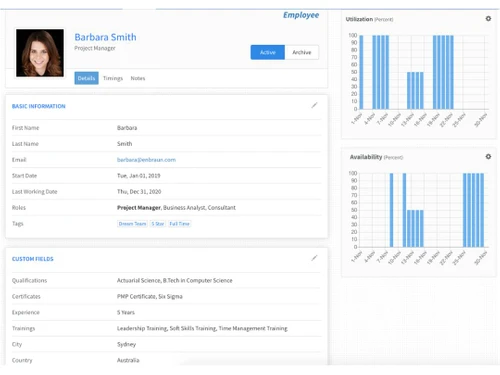
    View real-time dashboards to monitor schedules, utilization, availability, and key resource metrics at a glance.
  • icon_check Scheduling
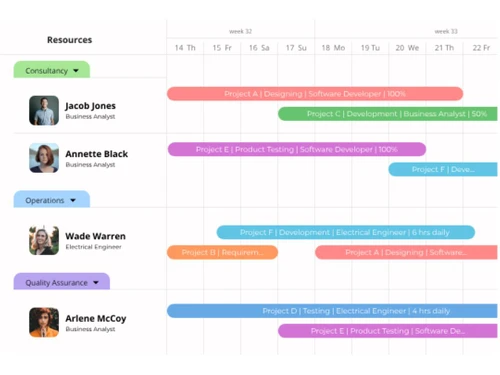
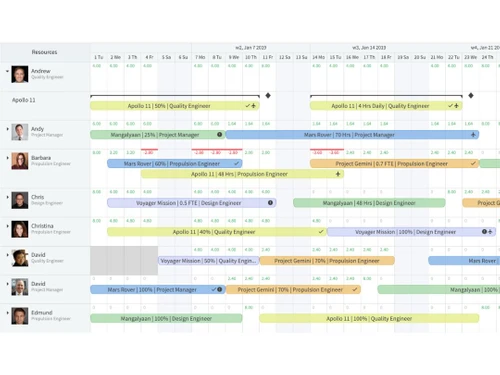
    Plan and assign resources with intuitive scheduling, Gantt-style charts, and real-time availability insights.
  • icon_check Centralized Control
    Manage all resources, schedules, and time entries from one central platform for consistent oversight and planning.
  • icon_check Collaboration Tools
    Streamline teamwork with shared schedules, integrated notifications, and cross-team resource visibility.
  • icon_check Drag & Drop
    Easily adjust bookings or reassign resources in seconds using drag-and-drop scheduling on the timeline.
  • icon_check Skills Tracking
    Filter and match resources by skills, roles, or attributes to assign the right people to the right tasks.
  • icon_check Utilization Reports
    View utilization reports to track how effectively resources are used and identify allocation gaps.
  • icon_check Filters
    Use powerful filters to quickly find resources, bookings, or projects by skills, role, availability, and custom fields.
eResource Scheduler Demo Video play icon

Get eResource Scheduler Demo

Watch the demo video to explore key features, real workflows, and how the software fits your business needs.

Understand
Key Features
Personal
Demo Insights
Interactive
Demo Support

eResource Scheduler Specifications

Supported Platforms
Ubuntu Ubuntu Windows Windows MacOS MacOS Linux Linux
Devices
Desktop Desktop
Deployment
Cloud-Based Cloud-Based
Suitable For
All Industries
Business Specific
All Businesses
Business Size
Small Business Startups Medium Business Enterprises
Customer Support
Phone Email Communities
Language
English
Integration
API Integration
Training Resources
Videos

Explore the Best Alternative Solutions Similar to Your Business Size and Needs

eResource Scheduler Review

4.2

Out of 5

img

Overall Rating

Based on
6 Verified Ratings

Rating Breakdown

  • Features 4
  • Value for Money 4.8
  • Ease of Use 4.0
  • Customer Support 4.0

91% Recommend this Product

Add Review

Techjockey Trusted Reviews from Verified Users

No reviews are currently available for eResource Scheduler. Discover similar Employee Scheduling Software reviews

  • Humanity

    4.3

    Whats great - Being a manager, planning for employee shifts in advance has become very easy. I can plan in advance and even forecast upcomi... read more

  • Zoho People

    4.5

    Whats great - Good easy to use browser based and mobile app read more

  • IconEdutech

    4.8

    Whats great - With IconEdutech, you can create a hybrid learning environment and keep teachers and parents updated on the academic progress... read more

Compare eResource Scheduler With other Employee Scheduling Software

Products
Ratings
Pricing
Device Supported
Deployment
Supported Platforms
  • img

    eResource Scheduler

  • 4.2

  • Price On Request

  • Desktop

    Mobile

  • Web based

    On Premises

  • Windows

    Mac OS

  • img

    Celayix

  • 4.2

  • Price On Request

  • Desktop

    Mobile

  • Web based

    On Premises

  • Windows

    Mac OS

  • img

    Zoho Shifts

  • 4.0

  • ₹ 60

  • Desktop

    Mobile

  • Web based

    On Premises

  • Windows

    Mac OS

  • img

    Schedule360

  • 4.0

  • Price On Request

  • Desktop

    Mobile

  • Web based

    On Premises

  • Windows

    Mac OS

  • img

    Aladtec

  • 4.0

  • Price On Request

  • Desktop

    Mobile

  • Web based

    On Premises

  • Windows

    Mac OS

  • img

    Planday Software

  • 4.2

  • Price On Request

  • Desktop

    Mobile

  • Web based

    On Premises

  • Windows

    Mac OS

  • img

    WorkSchedule

  • 4.2

  • Price On Request

  • Desktop

    Mobile

  • Web based

    On Premises

  • Windows

    Mac OS

  • img

    Shiftie

  • 4.5

  • Price On Request

  • Desktop

    Mobile

  • Web based

    On Premises

  • Windows

    Mac OS

  • img

    Deputy

  • 4.5

  • Price On Request

  • Desktop

    Mobile

  • Web based

    On Premises

  • Windows

    Mac OS

  • img

    Humanity

  • 4.2

  • Price On Request

  • Desktop

    Mobile

  • Web based

    On Premises

  • Windows

    Mac OS

  • img

    ShiftNote

  • 4.2

  • Price On Request

  • Desktop

    Mobile

  • Web based

    On Premises

  • Windows

    Mac OS

(0) Product(s) selected

eResource Scheduler Alternatives

See All eResource Scheduler Alternatives

Available

Price on Request

Available

Price on Request

Starting Price:

$6 /Month

Available

Price on Request

Articles for eResource Scheduler

See All Related Articles

How much does eResource Scheduler Software cost?

The software's price in India starts at USD 6 per month at techjockey.com. The final cost may, however, vary depending on the features included, deployment type, and total number of users.

Who uses eResource Scheduler Software?

The software is mainly used by businesses and organizations that manage multiple projects and teams. It helps managers and planners organize resources, schedules, and workloads efficiently.

Is there a mobile app available for eResource Scheduler Software?

There is no dedicated mobile app for this software. However, users can still view their schedules on mobile devices through calendar integrations.

Which operating systems are compatible with eResource Scheduler Software?

The software works smoothly on Ubuntu, Windows, MacOS, and Linux. It supports multiple environments to suit different user systems.

Does eResource Scheduler Software offer a free trial?

Yes, a free trial is available for new users. It allows anyone to explore the features before making a purchase.

How does eResource Scheduler Software function?

The platform helps businesses plan, allocate, and manage resources effectively. It provides scheduling tools, reports, and dashboards to improve visibility and productivity.

20,000+ Software Listed

Best Price Guranteed

Free Expert Consultation

2M+ Happy Customers

Terms and Condtions

close

Users with registered businesses can purchase goods from merchants on the platform to satisfy their business needs. Users are not permitted to utilize any products acquired through the platform for resale, advertising, business, or further distribution.

For each purchase made, users will receive a Tax Invoice (or 'GST invoice') that includes specific details such as:

  • the GSTIN of the user associated with their registered business, and

  • the specified Entity Name for their business.

It should be noted that not all products are eligible for GST Invoice. Only the products displayed by participating sellers with the 'GST-based Invoice Available' callout on the product description page would qualify.

Certain goods and services are not eligible to get a GST Invoice, including items with VAS, i.e., Value Added Services (e.g., Total Mobile Protection/Assured Buyback) and those involving an exchange offer at the time of purchase.

Users must ensure the accuracy of the GSTIN, and business entity name provided for the GST Invoice. Requests for corrections into GST Invoice would not be accommodated by Techjockey.com or any Seller, and any issues arising from user-provided information are the sole responsibility of users.

Techjockey.com is not liable for the GST Invoice or any associated input tax credit. To efficiently claim an input tax credit, users should select the registered place of business address as per the GST authority's data and follow the provisions of the GST Act and rules.

To claim an input tax credit, the delivery and billing addresses must match. Furthermore, input tax credits will not be granted if the delivery address and GSTIN on the invoice are from different states. In case of incorrect GST details provided during the order placement, the order will be canceled automatically.