USA
USA UAE
UAESmall Business
Designed for startups and growing businesses

See More


Brand: eyeZy
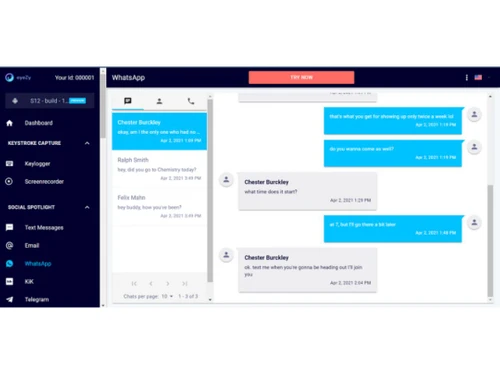
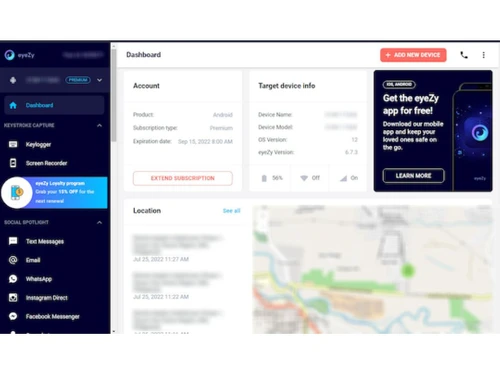
eyeZy phone monitoring app enables parents to keep track of the activities of their children on mobile. Software helps parents to learn children's exact location, location history, internet browsing history, call logs, messaging history and much more in real time. This phone monitoring app comprises a plethora of features such as phone analyzer, invisible shield, keystroke capture, files finder, ...
See MoreHave you used eyeZy before?
Share your insights for better experience
Looking for The Right Pricing?
Share your requirements and get a plan built around your business.
Price Available on Request
Get personalised eyeZy pricing that fits your needs. Our team will connect with you.
 Web Magnifier Connection Blocker Magic Alerts Phone Analyzer Invisible Shield Friendly Installer Keystroke Capture Social Spotlight Pinpoint Plans Breaker Files Finder

Watch the demo video to explore key features, real workflows, and how the software fits your business needs.
 Windows
  iOS
iOS  Android
  Desktop
  Mobile
  Cloud-Based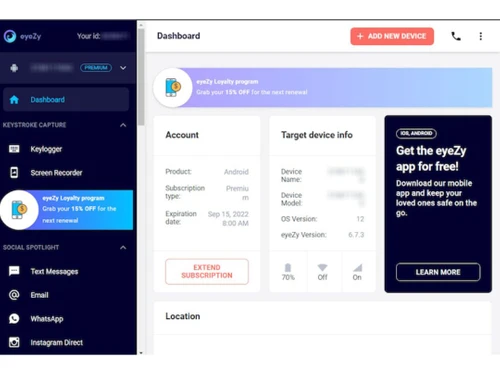
Small Business
Designed for startups and growing businesses
Medium Business
Built for business growth and flexibility
Enterprises
Designed for complex and large-scale business needs
4.5
Out of 5

Overall Rating
Based on
6 Verified Reviews
Rating Breakdown
93% Recommend this Product
Add ReviewCustomers generally appreciate eyeZy for its ability to monitor children's activities, including tracking call logs and social media interactions, with many expressing satisfaction with its performance. Users find value in the real-time location tracking and the ability to block unwanted sites. However, some complaints arise regarding delayed notifications for restricted activities and inaccuracies in location tracking, which have led to mixed feelings about the application's reliability. Overall, the sentiment leans positive, though there are notable areas for improvement.




Oct 7, 2022
Techjockey Verified
“eyeZy can be used to track call logs of children.”
Pros
I really like eyeZy because it helps me to view all types of audios, video, and text files saved on my children phones. With it, it has become so easy to track their social media activities. Such a wonderful application.
Cons
NO CONS
Reason to switch
Locategy does not allow web- filtering on all browsers, that’s why I have started using eyeZy because I can filter web activities on all browsers.
Oct 5, 2022
Techjockey Verified
“eyeZy works great to track your child’s location in real time.”
Pros
eyeZy is the first phone monitoring application that has helped me to track my kids' phone activities without being present. I can easily track their location, block unwanted sites, track their call logs and much more with this solution.
Cons
eyeZy does not notify me immediately whenever my child goes beyond the restricted location. It almost takes 30 min to 1 hour to send alerts regarding any restricted activity. Not completely satisfied with this application.
Reason to switch
Previously I used Mobicip to track children's activities, but its loading time was very slow. Then I started using eyeZy because its loading time is fast.
Oct 10, 2022
Techjockey Verified
“eyeZy is an excellent application to monitor children’ activities.”
Pros
I have started using eyeZy in 2021 when I started working to monitor my children and I am totally impressed with its performance. Now, with this solution I can easily track my children's mobile activities including the sites they visit. Completely satisfied with the application.
Cons
The location tracking feature of eyeZy does not work properly. I'm not able to locate my son’s location most of the time. Also, it shows inaccurate details of the location many times.
Reason to switch
Qustodio Parental Control that I was using previously, could not track my child social media sites that’s why I switched to eyeZy.

eyeZy
Price On Request
Desktop
Mobile
Web based
On Premises
Windows
Mac OS

SpyHuman
Price On Request
Desktop
Mobile
Web based
On Premises
Windows
Mac OS

Cube ACR
Price On Request
Desktop
Mobile
Web based
On Premises
Windows
Mac OS

Novocall
Price On Request
Desktop
Mobile
Web based
On Premises
Windows
Mac OS

VersaDIal Business Call Recording Software
Price On Request
Desktop
Mobile
Web based
On Premises
Windows
Mac OS

Versadial VSLogger
Price On Request
Desktop
Mobile
Web based
On Premises
Windows
Mac OS

CallSource
Price On Request
Desktop
Mobile
Web based
On Premises
Windows
Mac OS

Trident
Price On Request
Desktop
Mobile
Web based
On Premises
Windows
Mac OS

CallMiner(Orecx)
Price On Request
Desktop
Mobile
Web based
On Premises
Windows
Mac OS

Oreka TR
Price On Request
Desktop
Mobile
Web based
On Premises
Windows
Mac OS

Korecall Call Recording Software
Price On Request
Desktop
Mobile
Web based
On Premises
Windows
Mac OS
(2) Product(s) selected
Available
Price on Request
Available
Price on Request
eyeZy Parental monitoring app is web-based and compatible with all operating systems.
eyeZy Parenting control app is available for android and iOS devices.
eyeZy Parental monitoring app supports web-based deployment.
This Parental control app’s pricing is available on request at techjockey.com.
eyeZy Parental monitoring app is typically used by parents to monitor their child’s activity.
eyeZy parental monitoring solution demo is available for free with techjockey.com.
eyeZy app offers a free trial. However, the premium plan with advanced features is available at techjockey.com with exciting deals.
eyeZy app installation is not required, as it is web-based. Just open the Setup Wizard to get started.
eyeZy parental control app helps with tracking browsing history, limiting access to Wi-Fi, screen recording, etc. It's a complete solution for setting locations boundaries, call log monitoring, tracking location in real time, etc.
eyeZy regular updates are available free of cost. There are no hidden software update charges.
eyeZy Call Recording Software used for Keystroke Logging,Social Sharing,Shipping & Delivery and Products & Plans.
You can directly visit eyeZy portal and get in touch with eyeZy customer support for any software-related query.
Please contact our product experts to get eyeZy lifetime deal with exclusive offers.
20,000+ Software Listed
Best Price Guranteed
Free Expert Consultation
2M+ Happy Customers
Terms and Condtions

Users with registered businesses can purchase goods from merchants on the platform to satisfy their business needs. Users are not permitted to utilize any products acquired through the platform for resale, advertising, business, or further distribution.
For each purchase made, users will receive a Tax Invoice (or 'GST invoice') that includes specific details such as:
the GSTIN of the user associated with their registered business, and
the specified Entity Name for their business.
It should be noted that not all products are eligible for GST Invoice. Only the products displayed by participating sellers with the 'GST-based Invoice Available' callout on the product description page would qualify.
Certain goods and services are not eligible to get a GST Invoice, including items with VAS, i.e., Value Added Services (e.g., Total Mobile Protection/Assured Buyback) and those involving an exchange offer at the time of purchase.
Users must ensure the accuracy of the GSTIN, and business entity name provided for the GST Invoice. Requests for corrections into GST Invoice would not be accommodated by Techjockey.com or any Seller, and any issues arising from user-provided information are the sole responsibility of users.
Techjockey.com is not liable for the GST Invoice or any associated input tax credit. To efficiently claim an input tax credit, users should select the registered place of business address as per the GST authority's data and follow the provisions of the GST Act and rules.
To claim an input tax credit, the delivery and billing addresses must match. Furthermore, input tax credits will not be granted if the delivery address and GSTIN on the invoice are from different states. In case of incorrect GST details provided during the order placement, the order will be canceled automatically.