linkedin
Hubstaff logo
play Hubstaff staff scheduling demo
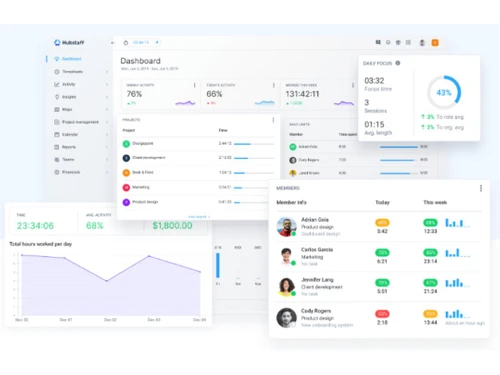
Hubstaff Dashboard
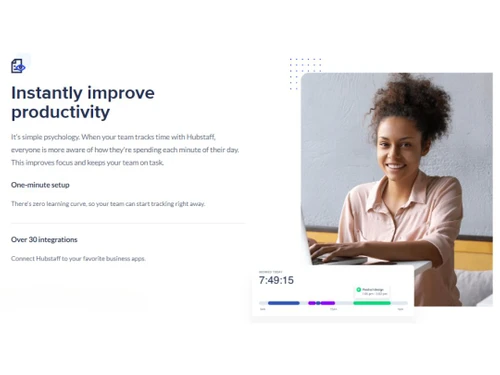
Hubstaff Productivity

Hubstaff

Brand: Hubstaff

  • 4.3

  • 6 Ratings & 1 Review

Hubstaff Staff Scheduling is an employee shift management software that helps manage employee shifts, plan the team’s schedule, and set weekly hours limit. The application gives a clear view of shift coverage and helps maintain the budget and staff in order. It has a user-friendly interface and is a powerful employee work tracker with screenshots, timesheets, billing, in-depth reports, and more...

See More

Have you used Hubstaff before?

Share your insights for better experience

Add a Review
Starting Price
$7

View plans

100% Genuine
Products
Best Price
Guaranteed
Safe & Secure
Payment
  • Description

  • Pricing

  • Features

  • Specification

  • Review

  • Compare

  • Alternatives

  • FAQ

Starting at $7

Hubstaff Software Overview

What is Hubstaff Staff Scheduling?

Hubstaff Staff Scheduling is an employee shift management software that helps manage employee shifts, plan the team’s schedule, and set weekly hours limit. The application gives a clear view of shift coverage and helps maintain the budget and staff in order. It has a user-friendly interface and is a powerful employee work tracker with screenshots, timesheets, billing, in-depth reports, and more.

How does Hubstaff Help in Employee Monitoring?

With Hubstaff Software, one can track the progress of tasks and projects that need to be accomplished. You can also keep a note of the performance of each of your employees or team members in real-time with this gps tracker app. 

Employee Scheduling Software comes with a Productivity Monitoring tool with which you can monitor your workflow with the help of optional screenshots and URL tracking to capture your team’s progress. However, you can completely turn off this feature whenever you wish.

This prevents you from interrupting the team for asking about the details of the project status. You can see what the team is working on from anywhere with the help of a mobile app as well. It helps in easily viewing and tracking your team's work progress with detailed analytical reports.

Features of Hubstaff Staff Scheduling Software

With Hubstaff's easy-to-use tools, you can create to-dos, or track the time taken by team members in completing individual tasks. Its Employee Timesheet feature also enables you to track whether your employees are making productive utilization of time. Hubstaff Software comes with an Employee Payroll Management module with which you can maintain the daily attendance of your employees and manage their payroll. With its daily, weekly and monthly calendar views, you can quickly have a glance at the performance of your workforce.

Hubstaff Pricing

The Hubstaff software has variant pricing slabs as per the requirement of users. Find them as below:

  1. Starter Plan - USD 7 per user per month.
  2. Grow Plan - USD 9 per user per month.
  3. Team Plan - USD 12 per user per month.

You can request a callback to get a suitable quote depending upon the needs of your business.

Importance of Hubstaff Staff Scheduling Solution

The software’s built-in efficiency tools help teamwork in a productive manner. It performs productivity monitoring with which you can track your work progress in real-time with the help of screenshots, mobile apps, and URL tracking. 

With Hubstaff Software, you can let your team keep moving forward while the work progress is captured in a flawless manner. By eliminating manual invoices, you can save your time with this software. With Hubstaff Software, you can track time and manage your bills and payments. The payment gets faster and accurate with automatic invoices.

Read more

Hubstaff Company Details

Founded Year:  2013

Hubstaff

Director/Founders Jared Brow
Company Size 1-100

Hubstaff Pricing & Plans

Starter
Starting at $7
    • Seat

      Seat
      Seat
    • Monthly

      Monthly
      Monthly

Key Features

  • Multi platform timer app

  • Timesheets

  • Activity levels

  • Limited screenshots 500 / seat / mo

  • Two-factor authentication

  • Dashboards

Grow
Starting at $9
    • Seat

      Seat
      Seat
    • Monthly

      Monthly
      Monthly

Key Features

  • All Features of Starter Plan

  • Idle time out

  • Expense tracking

  • Limited screenshots 1500 / seat / mo

  • Project budgets

Team
Starting at $12
    • Seat

      Seat
      Seat
    • Monthly

      Monthly
      Monthly

Key Features

  • All Features of Grow Plan

  • Timesheet approvals

  • Custom Idle time out/Auto discard idle time

  • Unlimited screenshots

  • Work breaks/Overtime

  • Workforce analytics

Hubstaff Features

  • icon_check Real Time Reporting & Compliance
    Hubstaff tracks your employees’ work time and provides you with detailed analytical insights and reports in real-time.
  • icon_check GPS Tracking
    The software records employees’ attendance with mobile-based time tracking app.
  • icon_check Recruitment Management
    Hubstaff helps manage candidate details so that you can build a talent pool and get the best professionals for your business.
  • icon_check Shift Management
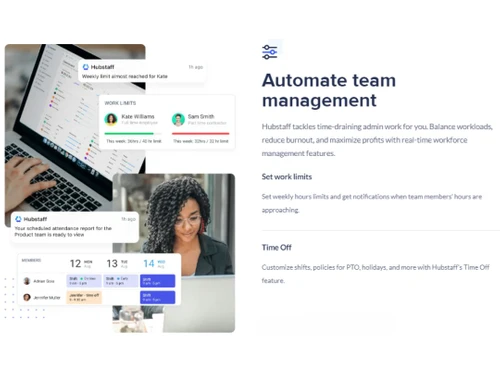
    With this software, you can manage your employees’ shifts, and even set weekly hour limits and plan your team’s schedules.
  • icon_check Document Management
    The software helps drill down into projects by tracking time against specific tasks.
  • icon_check MIS Reports
    The software provides accurate estimates for project budget and also tracks expenses.
  • icon_check Travel Requests Management
    Hubstaff keeps track of the travel requests made by employees and also manages their travel expenses.
  • icon_check Visitor Management
    Details of visitors coming at your organisation can be managed with this staff scheduling software.
  • icon_check Take the guesswork out of shift schedules
    Manual staff scheduling and attendance tracking is a thing of the past with Hubstaff.
  • icon_check Software to manage staff on a tight schedule
    Keep everyone aligned with clear schedules, task assignments, and weekly time caps to track work and productivity.
  • icon_check Scheduling your staff for success
    Set up staff schedules in advance so that your teams know what projects and tasks they should be focused on.
  • icon_check Staff Scheduling
    Smart online employee scheduling and attendance tracking that helps you know who’s working when.
  • icon_check Attendance Scheduling
    Hubstaff simplifies shift management by letting you add one-time or recurring team shifts directly to the work calendar.
Hubstaff Demo Video play icon

Get Hubstaff Demo

Watch the demo video to explore key features, real workflows, and how the software fits your business needs.

Understand
Key Features
Personal
Demo Insights
Interactive
Demo Support

Hubstaff Specifications

Supported Platforms
Ubuntu Ubuntu Windows Windows iOS iOS Android Android MacOS MacOS Linux Linux
Devices
Desktop Desktop Mobile Mobile Tablet Tablet iPad iPad
Deployment
Cloud-Based Cloud-Based
Suitable For
All Industries
Business Specific
All Businesses
Business Size
Small Business Startups Enterprises SMBs
Customer Support
Email Communities
Language
English
Training Resources
Videos

Explore the Best Alternative Solutions Similar to Your Business Size and Needs

Hubstaff Review

4.3

Out of 5

img

Overall Rating

Based on
1 Verified Review

Rating Breakdown

  • Features 4.4
  • Value for Money 4.6
  • Ease of Use 4.1
  • Customer Support 4.0

86% Recommend this Product

Add Review

Hubstaff Video Review

youtubeVideoId

4.3

“Hubstaff Review: Pros and Cons of Hubstaff”

Review by: Money Matters

Compare Hubstaff With other Time Tracking Software

Products
Ratings
Pricing
Device Supported
Deployment
Supported Platforms
  • img

    Hubstaff

  • 4.3

  • Price On Request

  • Desktop

    Mobile

  • Web based

    On Premises

  • Windows

    Mac OS

  • img

    ADP SecurTime

  • 4.0

  • Price On Request

  • Desktop

    Mobile

  • Web based

    On Premises

  • Windows

    Mac OS

  • img

    Time Doctor

  • 4.4

  • Price On Request

  • Desktop

    Mobile

  • Web based

    On Premises

  • Windows

    Mac OS

  • img

    TopTracker

  • 4.4

  • Price On Request

  • Desktop

    Mobile

  • Web based

    On Premises

  • Windows

    Mac OS

  • img

    OnTheClock

  • 4.4

  • Price On Request

  • Desktop

    Mobile

  • Web based

    On Premises

  • Windows

    Mac OS

  • img

    DeskViu

  • 4.1

  • ₹ 100

  • Desktop

    Mobile

  • Web based

    On Premises

  • Windows

    Mac OS

  • img

    TimeChart

  • 4.1

  • Price On Request

  • Desktop

    Mobile

  • Web based

    On Premises

  • Windows

    Mac OS

  • img

    QuickBooks Time

  • 4.4

  • Price On Request

  • Desktop

    Mobile

  • Web based

    On Premises

  • Windows

    Mac OS

  • img

    Beebole

  • 4.3

  • Price On Request

  • Desktop

    Mobile

  • Web based

    On Premises

  • Windows

    Mac OS

(0) Product(s) selected

Hubstaff Alternatives

See All Hubstaff Alternatives

Available

Price on Request

Available

Price on Request

Starting Price:

€9 /User/Month

Starting Price:

$50 /Month

Starting Price:

$28 /Month

Starting Price:

$12 /Month

Starting Price:

$14 /Seat/Month

Starting Price:

$4 /Month

Articles for Hubstaff

See All Related Articles

How does Hubstaff help in Time Tracking?

The software provides insights into your employees’ work hours and the progress of their tasks and contribution to the project completion.

Can Hubstaff help with Geofencing?

The feature of automatic time tracking along with Geo-fencing helps track employee attendance unfailingly

Can I export my data?

Yes. Your data is just that, yours. We provide several export options. We make it easy for you to get your data.

How efficient is Hubstaff with Payroll Management?

With Hubstaff software, we can set up pay rates for each individual, for the team and even for the project.

Does Hubstaff come with Online Timesheets?

The software records employee hours and can view online reports to optimise the company’s performance. Hubstaff provides accurate, detailed timesheets that one can easily export.

Does Hubstaff help in Team Scheduling?

Hubstaff Staff Scheduling software comes with a simple staff scheduler and an employee attendance tracker. With these features, one can easily figure out who is working on which project and how much time he/she is spending on each task.

Will I get Hubstaff staff scheduling demo?

Yes, you will get the staff scheduling demo before purchase.

20,000+ Software Listed

Best Price Guranteed

Free Expert Consultation

2M+ Happy Customers

Terms and Condtions

close

Users with registered businesses can purchase goods from merchants on the platform to satisfy their business needs. Users are not permitted to utilize any products acquired through the platform for resale, advertising, business, or further distribution.

For each purchase made, users will receive a Tax Invoice (or 'GST invoice') that includes specific details such as:

  • the GSTIN of the user associated with their registered business, and

  • the specified Entity Name for their business.

It should be noted that not all products are eligible for GST Invoice. Only the products displayed by participating sellers with the 'GST-based Invoice Available' callout on the product description page would qualify.

Certain goods and services are not eligible to get a GST Invoice, including items with VAS, i.e., Value Added Services (e.g., Total Mobile Protection/Assured Buyback) and those involving an exchange offer at the time of purchase.

Users must ensure the accuracy of the GSTIN, and business entity name provided for the GST Invoice. Requests for corrections into GST Invoice would not be accommodated by Techjockey.com or any Seller, and any issues arising from user-provided information are the sole responsibility of users.

Techjockey.com is not liable for the GST Invoice or any associated input tax credit. To efficiently claim an input tax credit, users should select the registered place of business address as per the GST authority's data and follow the provisions of the GST Act and rules.

To claim an input tax credit, the delivery and billing addresses must match. Furthermore, input tax credits will not be granted if the delivery address and GSTIN on the invoice are from different states. In case of incorrect GST details provided during the order placement, the order will be canceled automatically.