linkedin
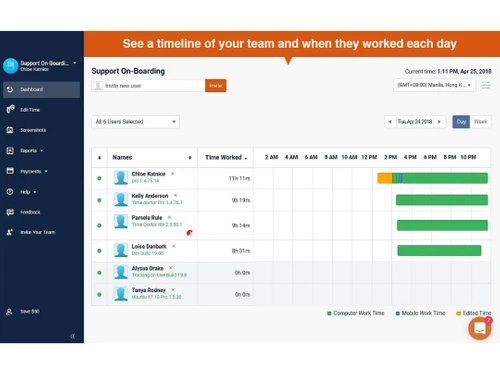
Time Doctor logo
time-doctor-window
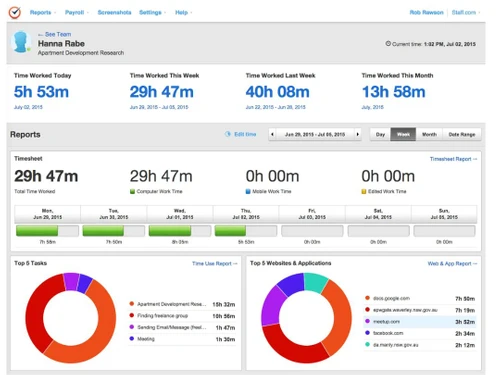
time-doctor-display
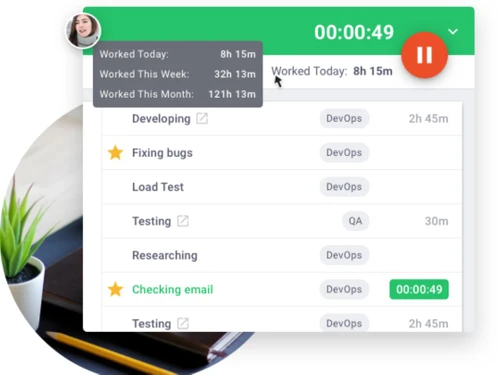
time-doctor-timer

Time Doctor

Brand: Time Doctor

  • 4.4

  • 4 Ratings & 1 Review

Time Doctor is one of the most popular time tracking software for enterprises to monitor their employees’ daily activities on their system during the work hours. The software has a robust design which helps with the monitoring of every employee at the same time. Time Doctor is one of the best applications for enhancing the productivity of the workforce. The time tracking software integrates wi...

See More

Have you used Time Doctor before?

Share your insights for better experience

Add a Review
Starting Price
$8

View plans

100% Genuine
Products
Best Price
Guaranteed
Safe & Secure
Payment
  • Description

  • Pricing

  • Features

  • Specification

  • Review

  • Compare

  • Alternatives

  • FAQ

Starting at $8

Time Doctor Software Overview

What is Time Doctor? 

Time Doctor is one of the most popular time tracking software for enterprises to monitor their employees’ daily activities on their system during the work hours. The software has a robust design which helps with the monitoring of every employee at the same time. Time Doctor is one of the best applications for enhancing the productivity of the workforce. The time tracking software integrates with a myriad of other applications used in the office network to trace how much time employee spent on each application and projects.

Time Doctor is also essential for companies that work for clients and charge them on an hourly basis. Organizations can set up charges for per hour services and track the time spent by them on each project to create final bills. The employee monitoring software also generates thorough reports for all the parties involved in the project to ensure that there is no discrepancy, such as, overcharging. Time Doctor also offers special features to manually configure the time to manage clients from foreign countries. 

How does Time Doctor app help in employee monitoring? 

Time Doctor provides detailed visibility into the activity of every employee. It covers all the important metrics, such as, attendance, engagement, and workflow. The software also shows summaries for web and application activities by an employee during the office hours. Organizations can setup optional screenshot options to check what the employees are doing during workhours. Managers can also send task alerts to the employees to help them avoid distractions. 

What are the features offered by Time Doctor software? 

Here is a quick rundown of the features offered by Time Doctor: 

  1. Time tracking solution
  2. Employee monitoring 
  3. Online timesheets and payroll 
  4. Project management and budgeting 
  5. Productivity analysis and summary reporting 
  6. Screenshot and activity leveling 

What is the Time Doctor Employee Monitoring Software pricing? 

Pricing of Time Doctor starts from USD 8 per month per user at techjockey.com. The price of Time Doctor varies on several factors, such as, size of workforce, module requirements, integrations, etc. Please request a call to get accurate estimates as per your business needs.

Read more

Time Doctor Company Details

Founded Year:  2010

Time Doctor

Director/Founders Liam Martin
Company Size 1-100

Time Doctor Pricing & Plans

Basic
Starting at $8
    • Users

      Users
      Users
    • Monthly

      Monthly
      Monthly

Key Features

  • Automatic Time Tracking

  • Projects & Tasks Report

  • Timeline Report

  • Screen shots

  • Online / Offline Tracking

  • Knowledge Base

Standard
Starting at $14
    • Users

      Users
      Users
    • Monthly

      Monthly
      Monthly

Key Features

  • Everything in Basic, plus

  • Schedule & Attendance

  • Time Approvals/ Activity Summary

  • Web & App Usage Reporting

  • Productivity Ratings

  • Leave & Break Tracking

  • Work-life Balance Analytics

  • Real-time Notifications

  • 60+ Integrations Upgraded Support

Premium
Starting at $20
    • Users

      Users
      Users
    • Monthly

      Monthly
      Monthly

Key Features

  • Everything in Standard, plus

  • Unusual Activity Report

  • Mouse jiggler & Clicker Detection

  • Irregular Keyboard Activity

  • Internet Connectivity Tracking

  • Video Screen Recording

  • Dedicated Success Manager

  • Executive Dashboard & Reporting

  • Automatic User Provisioning

  • Historical Data Storage

  • Open API Access

  • Single Sign On Client Login Access

Time Doctor Features

  • icon_check Time Tracking
    This software is designed for the purpose of tracking how what employees do during their office hours and suggest ways to improve
  • icon_check Project and Task Time Tracking
    Managers can set a schedule and allot specific time for clients and projects that the organization has undertaken and check how
  • icon_check Screenshots
    Managers can occasionally take screenshots of their employee’s computer screen during workhours to see what they are working
  • icon_check Application Tracking
    This time tracking software provides detailed information regarding application usage by your employees.
  • icon_check Payroll Management
    The software helps in calculation of the payroll through verified timesheets. Organizations can setup their payroll schedules as
  • icon_check Payment Options
    Time Doctor supports a wide range of payment gateways to deliver salaries, such as, PayPal, Payoneer, etc.
  • icon_check Chat Monitoring
    Managers can monitor the social media and messenger activities of the employees to make sure that not a single confidential file
  • icon_check Client Management
    This software helps companies create bills for clients who charge for workable hours. E.g., if a client’s project requires 10
  • icon_check Reports
    Get detailed, cumulative and summarized reports for the entire workforce or for individual employees.
  • icon_check GPS Tracking
    Monitor employee location in real time for attendance, field activity, and travel validation.
  • icon_check Time & Attendance Tracking
    The time tracking software also includes keeping a daily record of employee’s sign-in and sign-out hours.
  • icon_check Alerts & Notifications
    Managers can send direct prompts to their employees to make sure they aren’t distracted from their work for long time.

Time Doctor Specification

Supported Platforms
Windows Windows iOS iOS Android Android MacOS MacOS
Devices
Desktop Desktop Mobile Mobile
Deployment
Web-Based Web-Based
Suitable For
All Industries
Business Specific
All Businesses
Business Size
Small Business Medium Business Enterprises SMBs SMEs MSMBs MSMEs
Customer Support
Phone Email Live Chat
Language
English
Training Resources
Live Online
AI Features
AI Integrated

Explore the Best Alternative Solutions Similar to Your Business Size and Needs

Time Doctor Review

4.4

Out of 5

img

Overall Rating

Based on
1 Verified Review

Rating Breakdown

  • Features 4.3
  • Value for Money 4.3
  • Ease of Use 4.3
  • Customer Support 4.6

90% Recommend this Product

Add Review

Time Doctor Video Review

youtubeVideoId

4.3

“Time Doctor Review: 12 Things You Need To Know Before Buying”

Review by: Dan Thorne

Compare Time Doctor With other Time Tracking Software

Products
Ratings
Pricing
Device Supported
Deployment
Supported Platforms
  • img

    Time Doctor

  • 4.4

  • Price On Request

  • Desktop

    Mobile

  • Web based

    On Premises

  • Windows

    Mac OS

  • img

    Hubstaff

  • 4.3

  • Price On Request

  • Desktop

    Mobile

  • Web based

    On Premises

  • Windows

    Mac OS

  • img

    ADP SecurTime

  • 4.0

  • Price On Request

  • Desktop

    Mobile

  • Web based

    On Premises

  • Windows

    Mac OS

  • img

    TopTracker

  • 4.4

  • Price On Request

  • Desktop

    Mobile

  • Web based

    On Premises

  • Windows

    Mac OS

  • img

    QuickBooks Time

  • 4.4

  • Price On Request

  • Desktop

    Mobile

  • Web based

    On Premises

  • Windows

    Mac OS

  • img

    OnTheClock

  • 4.4

  • Price On Request

  • Desktop

    Mobile

  • Web based

    On Premises

  • Windows

    Mac OS

  • img

    DeskViu

  • 4.1

  • ₹ 100

  • Desktop

    Mobile

  • Web based

    On Premises

  • Windows

    Mac OS

  • img

    OfficeTimer

  • 4.2

  • Price On Request

  • Desktop

    Mobile

  • Web based

    On Premises

  • Windows

    Mac OS

  • img

    TimeChart

  • 4.1

  • Price On Request

  • Desktop

    Mobile

  • Web based

    On Premises

  • Windows

    Mac OS

(0) Product(s) selected

Time Doctor Alternatives

See All Time Doctor Alternatives

Available

Price on Request

Available

Price on Request

Starting Price:

$50 /Month

Starting Price:

€9 /User/Month

Starting Price:

$28 /Month

Starting Price:

$14 /Seat/Month

Starting Price:

$12 /Month

Starting Price:

$4 /Month

Articles for Time Doctor

See All Related Articles

Is it ethical to use Time Doctor?

Yes, companies can set time for work hours and breaks and only monitor during those working hours. It also makes sure that the employees are not being monitored beyond their working hours.

Can I record time in Time Doctor when the PCs are in offline?

Time Doctor can work offline in the absence of the internet. The data will be automatically updated once the internet connection is available.

What are the system requirements for Time Doctor?

Here are the key software requirements for Time Doctor: 1. OS: Mac 10.7 or above, Windows Vista or above, Linux OS 2. Browser: Safari (for best performance on Mac), Edge, Firefox, Chrome (for windows)

Is the data stored safe in Time Doctor?

Yes, all the data is stored under an airtight SSL encryption system on cloud to prevent any kind of data theft.

Can I use Time Doctor to check the browser activity of my employees?

Yes, the time tracking software checks for employee’s online web activity and see how much time they are spending on each website.

Can I get a demo for Time Doctor?

Techjockey offers a demo before purchase for Time Doctor. Please request a call to schedule the demo at your convenience.

How much does Time Doctor cost?

Pricing of Time Doctor starts from USD 8 per month per user at techjockey.com.

20,000+ Software Listed

Best Price Guranteed

Free Expert Consultation

2M+ Happy Customers

Terms and Condtions

close

Users with registered businesses can purchase goods from merchants on the platform to satisfy their business needs. Users are not permitted to utilize any products acquired through the platform for resale, advertising, business, or further distribution.

For each purchase made, users will receive a Tax Invoice (or 'GST invoice') that includes specific details such as:

  • the GSTIN of the user associated with their registered business, and

  • the specified Entity Name for their business.

It should be noted that not all products are eligible for GST Invoice. Only the products displayed by participating sellers with the 'GST-based Invoice Available' callout on the product description page would qualify.

Certain goods and services are not eligible to get a GST Invoice, including items with VAS, i.e., Value Added Services (e.g., Total Mobile Protection/Assured Buyback) and those involving an exchange offer at the time of purchase.

Users must ensure the accuracy of the GSTIN, and business entity name provided for the GST Invoice. Requests for corrections into GST Invoice would not be accommodated by Techjockey.com or any Seller, and any issues arising from user-provided information are the sole responsibility of users.

Techjockey.com is not liable for the GST Invoice or any associated input tax credit. To efficiently claim an input tax credit, users should select the registered place of business address as per the GST authority's data and follow the provisions of the GST Act and rules.

To claim an input tax credit, the delivery and billing addresses must match. Furthermore, input tax credits will not be granted if the delivery address and GSTIN on the invoice are from different states. In case of incorrect GST details provided during the order placement, the order will be canceled automatically.